
LEKATO MIDI Cable
4.5Editor score
USB Type-C connectivity
Low latency transmission
Plug and play setup
This comprehensive guide compares the top 10 MIDI interfaces for Mac, evaluating connectivity, latency, compatibility, and features to help musicians choose
Finding the right MIDI interface for Mac is essential for musicians and producers who need reliable connectivity between their keyboards and digital audio workstations. A quality interface ensures low latency, stable data transmission, and seamless integration with macOS systems. Without the correct hardware, even the best software can struggle to deliver a smooth creative experience.
We compared ten top-rated models based on compatibility, features, build quality, and user feedback to create this curated list. Each product was evaluated for its ability to handle complex MIDI messages, support multiple devices, and integrate smoothly into modern Mac workflows. Our goal is to help you find the perfect match for your specific setup needs.
Each pick highlights key strengths, pros, cons, and detailed specs to give you a clear understanding of what to expect. Whether you need a simple cable or a robust router, this guide covers the spectrum of options available. Please note that availability and specific features may change over time, so always verify details before purchasing.
4.5Editor score

4.6Editor score

4.5Editor score
This side-by-side comparison highlights the key specifications and capabilities of each model to help you make an informed decision quickly.




The CME U6MIDI Pro stands out as a professional solution for complex Mac setups. It features a unique standalone mode with filtering and routing capabilities that many competitors lack. Users appreciate its reliability and precision in transmitting data without errors or signal dropout.
We may earn a commission when you buy through this link, at no additional cost to you.
Its 3-in-3-out architecture allows for flexible hardware integration without needing a computer. The optocoupler technology ensures synchronization remains tight, which is critical for electronic drums and clocked instruments. Additionally, the free software tool allows deep customization of MIDI messages.
While it is slightly more expensive than simple cables, the routing features justify the cost for serious producers. Some users note that advanced configuration requires installing the desktop software first. However, once set up, the hardware operates seamlessly.
This device is ideal for musicians managing multiple synthesizers or drum machines on a Mac. If you need control over signal flow beyond basic pass-through, this is the top recommendation in our list.
The ability to merge and filter MIDI signals without a computer makes this a powerful tool for live performances or hardware-only studios.
High-speed optocouplers eliminate jitter, ensuring that time-sensitive data like clock signals arrive exactly when needed for tight sequencing.
We may earn a commission when you buy through this link, at no additional cost to you.
The LEKATO MIDI Cable offers an affordable entry point for Mac users needing basic connectivity. It is designed to work instantly with minimal setup, making it perfect for beginners or simple rigs. The 16 channels of support cover most standard keyboard requirements.
We may earn a commission when you buy through this link, at no additional cost to you.
Its long cable length helps position your keyboard comfortably away from your Mac or laptop. The LED indicators provide clear visual feedback on signal status, which aids in quick troubleshooting. The soft copper material ensures stable transmission even over longer distances.
While it lacks advanced routing, it performs its primary function of data transfer reliably. The price point makes it easy to have a spare without financial strain. However, it does not offer the flexibility of standalone routers found in other models.
Choose this if you need a straightforward, reliable cable for a single keyboard connection. It delivers excellent value for money and ensures your notes reach your DAW without delay or errors.
The intelligent LED indicator system helps users confirm connections instantly, reducing the time spent debugging missing signals in a busy studio.
The use of bare copper and resistance to electromagnetic interference ensures consistent performance without dropouts during long recording sessions.
We may earn a commission when you buy through this link, at no additional cost to you.
The Focusrite Scarlett 2i2 4th Gen is more than just a MIDI interface; it is a complete audio and MIDI solution. It brings professional studio features like Auto Gain and Air mode to home setups. Its 120dB dynamic range ensures recordings capture the full depth of your performance.
We may earn a commission when you buy through this link, at no additional cost to you.
This unit excels when you need to record vocals or instruments alongside MIDI. The included software bundle provides everything needed to start producing immediately. Users praise the clarity of the preamps and the stability of the driver software on macOS.
Although it costs more than a pure MIDI adapter, it replaces multiple devices in your rack. Some users may find it overkill if they only need MIDI, but the audio quality is unmatched in this price class. It is a future-proof investment for growing musicians.
Ideal for Mac users who want to record vocals or guitars along with keyboard data. It combines reliability, sound quality, and smart features to streamline the recording workflow effectively.
This feature automatically sets the optimal recording level, preventing clipping and ensuring you never miss a take due to technical errors.
Air mode adds harmonic richness and presence to your recordings, making vocals and acoustic instruments sound more professional and modern.
We may earn a commission when you buy through this link, at no additional cost to you.
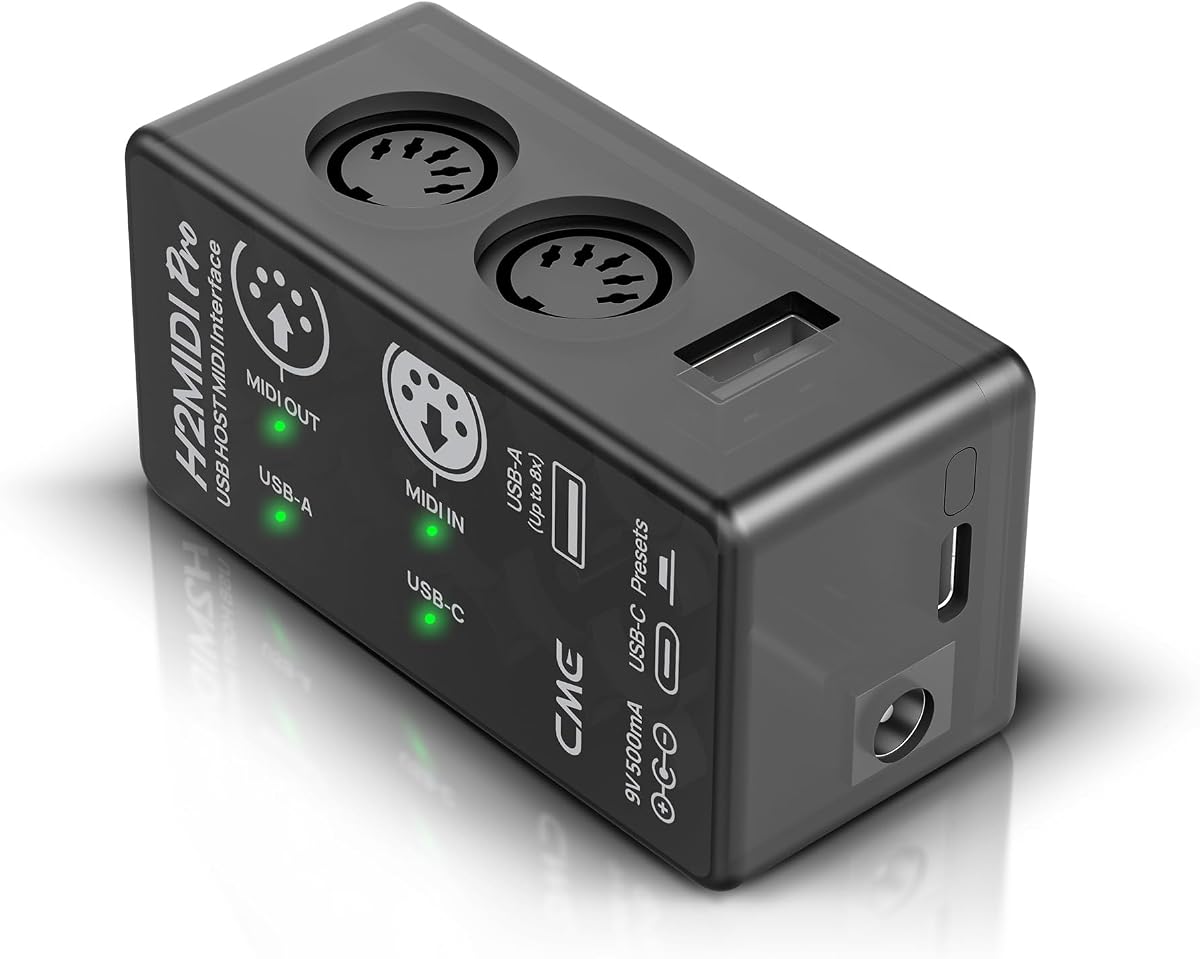
The CME H2MIDI Pro bridges the gap between modern USB controllers and older 5-pin DIN hardware. It allows you to connect keyboards directly to hardware synthesizers without a computer, which is rare in this category. The standalone mode is particularly useful for live setups.
We may earn a commission when you buy through this link, at no additional cost to you.
Its USB host capability means you can plug in multiple USB class-compliant devices to expand your rig. The free software tools allow detailed mapping of controls to suit your workflow. Users find it versatile for hybrid rigs mixing new and old gear.
Setting it up may require some reading of the manual to configure presets correctly. Once configured, it switches easily between modes during a performance. The compact size makes it portable, though it has fewer physical ports than larger rack units.
Choose this if you have a mix of USB and traditional DIN hardware. It provides the flexibility to expand your MIDI ecosystem without cluttering your desk with multiple cables and adapters.
This feature allows direct connection of modern USB controllers to vintage MIDI gear, enabling complex hardware setups without a central computer.
The software tools enable you to map and split signals precisely, giving you complete control over how data flows through your system.
We may earn a commission when you buy through this link, at no additional cost to you.
The FORE T1 MIDI USB interface is designed for simplicity and portability. It connects MIDI keyboards to Mac or iOS devices using a built-in Type-C cable. The integrated design reduces cable clutter, making it ideal for travel or small desks.
We may earn a commission when you buy through this link, at no additional cost to you.
It is bus-powered, meaning you do not need to carry an extra power brick. The intelligent LED indicator confirms connection status at a glance. Many users appreciate how quickly it integrates into recording sessions without configuration.
The cable length is decent, but note that adapters for older USB-A ports are not included. This is a minor inconvenience but worth considering if you use older MacBooks. Despite this, the build quality feels sturdy for everyday use.
Select this for a no-fuss connection solution for simple setups. It handles 16 channels effectively and ensures your notes get through to your DAW with minimal fuss or delay.
Having the cable built into the unit eliminates the need for extra adapters, streamlining your setup and reducing potential points of failure.
Drawing power directly from your Mac means you can record anywhere without hunting for power outlets or carrying additional adapters.
We may earn a commission when you buy through this link, at no additional cost to you.
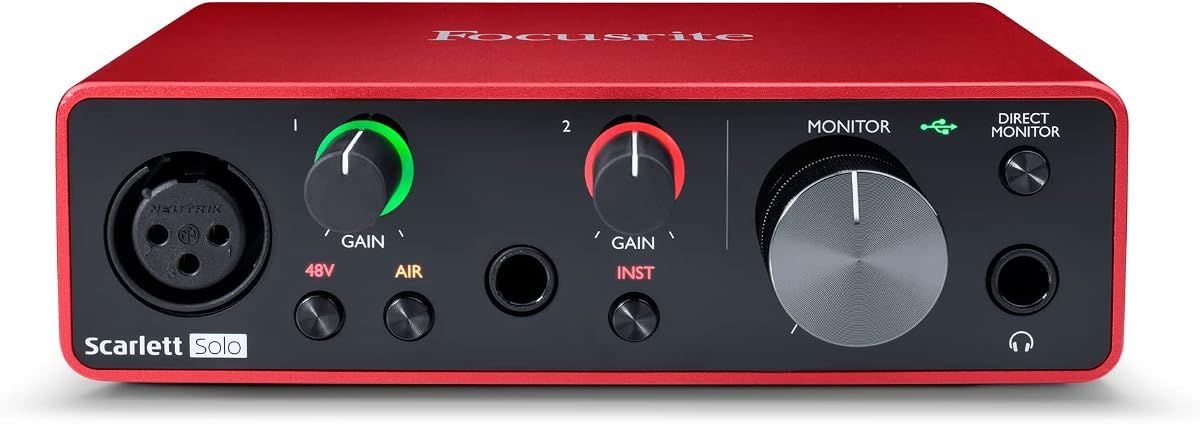
The Focusrite Scarlett Solo 3rd Gen is a compact powerhouse for solo artists. It handles both audio recording and MIDI input reliably. The high-headroom instrument input ensures your guitar or bass remains clean even at high volumes.
We may earn a commission when you buy through this link, at no additional cost to you.
Its Gain Halo indicators are a standout feature that simplifies getting the right recording level without guesswork. Air mode adds presence to vocals or acoustic guitars, enhancing their sound during recording. The included software bundle offers a complete suite for music production.
While it is audio-focused, the MIDI port handles your keyboard inputs with low latency. It is a great choice if you also record vocals or instruments. The warranty coverage offers peace of mind for long-term use in a studio environment.
Opt for this if you need to capture both MIDI and audio signals in one box. It simplifies your cabling and ensures consistent quality across all your recording inputs.
The Gain Halo provides a visual ring around the dial to indicate optimal levels, helping you avoid clipping and ensure clean recordings every time.
These inputs are designed to handle loud signals without distortion, allowing you to play your guitar or bass at full volume with confidence.
We may earn a commission when you buy through this link, at no additional cost to you.
The FORE MIDI USB Interface is designed to work seamlessly across multiple platforms including Mac and iOS. It uses a Type-C cable that fits most modern devices without adapters. The multi-layer protection ensures the cable withstands regular use without failure.
We may earn a commission when you buy through this link, at no additional cost to you.
Users report stable connections that do not drop during live sets. The LED indicators help confirm that your device is recognized by the host computer instantly. It is a practical tool for songwriters who move between different setups.
While it lacks advanced routing features, it performs basic data transfer reliably. The package does not include an adapter for older USB-A ports, so check your Mac model before buying. Otherwise, it is a solid performer for the price.
Choose this if you need a reliable, straightforward connection for your keyboard and Mac. It handles 16 channels efficiently and supports all standard MIDI messages without complications.
This interface works well with macOS, Windows, and iOS devices, making it a versatile tool for users who switch between different systems regularly.
The multi-layer shielding protects against electromagnetic interference, ensuring your data remains clean and stable even in noisy studio environments.
We may earn a commission when you buy through this link, at no additional cost to you.
This 2X2 interface focuses on high-quality audio conversion but also handles MIDI inputs for your instruments. It supports high-resolution recording up to 192kHz, ensuring detail is preserved. The direct monitor feature allows you to hear your performance without software delay.
We may earn a commission when you buy through this link, at no additional cost to you.
The illuminated control rings add a professional look to your setup while improving usability in low light. It is a great option for creators who prioritize sound quality. The combo jacks allow flexibility in connecting microphones or instruments.
MIDI functionality is standard, but the unit shines in audio performance. It may not have routing features like dedicated MIDI units, but it covers the essentials. Users find it reliable for both home studio and mobile recording scenarios.
Select this if you need high-resolution audio recording alongside MIDI tracking. It delivers crisp sound quality and a modern user experience that appeals to creators focused on production value.
Direct Monitor lets you hear your signal from the interface inputs without digital delay, which is crucial for recording vocals or instruments comfortably.
The 24-bit/192kHz converters ensure that your recordings capture every nuance and detail, giving you a professional sound from the start.
We may earn a commission when you buy through this link, at no additional cost to you.
The Focusrite Scarlett 2i2 4th Gen is a refined version of a classic interface. It brings advanced features like Auto Gain and Clip Safe to prevent recording mistakes. The converters match those found in flagship interfaces for superior sound quality.
We may earn a commission when you buy through this link, at no additional cost to you.
It supports MIDI input alongside audio channels for a versatile setup. The Air mode adds presence to your tracks, making them stand out in a mix. Users appreciate the simplicity and robust design that withstands daily studio use.
While it is pricier than basic MIDI adapters, it simplifies the recording process significantly. You might need a separate router if you have complex MIDI needs, but for standard setups, it is excellent. It is a great upgrade for growing projects.
Choose this if you want an all-in-one solution for audio and MIDI. It ensures professional sound quality and gives you the tools to record with confidence from the very first take.
Clip Safe detects when levels are too high and adjusts automatically, ensuring you never lose a great performance due to clipping distortion.
This feature boosts high frequencies to add air and presence to your vocals, helping your recordings sound more polished and professional.
We may earn a commission when you buy through this link, at no additional cost to you.
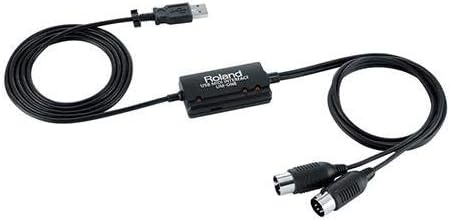
The Roland UM-ONE-MK2 is a trusted workhorse for MIDI connectivity. It offers a 1-in-2-out configuration that allows you to split your signal between two devices. Its integrated design means fewer loose parts to manage.
We may earn a commission when you buy through this link, at no additional cost to you.
Users appreciate the visual indicators that show data flow at a glance. The low latency ensures your keyboard responds instantly to your playing style. It is a classic solution that works well for many Mac setups.
While it lacks modern routing software, it is reliable for basic connections. The build quality is typical of Roland's reputation for durability. It is a solid choice if you need simplicity without sacrificing performance or consistency.
Opt for this if you need a stable, no-nonsense connection for your MIDI keyboard. It delivers consistent performance and integrates smoothly into your Mac system with minimal setup requirements.
These indicators show you exactly when MIDI data is flowing, helping you confirm connections and troubleshoot issues quickly during setup.
The cables are built into the device, so you do not need to worry about mismatched cables or lost connectors keeping your setup tidy.
We may earn a commission when you buy through this link, at no additional cost to you.
Selecting the right interface involves considering your specific hardware needs, budget, and software requirements.
Check how many inputs and outputs you need. Some interfaces offer multiple ports for routing to several synths while others are single port. Ensure they match your existing MIDI controllers and hardware.
Look for devices with enough ports to support your current setup and future expansion.
Decide if you need audio recording alongside MIDI. Hybrid interfaces allow you to record vocals and guitars while sequencing MIDI. Dedicated MIDI units focus purely on signal routing and control.
Choose hybrid models if you want an all-in-one solution to reduce cable clutter and cost.
Low latency is critical for responsive playing. Look for high-speed data transmission and efficient processing chips. Jitter can cause timing issues in electronic drums and sequenced tracks.
Prioritize interfaces known for fast processing to ensure your music stays tight.
Mac compatibility is key. Some devices are class compliant and work plug-and-play without drivers. Others require software for advanced routing features. Ensure the software is actively supported for your Mac version.
Choose models that work natively with macOS to avoid compatibility headaches.
Advanced units offer standalone routing or filtering without a computer. This is useful for live performances or hardware setups. It adds flexibility if you play without running a laptop.
Invest in standalone features if you perform live or build a computer-free studio.
Your interface may be used daily. Sturdy construction protects against wear and tear. Integrated cables reduce failure points compared to separate connectors that can be bent or broken.
Look for robust materials and integrated designs to ensure long-term reliability.
Prices range from basic cables to professional audio interfaces. Decide how much you are willing to spend based on the features you truly need. Sometimes a more expensive unit saves money by replacing other gear.
Balance your budget with your actual needs to get the best value without overspending.
Connect your MIDI keyboard to the interface using 5-pin DIN cables or USB depending on the model. Plug the interface into your Mac via USB. Check the LED indicators to confirm data flow is active.
Install any necessary software tools on your computer to unlock advanced features like routing or filtering. Configure your Digital Audio Workstation to recognize the MIDI ports for recording.
Keep the device free of dust and avoid sharp bends in the cables. If you move frequently, store the interface in a padded bag to prevent physical damage to the connectors.
Most modern interfaces are class compliant and do not require drivers. However, advanced routing features often require specific software. Check your product manual for compatibility details.
Yes, if the interface has multiple inputs. Some models allow routing to split data to various synthesizers. Verify the port count before purchasing to ensure it meets your needs.
MIDI interfaces transmit performance data like notes and control changes. Audio interfaces capture sound waves from instruments or microphones. Some models combine both functions for a complete studio solution.
Type-C offers faster speeds and reversibility which is convenient. Most modern Macs use Type-C so it reduces the need for adapters. Ensure your keyboard adapter matches the port type.
Most are bus-powered and draw power from your Mac. However, larger rack units may need external power. Check the product specifications to confirm power requirements before use.
Close other applications to free up system resources. Use a high-quality interface with low latency drivers. Adjust your audio buffer size in your software settings for faster response.
This guide has explored the top MIDI interfaces available for Mac users, ranging from simple cables to advanced routing units. Each option offers unique benefits depending on your workflow and budget constraints.
Prioritize reliability and compatibility when making your decision. Ensure the device supports your specific keyboard and software tools. Advanced routing features can save time during complex productions.
Always verify current product details before buying as features may evolve. By choosing the right interface, you ensure a smooth creative process that lets you focus on the music.