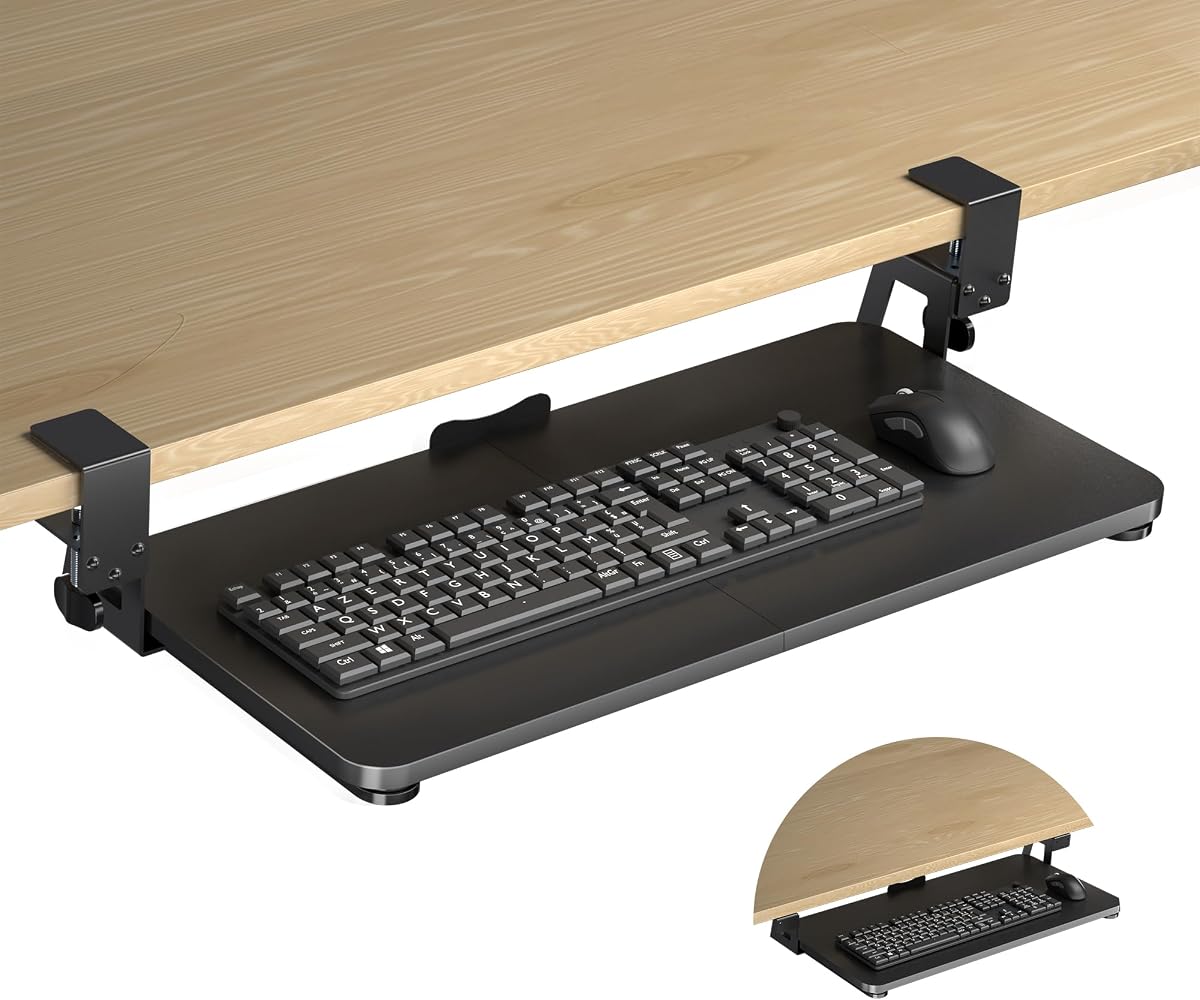
XINLEI Keyboard Tray Under Desk
4.4Editor score
Large space saves desk surface area
Smooth metal sliding rail system
Affordable price point for users
Finding the right keyboard tray for your standing desk is essential for maintaining comfort during long work sessions. A good tray provides ergonomic support, reduces wrist strain, and keeps your workspace organized. It should slide smoothly and adjust easily to fit your height needs.
We compared ten top-rated keyboard trays based on their build quality, installation ease, and ergonomic features. Each option offers unique benefits like clamp-on mounts, height adjustments, or swivel capabilities. Our analysis focuses on compatibility with standing desks and overall user satisfaction ratings.
Every pick below includes detailed specifications and real-world performance insights. Prices vary by retailer and may change over time, so verify current availability before buying. This guide helps you select the perfect tray to enhance your standing desk setup efficiently.
4.4Editor score
4.4Editor score

4.4Editor score
As an Amazon Associate we earn from qualifying purchases.
This side-by-side comparison highlights key specifications for all ten models. Use it to quickly find the right size, weight capacity, and mounting style for your desk setup.


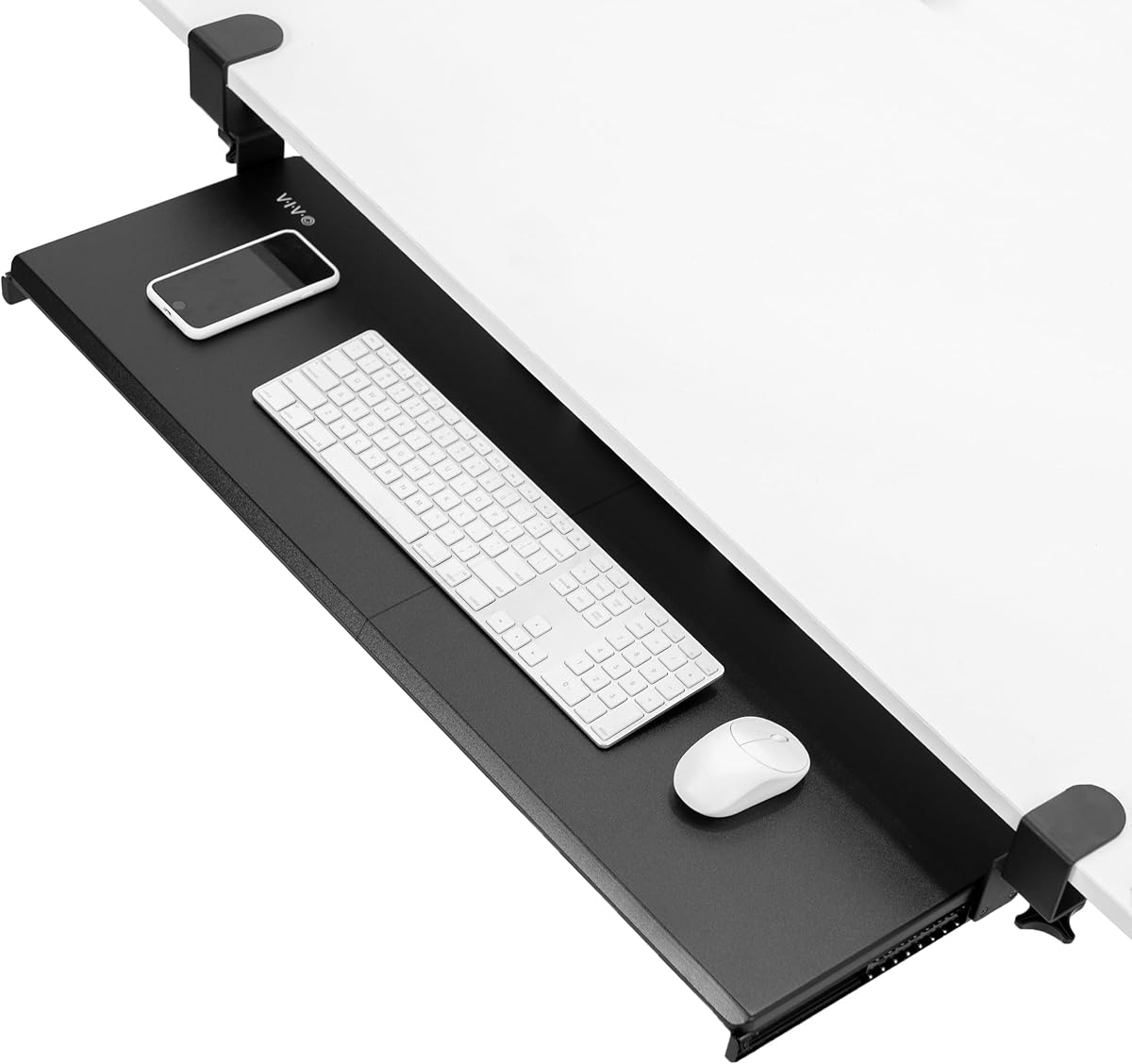
The VIVO Black Extra Large Clamp-on Keyboard Tray stands out with its wide surface and solid construction. Rated 4.4 stars, it supports up to 11 pounds and provides a spacious area for keyboards and mice. Its design focuses on comfort and stability for daily use.
We may earn a commission when you buy through this link, at no additional cost to you.
This model features an extra-long tray measuring 33.9 inches, giving plenty of room for accessories. The clamp-on mechanism secures tightly without damaging your desk, as long as it is under 1.25 inches thick. You can slide the tray in and out smoothly for ergonomic positioning.
While the tray is excellent for standard desks, it does not work with beveled edges. You need to ensure your desk has enough width for the total length including clamps. These minor constraints are acceptable given the overall durability and comfort it offers.
Choose this tray if you want a reliable solution that combines size with ease of use. It suits most home offices and professional setups needing extra desk space. The balance of price and performance makes it a top recommendation for standing desk users.
The adjustable angles help relieve stress on your wrists and shoulders during long sessions.
Solid C-clamps hold the tray firmly in place without requiring any drilling into your desk.
We may earn a commission when you buy through this link, at no additional cost to you.
The HUANUO Under Desk Keyboard Tray solves a common problem by supporting desks with cross beams. Rated 4.3 stars, it includes special brackets for beams up to 2 inches high. This flexibility makes it ideal for electric standing desks with complex frames.
We may earn a commission when you buy through this link, at no additional cost to you.
It features a high-quality metal roller track system tested for 20,000 cycles. The tray slides effortlessly and offers 6.3 inches of height adjustment for sitting or standing. Swivel capabilities allow you to angle the keyboard perfectly for your posture.
Installation requires verifying your desk dimensions and beam size to ensure a proper fit. You must also leave space for the slide rail to retract fully. These steps are straightforward but essential to avoid fitment issues.
Buy this tray if your standing desk has a cross beam that limits other options. Its robust build and smooth operation make it a great long-term investment. It brings ergonomic benefits to workstations that often lack keyboard support.
Specially designed brackets allow this tray to fit under cross beams found on many modern desks.
Premium metal tracks ensure the tray glides quietly and lasts through years of frequent use.
We may earn a commission when you buy through this link, at no additional cost to you.
The Mount-It! Standing Keyboard Tray offers unmatched height flexibility with a range from 1.7 to 15.6 inches. Rated 4.4 stars, it comes ready to use with no assembly. A lifetime warranty and US-based support add significant value for long-term buyers.
We may earn a commission when you buy through this link, at no additional cost to you.
This model uses a smooth scissor-lift mechanism that locks in place at any position. It supports up to 11 pounds and fits a full-size keyboard and mouse easily. The wide base keeps it steady during typing without wobbling.
While it is more expensive than basic clamp-on trays, the adjustability is superior for frequent sit-stand transitions. You might find the base takes up space under the desk. However, the ergonomic benefits and durability justify the extra cost for most users.
Choose this tray if you prioritize smooth height changes and warranty coverage. It works on any desk without clamps or drilling. The robust design ensures it lasts for years while keeping your wrists comfortable.
The scissor-lift mechanism moves through a full range to suit both seated and standing positions.
A lifetime manufacturer warranty and US support provide peace of mind beyond typical keyboard risers.
We may earn a commission when you buy through this link, at no additional cost to you.
The XINLEI Keyboard Tray provides excellent value with a large platform and sturdy build at a lower cost. Rated 4.4 stars, it measures 25.6 by 11.8 inches to hold keyboards and accessories. Its focus is on saving desk space and comfort.
We may earn a commission when you buy through this link, at no additional cost to you.
A high-quality metal sliding rail allows you to extend or retract the tray silently. You can choose between C-clamps or screw mounting for flexibility. The back baffle prevents the keyboard from falling off during use.
It fits desks up to 1.63 inches thick, which is standard for most tables. However, it lacks swivel adjustments found on pricier models. These trade-offs are acceptable given the low price and reliable performance for daily tasks.
Buy this tray if you need a simple, effective solution without breaking the bank. It suits basic home offices and study areas. The solid construction ensures it handles regular typing loads well.
Moving your keyboard below the desk frees up valuable surface area for monitors and documents.
Choose between clamp-on or screw options to suit your desk thickness and stability needs.
We may earn a commission when you buy through this link, at no additional cost to you.
The VIVO Clamp-On Adjustable Keyboard Tray stands out for its ability to fit thick desks up to 3.4 inches. Rated 4.3 stars, it offers five height set points for customized placement. The split tray design includes dedicated pads for keyboard and mouse.
We may earn a commission when you buy through this link, at no additional cost to you.
Its adjustable width from 8.8 to 10 inches allows you to tweak the fit. The sturdy C-clamps hold the tray firmly without damaging your desk surface. Sliding the tray in and out helps maintain ergonomic typing angles.
The split platform can be a bit unusual if you prefer a single continuous surface. Also, it requires a flat desk edge to clamp properly. These factors are minor compared to the flexibility it offers for varied desk types.
Select this tray if you have a thick tabletop and need height customization. It brings ergonomic benefits to desks that might otherwise exclude keyboard trays. The included accessories add convenience to your setup.
C-clamps support desks up to 3.4 inches thick, accommodating a wider range of furniture.
Wrist pads and mouse rests come included to enhance comfort during long typing sessions.
We may earn a commission when you buy through this link, at no additional cost to you.
The BONTEC Under Desk Keyboard Tray makes installation simple with its no-drill C-clamp system. Rated 4.4 stars, it supports desks up to 1.97 inches thick. Protective pads prevent scratches while securing the tray tightly to your desk.
We may earn a commission when you buy through this link, at no additional cost to you.
Its platform measures 25.6 by 11.8 inches, offering ample space for standard keyboards and mice. The slide-out design keeps your workspace tidy when not in use. This ergonomic position supports natural wrist posture for better comfort.
It only works with flat, unobstructed desk undersides. You must measure width and depth before ordering to avoid fitment issues. These requirements are common for clamp models but should be verified early.
Choose this tray for a quick, damage-free setup on a flat desk. It is ideal for renters or temporary workstations. The sturdy design ensures it holds up to daily typing tasks reliably.
Secure the tray with sturdy C-clamps without drilling any holes into your desk surface.
Place keyboard and mouse below the desktop to free space for documents and other tools.
We may earn a commission when you buy through this link, at no additional cost to you.
The VIVO Universal Tray is designed for standard desks with straightforward installation and rubber padding for comfort. Rated 4.2 stars, it features full side-to-side rotation to adjust your typing angle. Its simple build works well in most home office setups.
We may earn a commission when you buy through this link, at no additional cost to you.
It offers 5 inches of height adjustment and holds standard keyboards and mice easily. The total weight is 10 lbs, so ensure your desk can support under-mounted weight. For standing desks, you might need an adapter bracket.
The adapter requirement is a small hurdle for variable height desks. Still, for fixed desks, this tray provides a cost-effective ergonomic solution. It balances functionality and price for everyday use without complex features.
Buy this tray if you have a standard desk and want basic ergonomic support. Its universal design ensures it fits many common table types. Simple assembly makes it ready to use quickly.
Supportive rubber padding reduces wrist soreness during extended typing periods.
Full side-to-side rotation lets you customize the keyboard position for better posture.
We may earn a commission when you buy through this link, at no additional cost to you.
The HUANUO Mouse Platform provides extensive motion options with 180-degree swivel and tilt adjustments. Rated 4.3 stars, it measures 25 by 9.84 inches to fit keyboards and mice. An included wrist rest adds comfort to your setup.
We may earn a commission when you buy through this link, at no additional cost to you.
You can adjust the height by 6.3 inches to suit seated or standing positions. The platform slides under the desk when not in use to save space. Its smooth sliding mechanism ensures easy operation during work.
You need at least 35.4 inches of clearance for full rotation. Also verify no crossbars block the tray from sliding. These spatial requirements are important to check before purchase to avoid issues.
Choose this tray if you need flexible mouse positioning and height changes. It suits users who switch between seated and standing often. The motion options enhance ergonomic comfort significantly.
Swivel and tilt adjustments allow precise positioning for comfortable typing and mousing.
Slide the tray under the desk to free up surface area for monitors and documents.
We may earn a commission when you buy through this link, at no additional cost to you.
The Klearlook Adjustable Tray allows use above or under the desk for maximum flexibility. Rated 4.2 stars, it includes a drawer and phone slot to organize your space. Its 360-degree rotation and tilt options enhance ergonomic comfort significantly.
We may earn a commission when you buy through this link, at no additional cost to you.
Built with durable materials, it minimizes wobbling during typing. The integrated mouse pad provides a smooth surface for control. This setup suits both work and gaming environments well.
Installation is more complex than basic clamp trays, and it costs more. The dual mount feature justifies this if you need versatility. Ensure your desk allows both mounting styles for best results.
Buy this tray if you want organizational features and mounting flexibility. It brings unique benefits to home offices needing structure. The sturdy build ensures long-term reliability.
Switch between above and under desk use to suit your workspace preferences.
Built-in drawer and phone slots keep your desk tidy and organized.
We may earn a commission when you buy through this link, at no additional cost to you.
The Mount-It! Extra-Wide Tray offers a massive 30-inch platform for full-size keyboards and large accessories. Rated 3.9 stars, it fits desks up to 1.77 inches thick. A lifetime warranty and US support add value to this robust option.
We may earn a commission when you buy through this link, at no additional cost to you.
Premium steel gliding rails ensure a wobble-free slide-out action during typing. The reinforced construction handles daily use without loosening. Its ergonomic drop promotes neutral wrist angles for better posture.
The rating suggests some users face fit issues. Ensure your desk is flat and free of crossbars. The width and warranty make it a strong pick despite mixed reviews.
Choose this tray if you need extra width and warranty coverage. It suits large workstations requiring ample space. The durable build ensures it lasts through daily tasks.
At 30 inches wide, the tray accommodates large keyboards and extra mouse space easily.
Heavy-gauge steel frame supports daily typing and sliding without wobbling.
We may earn a commission when you buy through this link, at no additional cost to you.
Choosing the right keyboard tray requires considering several factors to ensure it fits your desk and supports your posture effectively.
Check your desk thickness and edge type before buying. Most trays require flat edges and specific thickness limits like 1.25 or 1.77 inches. Avoid models with beveled edges unless specified.
Measure your desk carefully to ensure the tray fits underneath properly.
Select a tray that holds your keyboard and mouse with room to spare. Common sizes range from 23 to 30 inches wide. Ensure under-desk width matches your desk for full retraction.
Adequate width prevents cramped typing and allows full mouse movement.
Decide between clamp-on or screw mounting. Clamp-on is ideal for renters needing non-damaging solutions. Screw mounts offer more stability for thick or irregular desks.
Choose the method that best suits your desk surface and permanence needs.
Look for adjustable trays to match your seated or standing height. Ranges from 2 to 15 inches offer flexibility. Scissor-lift systems provide smoother changes than simple clamps.
Proper height alignment reduces strain on wrists and shoulders significantly.
Metal roller tracks ensure smooth and quiet sliding. Check for weight capacity ratings like 11 lbs to avoid sagging. Quality rails extend the lifespan of the tray.
Smooth operation helps maintain focus during work or gaming.
Wrist rests and tilt options improve comfort. Rotating platforms allow better mouse positioning. These features reduce fatigue during long sessions.
Prioritize trays with built-in ergonomics for health benefits.
Review tools needed and steps to install. Some require crossbar clearance or spacers for standing desks. Simple setups save time and effort for users.
Check instructions carefully to avoid fitment issues after purchase.
Look for warranties covering defects and wear. Lifetime warranties offer confidence in long-term use. US-based support helps resolve issues quickly.
Strong warranty terms reflect manufacturer confidence in product quality.
First, ensure your desk surface is flat and stable before installation. Follow manufacturer guidelines to clamp or screw the tray securely. Test the sliding mechanism to confirm smooth movement.
Adjust the height to match your elbows and wrists during use. Keep your keyboard centered for balance. Tilt the tray slightly downward for better posture.
Clean the surface regularly with a dry cloth to prevent dust buildup. Check clamps periodically for tightness. Avoid placing heavy items exceeding weight limits to ensure longevity.
Yes, but check for crossbars that may interfere with mounting. Some trays include adapters specifically for standing desks. Ensure there is enough clearance for the tray to slide.
Many clamp-on trays require flat edges. Beveled edges may prevent a secure fit. Look for models offering screw options or special clamps designed for irregular shapes.
Most standard trays support up to 11 pounds. This capacity is enough for full-size keyboards and mice. Avoid placing heavy monitors or accessories on the tray.
Most include all necessary hardware like screws and clamps. Basic tools such as a screwdriver may be needed. No drilling is required for clamp-on models.
A keyboard tray helps wrist posture while monitor arms help neck posture. Using both creates a fully ergonomic workspace. Choose based on which discomfort you face most.
Yes, clamp-on trays are portable and easy to transfer. Ensure each new desk meets size and thickness requirements. Check that clamps fit securely on the new surface.
Our top picks include the VIVO Black Extra Large for versatility, XINLEI for value, and Mount-It! Standing Tray for adjustability. Each offers unique features suited to different needs.
Focus on desk compatibility and ergonomic adjustments when making your choice. A good tray transforms your workspace by reducing strain and increasing comfort.
Prices and stock vary so confirm current details before purchasing. This guide helps you find the ideal upgrade for your standing desk setup.