
Qanba N3 Drone 2 Wired Joystick
4.5Editor score
Officially licensed Sony peripheral
Authentic Qanba buttons and lever
Full control panel touch pad
This guide compares the top 10 Arcade Stick for PS5 options including HORI, Nacon, and Mayflash to help you choose the best fighting controller for your setup.
Finding the perfect Arcade Stick for PS5 can transform your fighting game experience completely. Whether you are a casual player or a tournament competitor, having the right hardware ensures precision and comfort during intense matches. We have researched the latest models to find options that work seamlessly with your console.
Our team analyzed ten top-rated products based on build quality, compatibility, and user feedback. We looked at official licensing, button types, and customization options to ensure you get the best value. Each product on this list has been selected for its ability to enhance gameplay on the PlayStation 5 platform specifically.
Every recommendation below includes detailed specs and real-world performance notes. You will see ratings and key features to help you make an informed decision quickly. Please note that prices and availability can change often so check the links before you buy to get the best current deal available today.
4.5Editor score

4.6Editor score
4.5Editor score
The following table provides a side-by-side comparison of all ten products reviewed in this guide. You can quickly see key specifications and features to decide which arcade stick fits your needs and budget best for PlayStation 5 gaming.


This HORI stick stands out as the top choice for serious PS5 fighters seeking reliable performance. With a rating of 4.6 it is the most trusted tournament grade stick available today. It offers a premium feel that justifies its cost with high-quality components.
We may earn a commission when you buy through this link, at no additional cost to you.
The Hayabusa joystick and buttons provide the precision needed for competitive play. Every frame you input is registered accurately which matters in games like Street Fighter or Tekken. The top panel is easily removable for maintenance or custom artwork which keeps it looking fresh.
The main trade off is the higher price compared to budget options. You are paying for official licensing and durability which is worth it for long-term use. The lack of Bluetooth means you must use a cable but it ensures zero latency issues.
Buy this if you want the best official PS5 experience without compromise. It is perfect for players who plan to compete or play daily. The build quality ensures it will last for years of intense fighting game sessions.
The Hayabusa components ensure every movement is registered instantly and accurately for competitive advantage.
Being officially licensed by Sony guarantees full compatibility and optimal performance on your PS5 console.
We may earn a commission when you buy through this link, at no additional cost to you.
The Nacon Daija offers exceptional value for players entering the fighting game scene. With a rating of 4.2 it delivers professional components like the Sanwa joystick at a lower price. It is a solid choice for those wanting quality without breaking the bank.
We may earn a commission when you buy through this link, at no additional cost to you.
You get two joystick heads to switch between which allows for personalized comfort. The faceplate is customizable too so you can make it look unique. The 3.5mm jack lets you use your headset directly which is convenient for online matches.
The main downside is the lighter weight which can allow it to move on slippery surfaces. You might need to place it on a rubber mat to keep it stable. The software mapping is good but works better on PC than on PS5.
This stick is ideal if you need a reliable entry-level option. It handles all major fighting games well without lag or issues. For the price you get high-quality parts that rival more expensive sticks.
Swap between two different joystick heads to find the perfect fit for your hand size and play style.
Connect your competition-grade headset directly to the stick for chat and audio without extra adapters.
We may earn a commission when you buy through this link, at no additional cost to you.
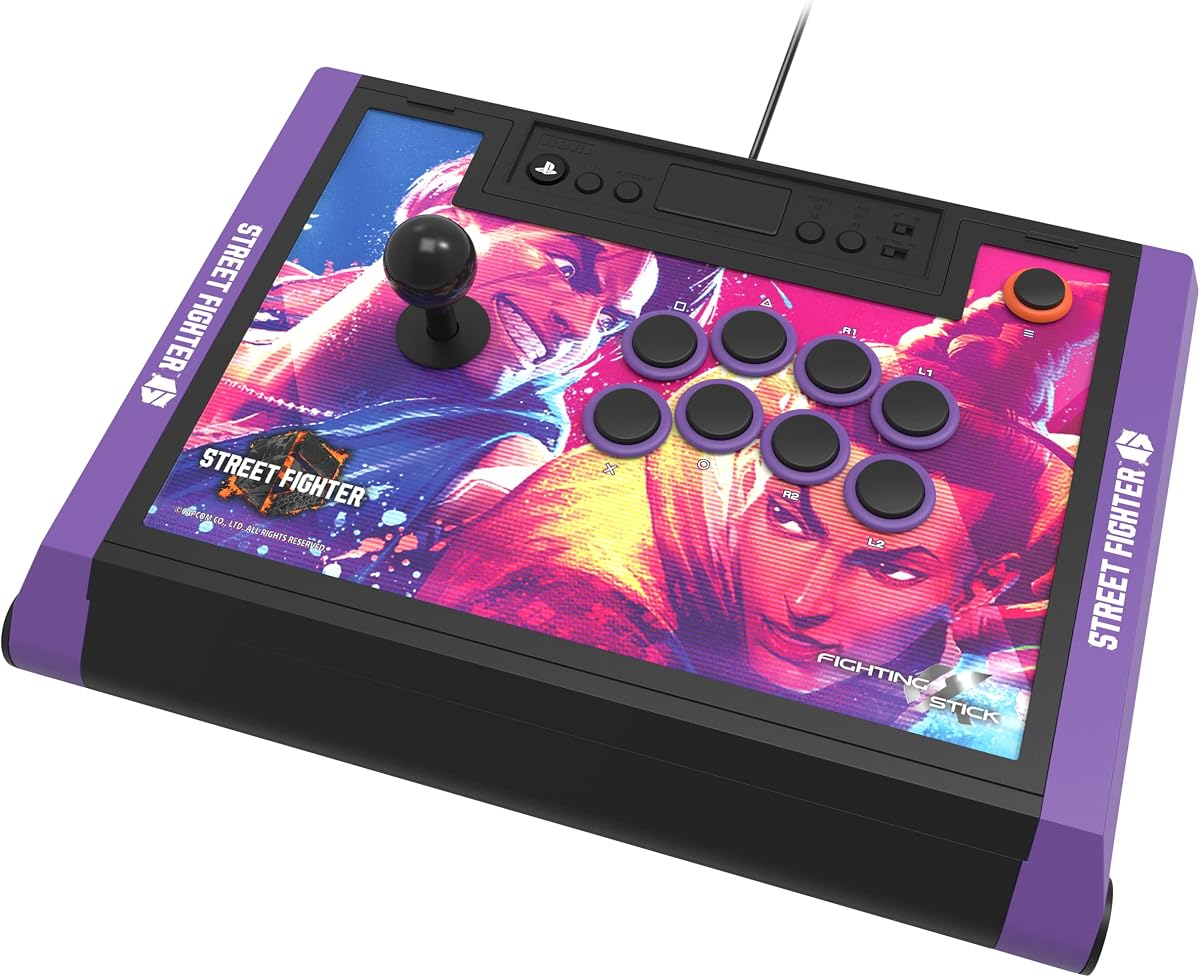
This Street Fighter 6 Edition version of the HORI stick is a standout for fans of the game. It retains the high-quality build of the standard Alpha but adds themed artwork and content. It is perfect for dedicated SF6 players wanting a thematic setup.
We may earn a commission when you buy through this link, at no additional cost to you.
It includes a link to 18 hi-res images for customization which adds value beyond the hardware. The Hayabusa joystick and buttons provide the same pro-level control as the original. It is fully compatible with PS5 and PC for seamless gaming.
The price is high and it does not include extra accessories beyond the art link. However the build quality justifies the cost for those who want the best. It offers a unique visual flair that matches the latest game title.
Buy this if you love Street Fighter 6 and want a matching controller. The performance is top-tier and ensures no input lag during matches. It is a great investment for serious players looking for style and function.
The official SF6 artwork and downloadable images create an immersive setup for fans of the game.
Retains all tournament-ready specs of the original Alpha for uncompromised competitive play.
We may earn a commission when you buy through this link, at no additional cost to you.
The F700 is unique because it supports wireless modes via Bluetooth and a 2.4G receiver. This flexibility makes it great for gamers who use multiple consoles like PS5 and Switch. It is rated 4.5 for its versatility across platforms.
We may earn a commission when you buy through this link, at no additional cost to you.
The Bluetooth connection allows for a clean setup without cables on PS5. You can also use wired headsets for chat which is convenient. Firmware updates ensure it works with the latest consoles like Switch 2 for future-proofing.
Note that it works exclusively with fighting games so do not expect it to work on regular titles. The Sanwa support means you can upgrade buttons easily if needed. This limitation is acceptable for players focused on fighting titles.
Choose this stick if you want wireless freedom and multi-console support. It delivers solid performance at a mid-range price point. Ideal for casual competitive players who switch between different systems regularly.
Use Bluetooth or a 2.4G receiver for a cable-free experience that works on PS5 and Switch.
Firmware updates ensure compatibility with new consoles like Switch 2 so you stay current.
We may earn a commission when you buy through this link, at no additional cost to you.
The Qanba N3 Drone 2 brings official Sony licensing at a very accessible price. With a rating of 4.5 it is one of the most affordable licensed options available. It uses authentic Qanba components for reliable performance.
We may earn a commission when you buy through this link, at no additional cost to you.
The OV7 joystick provides smooth and consistent inputs for precise gameplay. Buttons are large and responsive making them easy to press even during rapid combos. The microphone input is a handy feature for online voice chat.
The design is minimal without customizable panels or lights which keeps costs low. You might prefer more style options but this works well for pure function. It is a no-frills choice that delivers solid results.
This stick is perfect for budget-conscious players who need official compatibility. It handles all PS5 fighting titles without issues or lag. Choose this if you prioritize function and savings over aesthetics.
Uses official Qanba buttons and an OMRON switch joystick for durable and reliable inputs.
Get official Sony licensing and great performance without spending a premium on the stick.
We may earn a commission when you buy through this link, at no additional cost to you.
The F700 Elite upgrades the base model with premium Sanwa components included out of the box. With a rating of 4.6 it offers high-end feel at a reasonable cost. It supports Bluetooth and wired modes for versatile connection options.
We may earn a commission when you buy through this link, at no additional cost to you.
The anti-slip mat ensures the stick stays fixed on your table during intense battles. This solves the common issue of lighter sticks moving around unexpectedly. Turbo functions let you set custom speeds for faster attacks when needed.
Like other MAYFLASH models it is limited to fighting games only which is a known restriction. The Sanwa components make it feel like a much more expensive stick. This is great for competitive players who need durability.
Buy this if you want the premium Sanwa feel without paying top-tier prices. It is a fantastic option for multi-console users who value stability. A smart pick for those upgrading from a basic controller.
The included rubber mat keeps the stick secure on any surface during long gameplay sessions.
High-quality Sanwa buttons and joystick deliver a tournament-grade experience right away.
We may earn a commission when you buy through this link, at no additional cost to you.
The F500 bundle includes Magic Boots that make PS5 use much easier without an extra controller. It is compatible with Xbox and Switch too which is rare at this price point. This versatility makes it a strong all-rounder choice.
We may earn a commission when you buy through this link, at no additional cost to you.
X input and D input modes work on PC for broad software support. Turbo functions allow for custom speeds which adds a layer of control. The headset support lets you chat while playing on Xbox or PS4.
On Xbox you still need a controller plugged in which can be inconvenient. The setup varies by console so read instructions carefully before connecting. The quality is solid but not as refined as premium sticks.
This bundle is ideal if you need one stick for multiple consoles. It saves money by including the PS5 adapter. Good for players who want broad compatibility without buying multiple sticks.
Works with PS5, Xbox Series X/S, and Switch for a wide range of gaming systems.
The Magic Boots simplify PS5 setup so you do not need a separate controller.
We may earn a commission when you buy through this link, at no additional cost to you.
This Tekken 8 Edition brings the same high performance as the base Alpha with a specific theme. It is rated 4.6 and offers downloadable alternate artwork for customization. It is perfect for dedicated fans of the Tekken series.
We may earn a commission when you buy through this link, at no additional cost to you.
It features licensed artwork and design elements that celebrate Tekken 8. The internal specs match the standard Alpha for tournament-ready performance. You get a professional feel without any compromise on quality or response.
You pay extra for the special edition branding which may not suit everyone. However if you love the franchise the value is in the unique look. The customization options let you switch styles when you want.
Buy this if you want to showcase your love for Tekken 8. It performs flawlessly on PS5 and PC for competitive play. Great for those who appreciate themed gear that works at a high level.
Official Tekken 8 design and downloadable art let you personalize your stick to match the game.
Matches the tournament-ready standards of the base Alpha for reliable competitive results.
We may earn a commission when you buy through this link, at no additional cost to you.
The Q7 Obsidian 2 uses swappable Sanwa joystick tops to suit your preference. With a rating of 4.3 it balances price and quality well for enthusiasts. The OBSF buttons provide a distinct clicky feel for precise inputs.
We may earn a commission when you buy through this link, at no additional cost to you.
It has a physical switch to change between PS5 PS4 and PC modes easily. This makes switching between setups faster without unplugging cables. The full control panel layout is standard and intuitive for all players.
It is wired only which can be a drawback for those wanting wireless. The buttons are not Sanwa but high-quality Qanba OBSF which feel solid. You lose some versatility but keep a strong build.
Choose this if you prefer custom joystick tops and a solid wired connection. It works great for home setups where you sit at a desk. A good choice for players who value component quality.
Swap joystick tops to match your playing style without needing to buy a new stick.
A physical switch makes changing between PS5 and PC simple and quick.
We may earn a commission when you buy through this link, at no additional cost to you.
This leverless stick uses 18 keys for movement instead of a joystick for higher precision. It features Kailh Choc switches that offer low-profile and fast response times. RGB lighting and hot-swap options make it highly customizable.
We may earn a commission when you buy through this link, at no additional cost to you.
The OLED screen shows your current input mode which helps in complex setups. Tournament lock prevents accidental pauses during matches which is a great safety feature. It supports PC and Switch natively but needs a converter for PS5.
It is not for everyone since leverless controllers require significant practice to master. The need for an extra converter on PS5 adds to the complexity. However for pros the speed benefits are worth the learning curve.
Buy this if you are an advanced player looking to switch to leverless. It offers deep customization for those who want to tweak every detail. A specialized tool for serious competitive gamers only.
Leverless design reduces input errors with dedicated direction buttons for precise control.
Hot-swap switches and RGB lights let you tailor the stick to your exact needs.
We may earn a commission when you buy through this link, at no additional cost to you.
Choosing the right arcade stick involves several factors beyond just the price. This section breaks down the key elements you should consider to find the perfect fit for your PS5 gaming setup.
Ensure the stick is officially licensed for PS5 to guarantee full compatibility. Licensed sticks are tested by Sony to work flawlessly with fighting games. Unlicensed models may work but can suffer from connection issues or lack of support.
Look for official PS5 logos or statements in the product description.
The joystick type impacts movement precision and comfort during long sessions. Brands like Sanwa and Hayabusa are industry standards known for durability. Buttons should feel responsive without being too soft or overly stiff.
Prioritize models with replaceable parts for easy maintenance and upgrades.
Most sticks connect via USB cable which ensures zero latency. Wireless options offer convenience but add a slight delay which can affect competitive play. Check if the stick supports both modes if you need flexibility.
Wired is always better for tournament play but wireless is fine for casual use.
A good stick should allow you to change the panel or buttons easily. This lets you personalize the look or switch components if something breaks. Look for designs that open without tools for quick access.
Custom panels can also help you identify your setup in tournaments.
If you play on multiple consoles check if the stick supports them. Some sticks work on PC and Switch too which adds value to your purchase. Ensure the switches or adapters needed are included in the box.
Versatility can save money if you upgrade consoles in the future.
Heavier sticks stay in place on the table during fast movements. Lightweight models may shift around which can disrupt gameplay. Look for a sturdy feel that does not flex or creak during use.
A rubber mat can help if the stick is too light.
Some sticks include a 3.5mm jack for headphones which simplifies your setup. This allows you to chat online without connecting the headset to the console. Check if the mic and audio work as expected.
This feature is useful for players who rely on voice chat.
Price ranges from budget to premium so set a limit before buying. Higher cost often brings better parts but entry models can suffice for casual play. Compare features against the price to ensure you get fair value.
Balance your spending with how often you plan to use the stick.
To start use a USB cable to connect the stick directly to your PS5 console. Plug it in and the system should recognize it automatically for fighting games. You may need to switch modes on some models to match PS5.
Keep the stick clean by wiping it down with a dry cloth regularly. Dust and grime can build up in the buttons and joystick affecting performance. Use a small brush to clean between keys for better hygiene.
Store the stick in a dry place when not in use to avoid damage. High humidity can cause issues with internal electronics over time. Proper storage will extend its life and ensure consistent performance during play.
Not all sticks are guaranteed to work with PS5. Look for models that explicitly state PS5 compatibility or official licensing. Unlicensed sticks may work but can have bugs or not support all games fully.
Yes wired connections are generally better for fighting games due to lower latency. Wireless adds a small delay which can affect precise inputs. Use wired for competitive play and wireless if convenience is your top priority.
Many sticks allow button or joystick replacement if they use standard parts. Look for models with accessible panels or mention of modding support. This extends the stick's life if a part wears out over time.
Older or generic sticks use USB standards that differ from PS5 requirements. Adapters bridge this gap to ensure proper communication. Always check if an adapter is included before buying for PS5 use.
Leverless sticks offer higher precision but require significant practice to master. They are best for advanced players who need exact input control. Casual players may find traditional joysticks easier to pick up.
Sanwa buttons are industry standards known for durability and consistent tactile feel. Non-Sanwa buttons can vary in quality and may degrade faster. If you prioritize performance choose sticks that specify Sanwa components.
We hope this guide helped you narrow down the top options for PS5 fighting games. The HORI Alpha and Nacon Daija stand out for different reasons based on budget. Consider your needs for customization and platforms before making a choice.
Focus on build quality and compatibility as these impact your experience daily. A reliable stick can elevate your gameplay and last for years with care. Prioritize features that match your playstyle and gaming habits.
Prices and deals change often so check current listings before you buy. Make sure the model still meets your needs and has positive recent reviews. Your perfect stick is out there waiting to improve your setup.