
4 Pack HDMI Dummy Plug 4K HDR
4.8Editor score
Supports 4K at 60Hz
Durable aluminum housing
Universal cross-platform support
This guide compares the top HDMI Dummy Plug models for remote desktop, gaming, and mining, evaluating resolution support, build quality, and compatibility
An HDMI dummy plug tricks your graphics card into thinking a monitor is connected, enabling headless operations for remote access and GPU acceleration without a physical screen.
We evaluated ten leading models based on resolution capabilities, build durability, signal stability, and compatibility across Windows, macOS, and Linux environments for diverse use cases.
Each pick highlights specific strengths like 4K support or multi-pack value, helping you choose the right adapter for your setup, though note that availability and pricing may shift over time.
4.8Editor score
4.6Editor score

The following table provides a side-by-side comparison of all ten selected models, highlighting key specifications such as supported resolutions, pack sizes, and unique features to aid your decision process.


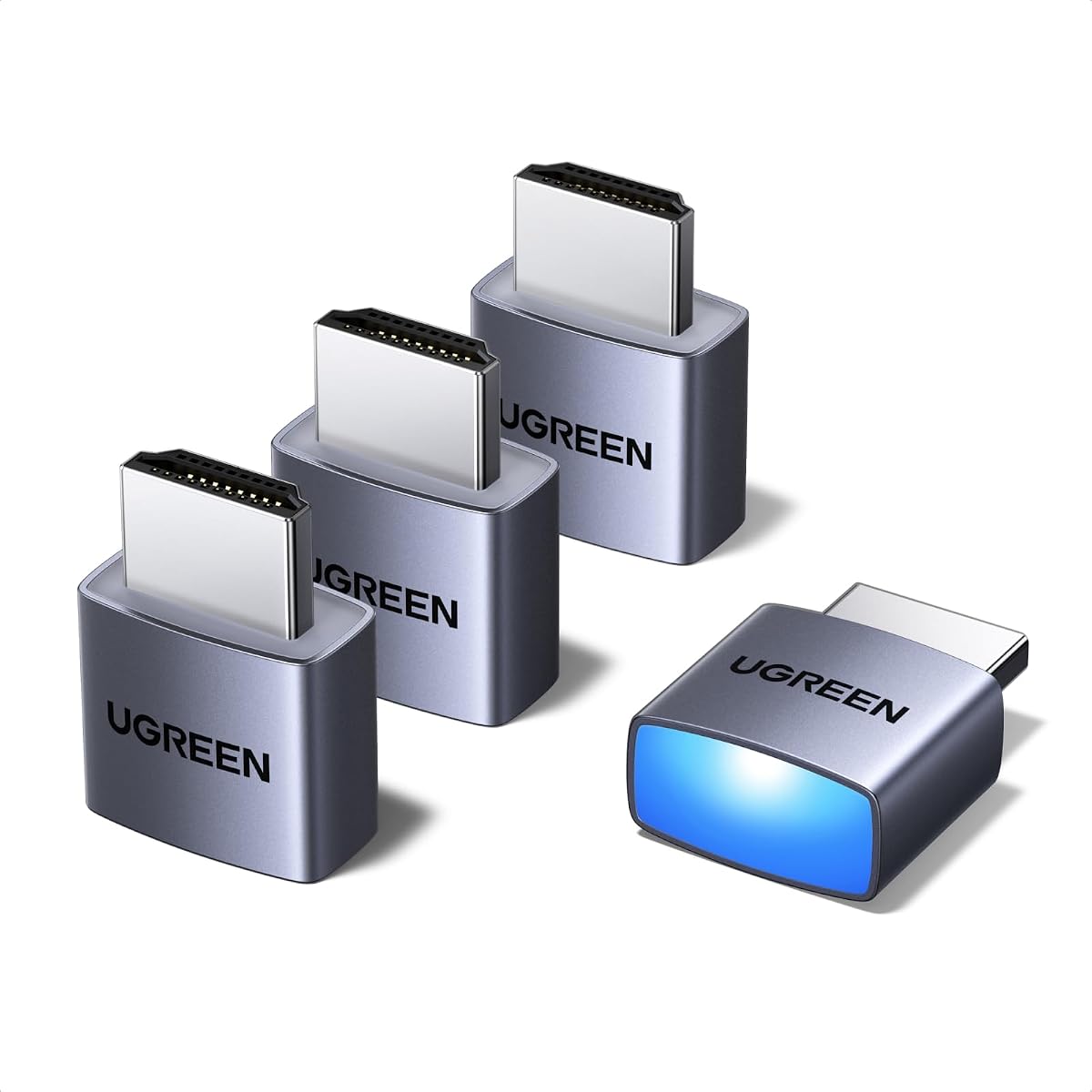
The UGREEN 4 Pack HDMI Dummy Plug stands out as a top choice for users needing reliable headless operation across multiple machines. With a rating of 4.6 stars, it consistently delivers stable virtual display signals without requiring complex setup procedures.
We may earn a commission when you buy through this link, at no additional cost to you.
Its standout quality lies in the True 4K@60Hz HDR performance, which ensures that even high-demand tasks like video editing or remote desktop access remain smooth. The aluminum shell aids in heat dissipation, preventing overheating during intensive tasks like cryptocurrency mining or game development.
One trade-off is the price point, which is slightly higher than generic alternatives, but the durability and included LED status light justify the investment for professional or multi-device setups. The LED provides immediate visual feedback on connection health, reducing troubleshooting time.
This pack is ideal for server farms, colocation centers, or anyone managing multiple headless PCs. The plug-and-play design ensures you can deploy these units quickly across Windows, Mac, and Linux systems without worrying about driver conflicts.
This emulator activates the GPU to create a virtual display, ensuring stable remote desktop operations without lag or signal dropouts.
The aluminum shell is designed to enhance heat dissipation, ensuring long-lasting use even during high-load computing sessions.
We may earn a commission when you buy through this link, at no additional cost to you.
This 4 Pack HDMI Dummy Plug offers a compelling balance of performance and cost, earning a high 4.8-star rating from users. It provides the essential features needed to keep GPUs active without a physical monitor attached.
We may earn a commission when you buy through this link, at no additional cost to you.
Key strengths include its ability to deliver crisp visuals with 4K Ultra HD resolution at 60Hz and support for 1080P at 120Hz. The aluminum armor casing ensures it resists overheating during marathon computing tasks, making it suitable for mining or rendering.
A minor trade-off is that while the build is rugged, the packaging can be minimal, requiring careful handling during unpacking. However, the price point makes it a low-risk investment for those needing multiple units for a server or multi-PC setup.
Buyers looking to optimize headless deployments across multiple stations should choose this model. It works seamlessly with NVIDIA, AMD, and Intel GPUs, ensuring broad compatibility for remote management and automated trading stations.
Revolutionize headless deployments in server farms by maintaining system stability while eliminating display power costs.
Zero drivers or external power are required, enabling instant virtual displays for stock trading platforms or simulation software.
We may earn a commission when you buy through this link, at no additional cost to you.
For users needing maximum resolution and refresh rate support, this model stands out by offering up to 8K at 30Hz and 4K at 120Hz. While it lacks a user rating due to newer release status, its specifications are impressive for high-end hardware.
We may earn a commission when you buy through this link, at no additional cost to you.
The standout quality is the HDMI 2.1 support, which is essential for next-gen gaming setups and high-fidelity streaming. It enables high-performance systems to maintain full GPU capabilities even without a physical display attached.
The trade-off is the requirement for an HDMI 2.1 graphics card, which limits compatibility with older hardware. However, for those with modern systems, the capability to output 8K makes it a future-proof choice for advanced workstations.
This adapter is perfect for gaming enthusiasts using tools like Moonlight or Steam Link that benefit from higher frame rates. It ensures the GPU remains active for tasks like VR setups or multi-monitor simulation.
Compatible with 1440P at 144Hz, ensuring smooth visual experiences for streaming and gaming applications.
Supports resolutions up to 8K, allowing users to prepare their setups for emerging display technologies.
We may earn a commission when you buy through this link, at no additional cost to you.
The DTech HDMI Dummy Plug is a practical choice for those who need a compact solution for headless computing. Rated at 4.6 stars, it is designed to enable GPU acceleration without requiring a physical monitor.
We may earn a commission when you buy through this link, at no additional cost to you.
Key strengths include its gold-plated interface which ensures a stable digital signal, unlocking the full potential of your graphics card. It is particularly noted for solving Apple OSX headless display issues, which can be tricky with generic adapters.
A trade-off is that the product description is less detailed regarding specific refresh rates compared to newer models. However, for general remote control and simulation tasks, it performs reliably across Windows and Linux systems.
This pack is a must-have for server and colocation farms where multiple units are needed. Its low cost and small size make it ideal for deploying many virtual screens efficiently.
This adapter emulates a high resolution up to 4K, making the computer run headless without a keyboard or mouse.
The gold plated dummy dongle ensures stable digital signal transmission for consistent performance.
We may earn a commission when you buy through this link, at no additional cost to you.
This HDMI Dummy Plug offers a straightforward solution for basic headless needs. With a 4.6-star rating, it is known for its simplicity and ability to work with any graphics card that has an HDMI output.
We may earn a commission when you buy through this link, at no additional cost to you.
Its standout feature is the ultra-compact, low profile design, making it unobtrusive on any setup. It allows for high-resolution GPU accelerated remote desktop tasks without the need for a physical display.
The trade-off is that it supports up to 1080P at 60Hz, which is lower than the 4K options available. However, for basic remote management or trading stations, this resolution is often sufficient.
Buyers looking for a no-fuss adapter for a single machine should consider this model. It acts exactly the same as a real LCD monitor to the system, ensuring stability for tasks like currency mining.
Will work with any graphics card that has HDMI output, ensuring no incompatibility problems with existing hardware.
No drivers, no configuration, and no power cable are needed, making it easy to set and forget.
We may earn a commission when you buy through this link, at no additional cost to you.
This 3 Pack model provides a balanced option for those needing a few units without overspending. It supports 4K HDR and 1080P at 120Hz, making it versatile for various computing tasks.
We may earn a commission when you buy through this link, at no additional cost to you.
Key strengths include the gold-plated HDMI interface which guarantees complete signal transmission. The device is designed to be low power consumption and supports hot swapping for flexible use.
A trade-off is the rating of 4.5, which is solid but slightly lower than some top contenders. However, the inclusion of a 2-year unconditional warranty adds significant value and peace of mind.
Ideal for home servers or small offices, this model reduces energy usage by eliminating the need for real displays. It ensures stable operation for mining and simulation mirroring.
This model ensures guaranteed stability for cryptocurrency mining, video rendering, and simulation mirroring operations.
Includes a 2-year unconditional warranty to protect your purchase against defects or issues.
We may earn a commission when you buy through this link, at no additional cost to you.
Designed for larger setups, this 5-pack allows you to outfit multiple machines efficiently. It supports a range of refresh rates including 120Hz and 144Hz, catering to high-performance needs.
We may earn a commission when you buy through this link, at no additional cost to you.
Standout qualities include the full board copper pouring for enhanced signal stability and peak brightness simulation of up to 1015 nits. This makes it suitable for color-sensitive applications like video preview.
A trade-off is the default resolution of 1080P, though it supports up to 4K. Being a newer product, it has limited user feedback compared to established brands.
Perfect for multi-screen trading or cloud gaming servers, this adapter reduces power usage and allows systems to run headlessly. It offers a low-cost, eco-friendly solution for professionals.
The copper pouring ensures maximum conductivity and corrosion resistance for reliable long-term use.
Simulates vivid output with high brightness levels, suitable for color-sensitive preview tasks.
We may earn a commission when you buy through this link, at no additional cost to you.
This model leverages HDMI 2.1 technology to provide higher refresh rate support than standard adapters. It is designed for users who need 4K at 120Hz for gaming or VR setups.
We may earn a commission when you buy through this link, at no additional cost to you.
Key strengths include its compatibility with Steam Deck and ROG Ally, making it ideal for handheld gaming users. It emits negligible heat and requires no configuration, ensuring a smooth experience.
A trade-off is the limitation on Windows 11 systems which may only achieve 4K at 60Hz. However, on Windows 10 it supports 120Hz HDR. The gold-plated connector ensures digital signal stability.
Choose this for headless gaming PCs accessed via Moonlight or for tweaking 4K streaming. It allows the GPU to stay active for tasks like Govee Gaming Lights synchronization.
Supports 4K at 120Hz on compatible systems, perfect for high-speed gaming setups.
Works seamlessly with devices like Steam Deck for streaming from main PC to handheld.
We may earn a commission when you buy through this link, at no additional cost to you.
This 8-pack offers exceptional value for large-scale operations requiring multiple virtual displays. With a default resolution of 1440P, it ensures a high-quality baseline for headless operations.
We may earn a commission when you buy through this link, at no additional cost to you.
Key strengths include the advanced build materials which ensure durability and signal stability. It supports high refresh rates like 144Hz, making it suitable for dynamic simulation environments.
A trade-off is the bulk of the packaging and higher total investment. However, for colocation centers or large home labs, having 8 units at a bulk rate is economical.
Buyers needing to outfit a large cluster of servers or workstations will appreciate this volume. It works with devices like Jetson Nano and Raspberry Pi for diverse setups.
Default resolution of 1440P provides a sharp baseline for virtual display operations without config.
Ideal for complex setups requiring multiple virtual screens for simulation or multi-tasking.
We may earn a commission when you buy through this link, at no additional cost to you.
This model stands out with a default resolution of 2160P, offering a high-quality baseline for virtual displays. It supports a wide range of refresh rates for flexible usage.
We may earn a commission when you buy through this link, at no additional cost to you.
Standout qualities include its HDR support which enhances brightness and color accuracy. The aluminum shell ensures durability and provides enhanced electromagnetic shielding for stable connections.
A trade-off is the default resolution which is higher than others, potentially requiring configuration for lower needs. However, it ensures high fidelity for video preview and mirroring.
Choose this for setups needing high-resolution defaults like development boards or mini PCs. It allows your system to run headlessly for improved efficiency and space-saving.
Supports High Dynamic Range for enhanced brightness and color accuracy suitable for color-sensitive apps.
Designed to reduce power usage and eliminate the need for a real display for efficiency.
We may earn a commission when you buy through this link, at no additional cost to you.
Selecting the right HDMI dummy plug involves considering resolution needs, refresh rates, and compatibility with your specific hardware and operating system.
Resolution support is the primary factor to consider as it dictates the quality of the virtual display. Most models support up to 4K at 60Hz which is sufficient for most tasks like remote desktop or streaming. However, some premium models offer higher refresh rates like 120Hz or even 8K support for next-gen hardware.
Ensure the plug supports at least 4K at 60Hz to maintain high-quality performance and compatibility with modern GPUs and software requirements.
Refresh rate capabilities are crucial for tasks involving gaming or high-frequency video editing. Standard adapters support 60Hz but for smoother motion and responsiveness, look for models that support 120Hz or higher refresh rates.
If you are gaming or streaming at high FPS ensure the plug supports the necessary refresh rate to prevent frame drops or lag.
Compatibility with your operating system ensures that the plug works seamlessly without driver issues. Most modern plugs work with Windows, macOS, and Linux but specific features like HDR might vary between systems.
Check the product description to confirm full support for your specific OS version to avoid compatibility headaches.
Build quality affects longevity especially for 24/7 tasks like mining or server operations. Look for models with aluminum shells or metal casing that help dissipate heat effectively.
Durable construction prevents overheating and ensures stable signal transmission over long periods of continuous use.
Pack size determines the value and convenience for multi-device setups. While single units are cheaper per item, multi-packs often offer better bulk pricing and convenience for setting up multiple machines.
Evaluate how many units you need and choose a pack size that fits your budget and deployment scale.
The HDMI version supported by the plug must match your graphics card capabilities. HDMI 2.1 is required for 4K at 120Hz or 8K resolutions while HDMI 2.0 covers standard 4K at 60Hz.
Verify your GPU output specifications to ensure the dummy plug can deliver the intended performance.
Plug-and-play features eliminate the need for installing drivers or additional software. This ensures quick setup and stability across reboots without software conflicts.
Choose a model that explicitly states no drivers or software are required for hassle-free deployment.
A warranty provides protection against defects and ensures customer support is available. Brands offering longer warranties like 2 years often have more confidence in their product quality.
Prioritize models with clear warranty terms to safeguard your investment against potential hardware issues.
To ensure longevity keep the plug in a clean environment and avoid bending the connector. Although durable regular checking for dust buildup in the HDMI port can prevent connectivity issues over time.
An HDMI dummy plug is used to trick your computer into detecting a monitor even when none is physically connected. This keeps the GPU active allowing for high-performance tasks like remote desktop access, gaming streaming, or video rendering without a physical screen.
No you do not need drivers for an HDMI dummy plug. Most models are plug-and-play devices that work immediately upon connection with Windows, Mac, and Linux systems without requiring any software installation.
Yes an HDMI dummy plug is a common tool for cryptocurrency mining. It ensures the graphics card remains active even when no monitor is attached preventing the mining software from stopping due to display detection issues.
Using an HDMI dummy plug does not negatively affect your computer performance. In fact it often improves performance for GPU-bound tasks by ensuring the graphics card is fully utilized without power-saving restrictions imposed by display detection.
Yes it is safe to leave the plug in all the time. These devices are designed for continuous operation with low power consumption and robust build materials that prevent overheating during long-term use.
Many modern HDMI dummy plugs support 4K resolution at 60Hz. However check the product specifications carefully to ensure it supports the specific resolution and refresh rate you need for your workflow.
Yes most HDMI dummy plugs work with Mac computers including Mac Mini and MacBook. They are particularly useful for solving headless display issues on macOS where the system might restrict GPU power without a connected monitor.
If the connection is unstable check the HDMI port for dust or damage. Sometimes reseating the plug or trying a different port on the graphics card can resolve intermittent connection issues.
Remember that prices and availability can change over time so always verify the current details before making a purchase. With the right dummy plug you can optimize your headless setup for efficiency and performance without the clutter of physical monitors.