
Lian Li Vector V100 ATX Mid-Tower
4.7Editor score
4mm tempered glass panels
Side I/O with USB-C
Supports GPUs up to 420mm
Discover the top PC cases with tempered glass for 2026. We compare airflow, build quality, and design to help you choose the perfect mid tower.
Building a gaming PC requires careful selection of components, and the case is no exception. Tempered glass panels offer a stunning view of your hardware while protecting it from dust and damage. Choosing the right one ensures optimal airflow and aesthetic appeal.
We evaluated ten leading models based on cooling performance, build quality, and design features. Each product offers unique strengths for different budgets and preferences. Our analysis focuses on real-world usability and compatibility with modern hardware standards.
Every pick highlights specific advantages like fan inclusion, cable management, and panel durability. Prices fluctuate frequently so check current listings before purchasing. This guide helps you find the perfect enclosure for your next build without compromising on style or function.
4.7Editor score

4.7Editor score

4.6Editor score
This side-by-side comparison highlights key specifications across all ten models to help you quickly identify the best fit for your specific hardware requirements and aesthetic goals.



The Fractal Design North stands out as a top choice for builders valuing aesthetics and performance. Its unique wood front panel combined with tempered glass sides offers a sophisticated look unmatched by typical mesh cases. The included 140mm fans ensure solid cooling right out of the box.
We may earn a commission when you buy through this link, at no additional cost to you.
Airflow is prioritized through the open front mesh which allows cool air to reach components efficiently. The tempered glass side panel provides scratch resistance and clear visibility of internal hardware. Build quality feels robust with attention to detail in panel alignment and mounting mechanisms.
Trade-offs include a higher price compared to standard steel cases and limited RGB customization options. The wood finish may not suit every aesthetic preference but adds warmth to modern setups. These factors are acceptable given the overall build quality and cooling performance.
This case is ideal for users seeking a premium build experience with natural materials. It fits well in home office or living room environments where style matters. We recommend it for those willing to invest in a case that balances looks and function.
The genuine walnut front offers acoustic damping and visual warmth while mesh ensures airflow remains unrestricted for high performance components.
Integrated tabs allow quick removal of side and front panels making hardware upgrades and cleaning straightforward without needing screwdrivers.
We may earn a commission when you buy through this link, at no additional cost to you.
The CORSAIR 3500X RS delivers a stunning panoramic view with glass wrapping around the front and side. This design maximizes visual impact while maintaining essential cooling features for high-end builds. Three pre-installed ARGB fans provide immediate lighting and airflow without extra cost.
We may earn a commission when you buy through this link, at no additional cost to you.
Cooling capacity is impressive with mounting points supporting up to ten 120mm fans across multiple zones. The case validates use with reverse connection motherboards ensuring a clean front without visible cables. Removable panels simplify access during assembly and maintenance tasks.
Trade-offs include potentially tight cable routing space and absence of a dedicated PSU shroud. These limitations require careful planning during build but do not hinder overall performance. The visual benefits often outweigh these minor inconveniences for enthusiasts.
Ideal for users prioritizing visual drama and RGB integration this case suits modern gaming setups. It accommodates various motherboard form factors and supports extensive fan configurations. We recommend it for builders wanting a showpiece with robust thermal potential.
Wraparound glass panels create an immersive view of your build enhancing aesthetics without compromising structural integrity or component safety.
Compatibility with back-connect motherboards ensures cable clutter stays hidden supporting emerging standards for cleaner internal organization and airflow.
We may earn a commission when you buy through this link, at no additional cost to you.
The Lian Li Vector V100 offers exceptional value with premium features typically found in higher-priced models. Its 4mm tempered glass panels and dedicated display platform create a clean showcase for components at a budget friendly cost. Support for back-connect motherboards enhances routing flexibility.
We may earn a commission when you buy through this link, at no additional cost to you.
Thermal performance is solid with open chassis layout supporting up to nine fan positions and large radiators. Side I/O with USB-C adds convenience for peripherals without cluttering the top. The case accommodates large GPUs and CPU coolers comfortably.
Trade-offs include limited pre-installed fans and basic RGB control options compared to premium rivals. Users may need to purchase additional fans for optimal cooling. These costs remain low making the total package still affordable overall.
Best for budget conscious builders seeking modern features this case delivers without breaking the bank. It suits those planning custom fan setups or using back-connect boards. We recommend it as a practical choice for versatile gaming rigs.
High quality materials and modern connectivity options make this case accessible to more users without sacrificing essential build standards.
Back-connect support and side I/O design reduce front cable clutter improving airflow and visual clarity inside the chassis.
We may earn a commission when you buy through this link, at no additional cost to you.
FOIFKIN F600 impresses with seven pre-installed PWM ARGB fans delivering immediate visual and cooling performance. The 270 degree panoramic glass provides wide visibility while dual chamber design improves airflow separation and cable management. This combination offers exceptional value at its price point.
We may earn a commission when you buy through this link, at no additional cost to you.
Cooling capacity supports up to three 360mm radiators simultaneously for aggressive liquid cooling setups. Tempered glass panels are fully transparent to showcase hardware details effectively. The case accommodates large GPUs and PSUs making it versatile for high-end components.
Trade-offs include variable fan quality and potentially complex assembly due to the dual chamber layout. Users may need patience during installation. These factors are offset by the low cost and inclusion of so many fans.
Suitable for users wanting high fan counts and glass views on a budget this case is compelling. It fits gaming builds needing strong airflow. We recommend it for those prioritizing performance per dollar.
Seven fans provide extensive airflow coverage reducing need for additional purchases and enhancing cooling out of the box.
Separating PSU and drives from main hardware improves temperature regulation and cable routing organization inside the chassis.
We may earn a commission when you buy through this link, at no additional cost to you.
GAMDIAS AURA GC1 combines mesh front intake with a glass side panel for balanced aesthetics and cooling. Four built-in ARGB fans deliver lighting and airflow while maintaining cost efficiency. Tool-free glass installation simplifies access for upgrades and maintenance tasks.
We may earn a commission when you buy through this link, at no additional cost to you.
The mesh front ensures adequate air intake reducing heat buildup during heavy loads. Case supports standard motherboard sizes and GPUs up to 340mm. Cable management features are functional though not exceptional. Overall design suits mainstream gaming builds.
Trade-offs include glass limited to one side and average build materials. This may not satisfy those wanting full glass views. However cooling performance is solid for the price.
Ideal for budget gamers wanting RGB lighting and decent airflow this case fits well. It accommodates standard components without issues. We recommend it for entry-level to mid-range builds needing value.
Mesh front paired with glass side allows air intake while showcasing components effectively without compromising thermal performance.
Tool-free installation mechanisms reduce time and frustration when accessing internals for upgrades or routine maintenance.
We may earn a commission when you buy through this link, at no additional cost to you.
The NZXT H5 Flow prioritizes airflow efficiency in a compact form factor. Ultra-fine mesh panels on top front and side maximize cooling while filtering dust. Two quiet fans included ensure solid performance without excessive noise during operation.
We may earn a commission when you buy through this link, at no additional cost to you.
Support for large radiators makes it suitable for liquid cooling despite smaller exterior. PSU shroud perforations allow additional airflow paths. Cable management channels simplify routing ensuring tidy internal appearance. Build quality reflects NZXT reputation for reliability.
Trade-offs include size constraints for very long GPUs and minimal RGB focus. Users prioritizing visuals may need to add more components. However cooling remains top-tier for the form factor.
Best for those wanting clean looks and strong cooling in tight spaces this case excels. It suits home office setups well. We recommend it for prioritizing airflow over flashy RGB.
Strategic mesh placement and shroud perforation guide air directly to components improving cooling efficiency without added fans.
Smaller exterior saves desk space while maintaining support for essential cooling features and standard hardware sizes.
We may earn a commission when you buy through this link, at no additional cost to you.
MOROVOL 621 features a diamond-shaped mesh front offering distinct visual appeal and strong airflow. Four pre-installed RGB fans enhance lighting effects immediately. Tempered glass side panel displays components with high transmittance for clear visibility of hardware.
We may earn a commission when you buy through this link, at no additional cost to you.
Cable management and I/O ports are practical with USB 3.0 support. Dust filters maintain cleanliness over time. The design supports common motherboard types and reasonable GPU sizes. Build quality is functional for the price range.
Trade-offs include fixed RGB lighting without customization and limited drive expansion. Users wanting addressable lighting may look elsewhere. However overall cooling and value are competitive.
Ideal for budget builds wanting unique looks this case delivers. It fits standard gaming needs well. We recommend it for those prioritizing design flair and affordability.
Diamond contour mesh adds visual interest while maintaining high airflow efficiency for heat dissipation.
Front panel offers easy access to ports ensuring convenient peripheral connection during daily use.
We may earn a commission when you buy through this link, at no additional cost to you.
The Lian Li V100 in white offers a clean sophisticated look for matching white builds. Four PWM ARGB fans provide lighting and airflow. Integrated ARGB strip enhances color control with motherboard sync. Tool-less panel mounting simplifies assembly and maintenance.
We may earn a commission when you buy through this link, at no additional cost to you.
Thermal support accommodates large GPUs and radiators ensuring performance for demanding workloads. Back-connect compatibility maintains cable clarity. Build quality remains high with precise tolerances. Dust filters protect internals effectively.
Trade-offs include white finish requiring more maintenance against dust and higher cost. Users wanting low maintenance may prefer darker colors. However the aesthetic is worth the effort for many.
Ideal for white-themed builds this case excels in style and function. It supports modern hardware well. We recommend it for designers prioritizing cohesive color schemes.
Pure white finish complements matching hardware ensuring uniform appearance across the system build.
Daisy-chain and motherboard sync enable centralized lighting management reducing need for extra controllers.
We may earn a commission when you buy through this link, at no additional cost to you.
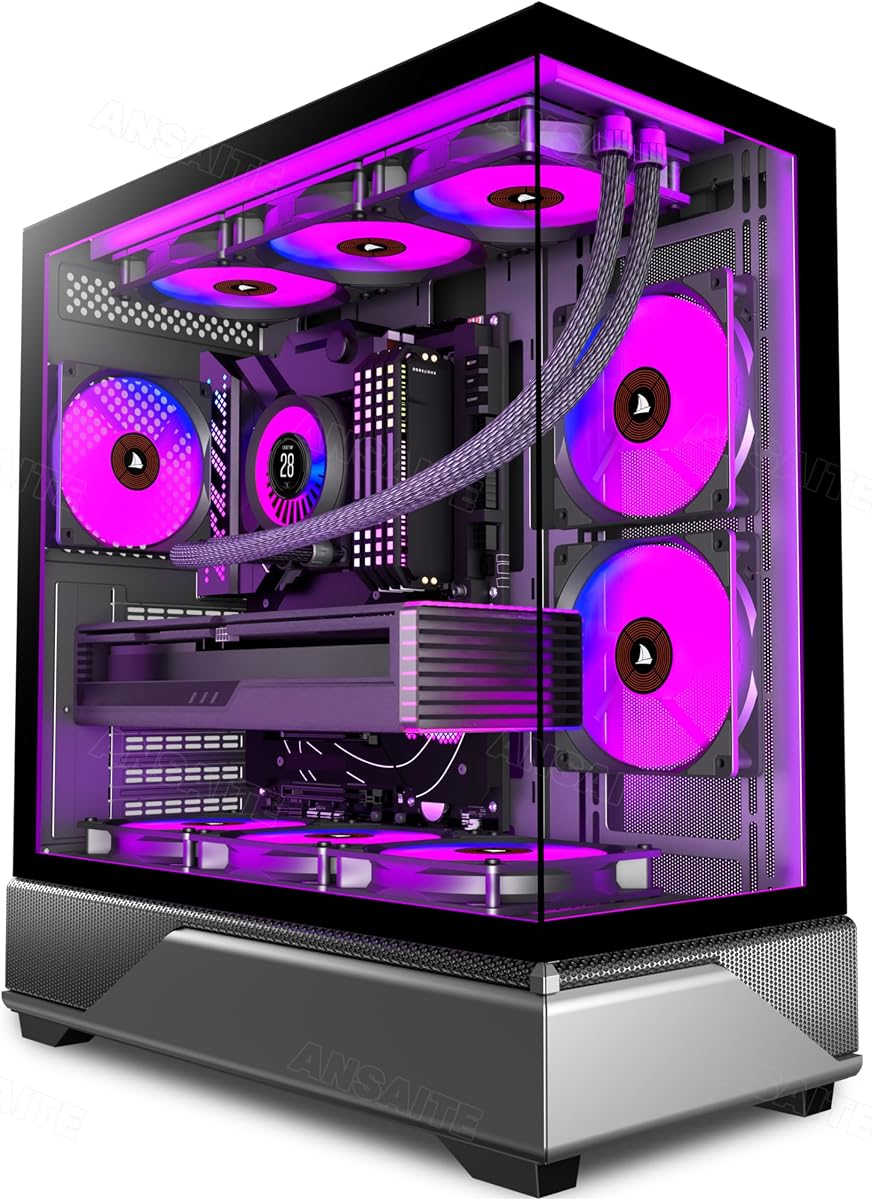
ANSAITE G8 features six PWM ARGB fans pre-installed with dual channel airflow targeting CPU and GPU. Panoramic glass side panel provides stunning visual effects. USB-C connectivity supports modern devices. Dust filters minimize internal accumulation.
We may earn a commission when you buy through this link, at no additional cost to you.
Thermal layout optimizes horizontal and vertical airflow paths. Back-connect readiness keeps cables hidden. The case fits large GPUs and PSUs. Build quality meets budget expectations for the features provided.
Trade-offs include variable fan noise levels and complex assembly due to multiple fans. Users may find cable routing challenging. However cooling performance is solid for the cost.
Best for gamers wanting extensive fan setups and glass views on budget this case fits. It supports modern hardware effectively. We recommend it for value seekers prioritizing cooling.
Dual channel design targets heat sources directly improving thermal efficiency across the system components.
USB-C on I/O ensures compatibility with latest peripherals enhancing daily usability and transfer speeds.
We may earn a commission when you buy through this link, at no additional cost to you.
ANSAITE K9 delivers nine pre-installed ARGB fans creating maximum airflow and lighting impact. Panoramic glass enhances visibility of components. Magnetic dust filters simplify cleaning and maintenance. USB-C connectivity supports modern devices effectively.
We may earn a commission when you buy through this link, at no additional cost to you.
The case supports very large GPUs and radiators for extreme builds. Cable management spaces accommodate the nine fans. Back-connect ready for clean routing. Build quality aligns with budget expectations for the fan count.
Trade-offs include internal space crowding and higher acoustic levels. Users may need sound dampening for quiet operation. However cooling performance is excellent for thermal heavy loads.
Best for those prioritizing fan count and cooling capacity this case stands out. It supports modern hardware well. We recommend it for enthusiasts maximizing thermal performance.
Nine fans enable aggressive cooling strategies ideal for overclocked or high-power components needing heat dissipation.
Magnetic filters allow quick removal and cleaning reducing dust buildup and extending component lifespan.
We may earn a commission when you buy through this link, at no additional cost to you.
Selecting the right tempered glass case involves evaluating airflow, build quality, and design features to match your hardware needs.
Tempered glass panels offer superior clarity and scratch resistance compared to acrylic or plastic. Look for panels that are tool-free to remove for easy cleaning and upgrades. Check if the glass is tempered for safety and durability against impacts.
Prioritize cases with tempered glass that match your desired aesthetic whether full panoramic or side only.
Airflow is critical for maintaining hardware temperatures especially with high-performance components. Mesh fronts and multiple fan mounts enhance airflow. Consider cases with dust filters to maintain efficiency over time.
Ensure the case supports your planned cooling solution whether air or liquid with adequate space for radiators.
Cases with included fans save cost and effort. Check fan speed PWM control and RGB synchronization capabilities. Addressable RGB allows customization while fixed RGB is simpler but less flexible.
Look for fan headers on the motherboard to ensure proper control and integration with software.
Verify support for your motherboard size whether ATX Micro-ATX or Mini-ITX. GPU length and CPU cooler height limits are crucial for modern graphics cards and tower coolers. Back-connect motherboard support offers cleaner cable management.
Ensure PSUs and drive bays fit your storage needs without restricting airflow or space.
Effective cable management improves airflow and aesthetics. Look for wide channels hooks and straps to route cables neatly. Back-connect boards can further reduce clutter on the front.
Plan your build considering cable length and routing paths before purchasing to avoid constraints.
Tool-free mounting mechanisms for panels and drives speed up build time. Consider how easy it is to access components for upgrades. Integrated tabs and clips improve usability.
Choose cases with clear instructions and well-designed internals for a smoother assembly experience.
Steel frames and thicker panels improve structural integrity and acoustic dampening. Check for sturdy hinges and latches on glass panels. Build quality affects longevity and safety.
Invest in a case with solid construction to ensure your components are protected over time.
Design should match your setup theme. Wood fronts offer natural looks while white cases suit clean themes. RGB integration can enhance visual appeal.
Balance aesthetics with functionality ensuring style choices don't compromise cooling or usability.
When assembling your PC always handle tempered glass panels gently to avoid stress or cracks. Use recommended tools or follow tool-free instructions for panel removal. Ensure components are secured properly to prevent vibration noise inside the case.
Regular cleaning keeps airflow optimal and glass clear. Use soft microfiber cloths to wipe glass surfaces without scratching. Check dust filters periodically and clean them to maintain cooling efficiency and reduce internal dust buildup.
Avoid placing heavy objects on glass panels and keep the case on stable surfaces. Inspect cable ties and mounts occasionally to ensure they remain secure. Monitor internal temperatures to ensure your cooling setup performs as intended.
Tempered glass panels are designed for safety and durability. They are treated to resist scratches and impacts. If they break they shatter into small blunt pieces rather than sharp shards reducing injury risk.
Modern glass cases include mesh vents and multiple fan mounts to ensure adequate airflow. Check for front or side intake options and dust filters. Proper fan setup ensures cooling matches your hardware needs.
Most cases include fan mounts supporting standard 120mm or 140mm RGB fans. Check motherboard headers and software compatibility for syncing. Cases with included fans save additional purchase effort.
Side glass covers only the left panel while panoramic wraps front and side for wider views. Panoramic designs offer more visual impact but may affect structural rigidity or cooling.
Use a soft microfiber cloth and mild glass cleaner to avoid scratches. Remove the panel before cleaning to prevent liquid entering internals. Dry thoroughly before reinstallation to ensure safety.
Many cases include pre-installed fans saving cost. Check product specs for included fan count. Additional fans may be needed for optimal cooling or custom RGB setups.
Our top picks highlight diverse options from premium wood designs to budget-friendly panoramic glass cases. Each model offers unique strengths balancing aesthetics cooling and build quality for different users.
Prioritize airflow and hardware compatibility to ensure your case meets performance needs. Consider RGB integration and panel design to match your personal aesthetic preferences for your setup.
Prices fluctuate frequently so check current listings before purchasing. Ensure your choice aligns with your specific build requirements and style goals for a satisfying experience.