
ASUS ROG Strix X870E-E Gaming WiFi
4.4Editor score
Q-LED Diagnostic System
18+2+2 Power Stages
PCIe 5.0 Ready
This guide compares the top motherboards with debug LED features to help you choose the best option for your next PC build based on performance and reliability.
Building a high performance PC requires careful selection of components that work seamlessly together. Debug LEDs on motherboards provide crucial diagnostic information when your system fails to start. These visual indicators help builders quickly identify issues with memory, CPU, or graphics cards without needing external tools.
We have analyzed ten top rated motherboards and diagnostic cards that feature reliable debug LED systems. Our comparison focuses on compatibility with latest processors, power delivery quality, and the clarity of diagnostic indicators. Each product was evaluated based on user feedback and technical specifications.
This article presents detailed reviews of each pick showing their strengths and weaknesses for different user needs. Prices and availability change frequently so please check current listings before purchasing. We aim to provide honest insights to help you make an informed decision for your build.
4.4Editor score

4.7Editor score

4.4Editor score
The following table provides a side-by-side comparison of all ten products featured in this guide. We highlight key specifications and features to help you quickly identify the model that best fits your specific build requirements and budget constraints.


The MSI PRO B550M-P WIFI6E ProSeries stands out as an excellent choice for builders who need reliable diagnostic tools. With a high user rating of 4.7 stars it offers a balance of performance and practical features. The EZ Debug LED system provides immediate visual feedback when hardware components fail to initialize properly.
We may earn a commission when you buy through this link, at no additional cost to you.
This motherboard supports the full range of AMD Ryzen 5000 Series processors ensuring compatibility with the latest desktop CPUs. Its DDR4 memory support allows for speeds up to 4400 MT/s with overclocking. The PCIe 4.0 slot ensures you can take full advantage of modern graphics cards and NVMe storage drives.
While the board is budget-friendly it does not compromise on essential connectivity features. The inclusion of Wi-Fi 6E and Bluetooth 5.2 means you do not need additional adapters for wireless networking. The Lightning Gen4 x4 M.2 slot provides fast storage access though there are limited options for additional drives.
This product is ideal for enthusiasts building a mid-range PC who want to avoid expensive troubleshooting tools. The EZ Mounting features simplify installation and the debug LEDs save time during initial setup. We recommend this board for anyone seeking a reliable foundation for a Ryzen build without overspending.
The EZ Debug LED system allows users to pinpoint whether the issue lies with the CPU memory or GPU without needing complex software.
With Wi-Fi 6E built-in you get secure stable and high-speed networking that will serve you well for years to come.
We may earn a commission when you buy through this link, at no additional cost to you.
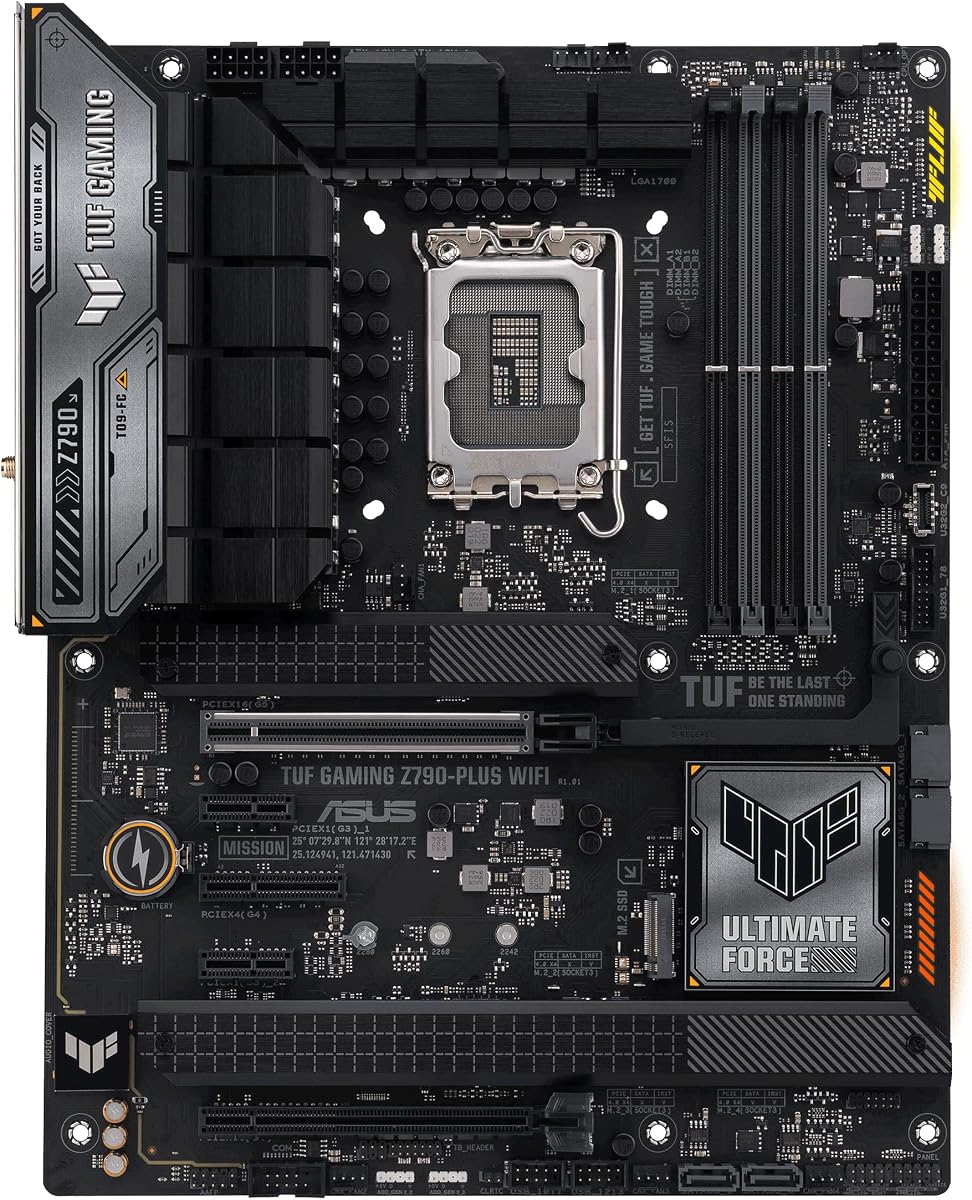
For Intel enthusiasts the ASUS TUF Gaming Z790-Plus WiFi offers a robust platform with excellent diagnostic capabilities. It supports 12th 13th and 14th Gen Intel Core processors providing a wide range of CPU choices. The board includes comprehensive cooling solutions to keep your system running at peak performance during intense tasks.
We may earn a commission when you buy through this link, at no additional cost to you.
The enhanced power solution with 16+1 DrMOS stages ensures stable power delivery even under heavy loads. This is crucial for overclocking and running high-end processors without throttling. The inclusion of four M.2 slots gives you plenty of room for fast NVMe storage drives to improve system responsiveness.
Connectivity is a strong suit here with Thunderbolt 4 and Front USB 3.2 Gen 2 Type-C headers. This future proofs your build allowing you to use the latest high-speed peripherals. The 2.5Gb LAN and Wi-Fi 6 ensure you have fast reliable internet for gaming and streaming.
This board is perfect for gamers and creators who want a durable system with easy maintenance features. The TUF components are tested for military-grade reliability and the debug tools help keep everything running smoothly. It is a solid investment for anyone building a high-performance Intel PC.
The use of military-grade TUF components ensures the motherboard can withstand harsh conditions and deliver long-term reliability.
Multiple heatsinks including VRM and M.2 coolers keep temperatures low ensuring stability during extended gaming sessions.
We may earn a commission when you buy through this link, at no additional cost to you.
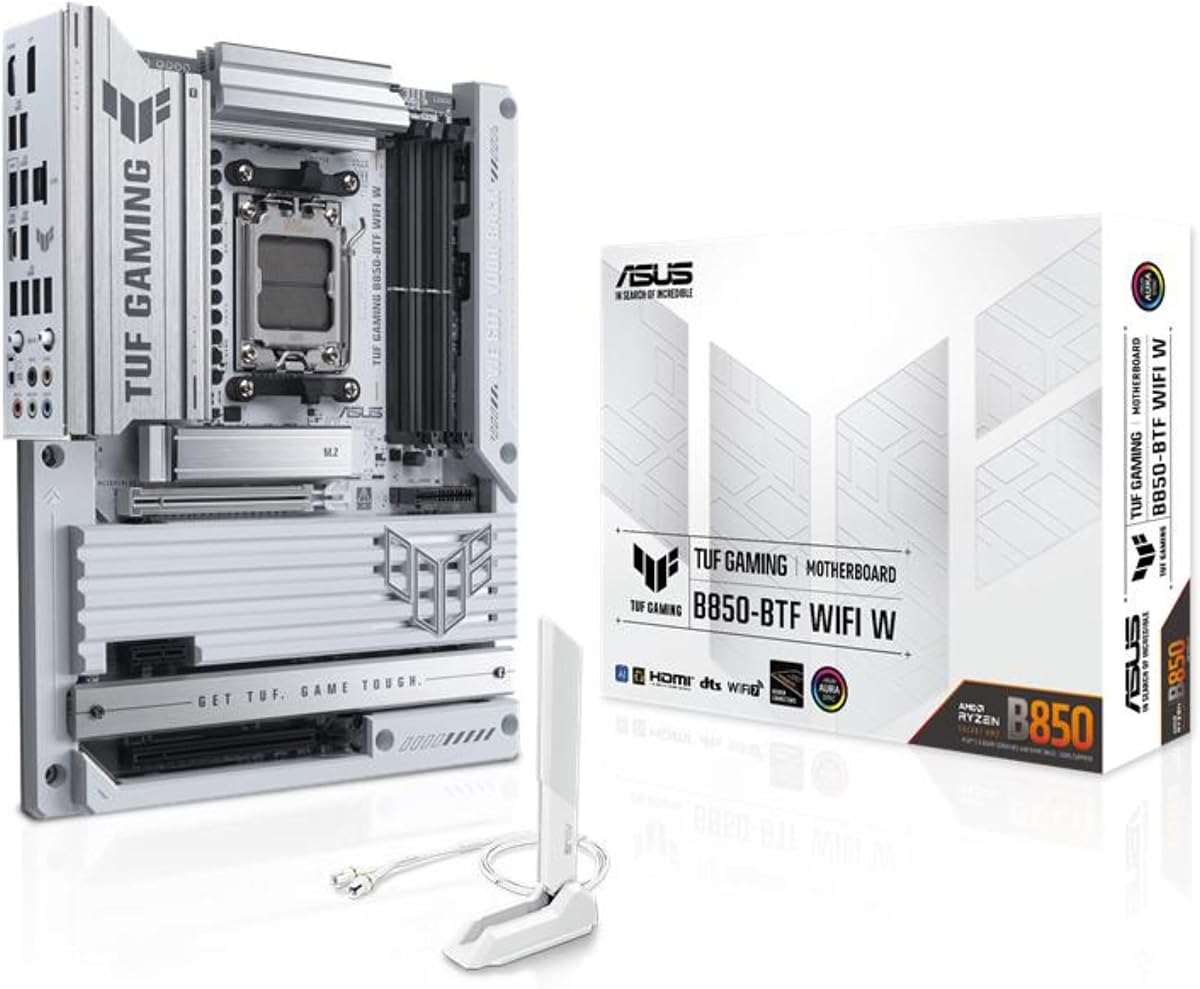
The ASUS TUF Gaming B850-BTF WiFi brings a unique twist to motherboard design with its hidden connector approach. This innovative feature significantly reduces cable clutter making your PC look cleaner and improving airflow inside the case. It is designed for future AI PC applications requiring high performance and connectivity.
We may earn a commission when you buy through this link, at no additional cost to you.
Equipped with 14+2+1 80A DrMOS power stages it delivers stable power to demanding AMD Ryzen 9000 and 8000 series processors. The graphics card high-power slot supports up to 600 watts ensuring your GPU gets the power it needs. This level of power delivery is essential for high-end gaming and content creation.
Connectivity features are top tier with Wi-Fi 7 and USB 20Gbps Type-C support. These technologies ensure you can transfer data quickly and connect to the latest networks without latency issues. The 8-layer PCB provides enhanced stability and signal integrity for demanding tasks.
If you value aesthetics and cutting-edge technology this board is an excellent choice. The hidden connectors simplify the building process and result in a professional look. It is recommended for users who want the best in modern design and performance without compromising on diagnostic reliability.
The hidden connector design allows for unprecedented cable management that enhances both the look and cooling of your PC.
Built with future AI applications in mind this board offers the power and connectivity needed for next-gen computing tasks.
We may earn a commission when you buy through this link, at no additional cost to you.
The MSI MAG X870 Tomahawk WiFi is a powerhouse designed for users who need the fastest data transfer speeds available. It supports AMD Ryzen 9000 8000 and 7000 series processors offering a broad range of options. The extended heatsink design ensures that high-end processors can run at full speed without thermal throttling.
We may earn a commission when you buy through this link, at no additional cost to you.
One of the standout features is the built-in USB 4 port offering lightning fast 40Gbps transmission speeds. This is incredibly useful for external storage and high bandwidth devices like 4K monitors. The 5G network solution provides a network experience that outperforms standard Gigabit Ethernet significantly.
For gamers and creators the Audio Boost 5 provides isolated audio with a high-quality audio processor. This results in a more immersive experience whether you are playing competitive games or editing video content. The motherboard also supports M.2 Gen5 drives for ultra-fast storage performance.
This board is best suited for tech enthusiasts who want the absolute latest in connectivity and speed. While it comes at a premium price the features justify the cost for professionals and power users. It is a great choice for building a future-proof workstation that can handle demanding workloads.
With USB 40Gbps and M.2 Gen5 support you get data transfer speeds that prepare your system for years of upgrades.
Audio Boost 5 ensures high fidelity sound output enhancing your gaming and media consumption experience significantly.
We may earn a commission when you buy through this link, at no additional cost to you.
Although this is an older model the GIGABYTE Z390 AORUS PRO Wi-Fi remains a strong contender for specific use cases. It supports 9th and 8th Intel Core processors which are still highly capable for many applications. The 12+1 phases digital VRM solution ensures stable power delivery even during overclocking sessions.
We may earn a commission when you buy through this link, at no additional cost to you.
The advanced thermal design features multi-cuts heatsinks and a heat pipe to keep temperatures in check. This is crucial for maintaining performance during long gaming sessions or heavy workloads. The onboard Intel CNVi Wi-Fi provides reliable wireless connectivity without needing extra cards.
Audio performance is highlighted by the ALC1220 codec which delivers high SNR levels for clear sound. The motherboard supports RGB Fusion allowing you to synchronize lighting across your system components easily. This makes it a popular choice for builders who care about the visual aspect of their PC.
For users looking to upgrade an existing 8th or 9th gen system this board offers great value. It is reliable and durable with a reputation that has stood the test of time. We recommend it for budget-conscious gamers who still want quality features and strong diagnostic support.
The 12+1 digital VRM phases provide the stability needed for overclocking without breaking the bank.
With the ALC1220 codec you get immersive audio quality that rivals dedicated sound cards for most users.
We may earn a commission when you buy through this link, at no additional cost to you.
The GIGABYTE B850 AORUS Elite WIFI7 is designed for reliability and long term support with a five-year warranty. It supports AMD Ryzen 9000 8000 and 7000 series processors making it a versatile choice for current builds. The 14+2+2 power phase design ensures robust power delivery for demanding CPUs.
We may earn a commission when you buy through this link, at no additional cost to you.
Thermals are managed well with VRM and M.2 Thermal Guard features that keep components cool under load. Connectivity is future-proofed with WIFI7 and PCIe 5.0 support allowing for high-speed networking and storage. The EZ-Latch design makes installing M.2 drives quick and tool-free for easier maintenance.
This board strikes a balance between performance and practicality without excessive frills that drive up costs. The Sensor Panel Link allows for easy monitoring of system stats and is useful for enthusiasts. It is a solid foundation for a build that values stability and long-term use over flashy features.
We recommend this board for anyone who wants peace of mind with strong warranty support. It is great for workstations and gaming rigs where downtime is not an option. The reliable diagnostic features ensure that any issues can be identified and resolved quickly.
The five-year warranty demonstrates confidence in the product quality and provides long-term support for users.
EZ-Latch mechanisms make it easy to install and remove M.2 drives without screws for faster upgrades.
We may earn a commission when you buy through this link, at no additional cost to you.
The GIGABYTE B650 AORUS Elite AX offers a balanced performance profile for AM5 users. It supports AMD Ryzen 9000 8000 and 7000 series processors with robust DDR5 compatibility. The twin 14+2+1 phases power solution provides stable power for high-end processors with efficient VRM cooling.
We may earn a commission when you buy through this link, at no additional cost to you.
Cutting-edge thermal design ensures that the motherboard stays cool even under heavy loads. With 6mm heatpipes and fully covered MOSFET heatsinks heat dissipation is efficient. This is critical for maintaining consistent performance during extended gaming or rendering sessions.
Connectivity includes PCIe 5.0 and front rear USB-C ports for versatile modern device support. The Q-Flash feature allows you to update the BIOS without needing a CPU installed which simplifies upgrades. WIFI6E ensures fast and stable wireless networking for all your online activities.
This board is an excellent choice for gamers and professionals who need reliable performance. It offers strong diagnostic support and is easy to maintain thanks to features like Q-Flash. We recommend it for anyone building a high-performance system that prioritizes stability and speed.
The 6mm heatpipe and full coverage ensure components stay cool during intensive workloads.
Front and rear USB-C ports allow for versatile connectivity with modern high-speed peripherals.
We may earn a commission when you buy through this link, at no additional cost to you.
The Jadeshay TL631 Pro is not a motherboard but a powerful diagnostic tool for identifying hardware issues. It is universally compatible with PCI mini PCI-E and LPC slots making it versatile across many systems. The intelligent power module recognition ensures swift and accurate diagnostics of critical components.
We may earn a commission when you buy through this link, at no additional cost to you.
Multi-channel LED indicators provide real-time status monitoring of power supply CPU memory graphics and hard disk. This visual feedback helps technicians quickly locate the source of a boot failure without expensive equipment. It is designed to be easy to handle for both professionals and enthusiasts.
While it requires a free slot to operate the troubleshooting capabilities it offers are significant. It works seamlessly with brands like ASUS Gigabyte and MSI allowing you to test various systems efficiently. The high recognition rate means it can detect a wide variety of motherboard issues accurately.
This card is essential for anyone who repairs PCs or builds systems and needs to verify components. It complements built-in debug LEDs by providing a deeper layer of hardware analysis. We recommend it for workshops or advanced users who need a portable and effective diagnostic solution.
Supporting multiple slot types ensures this tool works with the majority of desktop and laptop configurations.
LED indicators show exactly which component is failing so you can fix the issue faster.
We may earn a commission when you buy through this link, at no additional cost to you.
The TL611 Pro Mainboard Debug Card offers an affordable way to diagnose PC issues without deep technical knowledge. It automatically identifies power modules which simplifies the troubleshooting process for users. The 4-digit post card with LED indicators provides clear feedback on system status during boot.
We may earn a commission when you buy through this link, at no additional cost to you.
It supports PCI mini PCI and LPC slots making it compatible with all PCI slots for broad usability. The detection of various channels provides LED lights for power supply CPU and memory which helps pinpoint failures. This tool is designed for users who want precise diagnostic information to fix issues efficiently.
As a versatile diagnostic solution it works with a wide array of laptop and desktop configurations. The high recognition rate means it is reliable for detecting a variety of motherboard problems. It is particularly useful for identifying power and component failures that prevent the system from starting.
For home users or repair shops this card offers an excellent value for money. It is simple to use and provides the information needed to fix hardware issues without sending the system away. We recommend it as a first-line tool for anyone who troubleshoots computers regularly.
The ability to automatically identify power modules saves time and makes troubleshooting easier for everyone.
Supporting all PCI slots ensures this tool can be used on almost any desktop or laptop system.
We may earn a commission when you buy through this link, at no additional cost to you.
The ASUS ROG Strix X870E-E Gaming WiFi is designed for advanced users needing maximum power and diagnostics. It supports AMD Ryzen 9000 8000 and 7000 series with a robust 18+2+2 power solution. The Q-LED and Q-Code systems provide detailed diagnostic feedback to help you troubleshoot hardware issues effectively.
We may earn a commission when you buy through this link, at no additional cost to you.
Intelligent control features like AI Overclocking and AI Cooling II simplify setup and improve performance. These tools optimize your system automatically for the best balance of speed and thermals. The Dynamic OC Switcher allows you to switch between modes for gaming or productivity instantly.
Connectivity is top tier with Dual USB4 ports and five M.2 slots for massive storage options. The massive heatsinks with integrated I/O cover ensure excellent thermal performance under heavy loads. This makes it ideal for AI applications and future-proofed computing needs.
We recommend this board for enthusiasts who want the absolute best performance and diagnostic tools available. It is perfect for high-end workstations and gaming rigs where every bit of performance counts. The comprehensive design ensures your system runs reliably for years to come.
AI tools handle overclocking and cooling so you get max performance without manual tweaking.
With five M.2 slots you have room for all the fast storage you need for large projects.
We may earn a commission when you buy through this link, at no additional cost to you.
Selecting the right motherboard requires understanding several key factors to ensure compatibility and reliability. This guide outlines the most important aspects to consider when shopping for a motherboard with debug LED features.
Ensure the motherboard supports your chosen CPU by checking the socket type such as AM5 or LGA1700. Mismatched sockets will prevent the system from functioning regardless of other features.
Always verify the latest CPU support list on the manufacturer website to ensure compatibility with your specific model.
Debug LEDs vary in layout and color coding across different brands and models. Look for boards with clear labels next to LEDs to identify CPU RAM VGA and BOOT issues easily.
A clear LED system saves significant time during troubleshooting by visually indicating the exact component causing startup problems.
Check if the motherboard supports DDR4 or DDR5 memory to align with your budget and performance needs. Faster memory speeds can improve gaming and multitasking performance significantly.
Ensure the motherboard lists the specific speeds your RAM can run at to avoid bottlenecks in your system.
Look for enough M.2 slots and PCIe lanes to support your storage and graphics card needs. Future upgrades will depend on having available slots for additional drives or cards.
PCIe 5.0 support is becoming standard on high-end boards and offers faster data transfer speeds for future drives.
The VRM design determines how stable power is delivered to the CPU under load. High-end boards have more phases which help with overclocking and sustained performance.
Stable power delivery prevents throttling and ensures the CPU runs at full speed during intense tasks like gaming.
Modern motherboards should include Wi-Fi 6E or Wi-Fi 7 for fast wireless internet. USB ports like Type-C are essential for modern peripherals and fast data transfer.
Having multiple USB ports and high-speed networking ensures your PC stays connected and functional with all devices.
Overheating can cause system instability so look for boards with M.2 and VRM heatsinks. Good airflow design helps keep components cool during long gaming sessions.
Effective cooling solutions extend the lifespan of your components and maintain consistent performance over time.
A longer warranty indicates manufacturer confidence in the product quality and reliability. Good support channels help you resolve any issues that arise after purchase.
Check the terms of the warranty to understand what is covered and how to claim it if needed.
When installing your motherboard pay attention to the placement of the debug LEDs. Ensure they are visible inside your case so you can see them during startup without opening the side panel.
Regularly clean dust from the motherboard and heatsinks using compressed air. Dust buildup can cause overheating which may trigger diagnostic errors or system shutdowns.
Keep your BIOS updated to ensure compatibility with new processors and components. Updating the BIOS can also fix bugs that might cause false positive diagnostic LED indicators.
Debug LEDs typically use colors like red for CPU issues yellow for memory and green for boot problems. Each manufacturer may use slightly different color codes so refer to the manual for accurate identification.
Not all motherboards have built-in debug LEDs especially budget models. You may need to purchase an external diagnostic card for older or entry-level boards.
Diagnostic cards work on boards with available PCIe or LPC slots. Ensure your motherboard has a compatible slot before purchasing a diagnostic tool.
Sometimes an LED may stay on if there is a BIOS setting issue or a minor power glitch. Check your BIOS settings or reset CMOS to resolve false positives.
If the RAM LED stays on during boot it usually means the memory is not detected. Try reseating the RAM sticks or checking for compatibility issues.
Yes debug LEDs save time and money on troubleshooting hardware issues. They are especially useful for builders who want to avoid technical support delays.
Choosing a motherboard with debug LED features simplifies the build process and saves time when troubleshooting issues. The models we reviewed offer a range of options for both AMD and Intel platforms with strong diagnostic capabilities.
Prioritize features like power delivery and thermal management to ensure your system runs reliably. Compatibility with your chosen CPU and memory is essential for a smooth setup experience.
Prices and availability fluctuate frequently so check current listings before making your purchase. A reliable motherboard is the foundation of a great PC build so choose wisely based on your needs.