
HUANUO Laptop Desk Mount
4.5Editor score
Affordable price point
Ventilated tray with holes
Fits laptops up to 17 inch
Easy installation hardware included
Finding the right laptop tray desk mount can transform your workspace into a more ergonomic and efficient environment. Whether you work from home or in a shared office, having your device at eye level reduces strain and improves posture significantly throughout your day.
We compared ten highly rated models based on their adjustability, build quality, cooling features, and ease of installation. Each product offers unique benefits like versatile mounting options, sturdy arms, and space-saving designs that cater to different desk setups and user needs.
Each pick below highlights specific strengths and ideal use cases so you can choose confidently. Keep in mind that product availability and pricing may change over time, so always check the latest details before making your final purchase decision today.
4.5Editor score

4.6Editor score

4.6Editor score
As an Amazon Associate we earn from qualifying purchases.
The following comparison table summarizes key specifications for all ten models to help you quickly identify which option best fits your specific desk size and laptop requirements.

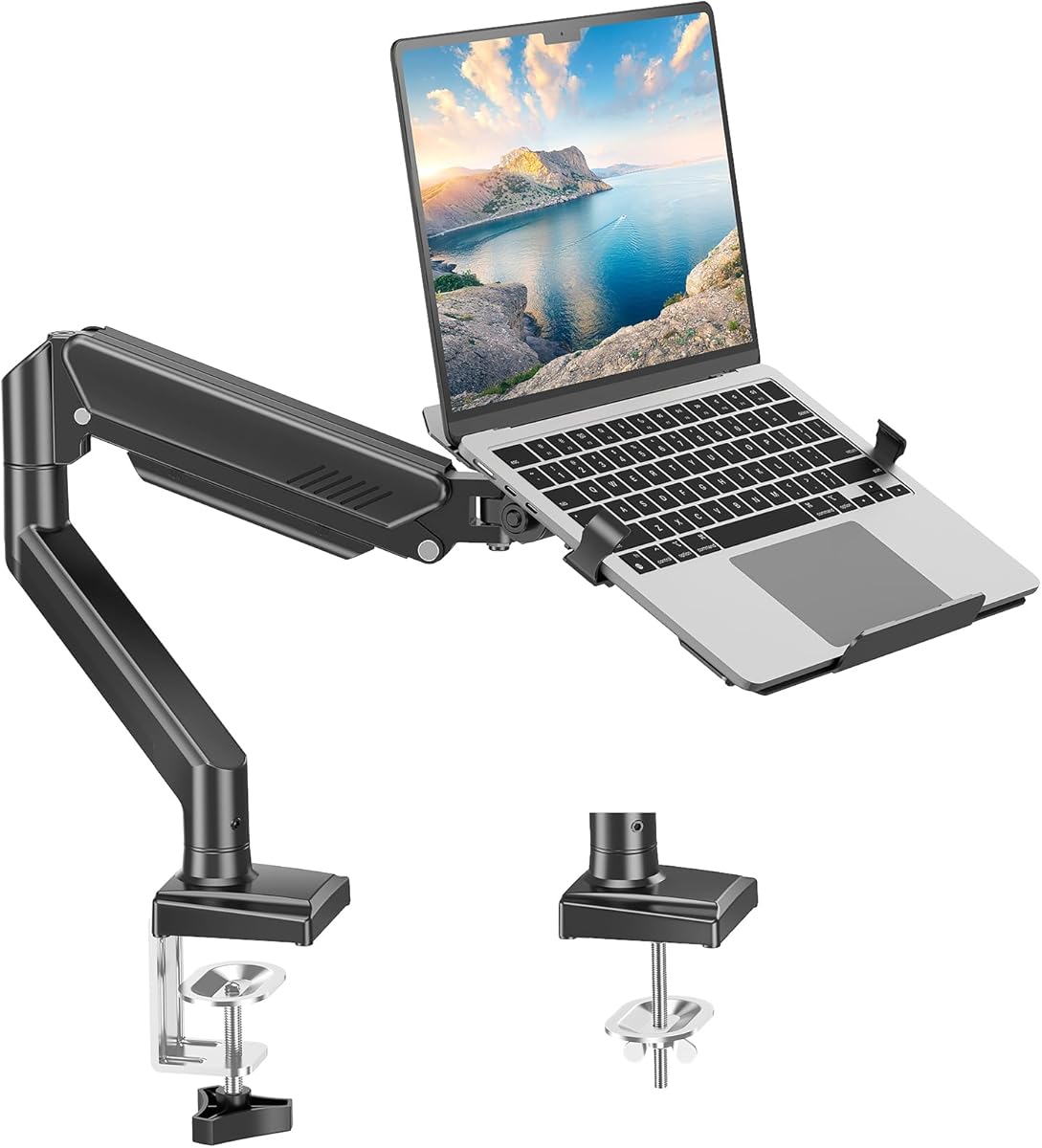


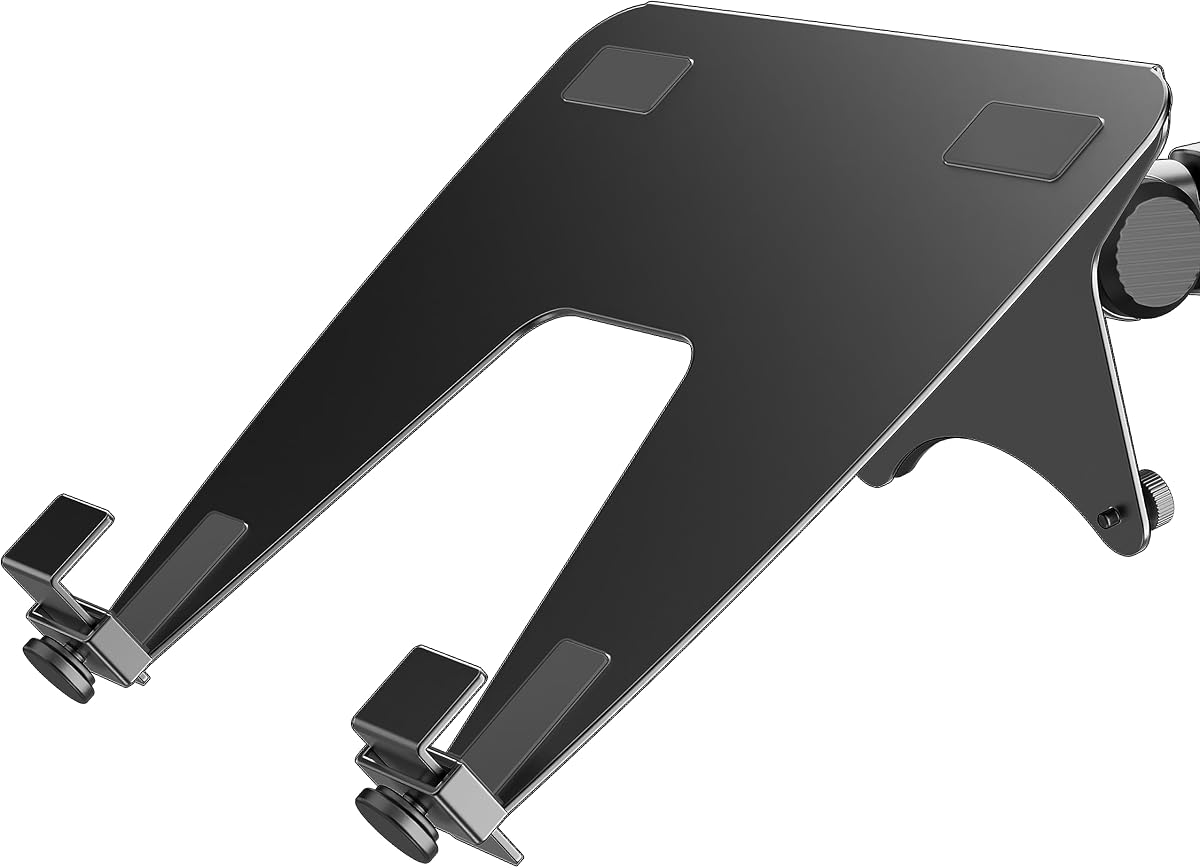
The VIVO Single Laptop Notebook Desk Mount Stand stands out as a top choice for professionals seeking a reliable and versatile mounting solution. With a strong 4.6 rating, this model offers exceptional adjustability and supports laptops up to 17 inches securely.
We may earn a commission when you buy through this link, at no additional cost to you.
Its full articulation allows for significant height and tilt adjustments ensuring your screen sits at the perfect ergonomic level. The ventilated tray prevents overheating during long sessions while cable clips keep your workspace tidy and organized effectively.
While the clamp works best on wood surfaces and assembly might require patience, the stability provided is well worth the effort. Users appreciate the robust construction that holds devices firmly even during active typing or movement.
If you need a durable mount that maximizes desk space and supports healthy posture this is the recommended pick. It balances functionality and value making it an excellent investment for any home or office workstation setup.
The wide range of motion ensures you can position your screen at eye level reducing strain on your neck and shoulders during extended work hours.
The ventilated tray design promotes airflow around your laptop preventing it from overheating during intensive tasks like video editing or gaming.
We may earn a commission when you buy through this link, at no additional cost to you.
The HUANUO Laptop Desk Mount delivers impressive value for users seeking affordability without sacrificing essential features. Its 4.5 rating reflects satisfaction with its build quality and ability to support devices up to 17 inches reliably.
We may earn a commission when you buy through this link, at no additional cost to you.
The ventilated tray with 240 holes ensures your laptop stays cool even during heavy use. You can also remove the tray to use it as a monitor arm adding flexibility to your workspace setup effortlessly.
Although the arm finish is simple and cable management is functional but not premium the stability is solid for everyday tasks. It provides the necessary adjustability to elevate your screen comfortably without breaking your budget.
This model is ideal for students or remote workers who want an ergonomic boost at a low cost. It offers the core functionalities you need to improve posture and free up desk space efficiently.
Get the benefits of an adjustable stand without the high price tag allowing you to upgrade your workspace economically.
The ability to switch between laptop and monitor modes means this stand adapts to your changing needs over time.
We may earn a commission when you buy through this link, at no additional cost to you.
The monTEK 2-in-1 Laptop & Monitor Desk Mount is a premium choice designed for users who demand high performance and versatility. With a 4.6 rating it stands out for its ability to support curved screens and heavier laptops securely.
We may earn a commission when you buy through this link, at no additional cost to you.
Constructed from durable steel and aluminum the build quality feels robust and long-lasting. The full motion adjustment allows for precise positioning ensuring you always have the best view for work or entertainment.
While it comes at a higher price point the added features like curved screen support justify the cost for many professionals. It also provides a secure platform that prevents wobbling even with heavier devices during active use.
Choose this model if you have high-end equipment and want a solution that matches its quality. It offers the durability and flexibility needed for a professional workstation that can handle diverse tasks.
Unlike many standard mounts this model supports curved monitors allowing you to use your favorite screens without compatibility issues.
The heavy-duty materials ensure the mount remains stable over time providing a reliable foundation for your expensive devices.
We may earn a commission when you buy through this link, at no additional cost to you.
The WALI Adjustable Laptop Desk Mount offers a standard reliable solution for elevating your laptop to a comfortable viewing height. It has a 4.5 rating for its ease of use and robust feature set that covers most basic needs well.
We may earn a commission when you buy through this link, at no additional cost to you.
You can choose between a clamp or grommet mount to fit your desk style. The tray features cooling holes and a lip to keep your laptop secure while allowing air to circulate underneath it freely.
Although some plastic components are used to keep costs down the overall stability is sufficient for daily work tasks. It provides good rotation and tilt options helping you find a view that reduces neck strain quickly.
This mount is suitable for users who want a straightforward setup without complex adjustments. It is a practical choice for those looking to reclaim desk space while maintaining a tidy and functional workspace.
With both clamp and grommet options this mount adapts to different desk styles ensuring you can install it where you need it.
The secure tray design keeps your laptop from sliding or falling ensuring your device stays safe during operation.
We may earn a commission when you buy through this link, at no additional cost to you.
The MOUNT PRO Laptop Arm Mount brings a clean modern design to your desk with strong aluminum construction. Its 4.4 rating highlights its effectiveness in supporting laptops and monitors while maintaining a sleek profile.
We may earn a commission when you buy through this link, at no additional cost to you.
Cable management guides keep wires organized and out of sight reducing clutter on your workspace. The ventilated tray ensures your laptop stays cool and the arm allows for significant height and tilt adjustments.
While it does not support curved monitors and instructions might need review before assembly the performance is solid for most users. The aluminum build adds durability without making the mount feel heavy or bulky on your desk.
Consider this option if you value a tidy desk and a strong build quality. It offers a good balance of features that help you maintain focus and comfort during long work sessions.
The built-in cable guides ensure wires are routed neatly preventing tangles and keeping your desk surface clear.
Aluminum components provide a strong yet lightweight structure that resists bending and ensures long-term stability.
We may earn a commission when you buy through this link, at no additional cost to you.
The HUANUO Adjustable Monitor Arm with Laptop Tray is designed for versatility allowing you to switch between laptop and monitor use. With a 4.5 rating it is known for its sturdy build and ability to support a wide range of devices.
We may earn a commission when you buy through this link, at no additional cost to you.
Its large tray provides ample room for laptops and includes a lip to keep them secure. The integrated cable management system ensures that wires stay organized and hidden improving the overall look of your workspace.
While installation requires attention to detail and tight tolerances for clamps the result is a very stable setup. Users benefit from the wide range of monitor compatibility which makes it suitable for larger displays or dual setups.
This mount is perfect for users who need a robust solution that can adapt to different screen sizes. It offers a professional quality experience that enhances your daily workflow and desk organization.
Compatibility with a range of monitor sizes ensures this mount is a future-proof choice as your equipment changes.
Integrated clips and guides keep cables out of sight reducing visual noise and making your desk look cleaner.
We may earn a commission when you buy through this link, at no additional cost to you.
The HUANUO 2 in 1 Function Laptop Mount offers a wide range of compatibility supporting monitors up to 34 inches. Its 4.4 rating reflects its ability to provide a secure and adjustable platform for various device types effectively.
We may earn a commission when you buy through this link, at no additional cost to you.
Anti-slip pads and straps ensure your laptop stays firmly in place preventing movement during use. The tray is ventilated to keep devices cool and the arm extends significantly to bring screens closer to your eye level.
While the unit is somewhat heavy and clamps may require extra tightening the stability is excellent. Users appreciate the ease of setup and the clear instructions that help avoid common installation errors quickly.
This model is recommended for those who want a large monitor capable mount that also serves as a laptop stand. It provides a robust solution for maximizing desk space while maintaining ergonomic comfort during work.
Anti-slip pads and straps provide extra security ensuring your laptop remains stable even during active typing.
The long extension arm allows you to position screens at an ideal distance for comfortable viewing angles.
We may earn a commission when you buy through this link, at no additional cost to you.
The VIVO Black Clamp-on Rotating Laptop Tray is a unique compact option designed to save significant desk space. With a 4.3 rating it is valued for its ability to stow away when not in use and for its rotation features.
We may earn a commission when you buy through this link, at no additional cost to you.
Its compact design allows you to store the laptop under your desk for a clean and professional look. The 360-degree rotation gives you flexibility to use your laptop from different angles or positions around your workspace.
While it has a lower weight limit and is not compatible with beveled desks the convenience is worth noting for small offices. It is an ideal choice for those who need a portable and out of sight solution for their devices.
Choose this model if you often need to clear your desk surface completely. It provides a clever storage solution that keeps your laptop accessible yet hidden when you are focusing on other tasks.
Storing your laptop under the desk frees up valuable workspace allowing for a cleaner and more open environment.
The full rotation allows you to adjust the laptop position to suit your immediate workflow needs easily.
We may earn a commission when you buy through this link, at no additional cost to you.
The Suptek Single Laptop Notebook Desk Mount is a practical choice for users seeking a balance of functionality and cost. It has a 4.4 rating for its ability to function as both a laptop stand and a monitor mount with ease.
We may earn a commission when you buy through this link, at no additional cost to you.
The tray features ventilation and a lip to secure your device during use. It offers full tilt and rotation allowing you to adjust the viewing angle to reduce strain on your neck and shoulders effectively.
While the plastic components are visible and height adjustment is somewhat limited the value is strong for budget users. It provides the necessary tools to elevate your laptop and maintain a tidy desk without spending much.
This model is suitable for students or casual users who want an ergonomic lift for their laptop. It is a cost-effective way to improve your workstation setup without compromising on essential features.
The detachable tray allows you to use the arm for monitors or laptops offering flexibility as your needs change.
Full tilt and rotation capabilities help you find the perfect angle to reduce physical strain during work.
We may earn a commission when you buy through this link, at no additional cost to you.
The ergounion Laptop Tray for Monitor Arm is an add-on accessory designed to turn existing mounts into ergonomic workstations. With a 4.4 rating it is praised for its heavy-duty build and support for large gaming laptops.
We may earn a commission when you buy through this link, at no additional cost to you.
Its hollow design allows for heat dissipation while the bottom clips ensure your laptop stays secure without blocking any ports. This is ideal for users who want to use a monitor arm for laptop work without buying a whole new stand.
Since this is an add-on it requires a compatible monitor arm which may limit its standalone use. However the high weight capacity and durable alloy construction make it a reliable choice for heavy devices.
Choose this tray if you already own a VESA mount and want to upgrade it for laptop use. It offers a cost-effective way to improve your existing setup with a sturdy and well-designed platform.
With support up to 28.6 lbs this tray handles even the heaviest gaming laptops securely and without flex.
The unique clip design ensures that all side ports remain accessible for charging and peripheral connections.
We may earn a commission when you buy through this link, at no additional cost to you.
Selecting the right mount involves considering several key factors to ensure it meets your workspace and device needs effectively.
Ensure the mount supports your laptop or monitor size and weight. Most models handle up to 17 inch laptops or 22 lbs but check specifications for larger gaming devices or ultrawide screens.
Matching the VESA pattern or tray dimensions to your device is essential for a secure fit and proper balance.
Decide between a C-clamp and a grommet mount based on your desk type. Clamps work on solid edges while grommets are better for desks with holes.
Consider your desk thickness and material to ensure the mount attaches securely without damaging the surface.
Look for mounts with tilt swivel and rotation capabilities to find the perfect viewing angle. Full motion arms allow you to customize height and position for better ergonomics.
Greater adjustability reduces neck strain and helps you maintain a comfortable posture during long work sessions.
Materials like aluminum or steel offer better durability and stability than plastic parts. Strong builds prevent wobbling when typing or moving the device.
Investing in a well-built mount ensures it lasts longer and supports heavier devices safely.
Trays with ventilation holes help dissipate heat and prevent laptops from overheating during intensive tasks.
Good airflow design extends the lifespan of your device and maintains optimal performance levels.
Integrated clips or guides keep wires organized and out of the way for a clean workspace.
Effective cable management prevents clutter and makes it easier to connect peripherals without tangling.
Choose a model with clear instructions and pre-assembled parts to save time and effort during setup.
Simple installation ensures you can start using your new ergonomic setup immediately without frustration.
Determine how much you are willing to spend while considering the features you need most.
Higher-priced models often offer better materials and support but budget options can still provide essential functionality.
Start by securely attaching the mount to your desk using the appropriate clamp or grommet. Ensure it is tightened firmly to prevent any movement during use.
Adjust the height and angle of the arm to align with your eye level. This positioning helps reduce neck and shoulder strain significantly.
Regularly check the screws and joints to maintain stability. Clean the tray to dust and remove any obstructions to ensure smooth adjustments and longevity.
Yes many models support up to 22 to 28 lbs and are designed with heavy-duty materials. Always check the weight capacity to ensure it matches your specific laptop to prevent strain on the arm.
No most mounts use clamp or grommet options that do not require drilling. Grommets fit into existing desk holes while clamps hold onto the edge of your desk securely.
Some models support curved screens while others do not. Check the product specifications to confirm if your mount is compatible with curved VESA panels before purchasing.
Mounts significantly free up surface area by lifting devices off the desk. This creates room for keyboards and mice allowing for a more organized workspace.
Ventilated trays are designed to improve airflow and prevent overheating. The open design helps dissipate heat better than placing the laptop directly on a closed surface.
Many models feature removable trays allowing you to switch between a laptop stand and a monitor arm. This flexibility adds value to your workspace setup.
Most clamps fit desks between 0.4 and 3.5 inches thick. Measure your desk edge to ensure the clamp can securely hold the mount in place.
Most models include clips or channels to keep cables organized. This feature helps hide wires for a cleaner look and prevents tangling during adjustments.
We highlighted top options like the VIVO and HUANUO models that offer strong value and features for various users. These picks balance affordability with performance to meet different workspace needs.
Prioritize ergonomics and build quality when making your decision. A sturdy and adjustable mount can greatly improve your daily comfort and productivity in any environment.
Remember to verify current prices and availability before buying. Product details and costs may change over time so always confirm the latest information for the best deal.