
SABRENT 74 in 1 3.5 Inch Internal Flash Media Card Reader/Writer with USB Port (CR-USNT)
4.0Editor score
Supports 74 card types
Includes USB 2.0 port
Internal power connector included
This guide compares the top internal media card reader options for desktop PCs, focusing on speed, compatibility, and ease of installation for professional
Finding the right internal media card reader can transform how you manage files on your desktop computer. These devices slot directly into your case providing fast access to memory cards without cluttering your workspace with external hubs or dongles.
We evaluated ten leading models based on speed, card support, and build quality. Our analysis covers 3.5 and 5.25 bay options with USB 3.0 and legacy interfaces to help you pick the best fit for your setup and budget.
Each pick highlights key strengths like simultaneous slot access or wide format compatibility. Prices and availability change frequently so check the current listings before buying to ensure you get the best deal available right now.
4.0Editor score
4.5Editor score

5.0Editor score
The following table provides a side-by-side comparison of all ten selected internal media card readers. Use this overview to quickly identify which model offers the specific features you need for your desktop workstation or home office.


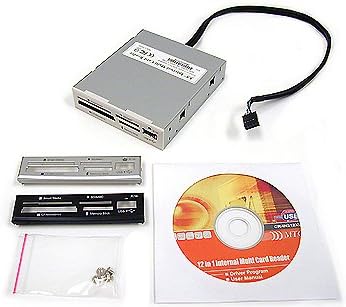
The SABRENT 74 in 1 is a highly affordable internal media card reader designed for users who need broad format support without spending much. It fits into a standard 3.5 inch drive bay and connects via internal USB headers to maintain a clean cable-free appearance inside your PC.
We may earn a commission when you buy through this link, at no additional cost to you.
Its standout quality is the incredible range of supported cards covering everything from old XD and MemoryStick formats to modern SDXC and microSD options. The unit also includes a dedicated power connector from the PSU to ensure the reader and any attached USB devices have enough power for stable operation.
While it uses USB 2.0 which limits transfer speeds compared to modern standards it remains a cost effective solution for archiving or moving files that do not require rapid throughput. Some users may find the plastic housing less durable than metal alternatives but it serves the purpose well for light to moderate use.
This reader is ideal for budget builders or those needing legacy card support in older workstations. If you prioritize versatility and price over raw speed this model offers excellent value and reliable performance for everyday file transfers.
The device supports 74 different memory card types making it a universal solution for diverse workflows and legacy media.
An internal power connector ensures the USB hub portion of the reader has sufficient power for connected devices.
We may earn a commission when you buy through this link, at no additional cost to you.
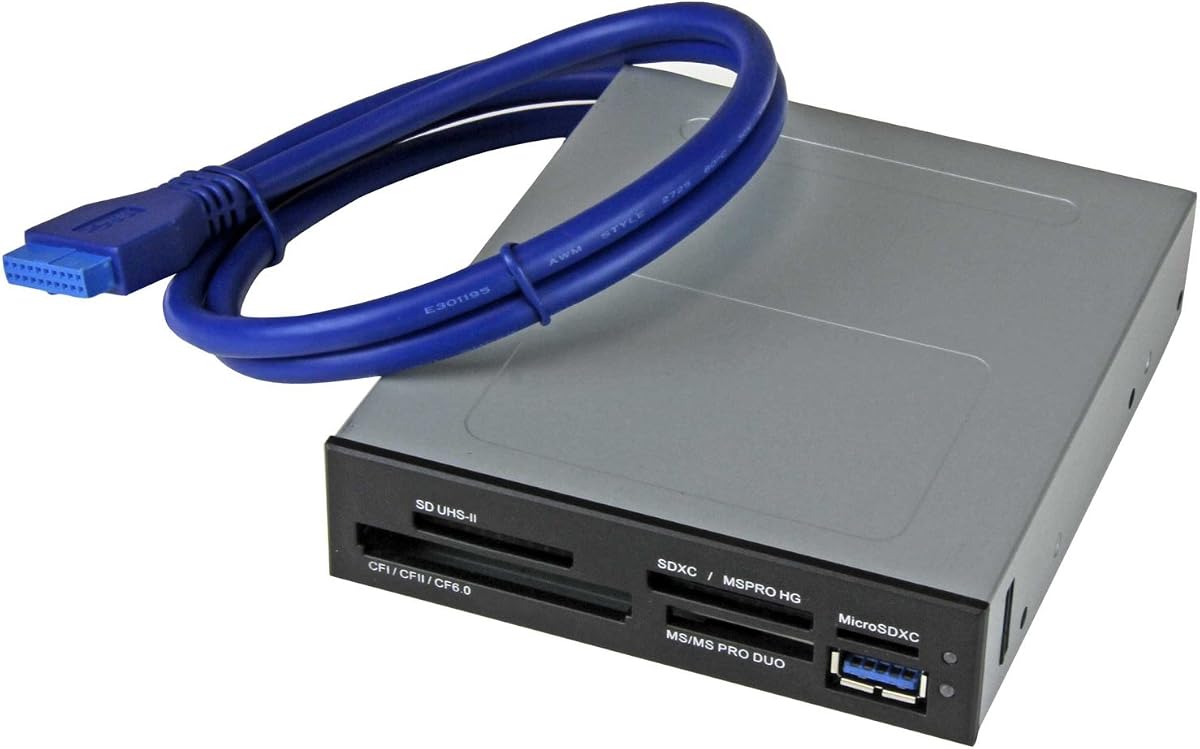
The StarTech Internal Card Reader USB 3.0 stands out as a professional grade solution for videographers and photographers who need fast reliable access to multiple card formats. It fits into a 3.5 inch drive bay and connects directly to a 20-pin motherboard header ensuring a secure and clean installation.
We may earn a commission when you buy through this link, at no additional cost to you.
Its key strength lies in the USB 3.0 and UHS-II support which delivers significantly faster transfer speeds than older USB 2.0 models. The ability to access four different card slots simultaneously allows you to copy files from various media types at once streamlining your workflow efficiently.
While the price point is higher than entry level options the build quality and feature set justify the investment for serious users. It requires a specific motherboard header which might limit compatibility with very old systems but for most modern PCs the setup is straightforward and effective.
This reader is the top choice for anyone who prioritizes speed and simultaneous access in a professional environment. The TAA compliance and robust support also make it a reliable option for government or enterprise procurement needs.
USB 3.0 and UHS-II support enable rapid file transfers essential for large media files and professional workflows.
Access four different card slots at once to move data between different media types without swapping cards manually.
We may earn a commission when you buy through this link, at no additional cost to you.
The Vantec Link USB 3.0 Multi-LUN Reader is a premium internal card reader designed for users who demand top performance and extensive format support. With a perfect 5.0 customer rating it has earned trust for its reliability and advanced features that cater to professional needs.
We may earn a commission when you buy through this link, at no additional cost to you.
Its standout qualities include support for CompactFlash V6.0 with Ultra DMA mode 7 and extensive SD and Memory Stick compatibility. The Multi-LUN feature allows you to access multiple cards at once which is ideal for workflows that involve moving data from several sources simultaneously.
While this model comes at a higher price point the performance and reliability it offers make it a worthwhile investment for power users. The setup requires a 20 pin header and internal power connection which might be slightly complex for beginners but ensures stable operation.
This reader is recommended for professionals who work with high capacity and varied memory card formats regularly. If you need the best performance and reliability and a premium solution this model delivers on all fronts.
Supports CompactFlash V6.0 with Ultra DMA mode 7 and large capacity SD cards up to 2TB.
Read and write to multiple cards at once using the Multi-LUN feature for improved workflow efficiency.
We may earn a commission when you buy through this link, at no additional cost to you.
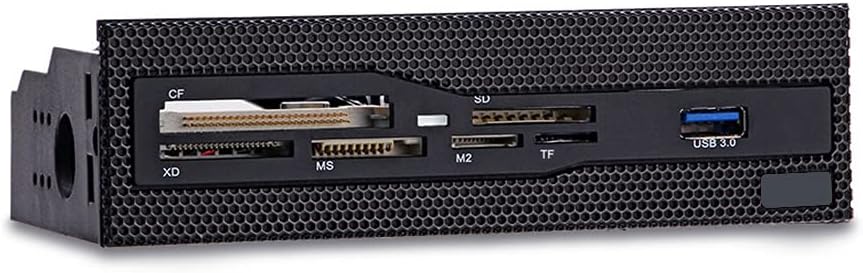
The 5.25 Internal Card Reader Media is a functional multi-function dashboard designed to fit standard 5.25 inch drive bays in desktop cases. It offers a USB 3.0 interface for faster data transmission and includes slots for common card formats like CF XD MS M2 and TF.
We may earn a commission when you buy through this link, at no additional cost to you.
Its key strength is the durable grid panel design that integrates well with cases that have a front mesh panel. The copper plated card slots ensure stability during data transmission reducing the risk of connection issues over time.
While the build is practical the aesthetic is somewhat basic compared to more premium models. It is a solid choice for users who have an available 5.25 bay and need a reliable high-speed reader without spending too much.
This reader is ideal for budget conscious builders who want USB 3.0 speeds and wide format support in a 5.25 bay. It offers good value and dependable performance for everyday file transfers.
The high-speed front USB 3.0 interface enables efficient and easy data transmission for modern storage needs.
Durable design that can be perfectly integrated with any case with a front mesh panel for a clean look.
We may earn a commission when you buy through this link, at no additional cost to you.
The 5.25inch Media Dashboard is an all-in-one solution that combines a USB 3.0 hub eSATA port audio jacks and a multi-format card reader. It is designed for PC builders and tech enthusiasts who want to maximize front panel functionality in their desktop case.
We may earn a commission when you buy through this link, at no additional cost to you.
Its key strengths include the combination of multiple connectivity options in one unit which reduces the need for separate devices. The simultaneous multi-card access feature allows you to transfer files from different media cards at the same time improving workflow efficiency.
While the device offers many features the ABS plastic construction and lower customer rating suggest there may be some quality concerns compared to more robust options. It is a good choice for hobbyists who value feature density over premium build quality.
This dashboard is ideal for custom PC builds where front-panel access to various interfaces is a priority. If you need a convenient central hub for audio video and card access this model offers a comprehensive solution.
Combines USB 3.0 hub eSATA and audio jacks in one unit for maximum front panel utility.
Features dedicated front-panel audio jacks for speakers and microphone eliminating the need to plug behind your chassis.
We may earn a commission when you buy through this link, at no additional cost to you.
The TCC-QL5E is a multifunction dashboard media front panel that offers a wide range of connectivity options including SATA eSATA USB 3.0 and audio ports. It is designed to integrate into a 5.25 inch drive bay providing a clean and accessible interface for your desktop.
We may earn a commission when you buy through this link, at no additional cost to you.
Its key strength is the inclusion of both SATA and eSATA ports which allows you to connect external drives directly through the front panel for fast data transfers. The USB 3.0 port provides high-speed access for card readers and USB devices ensuring efficient workflows.
While the device offers many features it requires a variety of cables to connect properly which may complicate the installation process. The LED indicators provide useful status updates on power and drive activity making it easier to monitor operations.
This panel is ideal for users who need both card reader and drive connectivity in a single front panel unit. If you prioritize versatility and have the available bay space this model provides a comprehensive solution.
Includes SATA and eSATA ports for direct drive connections improving work efficiency for large storage devices.
USB 3.0 port supports transfer speeds up to 5Gbps ensuring fast access to memory cards and USB devices.
We may earn a commission when you buy through this link, at no additional cost to you.
The Sony MRW620/U1/181 is a legacy brand internal card reader designed to support 17 different memory card formats. It fits into a standard 3.5 inch drive bay and comes with both black and ivory faceplates to match your system's style.
We may earn a commission when you buy through this link, at no additional cost to you.
Its key strengths include the inclusion of drive letter recognition software which simplifies the setup process for users unfamiliar with internal hardware. The build quality is reliable and the compact design ensures it does not interfere with other components inside your case.
While it lacks modern USB 3.0 speeds the device remains a solid choice for those with specific legacy card needs who value brand reliability. The dual faceplate options add a nice touch of customization for custom builds or office setups.
This reader is ideal for users who prefer a trusted brand and need support for older card formats. If you prioritize ease of setup and reliable performance over raw speed this model is a good option.
Sony is a well-known brand in memory media offering reliable hardware with solid build quality and support.
Includes both black and ivory faceplates to match your system's style and color scheme seamlessly.
We may earn a commission when you buy through this link, at no additional cost to you.
The All-In-One Internal Card Reader is a straightforward solution designed to fit into a 2.5 inch drive bay. It comes with multiple bezel colors including black silver and white allowing you to match your system's aesthetic easily.
We may earn a commission when you buy through this link, at no additional cost to you.
Its key strengths are its simplicity and reliable performance as evidenced by its 5.0 customer rating. The unit is designed for users who need a basic card reader without complex features or extensive formatting support.
While it lacks the advanced options of larger models it provides a solid and affordable option for simple needs. The high quality materials ensure it will last for years of regular use in a home office or personal PC.
This reader is ideal for users with limited drive bay space who need a simple and reliable card reading solution. If you prefer a clean look and essential features this model offers good value.
Fits into a 2.5 inch drive bay making it suitable for smaller cases or setups with limited space.
Includes retail with black silver and white bezels so you can choose the finish that matches your PC.
We may earn a commission when you buy through this link, at no additional cost to you.
The Akasa AK-ICR-07 Internal Card Reader is designed to be conveniently placed on the front of your PC for easy access to your memory cards. It supports high capacity SDHC cards and includes dedicated ports for adapters eliminating the need for extra adapters.
We may earn a commission when you buy through this link, at no additional cost to you.
Its key strengths include the additional USB port which provides extra connectivity for USB memory sticks or USB-enabled mobile phones. The unit comes with two front fascia panels in black and white so you can match your case style.
While the design is practical the card transfer speeds are limited to older standards which may not be ideal for large media files. The LED indicators show power card insertion and data transfer status helping you monitor activity at a glance.
This reader is ideal for users who want convenient front panel access and extra USB connectivity. If you need a reliable solution for small to medium file transfers this model offers good value.
Conveniently placed on the front of your PC allowing easy access to memory cards without opening the case.
An additional USB port provides extra connectivity for convenient data transfer from USB sticks or phones.
We may earn a commission when you buy through this link, at no additional cost to you.
The MTG CR-IN212XU-1 is a 22-in-1 USB 2.0 internal card reader designed for users who need broad card format support. It features a metal case that fits into a 3.5 inch drive bay offering durability and a classic look.
We may earn a commission when you buy through this link, at no additional cost to you.
Its key strengths include hot swappable plug and play capability which makes it easy to use without rebooting your system. The four slots can be used at the same time for data exchange increasing convenience when working with multiple cards.
While it uses the older USB 2.0 standard which limits transfer speeds the metal case and multiple bezel options add value and versatility. The support for CompactFlash IBM Microdrive and SmartMedia makes it a great choice for legacy workflows.
This reader is ideal for users who work with legacy card types and prefer a durable metal design. If you need a classic and reliable card reader for home office use this model is a solid choice.
Supports CompactFlash IBM Microdrive SmartMedia and Memory Stick series making it perfect for legacy workflows.
Hot swappable and Plug & Play capability allows you to use the reader without rebooting your system.
We may earn a commission when you buy through this link, at no additional cost to you.
Choosing the right internal media card reader depends on your specific workflow needs available drive bays and desired transfer speeds.
Ensure your case has an available 3.5 or 5.25 inch drive bay before purchasing. Many modern cases lack these slots so check your chassis dimensions carefully.
Match the reader size to your available slot to avoid fitting issues or wasted space.
USB 3.0 offers much faster data transfer rates compared to USB 2.0 which is crucial if you work with large video or photo files regularly.
Prioritize USB 3.0 or higher interfaces for improved efficiency and reduced wait times.
Check which memory card formats you need supported such as SDXC CF MemoryStick or older legacy types like XD or SmartMedia.
Choose a reader that explicitly lists the formats you use most frequently to avoid compatibility issues.
If you need to transfer files between multiple cards at once look for readers that support simultaneous slot access.
This feature significantly speeds up workflows involving multiple card types in parallel.
Some internal readers include extra USB or audio ports which can reduce the need for external hubs and save front panel space.
Consider whether additional connectivity will provide value beyond just card reading for your setup.
Metal cases tend to be more durable and offer better heat dissipation than plastic options but plastic units are often lighter and cheaper.
Select materials that align with your budget and longevity expectations for the long term.
Most internal readers are OS independent but check for driver requirements if you use older operating systems or specific workstation software.
Ensure the device works seamlessly with your current OS to avoid installation complications later.
Install the card reader into an available drive bay and connect the internal headers to your motherboard and power supply before securing it with screws.
Insert memory cards firmly into the appropriate slots and wait for the system to recognize the devices before transferring files to ensure data integrity.
Eject cards properly using the operating system before removal and avoid touching the contacts with fingers to prevent corrosion and connection issues.
Most internal readers fit into either a 3.5 inch or 5.25 inch drive bay. Check your case specifications to see which size is available before purchasing. Some modern cases may lack these slots entirely so external readers might be necessary if no bay is free.
Most internal card readers are plug and play and do not require manual drivers on modern operating systems. However some older systems or niche formats may need specific drivers to recognize the hardware properly.
Yes but the transfer speed will be limited to USB 2.0 speeds. USB 3.0 cards are backward compatible but you won't benefit from the higher speeds unless the reader supports USB 3.0.
Simultaneous slot access allows you to read from multiple memory cards at the same time which is useful for transferring files between different media types quickly without removing one card to insert another.
Some models include a USB port on the front panel that allows you to connect phones or external drives. Check the product specs to confirm if this feature is available before purchasing.
You should always safely eject the card from the operating system before physically removing it. Removing a card without ejecting can lead to data corruption or loss on the card.
We reviewed ten internal media card readers ranging from budget 3.5 inch models to premium 5.25 inch dashboards with advanced features like USB 3.0 and simultaneous slot access.
For speed and versatility consider the StarTech or Vantec models which offer fast transfer rates and broad compatibility. If you need a basic and affordable option the SABRENT unit covers many formats well.
Always verify your case's drive bay availability and OS requirements before buying. Prices and stock change frequently so check current listings to ensure you get the best deal today.