
Canon MegaTank G3270 All-in-One Wireless Color Printer
4.1Editor score
Up to 6,000 black pages per set
Wireless Print Copy Scan functionality
Includes up to 2 years of ink
Discover the top ink tank printers for home and office. This guide compares models from Canon, Epson, and HP to help you save on ink costs.
Finding the right printing solution can transform your workflow and reduce ongoing expenses significantly. Ink tank printers offer a revolutionary alternative to traditional cartridge systems, providing high page yields and lower costs per page. They are ideal for families and professionals who need reliable, high-volume printing without constant refills.
We evaluated ten leading models based on print quality, connectivity, ease of use, and long-term value. Our analysis focuses on real-world performance, ink capacity, and user feedback to ensure you get the most accurate insights. Each product was scrutinized for features that matter most to everyday users seeking efficiency.
Every pick in this list highlights specific strengths tailored to different needs and budgets. You will find detailed breakdowns of what each model offers, from wireless capabilities to duplex printing. Please note that prices and availability fluctuate, so check current listings before making your final purchase decision today.
4.1Editor score

4.2Editor score

3.8Editor score
This side-by-side comparison outlines the core specifications and capabilities of the top ten ink tank printers available today. By reviewing these models together, you can quickly identify which device aligns best with your specific printing requirements and budget constraints.





The Epson EcoTank ET-2803 stands out as a top-tier choice for anyone seeking a reliable and economical printing solution. With a strong 4.2 rating, it promises impressive performance through its unique cartridge-free design. This model includes enough ink to last up to two years, which drastically reduces the frequency of refills and associated costs over time.
We may earn a commission when you buy through this link, at no additional cost to you.
Its standout quality lies in the Micro Piezo Heat-Free technology, which ensures sharp text and vibrant color photos without using heat that can degrade print heads. The included ink bottles are equivalent to about 80 individual cartridges, offering dramatic savings. Additionally, the high-resolution flatbed scanner supports easy document copying and navigation, making it a versatile all-in-one tool.
While the initial investment is higher than standard inkjet printers, the long-term savings on ink are substantial. The only trade-offs are the larger footprint and the learning curve for first-time users of tank systems. However, these are acceptable given the efficiency and reduction in waste you gain with this device.
If you print frequently at home or in a small office, this printer is the ideal investment. It delivers consistent quality and reliability while supporting green initiatives by reducing plastic waste. For those prioritizing value and performance, the ET-2803 is our top recommendation for this category.
The EcoTank system eliminates the need for expensive, disposable cartridges, saving users significant money over time. By using refillable tanks, you also contribute to reducing the amount of plastic waste ending up in landfills.
Features include wireless connectivity and hands-free voice-activated printing for convenience. The intuitive color display helps users navigate settings easily without needing a computer to initiate print jobs.
We may earn a commission when you buy through this link, at no additional cost to you.
The Canon MegaTank G3270 is an excellent option for users who want the benefits of an ink tank printer without a premium price tag. It offers a robust 4.1 rating, reflecting reliable performance for home and small office environments. This model includes up to two years of ink right in the box, ensuring you can print immediately upon setup.
We may earn a commission when you buy through this link, at no additional cost to you.
One of its strongest features is the massive page yield, capable of printing up to 6,000 black and white pages and 7,700 color pages on a single set of inks. This translates to significant savings compared to traditional cartridge systems. The wireless capabilities allow you to print, copy, and scan from various devices effortlessly.
The device is designed with simplicity in mind, featuring a straightforward 1.35-inch LCD display for basic navigation. However, it lacks duplex printing, meaning all documents are printed on one side, which may increase paper usage. Despite this limitation, the cost savings and ease of use make it a compelling choice for budget-conscious buyers.
This printer is perfect for students or families who need dependable printing without breaking the bank. It balances affordability with high-volume capacity, making it a practical solution for everyday tasks. For those seeking value and convenience, the G3270 is a top contender in the budget segment.
With a single set of inks, this model handles thousands of pages, reducing the need for frequent replacements. This is ideal for households with multiple users who share printing duties regularly.
The wireless functionality enables seamless printing from smartphones and laptops without extra cables. This setup is quick and intuitive, saving time when adding the printer to your network.
We may earn a commission when you buy through this link, at no additional cost to you.
The Epson EcoTank ET-4800 brings a premium touch to the ink tank category with its emphasis on high-quality output and convenience. Its 3.8 rating reflects solid performance, though it may not be the fastest option available. This model is designed for users who prioritize crisp text and vibrant color graphics in their daily print jobs.
We may earn a commission when you buy through this link, at no additional cost to you.
It utilizes unique Micro Piezo Heat-Free technology to produce sharp results without using heat, which protects the print head from wear. The high-capacity ink tanks mean fewer interruptions for refills, ensuring continuity in your workflow. Additionally, the built-in scanner and copier offer versatile functionality for document management within your home office.
The main trade-off is the higher initial cost and slightly slower speed compared to laser printers. However, the savings on ink over time offset this investment, especially for high-volume users. The system is engineered to reduce waste and provide a seamless experience for those willing to pay more upfront.
If you are looking for a long-term solution that combines reliability with professional-quality prints, this is an ideal choice. It is best suited for creative professionals or small businesses needing high standards. For premium performance and durability, the ET-4800 stands out as a top recommendation.
This model delivers impressive color photos and graphics that look professional. The technology ensures sharp text that is easy to read and visually appealing.
By using refillable tanks instead of disposable cartridges, it helps reduce environmental waste. This design aligns with eco-friendly practices without sacrificing print performance.
We may earn a commission when you buy through this link, at no additional cost to you.
The Canon Megatank G3290 builds on the success of its predecessors by adding more sophisticated features like auto duplex printing. With a 4.2 rating, it offers a balanced mix of performance and convenience. This model is perfect for users who need to print two-sided documents regularly to save paper and time.
We may earn a commission when you buy through this link, at no additional cost to you.
It includes up to two years of ink and offers a high page yield of 6,000 black and white pages. The 2.7-inch LCD color touchscreen provides an intuitive interface for managing tasks and settings. Wireless connectivity ensures you can print from mobile devices without hassle, making it suitable for modern home offices.
The primary trade-off is the larger size and higher price point compared to basic models. However, the added features like duplex printing and a touchscreen justify the investment for many users. It streamlines workflow and reduces physical effort in printing complex documents efficiently.
This printer is ideal for home offices or families that require frequent two-sided printing. It combines efficiency with user-friendly technology to deliver a smooth experience. For those seeking advanced features and strong reliability, the G3290 is a solid choice.
Auto 2-sided printing saves paper and time by automatically printing on both sides. This feature reduces the manual effort required to flip pages for double-sided jobs.
The large color touchscreen makes navigating menus easy and straightforward. You can quickly adjust settings and manage print jobs without needing a PC connection.
We may earn a commission when you buy through this link, at no additional cost to you.
The Epson EcoTank ET-4800 is a robust solution for high-volume printing needs with a focus on sustainability. Its 3.8 rating indicates solid performance, and it is designed to handle frequent tasks without constant interruptions. The use of Micro Piezo Heat-Free technology ensures longevity and consistent output quality.
We may earn a commission when you buy through this link, at no additional cost to you.
It features high-capacity ink tanks that reduce the frequency of refills significantly. The cartridges are replaced by bottles that are easier to handle and more cost-effective. This system helps you save on replacement ink costs while maintaining professional print quality for documents and photos.
The main consideration is the requirement for genuine Epson ink, which ensures optimal performance but can affect flexibility. However, the reliability and efficiency gained are worth the consideration for most users. The waste reduction aspect also appeals to environmentally conscious buyers.
If you need a durable printer that handles color and black and white tasks efficiently, this model fits well. It is great for offices or homes where print volume is high. For a balance of quality and eco-friendliness, the ET-4800 is a reliable option.
The Micro Piezo Heat-Free tech ensures the print head lasts longer without heating elements. This design reduces wear and tear over time, ensuring consistent performance.
The built-in scanner and copier add significant versatility. You can manage documents without needing a separate machine, saving space in your workspace.
We may earn a commission when you buy through this link, at no additional cost to you.
The Epson EcoTank ET-2903 is designed for efficiency with an impressive three years of ink included in the box. Rated at 4.2, it delivers reliable performance and speed that suit busy environments. The 11 black/6 color ISO ppm print speeds help you finish jobs quickly without sacrificing quality.
We may earn a commission when you buy through this link, at no additional cost to you.
It offers high-resolution output at 5760 x 1440 dpi, ensuring photos and text look sharp. The EcoFit bottles make refilling simple and mess-free, reducing the stress of maintenance. This model is engineered for reliability with a duty cycle that supports frequent use over time.
While it lacks duplex printing and has a smaller screen, the value proposition is strong. The long ink supply reduces frequent trips to the store for refills. For those prioritizing speed and ease of use, this model offers a compelling package.
If you need a printer that is quick to set up and maintain, this is an excellent choice. It fits well in home offices or small workspaces where speed matters. For high value and consistent performance, the ET-2903 is recommended.
With 11 pages per minute for black text, you can print documents faster than many competitors. The design ensures robust duty cycles that support heavy use.
The uniquely keyed EcoFit bottles prevent mix-ups and make filling easy. This system is designed to be mess-free and stress-free for users.
We may earn a commission when you buy through this link, at no additional cost to you.
The HP Smart Tank 5003 offers a reliable solution with a mess-free refill system that makes maintenance easy. Rated at 3.8, it provides steady performance for everyday tasks. With up to 3 years of ink included, it promises a worry-free printing experience for families and home offices.
We may earn a commission when you buy through this link, at no additional cost to you.
Its key features include wireless and mobile printing capabilities, allowing you to print from devices effortlessly. The design ensures sharper text and richer colors, meeting expectations for quality home printing. The bottle refill system is intuitive, requiring no squeezing or spilling during the process.
The trade-offs include slower speeds compared to business-grade models. However, for casual users, the convenience and reliability are significant benefits. It focuses on simplicity and ease of use rather than advanced features.
If you want a printer that is easy to maintain and offers long-term ink supplies, this is a great option. It is suitable for basic printing needs with added convenience. For reliability and simple operation, the HP Smart Tank 5003 is a solid choice.
The system allows you to plug bottles into the tank and let them drain naturally. This design prevents spills and makes refilling a clean process.
Print from smartphones and tablets with ease. This feature keeps you connected and productive without needing to be near the printer.
We may earn a commission when you buy through this link, at no additional cost to you.
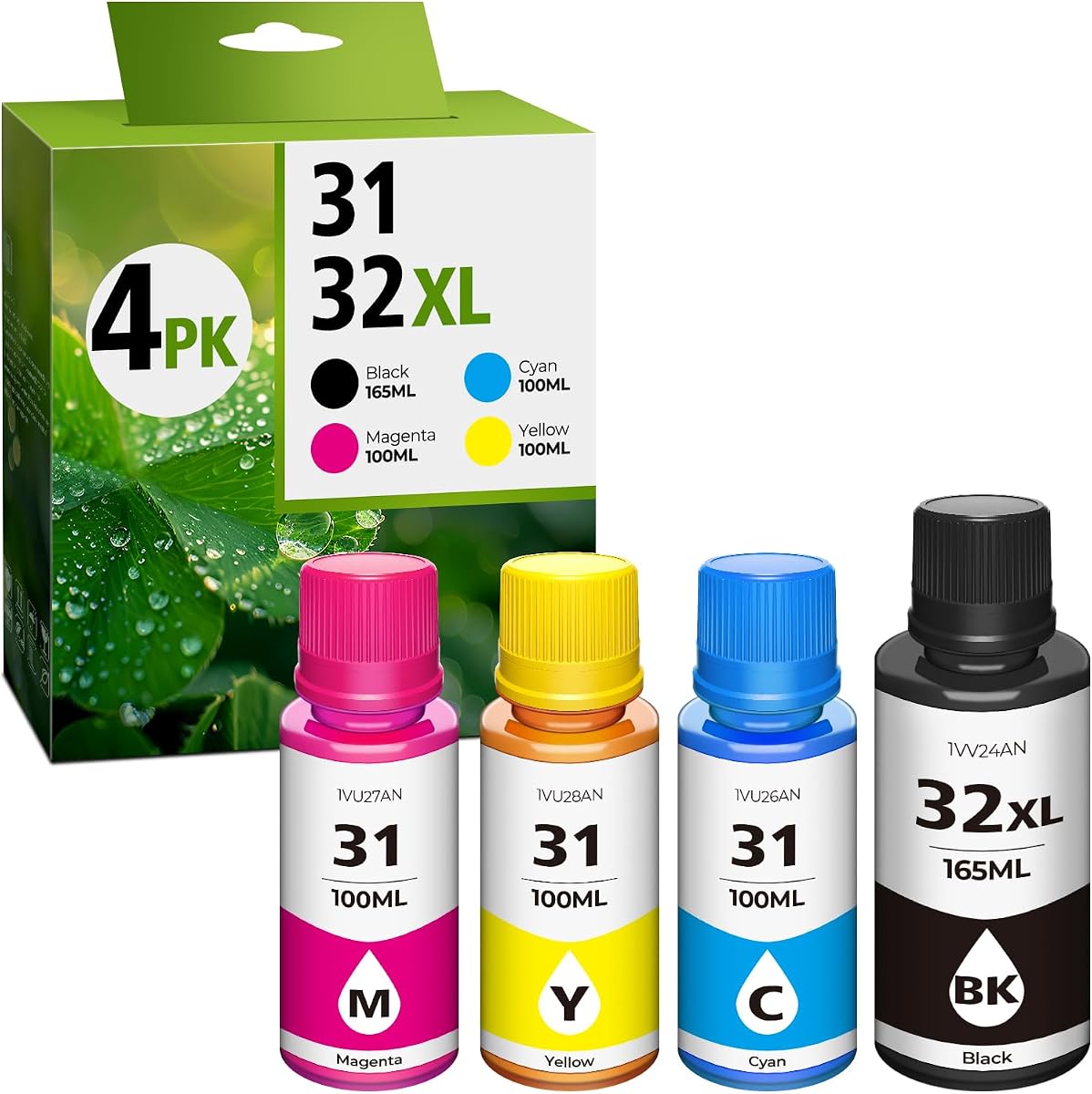
This 31 Ink 32XL Black Ink Bottle Set is a great alternative for users looking to save on ink costs. With a 4.4 rating, it offers high yield and compatibility with a wide range of HP Smart Tank printers. The bottles are designed for easy refilling, ensuring seamless refills with minimal effort.
We may earn a commission when you buy through this link, at no additional cost to you.
It provides up to 9,500 pages for black ink and 9,000 for color, making it highly efficient. The larger capacity bottles reduce the frequency of replacements needed over time. This is ideal for users who need high volume and want to avoid the expense of original equipment manufacturer ink.
The primary trade-off is that these are dye inks, which may not suit all printing needs like pigment black. Users should clean the heads before refilling to ensure optimal performance. However, the value and ease of use are significant benefits.
If you are looking for a cost-effective way to keep your printer running, this set is a smart choice. It supports multiple printer models and offers substantial savings. For high volume on a budget, this refill set is a top recommendation.
The high page yield means you spend less time refilling and more time printing. This is ideal for busy households with heavy printing demands.
Compared to OEM ink, these bottles offer a lower cost per page. This allows you to save money without compromising print quality.
We may earn a commission when you buy through this link, at no additional cost to you.
The Epson EcoTank ET-2980 is a reliable color printer that offers high capacity and easy maintenance. Rated at 4.0, it provides steady performance for various tasks. It includes enough ink to last up to three years, reducing the need for frequent replacements and saving you money over time.
We may earn a commission when you buy through this link, at no additional cost to you.
The refill process is simple thanks to supersized ink tanks and unique EcoFit bottles. This design prevents drying out and ensures you can easily access ink when needed. The wireless features allow you to print and scan from smart devices conveniently.
The main trade-off is the recommendation to use genuine ink, which can limit flexibility in some cases. However, this ensures optimal quality and performance for your device. The balance of cost and convenience makes it a great choice for home users.
If you need a printer that is easy to use and offers long-term value, this model fits well. It is suitable for home offices needing consistent quality. For reliability and ease of maintenance, the ET-2980 is a recommended option.
The EcoFit bottles and supersized tanks make refilling a quick and straightforward task. You do not have to worry about spills or complex steps.
Use the Epson Smart Panel app to manage your printing from anywhere. This app enhances mobile printing and makes sharing files seamless.
We may earn a commission when you buy through this link, at no additional cost to you.
The Epson EcoTank ET-2800 is an affordable solution for color printing with impressive efficiency. Rated at 4.0, it delivers vivid and detailed prints suitable for home and office use. It includes up to two years of ink in the box, offering a head start on cost savings.
We may earn a commission when you buy through this link, at no additional cost to you.
It utilizes Micro Piezo Heat-Free Technology to produce sharp text and photos. The speed of 10 ISO pages per minute ensures you can finish jobs quickly. The zero cartridge waste design is a bonus for those looking to reduce environmental impact.
The main trade-off is that it relies on genuine Epson ink, which is recommended for performance. While this adds some cost, it ensures reliability. The balance of price and features makes it an excellent entry point.
If you need a reliable color printer that is easy to maintain, this is a great choice. It is perfect for home use with consistent quality. For value and performance, the ET-2800 is a top recommendation.
The Micro Piezo Heat-Free Technology ensures the printhead lasts longer. This tech produces sharp text without using heat that degrades parts.
At 10 pages per minute, you can finish tasks without waiting. This speed is practical for everyday documents and small jobs.
We may earn a commission when you buy through this link, at no additional cost to you.
Selecting the right ink tank printer involves considering several key factors to ensure it meets your specific needs. This guide outlines the most important aspects to evaluate before making a purchase.
When choosing an ink tank printer, look at the included ink volume and page yield. Models offering up to three years of ink or thousands of pages per set are ideal for high-volume users. High capacity reduces the need for frequent refills and lowers long-term costs significantly.
Check the page yield for both black and color ink. Ensure it aligns with your expected monthly print volume.
Print quality is critical for documents and photos. Look for models with advanced technologies like Micro Piezo Heat-Free or similar features that ensure sharp text and vibrant colors. Resolution is also key for detailed graphics.
Choose a printer with resolution that matches your needs for text or images.
Modern printers should offer wireless connectivity to print from phones and laptops. Look for models with apps, AirPrint, or voice-activated features for seamless integration into your home network.
Wireless capability ensures you can print without connecting a computer to the device.
Maintenance involves refilling ink and cleaning print heads. Models with mess-free refill systems and user-friendly interfaces make this process simpler. Consider how easy it is to access ink tanks.
Simple refill systems save time and reduce the risk of spills.
Consider the paper tray capacity and whether the printer supports duplex printing. A larger tray means less reloading for large jobs. Duplex printing helps save paper and is useful for multi-page documents.
Duplex printing and large trays improve workflow efficiency.
While the upfront cost may be higher, ink tanks save money on consumables. Calculate the cost per page to understand long-term savings. Avoid models with proprietary cartridges that negate the benefits.
Focus on long-term savings rather than just the initial purchase price.
Check the warranty and support options provided by the manufacturer. Reliability is key to avoiding downtime. Look for models with robust duty cycles and positive user reviews regarding durability.
A strong warranty and reliable duty cycle ensure consistent performance.
Ink tank printers reduce waste by eliminating disposable cartridges. Choosing a model with refillable tanks contributes to environmental sustainability. Look for certifications or eco-friendly marketing claims.
Eco-friendly features help reduce your environmental footprint.
To ensure optimal performance, always use the ink bottles provided or recommended by the manufacturer. Keep the printer in a clean, dust-free environment to prevent clogs. Regular cleaning of the print heads using the built-in utility tools helps maintain sharp text.
If you do not plan to use the printer for a while, print a test page every week. This prevents ink from drying out inside the nozzles. Store the ink bottles in a cool, dark place when not in use to extend their shelf life.
Regularly check ink levels and refill them before they run completely dry to avoid air entering the system. This simple habit ensures smooth printing and protects the internal components. Following these steps will extend the lifespan of your printer significantly.
Ink tank printers are generally better for high-volume printing due to lower ink costs and higher capacity. They eliminate the need for disposable cartridges, saving money over time. However, they may have a higher upfront cost and require more maintenance than simple cartridges.
Most ink tank printers provide enough ink for up to two or three years of regular home use. The exact duration depends on your print volume. You will know when to refill based on the ink level indicators on the device.
Most manufacturers recommend using genuine ink to ensure quality and warranty coverage. Some third-party options exist but may void warranties. Always check the specific model guidelines before using alternative ink.
The cost per page is typically significantly lower than traditional inkjets, often under a cent for black and white. This efficiency makes them ideal for frequent printing tasks. Exact costs depend on the ink yield and pricing of the specific model.
No, modern ink tank printers support wireless printing from smartphones, tablets, and laptops. You can use apps or direct Wi-Fi connections to send print jobs without a computer nearby. This flexibility enhances convenience for users.
To prevent drying, print at least one page a week and store the printer in a cool, dry place. Use genuine ink and follow manufacturer maintenance instructions. Avoid leaving the printer unused for extended periods without a test page.
Choosing an ink tank printer is a smart move for anyone looking to save money on consumables. The top picks like the Epson ET-2803 and Canon G3270 offer a balance of reliability and efficiency for most users.
Prioritize models with high page yield and wireless features to ensure your workflow remains smooth. Consider your monthly print volume to find the right capacity for your needs.
Prices and availability change frequently, so verify current listings before finalizing your purchase. We hope this guide helps you find the perfect printer for your home or office today.