
MONTECH AIR 903 MAX
4.8Editor score
Four included fans
E-ATX support
High airflow mesh
This guide compares the top ten hybrid airflow PC cases for October 2026, evaluating cooling performance, build quality, and design features for optimal
Finding the right computer chassis is crucial for maintaining stable temperatures during heavy workloads. A hybrid airflow case combines mesh panels with strategic ducting to maximize intake while minimizing noise and dust accumulation.
We analyzed ten leading models based on fan configuration, radiator support, and internal layout. Each entry was selected for its ability to balance unrestricted airflow with aesthetic appeal and practical build considerations.
Every pick highlights specific strengths like dual chamber layouts or modular fan mounts. Note that availability and pricing fluctuate frequently, so verify current stock before finalizing your purchase decision.
4.8Editor score

4.8Editor score

4.6Editor score
The following table provides a side-by-side overview of key specifications for all ten selected cases, helping you quickly identify which model fits your specific hardware and cooling requirements.


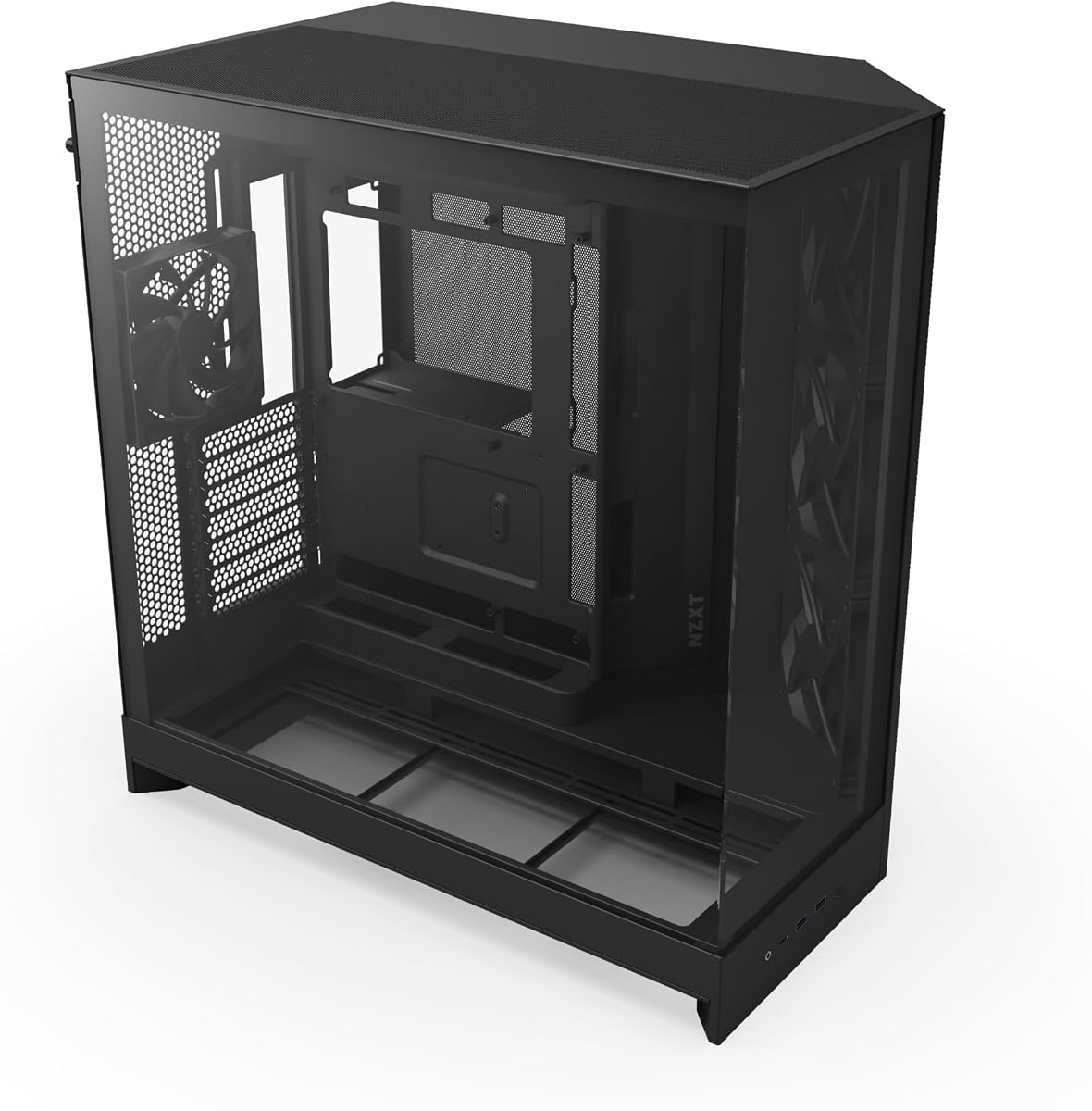

The NZXT H6 Flow RGB stands out as a top performer in the hybrid airflow category. It combines a compact dual chamber layout with high visibility glass panels for a modern look.
We may earn a commission when you buy through this link, at no additional cost to you.
Its perforated top and side panels ensure maximum airflow while filtering dust effectively. The included RGB fans are positioned at angles that optimize cooling efficiency immediately out of the box.
While the price is higher than basic models, the build quality and aesthetic cohesion justify the investment. Users should note that white finishes require more frequent cleaning to maintain appearance.
This case is ideal for builders who want a balance of performance and style. If you prioritize visual appeal alongside solid cooling, this model offers a compelling package.
The dual chamber design separates heat generating components from the intake path. This prevents hot air from recirculating into the GPU or CPU area.
Wraparound glass panels provide an unobstructed view of your internal hardware. The seamless edges reduce visual clutter for a cleaner build presentation.
We may earn a commission when you buy through this link, at no additional cost to you.
The MONTECH AIR 903 MAX delivers exceptional value by including four fans right out of the box. Its ventilated mesh front panel ensures the system gets the airflow it needs for high performance parts.
We may earn a commission when you buy through this link, at no additional cost to you.
Support for E-ATX motherboards means you can upgrade to larger components without outgrowing the chassis. The 140mm fans provide excellent static pressure and airflow balance for both air and liquid cooling.
Trade-offs include limited front I/O ports and fewer aesthetic features compared to pricier units. However, for pure cooling performance per dollar, it remains a strong contender.
This case is perfect for budget conscious gamers or workstation builders. It offers a reliable foundation for demanding parts without costing a fortune.
The mesh front panel allows unrestricted air intake to the radiator or CPU cooler. This is critical for maintaining low temperatures during sustained loads.
Support for E-ATX boards ensures long term compatibility with evolving hardware standards. You can upgrade to larger motherboards or GPUs without replacing the case.
We may earn a commission when you buy through this link, at no additional cost to you.
The HAVN HS 420 represents the pinnacle of hybrid cooling technology. Its dual chamber design directs cool air specifically onto the GPU while isolating heat sources effectively.
We may earn a commission when you buy through this link, at no additional cost to you.
With eleven 140mm fan slots and support for massive radiators, it handles extreme cooling needs. The SimpliCable routing system uses top-to-bottom guides for a pristine interior appearance.
The premium price and complex setup might deter casual users. However, for enthusiasts seeking maximum airflow and unique features, the investment is worth considering.
This case targets power users who want total control over airflow paths. If you need extreme cooling capacity and distinct design, this model is unmatched.
The hybrid structure balances traditional size ratios with dual chamber benefits. This design optimizes intake directly onto the graphics card for better GPU temps.
The SimpliCable system uses grooved guides to route wires cleanly without excess bulk. This ensures a professional look and better internal airflow.
We may earn a commission when you buy through this link, at no additional cost to you.
The CORSAIR 4000D RS introduces a revolutionary modular frame system that lets users upgrade components like trays and panels easily. Its 3D Y-Pattern airflow panel minimizes restriction for cool air intake.
We may earn a commission when you buy through this link, at no additional cost to you.
Three pre-installed RS fans support daisy-chainable connections and zero RPM modes for quiet operation. The InfiniRail mounting system allows flexible fan configurations up to 200mm.
While the modular design adds versatility, it may be overkill for those who do not plan frequent upgrades. The steel construction ensures durability but adds some weight.
This case suits builders who value long term customization options. If you want a case that adapts to your changing needs, this model delivers that flexibility.
The FRAME system allows you to swap motherboard trays and I/O panels effortlessly. This feature supports future tech changes without replacing the entire chassis.
The pre-installed RS fans offer high static pressure and support PWM daisy-chaining. This simplifies wiring while ensuring consistent cooling performance across the system.
We may earn a commission when you buy through this link, at no additional cost to you.
The NZXT H5 Flow offers exceptional cooling in a compact footprint. Its perforated PSU shroud enables optimal air intake from bottom intake fans, enhancing overall system efficiency.
We may earn a commission when you buy through this link, at no additional cost to you.
Ultra-fine mesh on all panels creates maximum airflow while keeping dust out. It supports large radiators like 360mm in front for powerful liquid cooling potential in a smaller box.
Space is tight for cables due to the compact design. You may need to choose smaller power supplies or manage cables very carefully to avoid obstruction.
This case is ideal for desk space limited setups. If you want a small case without sacrificing thermal performance, this is a top choice.
The small size makes it perfect for tight desk environments. Despite being compact, it supports high performance components and large radiators.
Perforated shrouds allow cool air to reach the PSU and GPU more effectively. This prevents heat buildup in critical areas during intense gaming sessions.
We may earn a commission when you buy through this link, at no additional cost to you.
The Antec Flux Pro blends metal glass and wood to create a unique high-quality texture. It supports up to 12 fans simultaneously with multi-directional vents for superior cooling.
We may earn a commission when you buy through this link, at no additional cost to you.
The innovative iShift PSU mount allows 90 degree rotation for better airflow. It supports both 420mm and 360mm radiators at once for extreme liquid cooling setups.
Its large size requires a dedicated room or large desk. Not everyone needs such extensive cooling capacity, so consider your actual hardware needs first.
This case is for serious enthusiasts who need maximum expansion. If you plan to run dual loop cooling or many fans, this chassis accommodates it.
Vents are placed to allow airflow from multiple angles. This flexibility helps adapt cooling strategies to specific hardware configurations.
The combination of materials offers a distinct look. This design elevates the aesthetic beyond standard all-metal PC chassis options.
We may earn a commission when you buy through this link, at no additional cost to you.
The Cooler Master HAF II features oversized 220mm intake fans for massive airflow. Its low resistance design improves throughput without requiring excessive fan speeds or noise.
We may earn a commission when you buy through this link, at no additional cost to you.
Split-level cable management optimizes routing space for the oversized rear exhaust. The Dual-Mode GPU Holder can support thick cards or a second GPU effectively.
The massive size may not fit standard desks easily. Ensure your workspace can accommodate the dimensions before purchasing this high flow model.
This case is excellent for builds needing low noise high cooling. If you want extreme airflow without loud fans, this model is designed for you.
Large front and rear openings reduce air resistance significantly. This allows more air to pass through the system at lower speeds.
MasterRail supports various fan sizes for flexible configurations. You can mix different fan sizes to optimize airflow paths as needed.
We may earn a commission when you buy through this link, at no additional cost to you.
The CORSAIR AIR 5400 RS isolates the CPU, GPU, and PSU into separate chambers. This prevents heat from the GPU chamber from affecting the CPU cooling performance.
We may earn a commission when you buy through this link, at no additional cost to you.
Airflow ducts in the bottom accelerate air velocity without needing higher fan speeds. This increases cooling power while keeping noise levels manageable during operation.
The layout might be complex for first time builders. Careful planning is needed to ensure cables fit within the dedicated zones properly.
This case is perfect for thermal isolation enthusiasts. If you want to keep hot air away from sensitive components, this design delivers superior results.
Separate chambers prevent cross contamination of hot air. This keeps CPU temps stable even when the GPU is under maximum load.
Bottom ducts force air into narrow channels to speed it up. This technique improves cooling efficiency without increasing overall system noise.
We may earn a commission when you buy through this link, at no additional cost to you.
The NZXT H9 Flow separates main components from the PSU to improve thermal performance. Its angled front-right fans ensure efficient cooling for high-performance builds without obstruction.
We may earn a commission when you buy through this link, at no additional cost to you.
With ten fan capacity, it offers great flexibility for custom loops or fan arrays. The panoramic wraparound glass showcases every detail of your build beautifully.
Back-connect readiness means you need specific motherboards to fully utilize the feature. Without them, some of the cable-free benefits might be lost.
This case suits those wanting maximum separation of components. If you prioritize neat cable management and thermal separation, this model works well.
The dual chamber layout keeps the PSU away from the CPU and GPU. This reduces heat buildup near sensitive components.
Compatible with motherboards that have rear-facing connectors. This allows for a much cleaner look by hiding all cables from view.
We may earn a commission when you buy through this link, at no additional cost to you.
The CORSAIR AIR 5400 LX shares the triple chamber layout of the RS variant but adds RGB lighting. It isolates CPU, GPU, and PSU chambers to maintain superior cooling performance.
We may earn a commission when you buy through this link, at no additional cost to you.
Airflow ducts accelerate air velocity for improved cooling without noise. This allows for quiet operation even under high loads due to the efficient airflow design.
The high price and heavy construction might limit placement options. Ensure your desk can support the weight and budget allows for the premium features.
This case is for RGB lovers needing top cooling. If you want vibrant lighting with serious thermal performance, this model offers both.
Heat is isolated to separate zones for better airflow. This ensures that CPU cooling is not affected by GPU heat generation.
The LX version adds lighting to the functional design. This brings aesthetic appeal without sacrificing the cooling performance of the chassis.
We may earn a commission when you buy through this link, at no additional cost to you.
Selecting the right hybrid airflow case involves considering size, fan capacity, and internal layout to ensure your hardware stays cool and runs quietly.
Ensure the case supports your motherboard size whether ATX E-ATX or smaller. Larger cases allow for better airflow but require more desk space.
Choose a size that matches your workspace constraints and component needs for a balanced setup.
Look for cases with high pre-installed fan counts or support for multiple large fans. This ensures adequate intake and exhaust without buying extra fans later.
Prioritize models that support 140mm or larger fans for better cooling with less noise.
Chamber designs separate heat sources from cool air intakes for improved thermal efficiency. This prevents hot air from recirculating into the CPU or GPU area.
Consider a dual chamber case if you want better cooling separation without excessive complexity.
Mesh or perforated panels are essential for hybrid airflow performance. They allow air to enter freely while keeping dust out of the system.
Check that the panels do not restrict airflow too much for optimal cooling.
Good cable management keeps airflow paths clear and the build looking clean. Look for wide channels, hooks, and straps to route wires properly.
Proper routing prevents cable clutter from blocking air vents or fan blades.
Verify that the case can fit your desired radiator size and GPU length. Some models have unique internal layouts that limit component dimensions.
Ensure clearance for thick GPUs or large radiators before making your purchase.
Modular cases allow you to change panels trays or mounts as needs evolve. This extends the usable life of the chassis for future hardware upgrades.
Prioritize modularity if you plan to swap parts frequently over time.
High quality materials ensure durability and a clean look. Consider the panel finishes and how they will maintain their appearance over years.
Select a design that fits your desk style and matches your component choices.
Always install fans correctly to ensure air moves from front to back or bottom to top. Proper direction is critical for effective airflow within the chambers.
Clean dust filters and fans every few months to prevent blockage. Dust buildup reduces airflow and increases operating temperatures significantly.
Route cables along the side channels to keep the main airflow paths clear. Clean interiors allow air to flow freely through the GPU and CPU zones.
A hybrid airflow case combines mesh panels with internal chamber layouts. It allows unrestricted intake while directing air specifically to critical components like CPUs and GPUs.
Most hybrid cases come with at least two to three fans. Check if you need additional fans for radiators based on your cooling setup requirements.
Yes, they usually support large radiators and provide dedicated airflow paths. This helps maintain cooler temperatures for radiators and components alike.
Dual chambers separate the PSU and GPU heat from the CPU intake. This keeps fresh cool air focused on the processor for stable performance.
Gaming generates significant heat so high airflow is essential. A hybrid case ensures heat dissipates quickly to prevent throttling.
Clean filters and fans every two to three months. More frequent cleaning may be needed if you are in a dusty environment.
The NZXT H6 Flow RGB, MONTECH AIR 903 MAX, and HAVN HS 420 lead the market for their unique features and thermal performance. Each offers a distinct approach to airflow management.
Prioritize chamber layouts and fan capacity if you run high end components. These features ensure your system remains cool during intense gaming or creative workloads.
Remember to verify stock and current availability before buying as models change often. Investing in the right case now will keep your system efficient for years to come.