
Amazon Basics 120W Fast Charging USB-C Nano GaN Wall Charger
4.2Editor score
Compact nano design
120W total output
Universal voltage input
This guide compares the top high wattage USB C chargers for laptops and phones, evaluating power output, safety features, and port flexibility for every user.
Finding the right high wattage USB C charger is essential for powering modern laptops and phones efficiently. These devices deliver fast charging speeds while keeping your workspace organized and clutter-free.
We compared ten top models based on power output, port flexibility, build quality, and safety features. Each pick offers unique benefits for travelers, professionals, and families needing reliable power solutions.
Each review shows key specs, pros, and cons to help you choose quickly. Prices and availability change frequently, so check current details before making your final purchase decision today.
4.2Editor score

4.7Editor score

4.5Editor score
This side-by-side comparison highlights key differences in power output, port count, and safety features across all ten selected high wattage USB C chargers to help you decide quickly.




This 380W charging station offers unmatched versatility for households with many devices. It delivers up to 380W total power across eight ports, including two 100W USB-C ports for laptops. Built with GaN technology, it keeps heat low while maintaining high efficiency and safety for your gear.
We may earn a commission when you buy through this link, at no additional cost to you.
The standout feature is the inclusion of four USB-C cables, saving you from buying extra accessories. Two ports support up to 100W each, ideal for laptops like MacBook Pro or Dell XPS. Three other USB-C ports provide 30W each, perfect for phones or tablets, ensuring you can charge multiple devices at once.
However, the charger is bulkier than single-port models, so it's best for desks rather than tight travel bags. Power splits across ports when many devices are plugged in, which may reduce speed on individual devices if all ports are used. It's a trade-off for ultimate convenience and organization.
This charger is ideal for families or shared workspaces needing to power many devices at once. If you want one hub for phones, tablets, and laptops with included cables, this is a strong choice. Check port needs before buying to ensure it matches your devices.
Eight ports let you charge phones, tablets, and laptops simultaneously without juggling multiple adapters. The built-in cable storage also helps keep your desk clean and organized.
Internal chips adjust power to each port, ensuring safe charging even when all devices are plugged in. This prevents overloading and keeps your electronics protected.
We may earn a commission when you buy through this link, at no additional cost to you.
Anker's 100W charger is a dependable choice for travelers and professionals needing reliable power on the go. It delivers enough energy to charge a MacBook Pro 16-inch from zero to 100 percent in about an hour and 20 minutes, keeping you productive throughout the day.
We may earn a commission when you buy through this link, at no additional cost to you.
Its compact design features a foldable plug that saves space in your bag. The included 5ft USB-C cable offers flexibility for reaching distant outlets. ActiveShield technology monitors temperature continuously to prevent overheating, ensuring safe charging for your laptop or phone without any worry.
The main limitation is its single USB-C port, which means you cannot charge multiple devices simultaneously. It also lacks a digital display, so you won't see real-time wattage or temperature. But for focused laptop charging, it excels in portability and trusted safety standards.
This charger suits solo travelers or those who prioritize simplicity and quality. If you want a no-fuss, reliable 100W charger with a long cable and safety tech, this is a great pick. It balances performance, compactness, and Anker's reputation effectively.
The foldable plug and small footprint make this easy to slip into any bag. It fits well in carry-ons and keeps your travel setup tidy.
Built-in temperature checks happen 24/7 to protect your devices from heat damage. This adds peace of mind during long charging sessions.
We may earn a commission when you buy through this link, at no additional cost to you.
This 160W charger stands out with a smart display showing real-time power usage and temperature. It can charge a MacBook Pro 16-inch M4 Max to 56 percent battery in 30 minutes, thanks to its powerful 140W single-port capability. The five ports let you power multiple devices at once without clutter.
We may earn a commission when you buy through this link, at no additional cost to you.
The display rotates and touches for easy viewing, making it a delight for daily use. GaN III technology keeps the charger smaller than older models while staying cool during heavy loads. You can monitor total output and per-port data, helping you optimize charging speed for your setup.
The price is higher than basic chargers, but the features justify the cost. The display can be slightly dim in sunlight, and the charger is bigger than ultra-compact options. Still, its balance of power, features, and size makes it a top choice for power users.
Ideal for home offices or desks where you need visible charging info and multiple ports. If you value smart features, high speed, and reliable build quality, this is the premium pick. It handles laptops and phones with ease.
The touch-enabled display shows exactly how much power each device gets. This helps you manage charging efficiency and avoid surprises.
With up to 140W on one port, it charges laptops quickly even while other devices are plugged in. This keeps your workflow uninterrupted.
We may earn a commission when you buy through this link, at no additional cost to you.
This 100W charger combines portability with a smart display for monitoring charging status. It maintains peak performance longer than average 100W chargers thanks to advanced GaN tech. The three ports allow you to charge a laptop plus two phones at the same time without juggling adapters.
We may earn a commission when you buy through this link, at no additional cost to you.
The high-definition display shows real-time details like temperature and port performance, giving you full visibility. It folds into a 330 percent smaller frame than traditional chargers, making it easy to carry. Low-power mode safely charges earbuds without overheating, extending its use cases.
It is slightly larger than single-port models and costs more due to the display. Also, 100W may not fully max out high-end laptops during heavy use. Still, it offers great value for users needing both speed and smart monitoring in a compact form.
Perfect for travelers or office workers who need visible charging details and multi-device support. If you want a reliable brand with a display and enough power for most laptops, this fits well. It balances features and size nicely.
The display gives instant feedback on charging speed and heat levels. You can adjust your setup based on real-time data easily.
Switches to low-current mode to safely charge small devices like earbuds. This prevents damage and extends charger lifespan.
We may earn a commission when you buy through this link, at no additional cost to you.
This 120W charger offers excellent value for those needing fast, reliable charging without extra features. It can deliver up to 100W on a single USB-C port for laptops, and supports three devices at once. The nano size makes it surprisingly small, fitting easily into any travel bag.
We may earn a commission when you buy through this link, at no additional cost to you.
With universal voltage support from 100 to 240 volts, you can use it worldwide without adapters. Safety features protect against overcharge and overheating, ensuring basic reliability. It lacks smart displays but covers core charging needs well for home, office, or travel use.
Build quality is functional but not premium, and power splits across ports when used together. It does not show real-time data, so you won't see wattage. Still, its compact size and low price make it a strong entry-level option for basic users.
Best for travelers or families needing affordable chargers for laptops and phones. If you want decent power and portability without spending much, this is ideal. It's a no-frills workhorse for daily charging.
Its tiny size makes it one of the smallest 120W chargers available. This is great for fitting into tight bags or pockets.
Works with any voltage worldwide, making it perfect for international travel. You don't need extra adapters for different regions.
We may earn a commission when you buy through this link, at no additional cost to you.
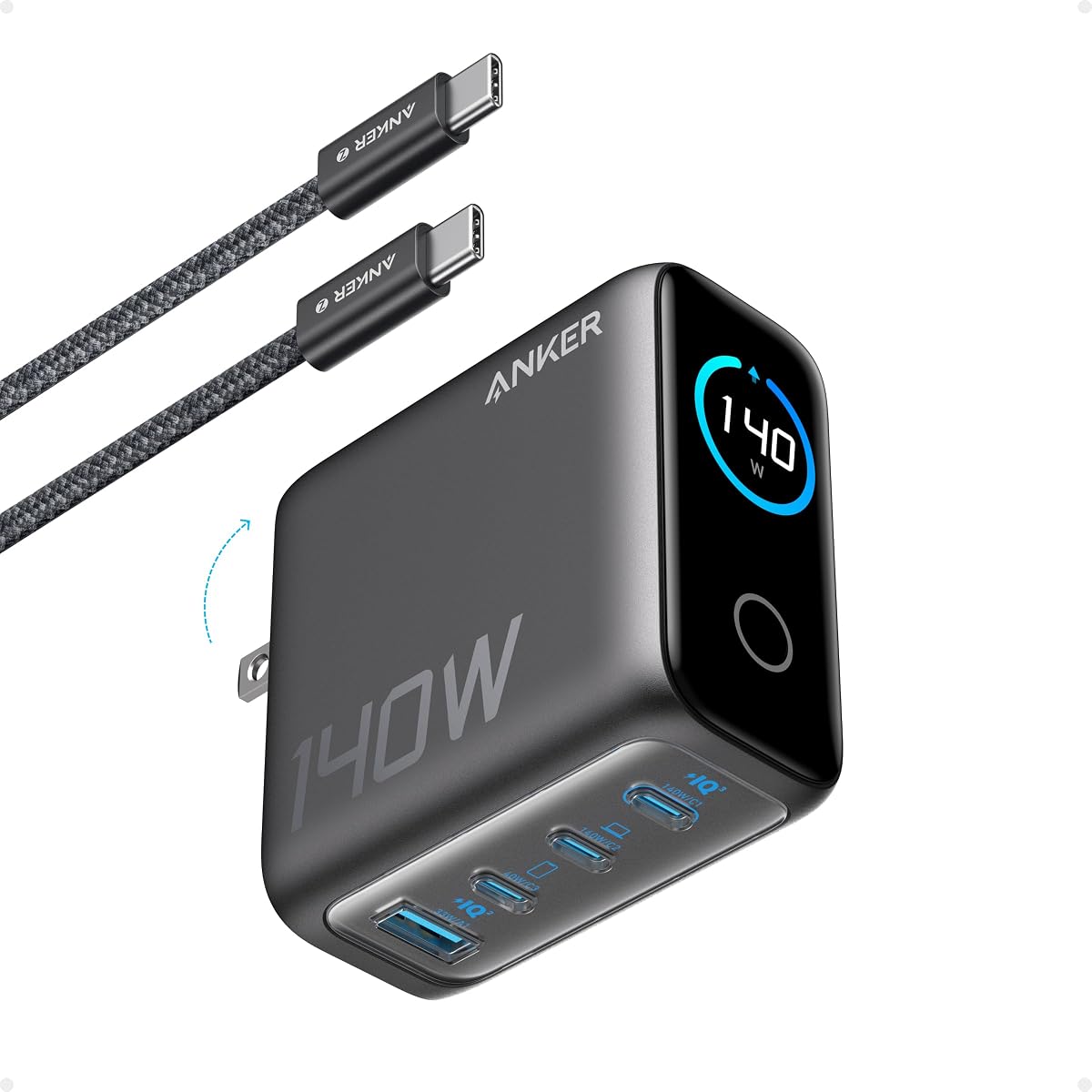
This 140W charger brings high power with a color display to track charging details. It can charge a MacBook Air to 50 percent in 30 minutes, ideal for fast sessions. The four ports let you power laptops and phones simultaneously, reducing cable clutter on your desk.
We may earn a commission when you buy through this link, at no additional cost to you.
ActiveShield 4.0 monitors temperature over 10 million times a day for maximum safety. The display shows port details and temperature, helping you keep your devices cool. Build quality is solid, ensuring durability for daily use at home or office.
It is larger and pricier than 100W options, which may not suit ultra-light travelers. The display also needs power, adding to consumption. Still, its high wattage and safety make it great for professionals who need reliable speed and visibility.
Great for users wanting high wattage with monitoring features. If you run multiple devices and value safety checks, this is a strong pick. It balances power, safety, and smart feedback well.
The display offers clear color info on each port's status and heat. You can manage your setup visually and efficiently.
Advanced safety checks run constantly to protect your devices from overheating. This ensures longevity and safe operation daily.
We may earn a commission when you buy through this link, at no additional cost to you.
This nano charger is as small as AirPods Pro but delivers full 100W power for laptops. It can charge a 14-inch MacBook Pro to 50 percent in 27 minutes, keeping you productive on the go. The matte prongs lock securely, preventing wobble during charging.
We may earn a commission when you buy through this link, at no additional cost to you.
ActiveShield 2.0 monitors temperature millions of times daily to ensure safety. Its compact design makes it easy to slip into any bag. This is perfect for travelers who want powerful charging without bulk or extra accessories.
It is limited to one port, so you can't charge multiple devices at once. There is also no display to show power usage. However, its size and speed make it a top choice for focused laptop charging while traveling.
Ideal for solo travelers or those prioritizing minimal bulk. If you need fast laptop charging in a tiny package, this fits. It balances portability and power well for daily use.
Its design matches the size of AirPods Pro, making it incredibly easy to carry. This saves space in your bag or pocket.
Matte prongs lock firmly in outlets for stable charging. This reduces wear on your wall socket and keeps it secure.
We may earn a commission when you buy through this link, at no additional cost to you.
This 200W charger supports two laptops simultaneously without slowdown. It delivers up to 140W on one port, ideal for power-hungry devices like MacBook Pro. The four ports allow charging laptops and phones at the same time, making it perfect for workspaces with multiple devices.
We may earn a commission when you buy through this link, at no additional cost to you.
GaN technology keeps the charger compact despite its power. It folds easily for travel while maintaining stability. Safety features protect against overheating, ensuring reliable long-term use. This is a robust choice for professionals with heavy charging needs.
It is larger and more expensive than 100W chargers. Also, port power splits if you plug in many devices, though it stays strong. Still, its ability to run two laptops makes it a standout for power users.
Best for office professionals who need to charge multiple laptops. If you want a reliable dual-laptop charger with strong performance, this is ideal. It combines power and flexibility effectively.
Designed to power two laptops at once with high-speed charging. This ensures all your gear stays ready for work.
The plug folds to reduce bulk when storing. It fits well in bags while keeping your setup portable.
We may earn a commission when you buy through this link, at no additional cost to you.
This 300W station is the most powerful on the list, supporting three laptops at once. It delivers 140W to the main port, charging a MacBook Pro 16-inch quickly. The five ports handle phones and accessories simultaneously, making it a hub for busy workspaces.
We may earn a commission when you buy through this link, at no additional cost to you.
GaN safety features guard against overcurrent and overheating effectively. It comes with a 240W cable for top performance. This is ideal for users with multiple high-demand devices who need all-in-one charging without multiple adapters.
It is heavy, large, and pricey, so not for travel. The power distribution may reduce speeds on all ports if fully used. Still, for a dedicated desk setup, it offers unmatched capacity and reliability for power users.
Best for offices or workstations with multiple devices. If you need to charge several laptops at once with speed, this fits. It is a premium workhorse for heavy-duty tasks.
Supports three laptops simultaneously for ultimate productivity. This keeps all your work gear charged at once.
With 300W total, it handles the highest power devices effortlessly. You can charge everything at once without limits.
We may earn a commission when you buy through this link, at no additional cost to you.
This two-pack set gives you two 85W chargers for different rooms or sharing. Each has three ports for charging a laptop and two phones at once. The 65W port supports fast MacBook charging, while the rest handle phones or tablets without hassle.
We may earn a commission when you buy through this link, at no additional cost to you.
Safety features include thermal sensors to keep temps low during use. It works with most USB-C devices from phones to tablets. This set is great for families or office setups needing multiple affordable stations without bulk.
Wattage is lower than 100W+ models, so charging heavy laptops may take longer. Build quality is functional but not premium. Still, buying two chargers for the price of one makes it a smart budget move.
Ideal for households needing multiple charging spots. If you want affordable, versatile power stations for different rooms, this fits. It's a great value for shared use.
You get two chargers, saving money and spreading power across rooms. This is perfect for families or offices.
Built-in sensors maintain safe temperatures to prevent overheating. This keeps your devices safe during long use.
We may earn a commission when you buy through this link, at no additional cost to you.
Choosing the right high wattage USB C charger requires understanding your device needs and port flexibility. These factors ensure you get safe, fast, and reliable power for your laptops and phones.
Higher wattage ensures faster charging for laptops like MacBook Pro or Dell XPS. Look for at least 100W for single devices, or 200W+ if you need multiple high-speed devices.
Prioritize total wattage that matches your devices to avoid slow charging or power limits.
More ports let you charge phones, tablets, and laptops at once. Consider how many devices you use regularly to decide between single or multi-port models.
Choose a port count that covers your daily needs without needing extra hubs.
Check each port's max wattage. Some chargers provide full power on one port but less when others are used. Ensure key ports support your main devices.
Select chargers with balanced power distribution for smooth multi-device charging.
Built-in overheat and overcurrent protection safeguard your devices. Look for technologies like ActiveShield or GaN chips that monitor temperature and voltage.
Always prioritize chargers with certified safety to prevent damage to expensive electronics.
Foldable plugs and compact designs are crucial for travel. GaN tech helps reduce bulk. If you carry chargers daily, choose smaller models.
Match the charger's size to your usage scenario, home or travel.
Some chargers come with USB-C cables, saving money. Others sell separately. Check if included cables match your needs for length and quality.
Buying a charger with cables simplifies setup and cuts accessory costs.
Smart displays show real-time power and temperature data. They add convenience but also cost. Decide if visibility is worth the extra price.
Use displays to optimize charging if you need detailed tracking.
Trusted brands offer better reliability and warranties. Research customer reviews for long-term performance. Avoid unknown brands unless they have strong safety certs.
Invest in brands known for quality to ensure safety and durability.
Plug the charger into a wall outlet and connect your devices via USB-C cables. Ensure the charger matches your device's power needs for optimal speed and safety.
Allow the charger to stay cool during use by avoiding covering it. Place it in a ventilated spot to maintain efficiency and prolong lifespan.
Unplug the charger when not in use to save energy. Store it in a dry, cool place to prevent wear and tear on the cables.
Most modern MacBook Pro models require 100W to 140W for fast charging. If you want to charge while in heavy use, aim for 140W or higher to keep up with battery drain.
No, smart chargers adjust power based on device needs. Phones typically draw only what they need, so even 100W+ chargers are safe for smaller devices.
Yes, GaN chips allow faster charging with less heat and smaller size. This improves efficiency and safety compared to older silicon-based chargers.
Count the devices you use at once. If you have a laptop and two phones, a charger with three USB-C ports would suit your needs without extra hubs.
Most modern chargers have USB-A ports for older devices. If yours only has USB-C, you will need adapters for legacy cables.
Price reflects features like displays, build quality, and power. High-wattage models with GaN tech cost more but offer better speed and safety.
Yes, most high wattage USB C chargers support universal voltage from 100V to 240V. Just bring the right plug adapter for your country's outlets.
Store it loosely coiled in a dry bag to avoid cable stress. Keep it away from extreme temperatures to maintain safety and performance.
Our top picks cover every need from budget-friendly options to high-power stations. The UGREEN Nexode Pro 160W stands out for its balance of speed and smart features, while Amazon Basics offers affordable reliability.
Prioritize power and port count based on your devices. If you charge multiple laptops, go for 200W+ models. For single devices, 100W with compact size is enough.
Remember that prices fluctuate and new models appear often. Check current deals and compatibility before buying to ensure the best value for your specific setup.