
M-AUDIO M-Track Duo USB Audio Interface
4.4Editor score
Two combo XLR inputs
Zero latency monitoring switch
Includes MPC Beats software
Finding the right guitar to Mac interface is crucial for musicians who want to record high-quality audio directly into their computers. These devices bridge the gap between your instrument and digital audio workstations, ensuring clear signal transmission and low latency performance.
We have evaluated ten top-rated interfaces based on sound quality, connectivity options, software bundles, and overall value. Our analysis focuses on how well each unit handles instrument inputs, provides monitoring options, and integrates with macOS systems for seamless recording experiences.
Each selection in this list highlights key strengths and potential limitations to help you make an informed decision. Please note that pricing and availability can change frequently, so verify current details on the product pages before purchasing your next audio interface.
4.4Editor score
4.6Editor score

4.5Editor score
As an Amazon Associate we earn from qualifying purchases.
The following comparison table provides a quick overview of the key specifications and features for each of the ten selected interfaces, helping you identify the right fit for your recording needs at a glance.



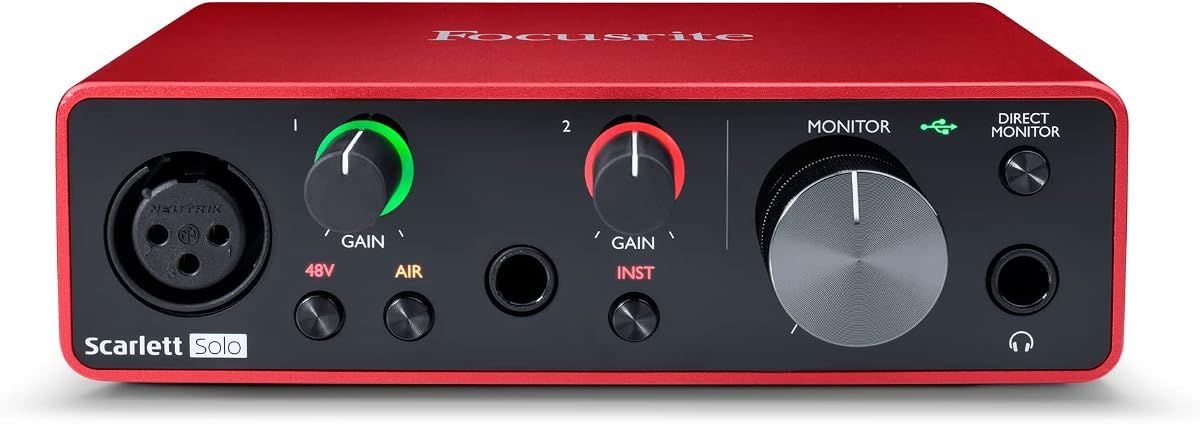
The Focusrite Scarlett Solo 3rd Gen stands out as the top choice for musicians seeking professional quality on a budget. With its high-performance converters and Air mode, it delivers clarity that rivals much more expensive gear.
We may earn a commission when you buy through this link, at no additional cost to you.
Its standout feature is the Gain Halo, which provides visual feedback to help you hit the perfect recording levels without clipping. The inclusion of Pro Tools Intro and Ableton Live Lite makes it ready to use right out of the box.
While it lacks MIDI connectivity and only offers a single instrument input, these limitations are acceptable for solo artists focusing on vocals and guitar. The build quality is robust, ensuring it can withstand the rigors of daily practice and recording sessions.
This interface is ideal for home studio owners and podcasters who need reliable, high-quality audio conversion. If you value sound quality and software value, the Scarlett Solo is the definitive starting point for Mac recording.
The high-performance converters ensure your recordings retain all sonic qualities, even at high sample rates like 192kHz.
Access a suite of production tools including Pro Tools Intro, Ableton Live Lite, and Cubase LE for immediate creativity.
We may earn a commission when you buy through this link, at no additional cost to you.
The M-AUDIO M-Track Duo is an excellent entry-level interface for those needing multiple inputs without breaking the bank. It offers two combo XLR inputs, allowing you to record a guitar and microphone simultaneously.
We may earn a commission when you buy through this link, at no additional cost to you.
Its transparent Crystal Preamps guarantee optimal sound from all your microphones, including condenser mics that require phantom power. The USB/Direct switch ensures you can monitor your audio with zero latency during recording.
While it lacks the software bonuses of pricier models, the hardware functionality is solid and reliable. The 48kHz resolution is sufficient for most streaming and basic recording needs, making it a practical tool for creators.
Choose this interface if you need dual inputs for interviews or band demos on a tight budget. It delivers fuss-free monitoring and reliable performance for everyday audio tasks.
Two combo XLR inputs allow you to connect instruments and microphones simultaneously for complex recording setups.
A dedicated USB/Direct switch lets you toggle between direct monitoring and DAW monitoring effortlessly.
We may earn a commission when you buy through this link, at no additional cost to you.
The Fender Quantum HD 2 is a powerhouse interface designed for serious producers who need expandability. Its 20×24 configuration allows for massive hybrid studio growth with ADAT expansion and S/PDIF I/O.
We may earn a commission when you buy through this link, at no additional cost to you.
Front-facing Fender instrument inputs are optimized for transparent guitar and bass recording, ensuring your tone shines through. The included Fender Studio Pro offers a complete suite for recording, mixing, mastering, and performing.
While the price is high, the build quality and feature set justify the investment for professionals. The Auto Gain button and dual re-amp outputs provide convenience and tonal flexibility that budget units simply cannot match.
This interface is best for studio owners or advanced musicians needing expandable inputs and premium sound. It bridges the gap between home recording and professional studio environments seamlessly.
ADAT expansion and S/PDIF I/O add sixteen digital inputs, allowing your studio to grow with your needs.
Includes a perpetual license for Fender Studio Pro, offering recording, mixing, and mastering tools.
We may earn a commission when you buy through this link, at no additional cost to you.
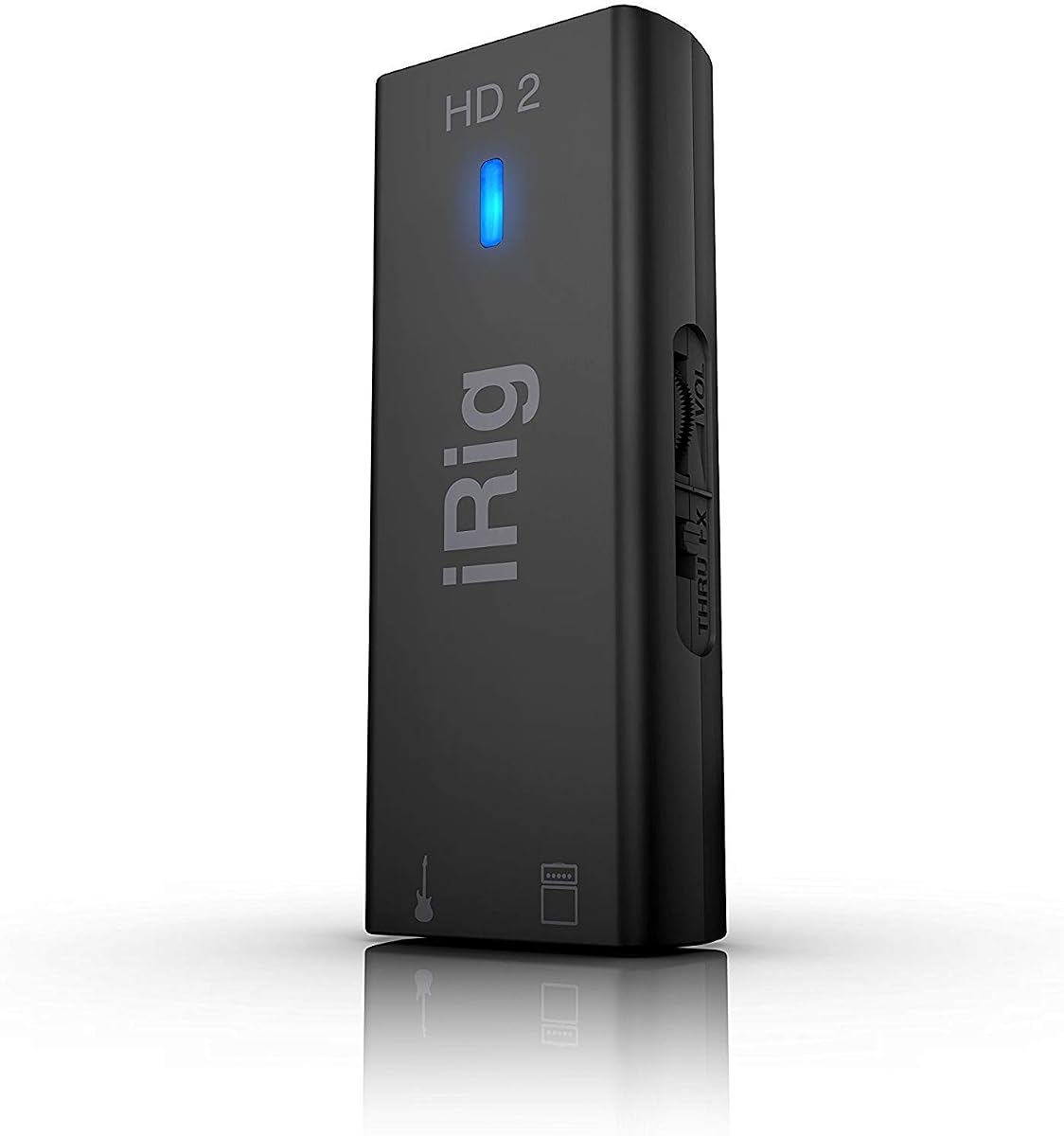
The IK Multimedia iRig HD 2 is renowned for its high-definition digital guitar interface that works with iPhone, iPad, and Mac. It supports a 96kHz sampling rate, the highest in its class, ensuring pristine recording quality.
We may earn a commission when you buy through this link, at no additional cost to you.
You can connect to an amplifier without additional accessories using the 1/4" Amp Out jack, which lets you use FX or Thru settings. This flexibility is perfect for practicing silently while retaining full tonal control.
Its lightweight construction allows for portability, easily fitting in your pocket or laptop bag. However, it is primarily designed for mobile devices, so desktop users might prefer a more robust interface for full studio work.
Choose this interface if you prioritize mobile recording and high-resolution audio. It is the go-to solution for guitarists who want to create anywhere without sacrificing sound quality.
The 96kHz sampling rate ensures your tracks retain all nuances and professional clarity.
Connect directly to your amp using the dedicated amp out jack for authentic tone.
We may earn a commission when you buy through this link, at no additional cost to you.
The JOYO MOMIX CAB is a direct monitoring interface designed for mobile recording. It passes your guitar's clean signal to headphones with zero latency while simultaneously sending audio to your phone for recording.
We may earn a commission when you buy through this link, at no additional cost to you.
Its back clip design makes it smaller than a key, allowing you to clip it to your pocket or strap for mobile recording. There are no batteries or drivers required, making it incredibly easy to use.
However, the dry signal cannot be muted, meaning you always hear the unprocessed guitar in the headphones. This limits its use for real-time software effects but makes it ideal for capturing clean ideas.
This interface is best for songwriters needing to capture ideas on the go. It is a practical tool for recording dry tracks or practicing with backing tracks anywhere.
Hear your guitar instantly in headphones with no delay, perfect for recording and practice.
The pocket-sized design and clip feature ensure it fits anywhere, from backpacks to pockets.
We may earn a commission when you buy through this link, at no additional cost to you.
The PIYONE 2×2 Interface offers seamless connectivity with USB-C ports that handle data and power. It features high-performance converters for 24-bit/192kHz fidelity, ensuring crystal-clear recordings.
We may earn a commission when you buy through this link, at no additional cost to you.
Signature fixed LED light rings on each gain knob enhance visibility in dimly lit studios while adding a modern aesthetic. The included 48V phantom power supply ensures clean gain for demanding microphones.
Its direct monitor feature allows for silent, zero-latency tracking without needing additional adapters. The 3.5mm headphone jack ensures compatibility with standard headsets, making it user-friendly for everyone.
Choose this interface for its blend of style and function at a competitive price. It is perfect for home recording and mobile creators needing professional resolution.
Experience 24-bit/192kHz fidelity to capture every nuance of your audio with professional resolution.
Direct monitoring ensures your recordings track in real time without audio delay.
We may earn a commission when you buy through this link, at no additional cost to you.
The Motu M2 is engineered for superb analog sound using ESS Sabre32 Ultra DAC technology. It delivers a measured 120 dB dynamic range, comparable to interfaces costing thousands.
We may earn a commission when you buy through this link, at no additional cost to you.
The ESS-driven headphone output provides high power, allowing you to use demanding headphones without distortion. Its compact design fits easily on any desk while offering the same converter technology as larger studio units.
While it lacks extensive software bundles, the hardware performance is unmatched at this price point. The dynamic range ensures your recordings are quiet and detailed, essential for professional audio production.
Choose this interface for its superior analog performance. It is a favorite among engineers who prioritize raw sound quality over additional features.
ESS Sabre32 Ultra DAC technology provides an analog sound that rivals professional studio gear.
A 120 dB dynamic range ensures low noise and high detail in every recording.
We may earn a commission when you buy through this link, at no additional cost to you.
The PreSonus Quantum ES 2 is designed for low-latency recording with a custom driver. It features MAX-HD mic preamps with 75 dB of gain, ensuring clean and transparent input for your instruments.
We may earn a commission when you buy through this link, at no additional cost to you.
Co-developed with Fender engineers, the instrument input is specifically optimized for guitar and bass. The Auto Gain button sets perfect levels automatically, saving you time during setup and recording sessions.
Its Universal Control app allows remote control of functions like preamp gain, making it ideal for mobile creators. The included Studio One Pro software adds significant value for musicians starting their production journey.
Choose this interface for professional latency performance and gain control. It is an excellent choice for musicians who need reliable software integration and clean audio.
The custom low-latency driver ensures exceptionally low audio latencies for real-time performance.
Instrument inputs designed by Fender engineers deliver transparent recording for guitars and bass.
We may earn a commission when you buy through this link, at no additional cost to you.
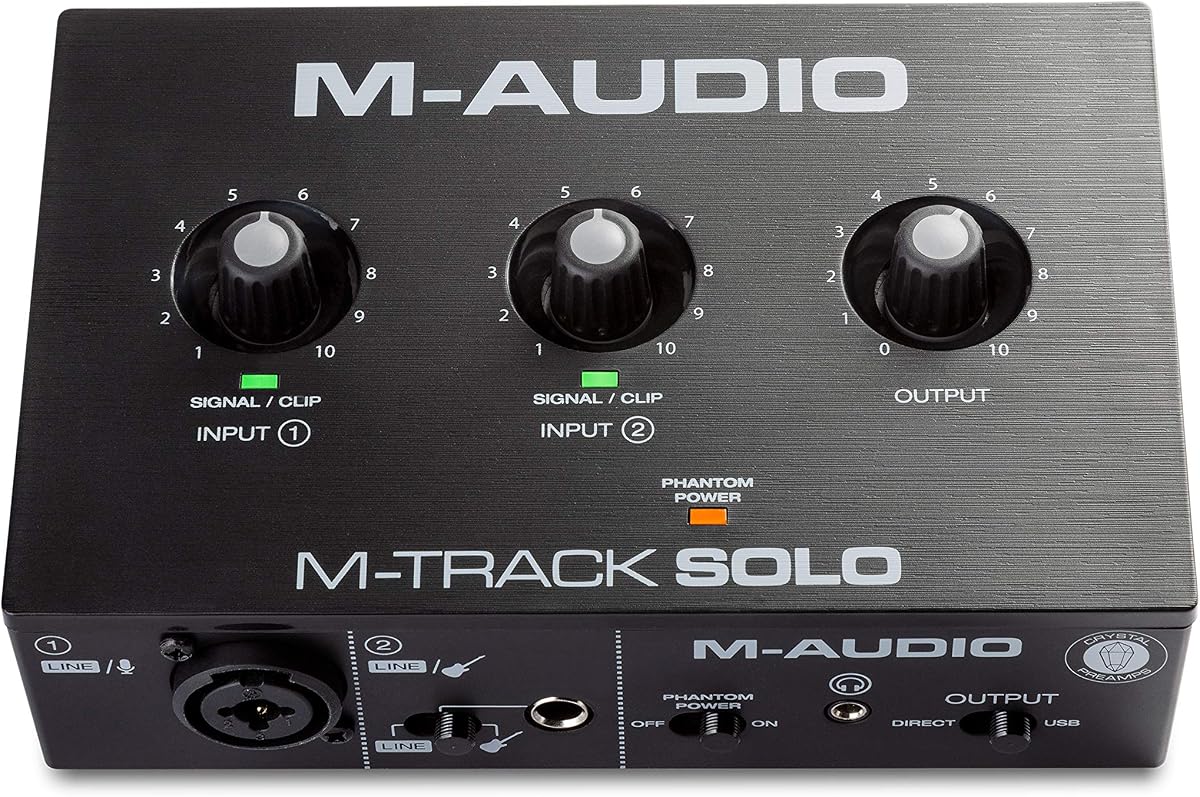
The M-AUDIO M-Track Solo is a portable interface that covers all essential needs for podcasting and recording. It delivers 48kHz audio resolution for pristine sound every time you record.
We may earn a commission when you buy through this link, at no additional cost to you.
Its transparent Crystal Preamp guarantees optimal sound from all your microphones, including condenser mics that require phantom power. The USB/Direct switch ensures you get zero latency monitoring for accurate tracking.
With RCA outputs and a headphone jack, it provides total monitoring flexibility for simple setups. The inclusion of MPC Beats software gives you essential production tools to start creating right away.
Choose this interface for solo recording and streaming on a budget. It is reliable, simple to use, and ready to work with your Mac or PC.
The transparent preamp ensures optimal sound from any microphone, even condenser types.
Includes essential production tools from Akai Professional to jumpstart your creative journey.
We may earn a commission when you buy through this link, at no additional cost to you.
The IK Multimedia iRig USB provides pristine audio quality with a studio-grade 24-bit/48kHz resolution. It works with popular apps and includes a USB-C cable for Mac, PC, and iPad compatibility.
We may earn a commission when you buy through this link, at no additional cost to you.
Its universal compatibility includes direct monitoring for silent practice and a dedicated Amp out for connecting to rigs with FX or THRU settings. The compact and durable design makes it easy to take on the road.
While it lacks the advanced features of desktop interfaces, its simplicity and reliability make it a great travel companion. It ensures you can focus on music without technical hassles anywhere.
Choose this interface for its ease of use and robust build. It is perfect for musicians who want a straightforward connection for recording and practice.
Connect seamlessly with Mac, PC, iPad, and iPhone using the included USB-C cable.
Built to withstand professional use, ensuring it survives the rigors of travel and daily practice.
We may earn a commission when you buy through this link, at no additional cost to you.
Selecting the right audio interface involves understanding your specific recording needs, budget constraints, and connectivity requirements. Here are the key factors to consider.
Ensure the interface has enough inputs for your instruments and microphones. If you plan to record guitar and vocals simultaneously, look for at least two combo inputs. Outputs like RCA or TRS are vital for connecting to studio monitors.
Check that the input and output configuration matches your gear to avoid compatibility issues.
Higher resolutions like 24-bit/192kHz capture more detail and dynamic range. While 48kHz is standard, 192kHz provides future-proofing for high-quality production. Ensure your computer can handle the data load.
Prioritize resolution based on your professional goals and processing power.
Latency is the delay between playing your instrument and hearing it. Look for interfaces with direct monitoring features to achieve zero latency while recording. Low driver latency is also crucial for using software effects.
Choose interfaces with direct monitoring for real-time tracking.
USB-C is the modern standard, offering high-speed data and bus power without external adapters. Lightning or USB-A might be necessary for older Macs. Verify your computer's ports before purchasing to ensure seamless connection.
Match the connectivity type to your computer's available ports.
Many interfaces come with DAWs and plugins like Pro Tools or Ableton. These can save money and get you started immediately. Check if the software is a perpetual license or a trial version.
Prioritize bundles that include full versions of popular DAWs.
A sturdy chassis ensures the interface survives daily use. Look for metal casings and robust knobs that can handle frequent adjustments. Good build quality translates to better shielding from interference.
Invest in durable construction for long-term reliability.
If you use condenser microphones, ensure the interface provides +48V phantom power. Not all budget units support this feature, which is essential for vocal recording. Verify this capability in the specs.
Confirm phantom power availability if you use condenser mics.
For musicians on the go, compact and lightweight designs are essential. Look for pocket-sized interfaces or those that fit easily in a laptop bag. Portability allows you to capture ideas anywhere.
Select a compact unit for travel and mobile recording.
Always connect your interface before launching your recording software. Use the included USB-C cables to ensure stable data transfer and power delivery. Check that your system recognizes the device in the sound settings.
Set your gain knobs carefully to avoid clipping. Use the gain Halos or LED meters to aim for a healthy signal level. Adjust your instrument volume if the input signal is too hot to prevent distortion.
Store your interface in a dry place away from extreme temperatures. Use a protective case when transporting it to prevent physical damage. Regularly clean the ports to ensure consistent connectivity and performance.
Most modern USB-C audio interfaces are class-compliant and do not require drivers on macOS. They work plug-and-play, similar to a standard USB mouse or keyboard. However, some advanced models may need a driver for full feature access like loopback.
USB-C offers faster data transfer speeds and bus power without needing an external adapter. It is the standard for newer Macs. USB-A interfaces are compatible with older systems but may require separate power sources for full functionality.
Yes, most guitar interfaces include XLR inputs with phantom power suitable for microphones. The preamps are designed to handle both instruments and vocals. This makes them versatile tools for full home studio recording.
Use the direct monitor switch on your interface to hear audio with zero delay. Ensure your DAW buffer size is set low in the preferences. Updating your interface drivers can also help optimize performance and reduce latency.
Mobile interfaces offer convenience and portability but lack the connectivity of desktop units. They are great for quick demos and practice. For serious multi-track recording, a desktop interface provides more control and inputs.
Phantom power supplies the necessary voltage for condenser microphones to operate. Without it, these mics will not produce a signal. Check your interface has a +48V switch if you plan to use condenser microphones.
Our top picks highlight the Focusrite Scarlett Solo for its balance of quality and software, the M-AUDIO M-Track Duo for budget-conscious creators, and the Fender Quantum HD 2 for professionals needing expandability.
Prioritize the features that matter most to your workflow, such as low latency, software bundles, or connectivity options. The right interface depends on whether you need a simple setup or a robust production hub.
Remember to verify current pricing and availability before making your purchase. Audio technology evolves rapidly, and checking the latest specs ensures you get the best value for your specific recording needs.