
Selore USB C Docking Station Dual Monitor
4.4Editor score
Dual 4K@60Hz HDMI ports
Affordable price point
100W PD charging support
This guide compares the top 10 docking stations with 2 HDMI ports for dual monitor setups, covering performance, connectivity, and value.
Finding a reliable docking station with 2 HDMI ports is essential for modern professionals who need dual monitor setups. These devices transform a single laptop into a powerful workstation, offering seamless connectivity for productivity.
We compared ten top-rated models based on video output quality, power delivery, data transfer speeds, and overall build quality. Our analysis ensures you find a solution that meets your specific workflow needs without compromise.
Each pick highlights unique strengths like 4K support, fast charging, or extensive port selection. Remember that prices and availability can change frequently, so check current listings before making your final purchase decision.
4.4Editor score

4.5Editor score

4.5Editor score
This side-by-side comparison highlights key specifications across all ten models to help you quickly identify the best fit for your dual monitor workstation setup.


This Anker docking station is an excellent choice for users needing dual HDMI ports. With a strong 4.5 rating, it offers stable performance and reliable connectivity for most Windows laptops.
We may earn a commission when you buy through this link, at no additional cost to you.
The 8-in-1 design includes two HDMI ports, USB-C PD charging up to 85W, and data ports for peripherals. It supports 4K@30Hz on dual monitors, making it ideal for productivity and media viewing.
While it lacks Thunderbolt support and macOS extended display support, these trade-offs are acceptable for its price point. The included power delivery ensures your laptop stays charged while multitasking.
If you need a dependable, well-reviewed docking station with two HDMI ports, this Anker model is a top recommendation for Windows users seeking efficiency and simplicity.
The two HDMI ports allow you to connect two external monitors simultaneously, extending your desktop workspace effectively for multitasking.
The USB-C Power Delivery port passes through up to 85W of power to charge your laptop while using the hub for other devices.
We may earn a commission when you buy through this link, at no additional cost to you.
The Acer 13-in-1 docking station stands out with its ability to drive triple displays. Rated 4.5 stars, it is a premium option for power users needing maximum screen real estate.
We may earn a commission when you buy through this link, at no additional cost to you.
It includes two HDMI ports plus a DisplayPort, supporting triple 4K@30Hz output on compatible Windows laptops. The included 110W adapter ensures robust power delivery for demanding workloads.
The aluminum body dissipates heat well, and the security slot adds physical protection. While macOS limits output to mirroring, Windows users benefit greatly from this expansive connectivity.
For professionals requiring three monitors and extensive ports, this Acer docking station delivers premium performance and reliability for complex workstation setups.
With MST technology, Windows laptops can extend three independent screens for enhanced multitasking and productivity across multiple applications.
A 110W adapter provides sufficient power for high-performance laptops, and a security slot lets you lock the device to your desk.
We may earn a commission when you buy through this link, at no additional cost to you.
This Selore docking station offers excellent value for budget-conscious buyers. With a 4.4 rating, it provides dual HDMI 4K@60Hz output at a competitive price point.
We may earn a commission when you buy through this link, at no additional cost to you.
The 8-in-1 hub supports 100W PD charging and includes USB data ports and SD card slots. It is ideal for home offices or students needing dual monitors without spending a lot.
While it lacks a premium aluminum body, the performance is stable. It supports extended displays on Windows but mirrors on macOS, which is typical for this category.
If you want reliable dual monitor functionality without breaking the bank, this Selore hub is a smart choice for entry-level docking needs.
Both HDMI ports support up to 4K resolution at 60Hz, delivering crisp visuals for productivity and media consumption on dual screens.
The USB-C PD port accepts up to 100W input and provides high-speed charging to your laptop while other peripherals are connected.
We may earn a commission when you buy through this link, at no additional cost to you.
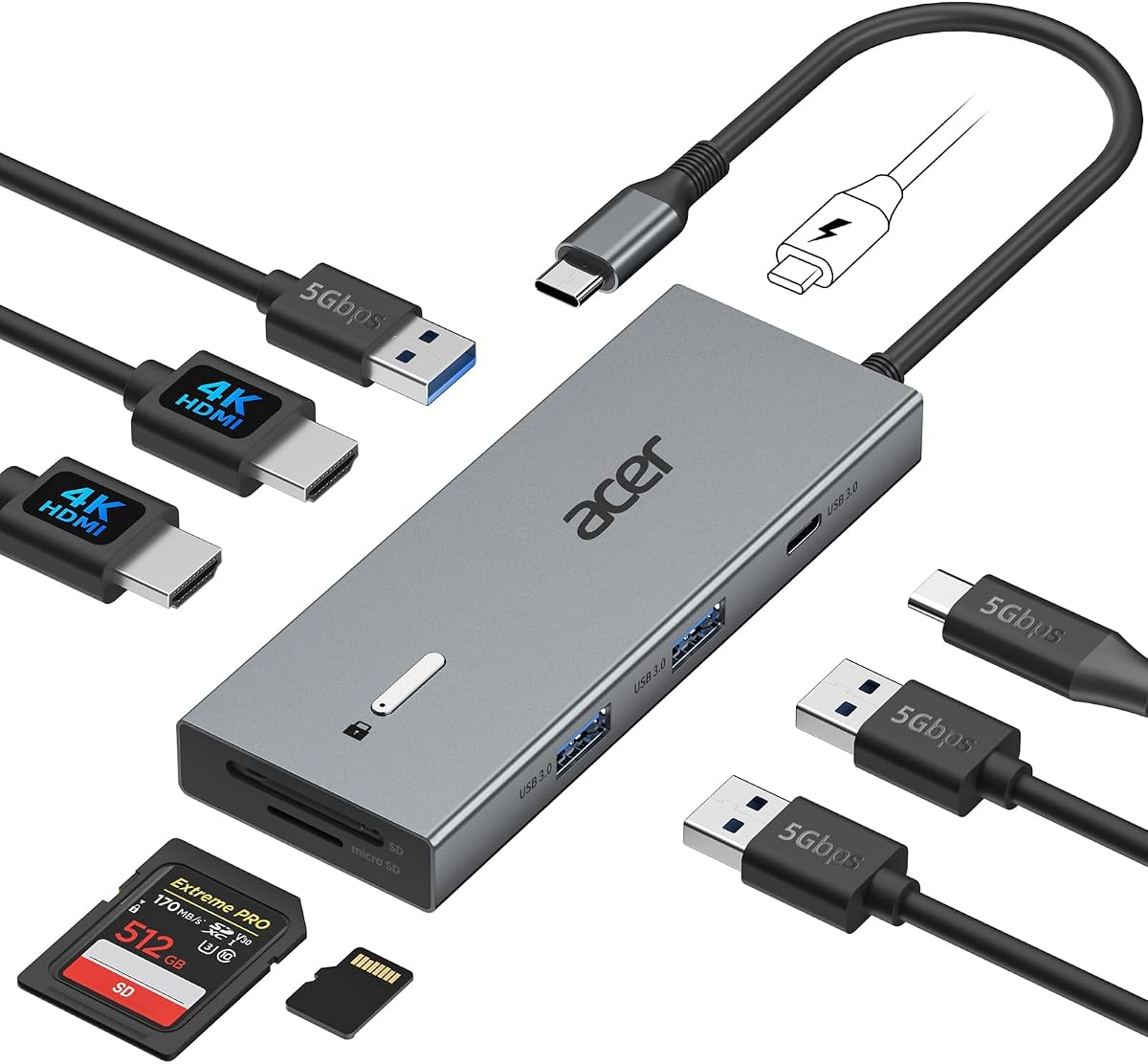
This Acer docking station is a compact and efficient choice for dual monitor setups. Rated 4.2 stars, it combines portability with solid performance for everyday work.
We may earn a commission when you buy through this link, at no additional cost to you.
It features two HDMI ports supporting 4K@60Hz and a 100W PD pass-through port. The aluminum body is durable and helps dissipate heat during extended use.
While it does not include an adapter, it supports up to 100W input from a compatible charger. Windows users get extended displays, while Mac users see mirrored screens.
For a portable yet capable dual HDMI dock, this Acer model balances size, build quality, and connectivity effectively.
The slim aluminum chassis makes this dock easy to transport, ideal for professionals who switch between home and office workspaces.
Dual HDMI ports allow you to connect two external monitors simultaneously, enhancing your workspace with extended screen real estate.
We may earn a commission when you buy through this link, at no additional cost to you.
The Dell D3100 is a versatile docking station using USB 3.0 instead of USB-C. Rated 4.2 stars, it supports dual HDMI and a DisplayPort for triple display setups on compatible Dell laptops.
We may earn a commission when you buy through this link, at no additional cost to you.
It includes a 65W power supply and features three USB 3.0 ports for fast data transfer. It is ideal for older laptops without USB-C video output.
While not as modern as USB-C docks, it provides reliable performance and is optimized for specific Dell Latitude and Inspiron models.
If you have a legacy Dell laptop and need dual HDMI ports, this docking station is a robust and compatible choice.
The station works via standard USB 3.0 ports, ensuring compatibility with laptops that lack Thunderbolt or USB-C video support.
Using two HDMI ports and one DisplayPort, you can connect three external monitors for expanded productivity on supported systems.
We may earn a commission when you buy through this link, at no additional cost to you.
This entry has limited available product data. We were unable to retrieve full specifications or ratings for this model, so we recommend caution.
We may earn a commission when you buy through this link, at no additional cost to you.
Always verify current product listings before purchasing to ensure accuracy in connectivity, port types, and compatibility with your devices.
Without confirmed details, we cannot recommend this product as a reliable choice for your dual HDMI docking needs at this time.
Please check other verified models from our list to ensure you get the connectivity and performance you require for your workspace.
Due to lack of verified specifications, we cannot assess features like port types or power delivery for this product accurately.
We may earn a commission when you buy through this link, at no additional cost to you.
This Anker 7-in-1 hub is a compact option for users needing dual HDMI ports at 1080p resolution. Rated 4.2 stars, it balances portability with performance.
We may earn a commission when you buy through this link, at no additional cost to you.
It supports 100W PD charging and includes a 10Gbps USB-C port for rapid data transfers. It is ideal for travelers who need dual screens without carrying a large dock.
While it does not support 4K on dual monitors, it is perfect for productivity at standard resolution. It also works well with macOS for mirrored displays.
For lightweight and reliable dual HDMI connectivity on the go, this Anker hub is a strong candidate.
The compact design makes this hub easy to slip into a laptop bag without adding significant bulk to your travel setup.
A USB-C 10Gbps port allows for fast file transfers between devices, ensuring you stay productive with large files.
We may earn a commission when you buy through this link, at no additional cost to you.
The MOKiN docking station offers a wide range of ports including two HDMI outputs supporting 4K@60Hz. Rated 4.3 stars, it is a feature-rich solution for general users.
We may earn a commission when you buy through this link, at no additional cost to you.
It includes Ethernet, multiple USB ports, and a lock button to toggle screen privacy instantly. This is useful for protecting sensitive data in public spaces.
While it does not come with a power adapter, it supports up to 100W input to charge your laptop while using the dock.
If you value privacy features and extensive connectivity, this MOKiN dock is a versatile choice for dual monitor setups.
A dedicated lock button allows you to turn off external screens quickly, protecting your data when stepping away from your desk.
With 13 ports, this dock ensures you have enough connectivity for all your peripherals including monitors, drives, and network cables.
We may earn a commission when you buy through this link, at no additional cost to you.
This Selore docking station stands out by supporting three monitors using dual HDMI and a DisplayPort. Rated 4.5 stars, it offers high-resolution output up to 8K on DP.
We may earn a commission when you buy through this link, at no additional cost to you.
It features a monitor control button to quickly switch display modes and includes Gigabit Ethernet for stable internet. It is a robust choice for power users.
The aluminum chassis aids heat dissipation during long sessions. While macOS users see mirrored screens, Windows users can extend across three displays.
For those needing maximum screen real estate and high-resolution support, this Selore dock delivers exceptional flexibility and performance.
The DisplayPort supports up to 8K resolution at 30Hz, offering incredible detail for professional workflows and creative tasks.
A dedicated button lets you control external display modes quickly, streamlining transitions between work and present modes.
We may earn a commission when you buy through this link, at no additional cost to you.
This Anker 13-in-1 dock is a high-powered option with a included 135W adapter. Rated 4.0 stars, it offers extensive connectivity and triple display support on Windows.
We may earn a commission when you buy through this link, at no additional cost to you.
It features two HDMI ports and a DisplayPort for triple displays. Multiple USB-C ports support high-speed data and charging for devices like phones.
The vertical design saves desk space despite its high port count. While macOS limits output to mirroring, Windows users benefit from true extended displays.
If you need a powerful, fully loaded workstation hub, this Anker model delivers robust performance for complex setups.
The included 135W adapter ensures you have enough power for laptops and peripherals simultaneously without worrying about insufficient charging.
Using two HDMI ports and a DisplayPort, you can connect three external monitors for maximum productivity and multitasking.
We may earn a commission when you buy through this link, at no additional cost to you.
Selecting the right docking station requires understanding your display, power, and data needs. Here are the key factors to consider for your next purchase.
Check if the docking station supports 4K at 60Hz or 30Hz on both HDMI ports. Higher refresh rates ensure smoother visuals for video editing or gaming.
Prioritize models supporting 4K@60Hz for sharp, lag-free performance on dual monitors.
Ensure the hub provides sufficient wattage to charge your laptop while in use. Look for at least 85W to 100W PD input for most laptops.
Select a dock with matching PD output to keep your laptop charged during extended work.
MacOS typically only supports mirror mode for dual HDMI docks, while Windows supports extended displays via MST. Verify OS support before buying.
Windows users can extend displays; Mac users should expect mirroring unless using Thunderbolt docks.
Consider additional ports like USB-A, USB-C, Ethernet, or SD card readers. More ports reduce the need for extra dongles and adapters.
Choose a hub with enough ports to connect all your peripherals directly without clutter.
Aluminum chassis help dissipate heat and ensure durability. Plastic builds may be cheaper but can overheat under heavy loads.
Look for metal builds to ensure longevity and better thermal performance during long use.
A longer built-in cable provides flexibility in placing your laptop. Short cables may restrict your desk layout.
Check cable length to ensure it reaches your laptop comfortably from your desk.
Dual HDMI docks range from affordable hubs to premium workstation docks. Balance your needs with your budget to get the best value.
Set a realistic budget that fits your needs without overpaying for features you won't use.
Look for docks with at least an 18-month warranty. A good warranty protects your investment against defects.
Prioritize models with longer warranty periods for peace of mind and reliable support.
Connect the docking station to your laptop using a full-featured USB-C port that supports display output. Ensure the port is connected firmly to prevent intermittent video issues.
Plug your two monitors into the HDMI ports on the dock. Set your operating system to extend displays for maximum productivity or mirror for presentations.
Keep the dock in a well-ventilated area to prevent overheating. Regularly check cables for wear and store them properly when not in use to extend the lifespan.
Yes, many docking stations support two 4K monitors. Some support 4K@60Hz on both, while others limit to 4K@30Hz. Check specs for resolution limits before buying to ensure compatibility.
Dual HDMI docks work with MacBooks but typically mirror screens due to macOS limits. Extended desktop mode requires Thunderbolt docks or specific macOS versions for MST support.
Most laptops need 85W to 100W of Power Delivery for charging while using peripherals. Ensure the dock provides enough wattage to avoid slow or insufficient charging during use.
Some docks can pass power through USB-C without a separate adapter if the laptop charger is strong enough. Others require a dedicated power brick for full performance. Check specs.
Thunderbolt docks offer higher bandwidth and faster data transfer than standard USB-C docks. They often support more displays but cost more. Ensure your laptop matches the dock type.
Yes, most docking stations include multiple USB-A and USB-C ports to connect keyboards, mice, and drives. Check the exact count to ensure it meets your peripheral needs.
Connect monitors to both HDMI ports. Go to Settings > System > Display. Select multiple displays and choose Extend desktop mode for more workspace on each screen.
Docking stations are generally for productivity not gaming. They may not support high refresh rates or low latency. For gaming, connect directly to your laptop or GPU if possible.
Choosing the right docking station with two HDMI ports depends on your specific workflow and operating system needs. The Anker 8-in-1 and Acer 13-in-1 models offer excellent performance for most users.
Prioritize power delivery and video resolution to ensure your setup supports both your laptop and monitors effectively. Always verify compatibility with your laptop's USB-C port before buying.
Prices and availability change regularly, so check current listings to confirm details. Investing in a reliable dock now will improve your productivity and workspace setup for years.