
NICE-POWER DC Power Supply Variable
4.5Editor score
Compact 150W output
Encoder button precise adjustment
Wide AC input voltage range
This guide compares the top DC Power Supply for Laptop Repairing models based on precision, safety features, portability, and professional reliability for
Finding the right power source is critical when repairing laptops. A stable DC power supply ensures components receive the exact voltage and current needed without risking damage during diagnostics or testing phases.
We evaluated ten top-rated units focusing on accuracy, protection mechanisms, and ease of use. Each model offers unique features tailored to repair professionals and hobbyists needing reliable bench power solutions.
Each pick highlights specific strengths like encoder knobs, USB charging, or protection modes. Please note that availability and pricing may change, so verify details before purchasing to ensure the best fit for your needs.
4.5Editor score

4.6Editor score

4.2Editor score
This table provides a quick side-by-side overview of key specifications for each unit to help you compare capabilities at a glance.



This unit stands out as the most versatile option for laptop repair technicians. It combines precise encoder control with modern USB Type-C charging capabilities, making it suitable for both power supply testing and mobile device charging.
We may earn a commission when you buy through this link, at no additional cost to you.
The coarse and fine tuning knobs allow you to set voltage down to decimal points effortlessly. Automatic voltage detection simplifies setup by adapting to 110V or 220V inputs without manual switching. The OCP protection ensures your boards stay safe during testing.
While the unit includes a loud key beep by default, it can be easily disabled via a button hold. The packaging includes necessary cords and a manual, though you may want to upgrade test leads for heavy current usage.
Technicians needing a balance of power and modern connectivity will appreciate this supply. It supports efficient workflows by allowing device charging directly from the bench while performing repairs on laptops.
The combination of coarse and fine knobs ensures you can dial in exact voltage settings without overshooting, which is critical for delicate logic board testing.
The 3.6A USB and Type-C ports allow you to charge phones or tablets simultaneously, saving outlet space and streamlining your multi-device repair workflow.
We may earn a commission when you buy through this link, at no additional cost to you.
The YIHUA 305D-IV offers a compact footprint ideal for smaller workbenches or field repairs. It delivers low noise switching performance, which helps maintain signal integrity during sensitive laptop board testing.
We may earn a commission when you buy through this link, at no additional cost to you.
Its design eliminates the need for a fan, relying instead on improved heat sink cooling. This silent operation is beneficial when working in quiet environments. The display shows voltage, current, and power with high resolution.
While limited to 5A, this is sufficient for most laptop repairs which rarely draw peak currents. The unit comes with clips for quick connections, though permanent leads might be more durable for daily heavy use.
This supply is perfect for repair techs prioritizing quiet operation and portability. Its reliability and compact form factor make it a great secondary or mobile bench station.
The lack of a cooling fan reduces noise interference, making it easier to hear audio cues from devices during diagnostic testing.
The display reads up to every 10mV for voltage and every mA for current, allowing highly accurate setup for testing low-power components.
We may earn a commission when you buy through this link, at no additional cost to you.
The X-Tronic PX-70 is designed for advanced users who require repeatability and robust protection. It includes a comprehensive kit with multiple lead sets and a work mat, offering a complete setup right out of the box.
We may earn a commission when you buy through this link, at no additional cost to you.
Memory recall presets allow you to save common voltage settings for specific laptop models. The lock function protects settings from accidental changes during long tests. Five protection modes ensure device safety during complex diagnostics.
While it lacks international voltage support, it excels in accuracy with low output noise and ripple. The inclusion of a 5V limit switch adds an extra layer of safety for sensitive components you might connect.
For repair professionals needing reliable repeatability and support, this unit is a strong contender. The detailed warranty and US-based customer service add significant value to the purchase.
With three memory presets, you can instantly recall settings for different laptop models, significantly speeding up the repair and testing workflow.
The five distinct protection modes cover overcurrent, overheating, and more, ensuring that both the power supply and your devices remain safe during use.
We may earn a commission when you buy through this link, at no additional cost to you.
This supply distinguishes itself with direct USB-C connectivity to your laptop, allowing for programmable control without obsolete interfaces. It is ideal for R&D and automated testing scenarios where logging is essential.
We may earn a commission when you buy through this link, at no additional cost to you.
The dual display shows both the set value and the real output side by side, preventing ambiguity during testing. The one-key OCP button instantly sets the current threshold, protecting your circuits from accidental overloads.
While the software integration is powerful, it may require a learning curve for basic users. The 18W USB-C port is a practical addition for charging mobile devices while you work on laptop boards.
Engineers and techs looking to integrate bench power into their PC workflow will find this unit highly versatile. It bridges the gap between manual bench tools and automated testing systems.
Seeing the set value and real output simultaneously ensures you know exactly what your circuit is receiving without second-guessing the supply status.
Plug-in USB-C control enables automated test sequences and parameter logging, streamlining complex workflows in R&D or quality control labs.
We may earn a commission when you buy through this link, at no additional cost to you.
The NICE-POWER supply offers impressive value with its encoder buttons and broad voltage range. It is an excellent entry-level unit for hobbyists or shops that need reliable power without a high investment.
We may earn a commission when you buy through this link, at no additional cost to you.
Its design uses encoder buttons to select and adjust digits precisely, avoiding the drift common with potentiometers. The automatic fan cooling ensures it stays safe during extended use, and it supports global AC voltages.
While the display resolution is standard, it provides accurate voltage and current readings for most laptop repair tasks. The compact size makes it easy to store or transport for on-site repairs.
Budget-conscious technicians looking for essential features like encoder control will find this unit a solid choice. It performs reliably for standard diagnostic and testing requirements.
The unique button encoder design allows for quick digit selection and precise adjustment, making it easier to set exact values compared to traditional knobs.
The wide input voltage range means you can use this unit safely in different regions without needing a transformer for international travel.
We may earn a commission when you buy through this link, at no additional cost to you.
This unit emphasizes user safety with a dedicated output enable/disable button and audible alarms. These features help prevent accidental damage to devices if connections are changed while powered on.
We may earn a commission when you buy through this link, at no additional cost to you.
The high-precision encoder knob allows for accurate settings by switching digits and turning. The display is bright and clear, with adjustable brightness to suit your workspace lighting conditions.
It includes a USB fast charging port for mobile devices, keeping your bench organized. While it lacks advanced programming, its straightforward controls and safety features make it ideal for repair work.
Technicians prioritizing safety during connection changes will appreciate the output switch and alarms. It provides a reliable and secure power source for laptop repair tasks.
The dedicated output button prevents accidental power-on during adjustments, protecting your laptop components from unexpected surges.
If a short circuit is detected, a buzzer alerts you immediately, allowing for a quick response to prevent damage to your equipment.
We may earn a commission when you buy through this link, at no additional cost to you.
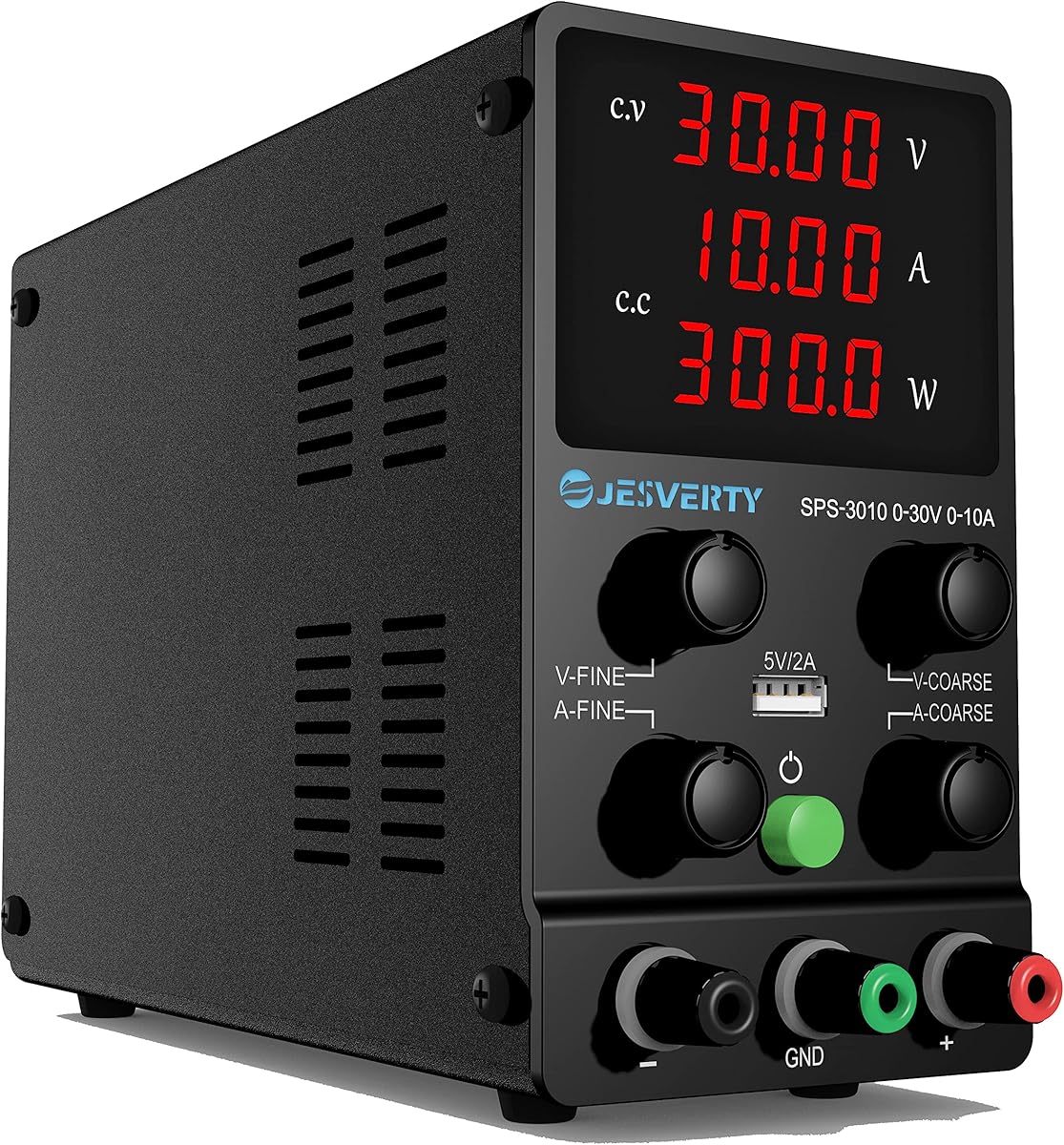
The Jesverty SPS-3010 delivers a balanced feature set at a competitive price. Its compact and lightweight design makes it easy to move between workstations or transport for repairs.
We may earn a commission when you buy through this link, at no additional cost to you.
It features automatic switching between constant voltage and constant current modes, simplifying operation during changing loads. The temperature-regulated fan ensures efficiency without excessive noise.
While the included test leads are basic, they are sufficient for occasional use. The display resolution is high, showing voltage, current, and power clearly for comprehensive monitoring.
For hobbyists and small shops needing a reliable all-rounder, this unit is a great fit. It offers strong safety and portability without unnecessary complexity.
The supply automatically switches between CV and CC modes based on the load, protecting devices without requiring manual mode selection.
The bright 4-digit LED display ensures readings are clearly visible in any lighting condition, reducing errors during precise voltage settings.
We may earn a commission when you buy through this link, at no additional cost to you.
The FNIRSI DPS-150 features a unique IPS flip display that allows multi-angle viewing. This is particularly useful when the unit is placed under other equipment or angled for better visibility.
We may earn a commission when you buy through this link, at no additional cost to you.
It supports PC programmable output and presets, facilitating quick adjustments for repetitive testing. The low ripple ensures clean power delivery, which is vital for sensitive electronics.
When charging batteries, external protection is recommended to prevent reverse current issues. The diverse connection methods support various equipment needs with standard banana and wire terminals.
This unit stands out for its display innovation and PC integration. It is a strong choice for techs who value flexible viewing and precise power delivery.
The 90-degree flip capability allows you to adjust the viewing angle for better comfort and visibility in crowded workspaces.
With under 20mV ripple, the supply delivers stable power that prevents interference during testing of sensitive laptop components.
We may earn a commission when you buy through this link, at no additional cost to you.
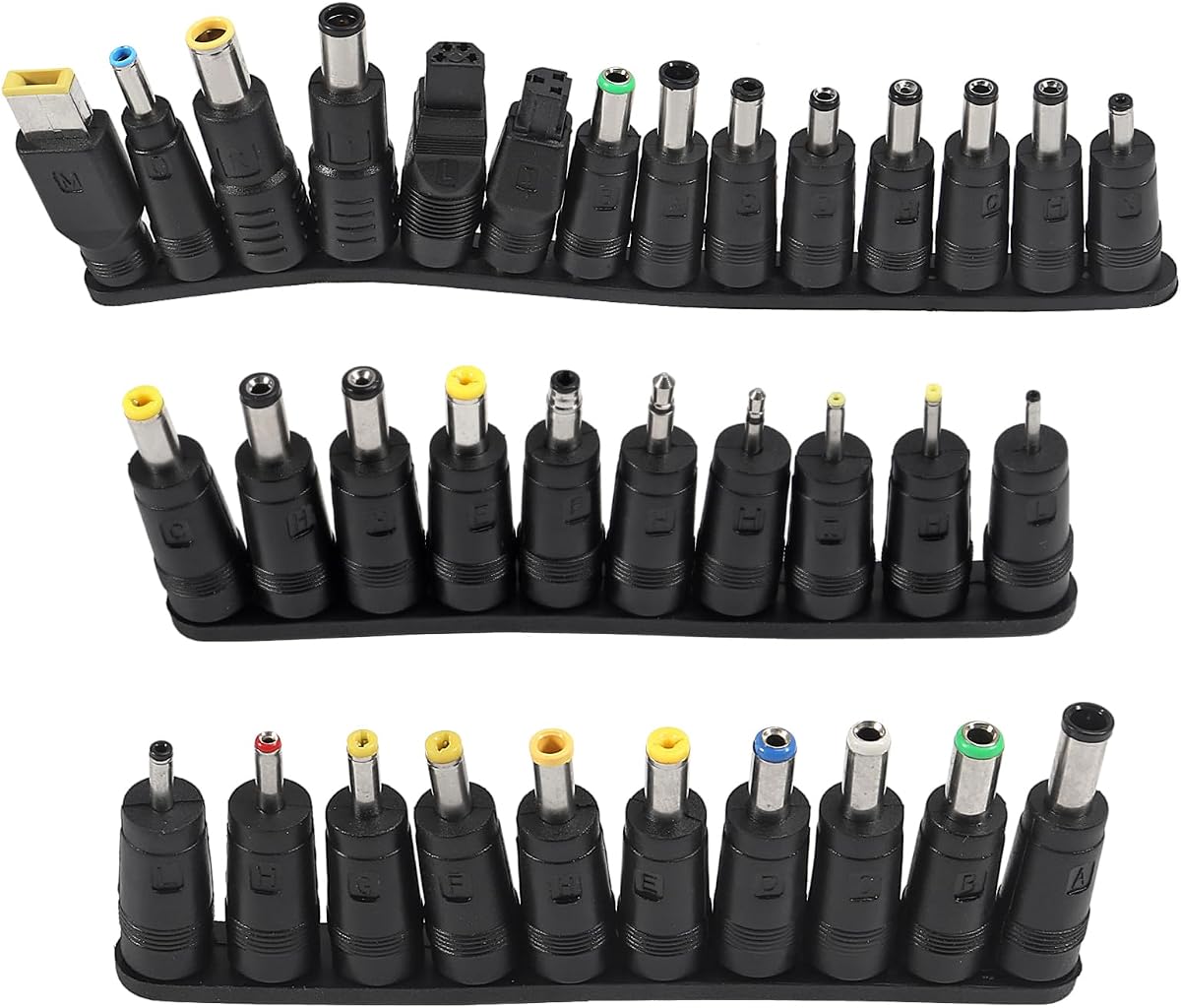
This kit provides a wide range of adapter tips to ensure compatibility with various laptop models. It is an essential accessory for repair shops that need to test devices with different input connectors.
We may earn a commission when you buy through this link, at no additional cost to you.
It includes specific tips for Lenovo, Dell, HP, and more, saving the need to buy individual adapters. The variety ensures you can connect your power supply to almost any device in your inventory.
While it is not a power supply itself, it complements any bench unit by extending its usability. The packaging is organized, making it easy to find the right tip quickly.
For any technician needing universal connectivity, this kit is a valuable addition to your toolbox. It ensures you can test laptops without compatibility interruptions.
With tips for brands like Lenovo, Dell, and HP, this kit ensures you can connect to most common laptop charging ports effortlessly.
The variety of shapes and sizes includes tuning forks and square tips, making it easy to identify and select the correct adapter for your device.
We may earn a commission when you buy through this link, at no additional cost to you.
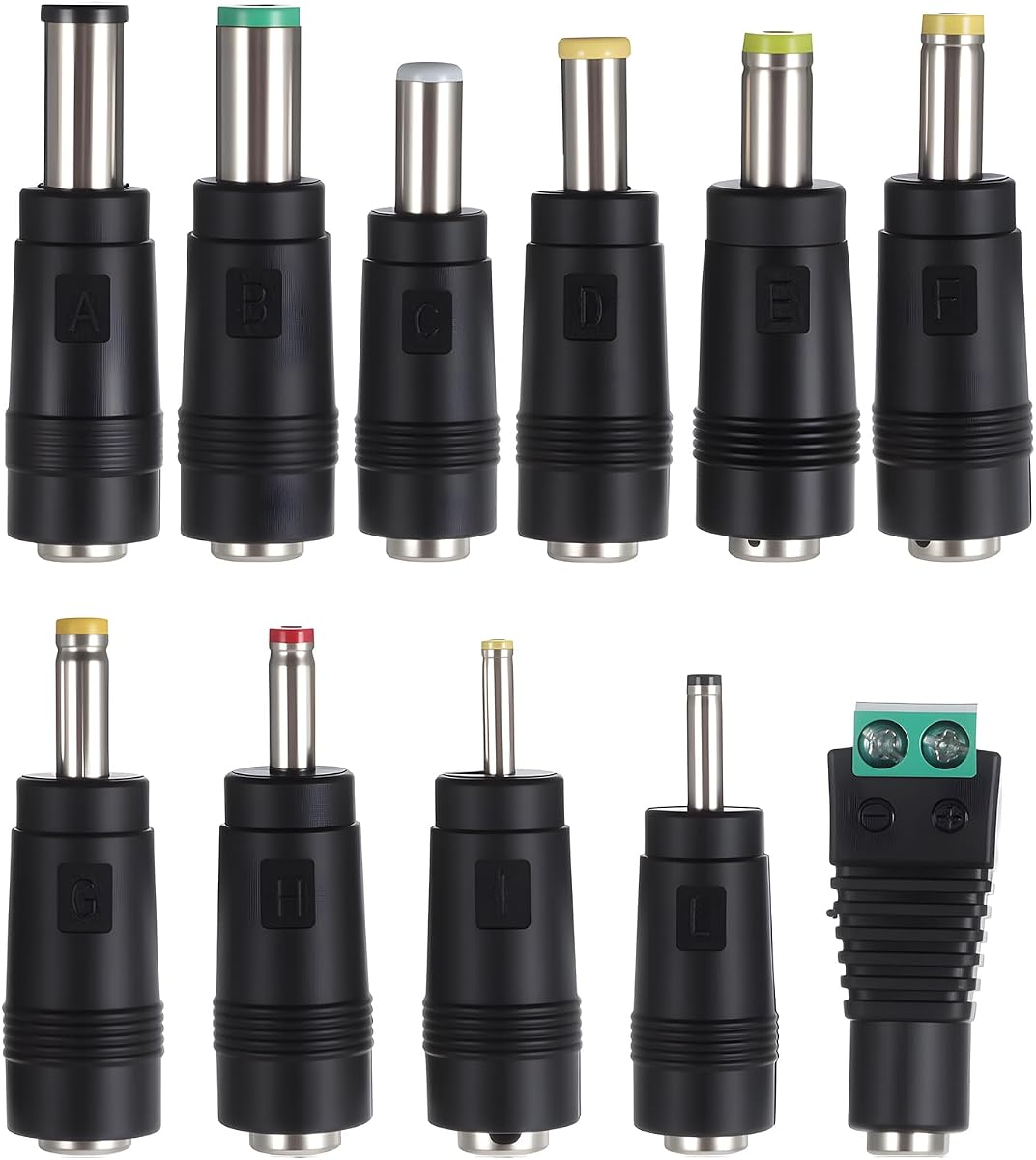
This compact kit offers essential universal tips for connecting devices to a power source. It is designed for on-the-go repairs where space is limited and quick access is necessary.
We may earn a commission when you buy through this link, at no additional cost to you.
It includes common sizes like 5.5mm x 2.1mm and others for LED strips and small appliances. Its lightweight design makes it easy to carry in a repair kit without adding bulk.
While it has fewer pieces than other sets, it covers the most frequently needed connections. Always verify the device interface type before purchasing to ensure compatibility.
For mobile technicians who need a quick solution, this kit is practical and affordable. It provides the flexibility to connect various devices efficiently during field repairs.
The compact design ensures these tips are easy to carry, making them ideal for technicians working outside the shop.
Despite being smaller, this kit includes the most essential connector sizes for laptops and common electronics, ensuring usability for most tasks.
We may earn a commission when you buy through this link, at no additional cost to you.
Selecting the right unit requires balancing technical specs with your daily workflow needs. Here are the critical factors to consider.
Ensure the supply covers at least 0 to 30V and sufficient amps for your needs. Most laptops require under 10A, but higher current options provide headroom for future devices.
Aim for a range that supports standard laptop voltages and provides enough current for testing under load.
Look for displays that show voltage and current with high resolution. Encoder knobs or digital buttons offer better accuracy than traditional rotary potentiometers.
Precise displays prevent setting errors that could harm sensitive components during repair testing.
Overcurrent, overvoltage, and short-circuit protection are non-negotiable. They protect both your expensive supply and the laptops you are working on.
Always choose a model with built-in OCP and OTP to minimize risks during diagnosis.
USB ports for charging devices and PC control for logging data can streamline workflows. Consider how you plan to integrate the supply with your other tools.
Modern connectivity like USB-C can reduce the number of adapters needed on your bench.
A sturdy case and reliable cooling system ensure longevity. Fan cooling is common but can introduce noise; fanless models are quieter but may be bulkier.
Choose a build that withstands daily bench use and matches your environment's noise requirements.
Comprehensive kits with leads, plugs, and manuals save time. Manufacturer support and warranties are crucial for long-term reliability and peace of mind.
Verify that the package includes the connectors you need or if you must buy them separately.
If you repair on-site or have a small space, choose a lightweight and compact unit. Larger supplies offer more stability but take up significant space.
Assess your workspace constraints to decide between a portable unit and a larger bench model.
Check if the supply supports global voltages if you work internationally. Auto-detecting inputs prevent manual switching and reduce setup errors.
Ensure the unit matches your local power standards to avoid using external transformers.
Always connect the output leads before powering on the unit. Ensure polarity matches the device requirements to prevent reverse polarity damage to the laptop circuitry.
Use the current limit feature to protect against shorts. Set the maximum current before starting to avoid burning components if a short circuit is present.
Keep the unit clean and free of dust to maintain proper cooling. Avoid placing heavy objects on top and ensure vents are clear for optimal performance.
Yes, most laptops operate between 12V and 20V. A 30V unit provides the necessary range and headroom for different models. It ensures you can safely test a wide variety of devices without purchasing multiple supplies.
CV stands for Constant Voltage where the supply maintains a fixed voltage while current varies. CC stands for Constant Current where the supply maintains a fixed current while voltage varies. Modern units switch automatically to protect your device.
Yes, digital encoders allow for precise setting without drift. Traditional knobs can wear out over time, while encoders offer a more reliable method to set exact values for testing.
No, laptop chargers provide fixed voltage and current. A DC power supply allows you to adjust settings for testing, which is crucial for diagnosing faulty components effectively.
Yes, it allows you to charge mobile devices without extra wall outlets. Some models also use USB for PC control, enabling advanced testing and logging capabilities.
Set a safe current limit based on the laptop's requirements. Use the OCP feature and monitor the display closely for any spikes that could indicate a short circuit.
Most units include basic test leads or alligator clips. However, heavy duty leads might be necessary for sustained high current usage in professional environments.
Look for at least a one-year warranty with good customer support. Reputable brands often offer better service terms to cover defects or malfunctions during use.
The top picks offer a range of features to suit different repair needs. From the versatile precision of the first pick to the value of the budget options, there is a unit for every workspace.
Prioritize safety features and display accuracy when making your choice. These factors directly impact your ability to diagnose issues quickly without risking hardware damage.
Remember to check current availability and verify compatibility with your specific devices before buying. Investing in the right power supply ensures longevity and efficiency in your repair work.