
2×2 4k Video Wall Controller
4.6Editor score
Affordable price point
HDMI and DVI input
Includes memory function
This guide compares the top HDMI Video Wall Controllers for multi-screen setups, evaluating resolution, features, and compatibility to help you choose the
Creating a seamless multi-screen display requires a reliable HDMI Video Wall Controller to split and manage signals across multiple monitors. These devices allow you to combine four or more screens into a single large canvas for presentations, advertising, or monitoring purposes.
We evaluated ten top-rated models based on their resolution support, display modes, and ease of setup. Each product was analyzed for its ability to handle 4K inputs, audio extraction capabilities, and control options like RS232 or remote interfaces.
Each pick in this list highlights specific strengths such as bezel adjustment or edge masking. Please note that availability and pricing may change over time, so verify the latest details on the manufacturer or retailer site before purchasing.
4.6Editor score

4.8Editor score

4.2Editor score
The following table provides a side-by-side comparison of the ten selected HDMI Video Wall Controllers. Review the specifications to find the model that best fits your display configuration and technical requirements.



This J-Tech Digital processor is a top choice for creating seamless video walls. It holds a strong rating and supports splitting one 4K input across four displays. The device offers essential features like audio extraction and bezel adjustment.
We may earn a commission when you buy through this link, at no additional cost to you.
The standout quality is its ability to toggle between eight distinct display modes. You can arrange screens in 2×2 or linear formats like 1×4. The edge masking function helps correct image distortion caused by bezels, ensuring a cleaner look.
While the outputs are fixed at 1080p, this is acceptable for most standard video wall setups. The 180-degree rotation works well in 2×2 mode to align images properly. However, note that splitter mode does not support rotation.
Buy this if you need a reliable processor with flexible modes and strong support. It is ideal for advertising and information display. The combination of audio ports and video features makes it a versatile pick for professionals.
The eight modes allow you to adapt the wall layout to your room size or content needs instantly.
Edge masking allows fine-tuning of pixel edges to minimize gaps between screens and improve aesthetics.
We may earn a commission when you buy through this link, at no additional cost to you.
This controller is an excellent budget option for basic video wall needs. It allows you to split 4K signals across four screens. Despite the lower cost, it includes useful features like DVI support and memory functions.
We may earn a commission when you buy through this link, at no additional cost to you.
The device offers 11 splicing modes which provides good flexibility for different layouts. The memory function remembers your last settings so you do not have to reconfigure after power loss. This saves time during daily operations.
One limitation is that the HDMI outputs are fixed at lower resolutions. If you need full 4K output on all screens, this might not be the best choice. However, for text and simple graphics, it performs well.
Consider this if you are building a video wall on a tight budget. It is suitable for retail displays or simple information boards. The inclusion of DVI input adds value for older equipment setups.
Get essential video wall functionality without spending a fortune, making it great for small businesses.
Memory function ensures you do not lose your preferred layout after turning the device off.
We may earn a commission when you buy through this link, at no additional cost to you.
This premium model is designed for advanced users needing high-performance routing. It supports 4K60Hz input and offers seamless switching between sources. The addition of LAN web control allows for remote management via a browser.
We may earn a commission when you buy through this link, at no additional cost to you.
The seamless switching feature ensures no picture loss when changing sources, which is vital for live events. It also supports upscaling and downscaling to match output requirements. Multiviewer presets allow you to view all sources on one screen.
While powerful, this unit is more expensive than standard controllers. The setup may be complex for beginners compared to plug-and-play models. It is best suited for professional control rooms or high-end installations.
Choose this if you need enterprise-grade features like LAN control and high bandwidth support. It is ideal for environments where uptime and signal quality are critical. The investment ensures a robust and flexible system.
LAN web control lets you adjust settings without physical access to the device location.
Seamless switching prevents blackouts or artifacts when switching inputs, maintaining professional presentation quality.
We may earn a commission when you buy through this link, at no additional cost to you.
OREI offers a versatile controller that accepts both HDMI and USB-C inputs. This makes it compatible with modern laptops and older media sources. The device handles 4K input well and provides solid audio extraction capabilities.
We may earn a commission when you buy through this link, at no additional cost to you.
Audio support is comprehensive, including Dolby Digital and DTS formats. You can route audio to external speakers via optical or analog outputs. The RS-232 interface allows for integration into larger automated control systems.
It does not support HDR10, so HDR content will be downconverted. This is a limitation if you are playing high dynamic range media. However, for standard SDR content, the performance is reliable.
This controller is a strong choice for mixed-source environments. If you connect laptops and gaming consoles, the USB-C option is beneficial. Ensure you check your content requirements against the HDR limitations.
The USB-C port allows direct connection to modern devices without additional adapters.
Supports multiple audio formats ensuring sound quality matches your video wall content.
We may earn a commission when you buy through this link, at no additional cost to you.
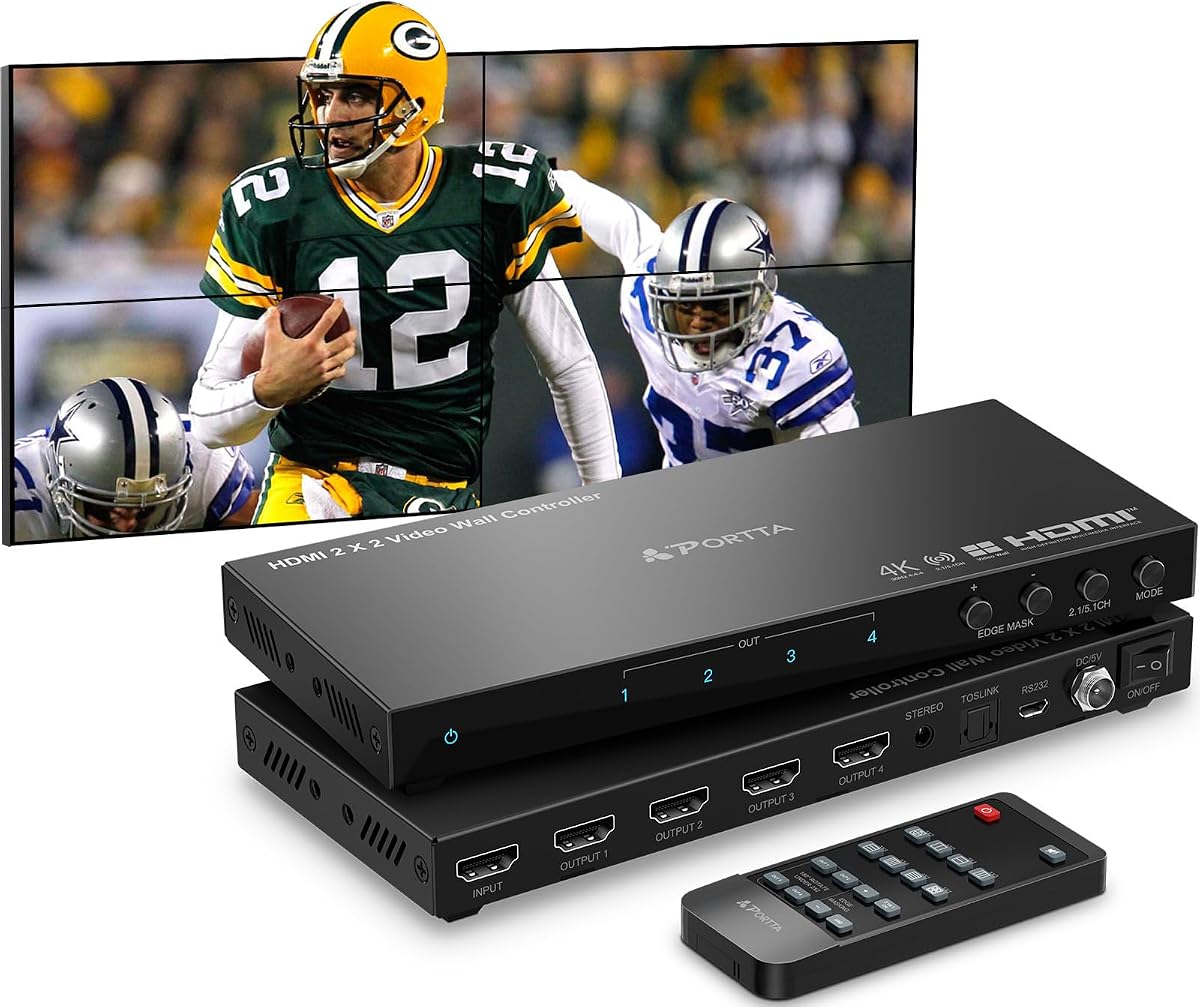
PORTTA provides a controller with an extensive list of display modes. It supports 11 splicing configurations, giving you flexibility in arranging your screens. The device also includes a generous two-year warranty for peace of mind.
We may earn a commission when you buy through this link, at no additional cost to you.
The portrait display support is useful for vertical signage or specific layout needs. Edge masking helps eliminate black bars and distortion around the screen borders. You can manage settings via remote or RS232 connection.
Output is limited to 1080p regardless of input resolution. This means you will not get full 4K output on the wall. However, it is efficient for general display purposes and maintains smooth video playback.
Select this if you want detailed layout control and a solid warranty. It is great for installations where screen orientation varies. The edge masking tool is a valuable addition for maintaining a professional look.
The two-year warranty provides extra protection compared to the standard one-year offer from many competitors.
Portrait mode support allows for vertical displays that suit narrow spaces or digital signage.
We may earn a commission when you buy through this link, at no additional cost to you.
This OREI model focuses on compact design with strong input support. It accepts 4K60Hz signals and manages bezels effectively. The dual voltage power supply makes it suitable for international travel and use.
We may earn a commission when you buy through this link, at no additional cost to you.
Bezels can be adjusted to minimize visual gaps between screens. This improves the overall viewing experience on large walls. Optical audio output ensures you can connect to external sound systems easily.
Outputs are fixed at 1080p, which limits high-fidelity video usage. This is standard for many budget controllers but reduces sharpness on 4K screens. Still, it handles standard content reliably.
Buy this if you need a portable and efficient video wall solution. It is ideal for touring exhibitions or international displays. The bezel adjustment feature adds significant value for tight screen arrangements.
The dual voltage supply allows you to use the device in different regions without extra transformers.
Bezel adjustment helps make the video wall look like a single cohesive screen.
We may earn a commission when you buy through this link, at no additional cost to you.
This device offers both video wall splitting and full matrix switching. You can switch four sources to four displays independently. It supports advanced audio codecs like Dolby TrueHD for high-quality sound reproduction.
We may earn a commission when you buy through this link, at no additional cost to you.
The web control interface allows remote management of the matrix. This is essential for centralized control rooms where devices are mounted remotely. Advanced EDID ensures source devices send the correct resolution.
Setup can be complex due to the dual functionality of matrix and video wall. It requires more technical knowledge to configure correctly. However, once set up, it provides significant flexibility.
Choose this if you need both video wall and matrix switching features. It is best for control rooms or command centers. The advanced audio and web control justify the higher price for professionals.
The ability to switch multiple sources to multiple screens adds significant versatility to your setup.
Web control lets you manage settings without physically accessing the hardware.
We may earn a commission when you buy through this link, at no additional cost to you.
ISEEVY offers a controller that supports 4K outputs. This is rare at this price point and ensures better image quality. The input options include HDMI and USB-C for wide compatibility.
We may earn a commission when you buy through this link, at no additional cost to you.
The controls are simple with just three buttons or a remote. This makes it easy to switch modes quickly. It also supports 180-degree rotation for flexible screen mounting.
Audio ports are minimal compared to other models. You might need to rely on HDMI audio extraction. The interface is basic, which is fine for quick setups but lacks advanced tweaks.
This is a solid choice if you need 4K output on your wall. The USB-C input is a modern convenience. Ensure your audio needs match the HDMI extraction capabilities.
Outputs matching input resolution ensure full detail is displayed on each screen.
Simple buttons allow quick mode switching without navigating deep menus.
We may earn a commission when you buy through this link, at no additional cost to you.
This controller supports USB playback, which adds standalone functionality. You can plug a USB drive to play video directly. It also offers image settings like brightness and color temperature adjustments.
We may earn a commission when you buy through this link, at no additional cost to you.
USB auto display makes it easy to run digital signage without a computer. The border adjustment removes black edges for a cleaner look. It supports 4K60Hz input well.
Navigation can be complex without a PC setup tool. Manual adjustments might take time to perfect. However, the direct USB playback is a unique and convenient feature.
Choose this if you want a standalone media player and controller. It is great for simple displays where a PC is not available. Ensure you test USB formats before full deployment.
USB playback eliminates the need for a separate media source like a computer.
Adjust brightness and color to fit the ambient lighting of your room.
We may earn a commission when you buy through this link, at no additional cost to you.
This model is unique because it supports six HDMI outputs. It is ideal for larger walls with six screens. It supports various modes like 2X3 and 3X2 for large layouts.
We may earn a commission when you buy through this link, at no additional cost to you.
The input supports HDMI and USB-C at 4K60Hz. This ensures high-quality signal feeding. It also includes 180-degree rotation for flexible mounting needs.
Due to the extra outputs, setup might be more involved. You need to ensure all six screens are aligned properly. It is a specialized choice for larger projects.
Select this if you need a six-screen video wall. The support for complex modes like 2X3 is rare. Ensure your power supply and space accommodate the larger system.
The six output ports allow you to build a significantly larger display wall than typical four-screen models.
Support for 2X3 modes gives you rectangular video wall options.
We may earn a commission when you buy through this link, at no additional cost to you.
Choosing the right controller requires evaluating technical specifications and your specific layout needs.
Ensure the controller supports your source resolution. Some models support 4K60Hz input but downscale output to 1080p. Check if you need full 4K output on all screens.
Match the input and output capabilities to your screens for consistent image quality.
Standard controllers often support four outputs. However, some models support more. Choose a unit that matches the number of screens you plan to use.
Verify the output count before purchasing to avoid compatibility issues.
Look for devices offering multiple display modes like 2×2, 1×4, or 3×1. Flexible modes allow you to change layouts for different content.
Check that the model includes specific modes you need for your project.
Bezel adjustment helps align images across screen borders. Edge masking can crop black bars caused by physical screen edges. These features are vital for a seamless look.
Prioritize controllers with image adjustment tools for a professional video wall.
Many models extract audio via Optical or 3.5mm jacks. This is useful if your TVs lack good speakers. Ensure the audio format matches your sound system.
Check audio ports to ensure they meet your sound needs.
Control can be via remote, buttons, or RS-232. RS-232 is essential for integration with control systems. Web control is useful for remote management.
Select the control method that fits your installation environment.
Some units support HDMI and USB-C. This is important for connecting modern laptops without adapters. Ensure the ports match your sources.
Verify input types to avoid needing extra adapters.
Reliable controllers often feature 24×7 stability. Check power requirements and voltage. Dual voltage is useful for travel. Ensure the unit runs cool.
Prioritize reliability and power features for long-term use.
Connect your source device to the input port using a high-quality HDMI or USB-C cable. Ensure the source device resolution matches the supported input of the controller.
Connect each TV screen to an output port on the controller. Use high-speed HDMI cables to avoid signal degradation. Turn on all screens to detect connections.
Use the remote or front panel to select your desired display mode. Adjust bezels and rotation settings as needed. Keep firmware updated if web control is supported.
Not all models support 4K output. Many budget units accept 4K input but output 1080p. Check the product specifications to see if outputs match your TV resolution.
Yes, many controllers support USB-C or HDMI which Macs use. You may need an adapter if your Mac uses a different port. Ensure the controller supports the resolution your Mac outputs.
Video wall controllers are independent devices. They work with smart TVs as sources but do not require smart features. They control video output only and ignore TV software settings.
Bezel adjustment shifts the image to align with screen bezels. It minimizes the visual gap caused by the screen frame. This creates a seamless single large image look.
High-speed HDMI cables are recommended. Ensure cables are rated for the resolution you plan to use. Longer cables may require boosters to avoid signal loss.
Yes, provided the controller supports seamless switching. Models with matrix capabilities are better for switching sources quickly. Ensure the model supports 4K60Hz for high-quality live feeds.
We reviewed ten top-rated controllers ranging from budget options to advanced matrices. The J-Tech Digital models stood out for their balance of features and support.
Prioritize models that match your resolution needs and output count. Check for bezel adjustment and audio extraction to ensure a clean setup.
Always verify current availability and compatibility before purchasing. Technical needs vary and checking details ensures you get the right hardware.