
TR Trofeo Vision 9.16in LCD PC Sensor Panel
4.0Editor score
9.16 inch IPS display
USB Type-C connection
Customizable static and video visuals
PC thermal monitoring displays offer a sleek way to watch hardware stats in real time. They turn system data into vibrant visuals that fit inside or outside your case for quick access during gaming or work.
We evaluated ten models based on screen quality, software flexibility, mounting options, and ease of setup. Each pick balances performance with style to help you choose the right panel for your specific build needs.
Every review highlights key strengths and trade-offs so you can decide based on your priorities. Note that prices and availability change frequently, so always check the current listing before making your final purchase decision.
4.0Editor score

4.2Editor score

4.4Editor score
As an Amazon Associate we earn from qualifying purchases.
This side-by-side comparison lists every model we reviewed to help you see key differences at a glance. Use it to match screen size, resolution, software features, and mounting styles with your build requirements.


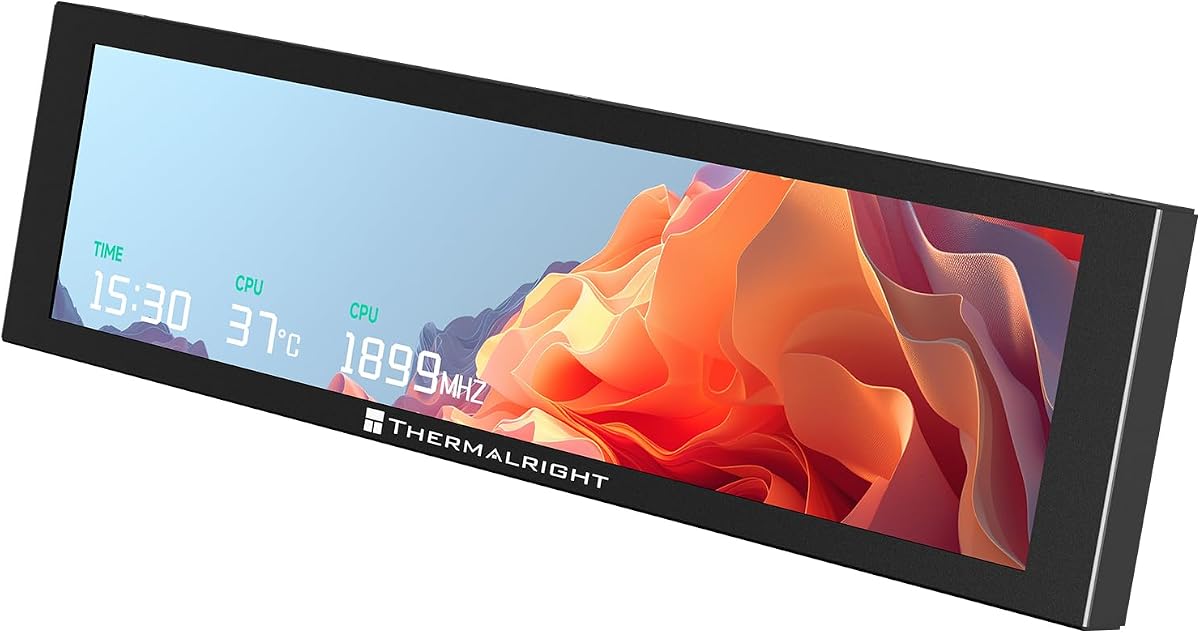

This Thermalright Trofeo Vision LCD AIO Display stands out as the top choice for users seeking a reliable and visually appealing way to monitor system stats. It earns its lead thanks to its crisp screen and straightforward setup process that appeals to both new and experienced PC builders.
We may earn a commission when you buy through this link, at no additional cost to you.
The 9.16-inch panel delivers sharp visuals at 1920×480 resolution, making it easy to read temperatures and fan speeds even through tempered glass. Its USB-C connection simplifies cabling while TRCC software lets you personalize layouts and themes without needing complex tools.
One trade-off is that the software must run in the background to maintain display functionality, which uses minimal resources but requires attention on lower-end systems. Still, this small constraint is acceptable for the flexibility and clarity you gain during daily use or gaming.
Buyers who want a balanced mix of performance and style will find this model ideal. It fits neatly inside or outside cases, supports custom visuals, and keeps vital hardware data visible at all times.
The 1920×480 resolution ensures text and graphs remain legible even from side angles through glass panels.
TRCC app offers preset themes and DIY options to match your build aesthetic without coding knowledge.
We may earn a commission when you buy through this link, at no additional cost to you.
The darkFlash V92 delivers strong value by offering a bright IPS panel with versatile connection choices that suit different case designs. Its lightweight build and flexible mounting make it a solid pick for builders who need a practical display without high costs.
We may earn a commission when you buy through this link, at no additional cost to you.
Users benefit from the ability to connect via external USB or internal 9-pin headers, keeping GPU ports free. Station Space software supports a wide range of content types from weather to custom GIFs while remaining free to use.
A potential limitation is the need for sufficient clearance inside the case, which may affect smaller ITX builds. Additionally, macOS and Linux users cannot utilize this display since it relies on Windows-only software drivers.
For those prioritizing versatility and cost efficiency, this model offers a compelling combination of features. It provides clear visuals and multiple mounting paths without demanding extra GPU resources.
Choose between USB-C for external setups or internal 9-pin headers for cleaner cable management.
Station Space handles JPG, GIF, MP4, and widgets to keep your display dynamic and engaging.
We may earn a commission when you buy through this link, at no additional cost to you.
The Lian Li SM088X stands out as the premium choice for users seeking advanced lighting integration and top-tier software control. Its diffused ARGB frame creates a cohesive look with the rest of your RGB ecosystem while delivering sharp hardware data.
We may earn a commission when you buy through this link, at no additional cost to you.
The 60Hz IPS panel offers 500-nit brightness for clear readability even in well-lit rooms. L-Connect 3 lets you upload personal media, adjust temperature units, and sync lighting effects with your system for a polished unified appearance.
While it costs more than other models, the build quality and included mounting flexibility justify the expense for high-end builds. The only minor drawback is reliance on USB power, which may add one more cable to your management tasks.
Enthusiasts focused on aesthetics and customization will find this screen worth the investment. It combines practical monitoring with a visually striking design that elevates any workstation or gaming setup.
The ARGB strip synchronizes with other components through L-Connect 3 for a seamless visual experience.
Bracket allows height and tilt adjustments to optimize visibility from any seating position.
We may earn a commission when you buy through this link, at no additional cost to you.
This larger Thermalright Trofeo Vision model gives you more room to view detailed system information at once. The 11.3-inch panel keeps the same slim profile and resolution as smaller variants but provides a broader canvas for complex layouts and widgets.
We may earn a commission when you buy through this link, at no additional cost to you.
Users gain better visibility for multiple data points like network speed and GPU loads without crowding the display. The USB-C connection ensures straightforward installation while TRCC software maintains consistent customization options across the lineup.
The main trade-off is higher space requirements which may not suit compact cases. Some users also report less polished software experiences compared to other brands, which could affect long-term satisfaction despite the hardware quality.
For large EATX or open-air builds where space isn't limited, this display is a strong fit. It balances size with practicality for those who prioritize data depth over compact design.
The wider panel allows more widgets and graphs on screen at once for deeper system insights.
Slim 14mm thickness keeps it unobtrusive even with the increased screen footprint.
We may earn a commission when you buy through this link, at no additional cost to you.
The white variant of the Lian Li SM088X matches clean or light-themed builds while offering all the premium features of the black version. It provides the same high-resolution panel, ARGB lighting, and powerful software control to keep system data visible and stylish.
We may earn a commission when you buy through this link, at no additional cost to you.
Users benefit from L-Connect 3 features that allow custom uploads, temperature unit changes, and full RGB synchronization. The screen stays bright at 500 nits and maintains sharp text readability through tempered glass panels.
Installation requires a USB connection for power, but the flexible mounting bracket simplifies positioning. The only minor downside is its higher cost compared to basic monitors, yet this is justified for matching build aesthetics without compromise.
This model is ideal for white PC enthusiasts seeking top-tier performance and looks. It ensures your thermal display blends perfectly with other components while providing clear real-time hardware insights.
Designed to complement white cases and RGB setups for a seamless visual integration.
Retains all features of the black variant including brightness and customization tools.
We may earn a commission when you buy through this link, at no additional cost to you.
The TR Trofeo Vision delivers excellent value as the most affordable option without sacrificing key performance traits. It offers the same resolution and software capabilities as pricier models, making it a smart pick for budget-conscious builders.
We may earn a commission when you buy through this link, at no additional cost to you.
Setup is straightforward with USB-C for single-cable power and data. TRCC software enables dynamic visuals, GIF support, and temperature monitoring that adapts to your style. The slim profile fits easily in tight spaces while keeping cables tidy.
One limitation is that the software must remain active to maintain the display, which is standard but worth noting. Additionally, mounting accessories are minimal compared to more expensive kits, so you may need extra hardware for custom setups.
For users seeking an entry-level panel that still supports advanced features, this model fits well. It brings system monitoring to the forefront without a steep investment cost.
Gets you full customization and clarity at the lowest price point in this comparison.
Slim 17mm height ensures it slides into tight case spaces without obstruction.
We may earn a commission when you buy through this link, at no additional cost to you.
This mini monitor excels for users who prefer external placement with a included stand rather than internal mounting. Its compact design and multi-angle stand allow flexible positioning on desks while maintaining clear visibility of vital system data.
We may earn a commission when you buy through this link, at no additional cost to you.
The screen uses USR software to show CPU and GPU stats alongside animated themes and custom layouts. Anti-scratch glass protects the display from daily wear and keeps colors vibrant even over long use periods.
While it supports internal mounting via screws, the stand adds stability for non-case use. However, customization options are more limited compared to other models and the software must remain active during sessions.
If you want an external monitoring display that is easy to adjust and durable, this is a top contender. It offers a simple setup with high user satisfaction ratings for both gaming and office work.
Multi-angle stand supports both landscape and portrait modes for flexible desk positioning.
Anti-scratch glass coating extends screen life against accidental contact or dust.
We may earn a commission when you buy through this link, at no additional cost to you.
The MT-VIKI screen stands out by offering extended desktop mode, which turns the bar screen into a true secondary workspace for widgets and apps. It also includes a game mode that pauses animations to keep system resources stable during gaming sessions.
We may earn a commission when you buy through this link, at no additional cost to you.
Setup uses a single USB connection with included cables for internal or external mounting. The stand allows flexible positioning while the software supports dynamic themes and custom layouts. Its compact design fits well in tight builds or on desktops.
While the extended mode is innovative, it requires software updates to function fully. Also, it supports Windows 64-bit only and does not work on Mac or Linux. This limits compatibility but suits most PC gamers.
This model is ideal for users who want more than just monitoring and need a flexible secondary display. It adds practical value for multitasking and performance optimization without heavy GPU load.
Drag windows or widgets onto the screen for multitasking without using GPU ports.
Game mode pauses animations to reduce CPU usage and maintain stable in-game FPS.
We may earn a commission when you buy through this link, at no additional cost to you.
This Thermalright model uses a magnetic design that makes installation and removal extremely fast on compatible metal cases. It delivers the same high-resolution display and TRCC software features as other variants but prioritizes flexible placement options.
We may earn a commission when you buy through this link, at no additional cost to you.
Users appreciate the ability to reposition the screen easily without drilling or adhesive. The metal frame adds durability and supports full-color IPS visuals with stable viewing angles. TRCC software allows dynamic themes and layout customization for personalization.
The main limitation is the need for a metal surface, which restricts use to specific case types. Some users report lower software polish compared to competitors, which could affect long-term satisfaction and ease of configuration.
For those prioritizing quick access and flexible mounting, this design offers distinct advantages. It is best suited for modders who frequently adjust their setup or prefer tool-free builds.
Strong magnets secure the panel to metal surfaces instantly for fast adjustments.
IPS panel ensures consistent color and text clarity from various viewing angles.
We may earn a commission when you buy through this link, at no additional cost to you.
This Thermalright Trofeo Vision model offers a reliable and consistent experience for users who want a standard AIO display with solid ratings. It delivers clear visuals and strong software control while maintaining a slim footprint for flexible mounting.
We may earn a commission when you buy through this link, at no additional cost to you.
The USB-C connection streamlines installation and TRCC software lets you adjust layouts and themes easily. Its design works well for both internal and external setups without needing extra ports or drivers beyond standard system requirements.
Like other models it requires software to run actively but this is manageable on most systems. The lack of ARGB lighting may be a drawback for RGB enthusiasts but the value and stability remain strong across different cases.
Buyers seeking a dependable and well-reviewed display with good performance will find this model a safe choice. It combines ease of use with practical monitoring features for daily system management.
Earns strong satisfaction scores from buyers who value reliability and clear visuals.
Simple USB-C connection ensures quick installation without complex driver steps.
We may earn a commission when you buy through this link, at no additional cost to you.
Choosing the right thermal monitoring display depends on your case layout, software preferences, and visual priorities. The following factors help you narrow down options based on build type and usage needs.
Most displays range from 8.8 to 11.3 inches with ultra-wide resolutions like 1920×480 or 1920×462. Larger screens offer more space for widgets but require more mounting clearance. Higher pixel counts ensure text remains sharp even through glass panels.
For most builds, 9.16 or 9.2 inches balances readability and space efficiency. Match the size to your case's interior or exterior mounting zone for best visibility.
Displays use either USB Type-C, USB-A, or internal 9-pin headers. USB-C simplifies cabling with single-wire power and data. Internal headers save external ports but need motherboard compatibility.
Choose USB-C if you want easier setup. Pick internal headers to keep external ports free for other peripherals.
Different vendors offer unique apps like TRCC, Station Space, L-Connect 3, or USR. These control themes, layouts, and content types. Some allow video playback while others focus on data widgets.
Check software features before buying. Ensure it supports dynamic content, theme changes, and system data formats you need.
Some models include flexible brackets, magnetic mounts, or stands. Others need adhesive or screws. Magnetic mounts allow quick removal. Stands suit external desk placement.
Match mounting style to your case and placement goal. Bracketed screens offer more tilt adjustment.
A few panels include ARGB lighting that syncs with your build. Others focus on clear data display. Match lighting to your existing RGB ecosystem for visual cohesion.
Pick ARGB if color sync matters. Otherwise, prioritize screen clarity and mounting fit.
All tested models work on Windows 64-bit. Most do not support macOS or Linux due to software limits. Check compatibility before purchase.
Ensure your system meets OS requirements. Software must run in background to function.
Most displays use aluminum or metal frames with anti-scratch glass. Some include adhesive pads or magnetic tech. Durability affects long-term use especially in high-traffic builds.
Look for solid frames and protective glass. Strong materials prevent wear and damage.
USB power keeps energy use low. The displays draw power from existing ports or headers. Check wattage to avoid overloading USB hubs.
Select displays that use minimal USB power. Most models stay within safe power limits.
Start by connecting the display to USB or motherboard header per instructions. Ensure all cables are secure and power is connected properly for first use.
Install vendor software and run system checks to detect sensors. Customize layouts, themes, and data points to match your build style and monitoring needs.
Keep software active while using the display. Clean screen surface with microfiber cloth. Avoid strong chemicals or heavy impacts during use.
No, these panels function as secondary sensor displays and lack full video output like HDMI or DisplayPort. They are designed to complement your main monitor by showing system stats instead of running desktop tasks.
Most models draw power via USB Type-C, USB-A, or motherboard headers. No external power adapter is needed for typical cases as long as the USB port or header provides enough power.
Yes, many models fit inside cases if clearance and mounting options match. Check dimensions and bracket types. Some require fan slots or specific panels.
Each display includes vendor software like TRCC or L-Connect 3. Install it to configure layouts, enable sensor data, and manage themes or content updates.
Most work with ATX and micro-ATX cases but may be too large for compact ITX builds. Confirm mounting clearance and USB header availability before purchase.
These displays currently support Windows 64-bit only. macOS and Linux compatibility is not supported due to software dependencies on specific system APIs.
The top picks offer strong balances of resolution, software features, and mounting styles. The Thermalright Trofeo Vision leads for value while Lian Li stands out for RGB integration.
Consider your case size, USB availability, and software needs before choosing. Smaller builds benefit from compact designs while RGB users may prefer models with lighting support.
Prices and availability vary so check current listings before purchasing. Regular reviews keep this guide updated with the latest options for your build.