
HDMI KVM Switch 3 Monitors 2 Computers 4K@60Hz KVM Switches
4.5Editor score
Supports 4K@60Hz output
Includes 4 USB 3.0 ports
Simple panel button switching
This guide compares the top 10 KVM Switch for Triple Monitors models available in October 2026 based on resolution support, USB sharing, and switching speed
Finding the right KVM Switch for Triple Monitors can transform your dual-computer workspace into a seamless productivity hub. You need a device that handles high resolutions without lag while sharing peripherals like keyboards and mice across multiple screens.
We compared ten leading models based on resolution support, port variety, and switching mechanisms. Our analysis focuses on how well each unit manages 4K and 8K outputs alongside USB 3.0 data transfer capabilities for modern workflows.
Each pick below highlights key strengths and potential limitations to help you decide. Remember that prices fluctuate frequently, so check the current listing details before making your final purchase decision for your setup.
4.5Editor score

4.9Editor score

4.9Editor score
The table below provides a side-by-side comparison of the top ten models. It highlights key specifications such as maximum resolution, supported ports, and switching methods to help you identify the best fit for your specific hardware needs quickly.




This AV Access KVM Docking Station stands out as the top choice for complex setups requiring both performance and convenience. It earns the Editor's Choice award for integrating triple monitor control with full docking station capabilities in one robust device.
We may earn a commission when you buy through this link, at no additional cost to you.
The standout feature is its ability to handle up to 100W power delivery via a single USB C connection for laptops. This means your laptop stays powered while you switch between it and a desktop PC without extra chargers cluttering your desk space.
While it offers impressive connectivity including 10Gbps USB transfer and network pass-through, note that MacBooks are limited to mirrored displays. Additionally you must purchase HDMI and DisplayPort cables separately as they are not included with this specific version.
This model is ideal for professionals who need to keep files transfers and background downloads running on one computer while working on another. If you value cable simplicity and high-end specs this is the premium solution to consider first.
The single USB C cable handles video data and up to 100W charging to reduce desk clutter significantly.
The shared Ethernet connection stays active on both systems ensuring background tasks continue without interruption.
We may earn a commission when you buy through this link, at no additional cost to you.
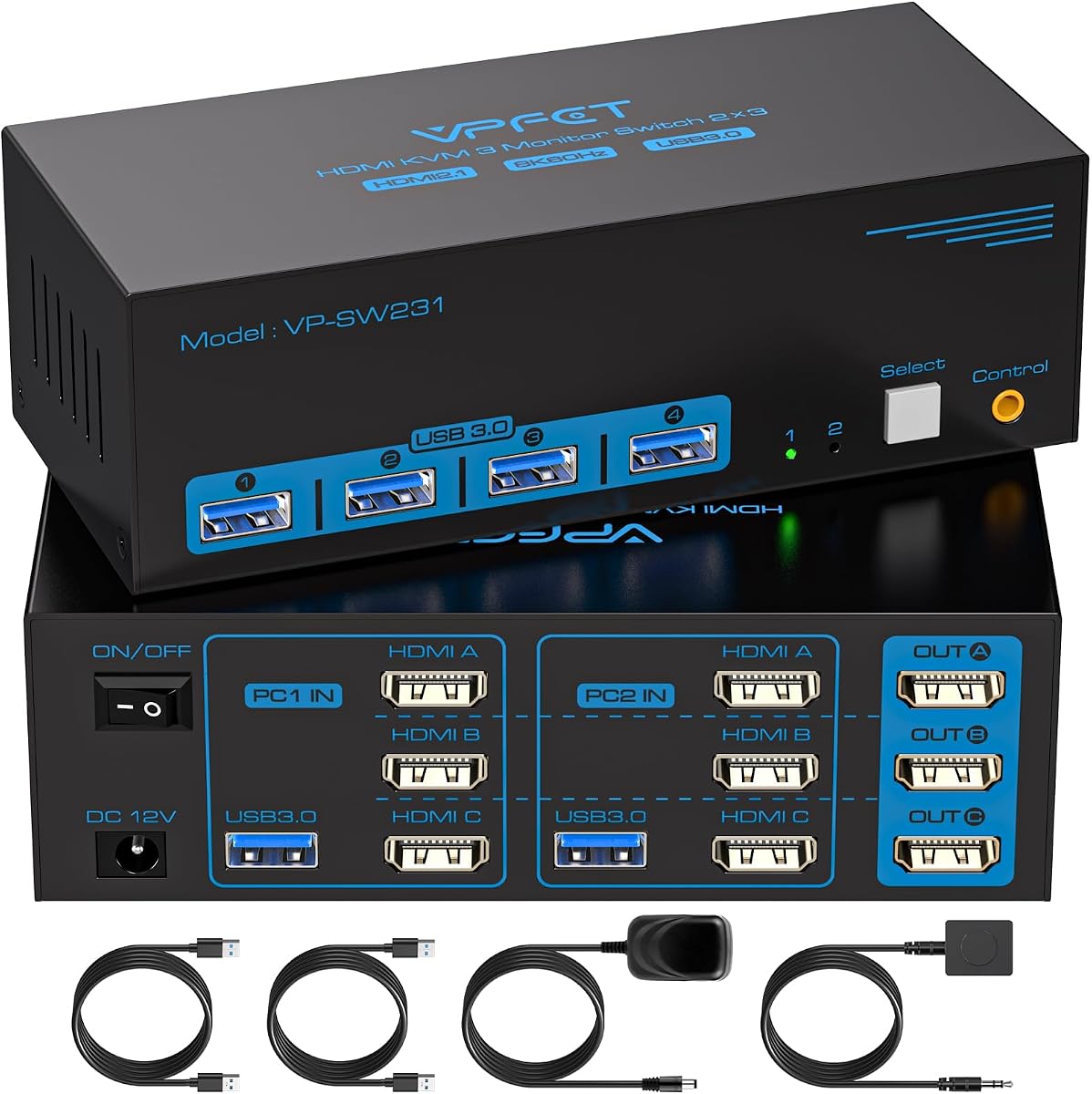
This HDMI KVM Switch offers a cost-effective entry into triple monitor management without sacrificing essential features. It earns the Best Budget badge by delivering 4K@60Hz performance and USB 3.0 sharing at a very competitive price point for home users.
We may earn a commission when you buy through this link, at no additional cost to you.
You get four USB 3.0 ports for peripherals like keyboards and mice ensuring fast data transfer rates up to 5Gbps. The unit supports both panel button and wired controller switching giving you flexibility in how you manage your workspace layout.
Keep in mind that keyboard hotkeys are not supported so you must rely on physical buttons or the remote to switch computers. You also need to ensure each PC has three HDMI outputs or use compatible adapters as this model does not handle conversions well.
For users on a tight budget who still need reliable 4K output this unit is an excellent starting point. It simplifies your desk setup by allowing two computers to share a single set of monitors and USB devices efficiently.
Immerse yourself in crystal-clear images with support for resolutions up to 4K@60Hz across all three screens.
Choose between panel buttons or an external wired controller to place the switch wherever it fits best.
We may earn a commission when you buy through this link, at no additional cost to you.
The UGREEN 8K KVM Switch delivers top-tier performance for enthusiasts needing the highest visual fidelity available today. It claims the Best Premium title with its robust aluminum build and support for 8K@60Hz and 4K@240Hz across three monitors.
We may earn a commission when you buy through this link, at no additional cost to you.
Gaming and creative workflows benefit greatly from support for VRR FreeSync and G-Sync which eliminate screen tearing and stuttering. The two DisplayPort 1.4 ports and one HDMI 2.1 port ensure compatibility with the latest high-resolution panels and graphics cards.
Be aware that this unit does not support EDID emulation which might cause detection issues with certain monitors. Also to achieve maximum 8K resolution your cable lengths must stay within 2 meters and both PC and monitor must support the output.
If you need uncompromised visual quality for design or gaming this switch is the ultimate choice. It combines premium build quality with high-end feature support to ensure smooth transitions between powerful workstations without lag.
Supports up to 4K@240Hz for incredibly smooth motion in gaming and video editing tasks.
Aluminum construction ensures durability and helps with heat dissipation during extended use sessions.
We may earn a commission when you buy through this link, at no additional cost to you.
This HDMI Displayport KVM Switch stands out by supporting up to four computers sharing three monitors. It is an excellent choice for IT environments or small offices where multiple systems need to access the same display setup efficiently.
We may earn a commission when you buy through this link, at no additional cost to you.
With support for 8K@60Hz and 4K@144Hz it handles high-definition content well. The package includes the necessary USB cables and a wired remote controller making setup straightforward for most users without needing extra purchases.
Note that each computer requires a specific mix of two DisplayPort and one HDMI output ports which may require discrete graphics cards. This adds complexity to the hardware requirements but ensures stable signal distribution across all connected displays.
If you manage four different workstations this unit simplifies switching without duplicating peripherals. Its plug and play design reduces setup time and lets you focus on productivity across multiple systems simultaneously.
Allows four desktops to share three monitors and four USB devices to reduce cable clutter.
Package includes four USB 3.0 cables and a wired remote to save you buying extras.
We may earn a commission when you buy through this link, at no additional cost to you.
This 8K KVM Switch offers reliable dual computer sharing with a focus on high resolution capabilities. It delivers strong performance for both work and gaming setups thanks to its support for 8K@60Hz on the HDMI port.
We may earn a commission when you buy through this link, at no additional cost to you.
The unit features four USB 3.0 ports allowing fast data transfer up to 5Gbps for external drives. A separate external 12V power port ensures stable operation even when connecting high power devices like hard drives or webcams.
It is important to note that only active DisplayPort to HDMI adapters are supported and passive ones will not work. Also for best results keep your cable lengths under 1.5 meters to avoid signal degradation during use.
For users needing a straightforward switch with high-end video capabilities this model is a solid choice. It balances price and features effectively while ensuring your peripherals stay connected and functional across both systems.
Rapid file transfer between connected computers improves work efficiency with 5Gbps speeds.
A dedicated 12V power port provides stable power for high consumption USB devices.
We may earn a commission when you buy through this link, at no additional cost to you.
This AV Access KVM Switch combines switching with docking features to keep your network active on both systems. It is designed for users who cannot afford downtime when switching control between their laptop and desktop computers.
We may earn a commission when you buy through this link, at no additional cost to you.
The shared 1Gb Ethernet connection ensures downloads and updates continue on the unselected computer while you work. It also adds an SD card reader and 10Gbps USB transfer to handle media and large files seamlessly.
While it offers great functionality note that MacBooks are limited to mirrored displays only. The higher price point reflects these premium features making it suitable for professional workstations where productivity and connectivity are critical priorities.
If you need to keep cloud sync running on one machine while working on another this unit is ideal. Its all-in-one design replaces multiple adapters and hubs to streamline your dual-computer workspace significantly.
Background tasks like downloads continue on the unselected PC during switching without interruption.
High-speed USB ports and SD card reader handle large file transfers without extra adapters.
We may earn a commission when you buy through this link, at no additional cost to you.
This HDMI KVM Switch offers a straightforward way to manage two computers with triple monitors. It focuses on ease of use with plug and play functionality and includes a wired controller for convenient desktop switching options.
We may earn a commission when you buy through this link, at no additional cost to you.
Support for 8K@60Hz and 4K@120Hz ensures you get sharp visuals whether working or gaming. The four USB 3.0 ports handle common peripherals efficiently keeping your workspace organized without extra USB hubs or cables.
The package includes a 12V power adapter which improves stability for connected devices like hard drives. You can choose between the physical button on the body or the wired remote to suit your desk layout needs.
If you want a simple effective solution without complex setup this unit fits well. It balances performance with affordability to provide a reliable switch for shared monitor and peripheral setups at home.
No software drivers are required making the initial installation quick and straightforward.
Immersive visuals with support for high resolutions and refresh rates across all screens.
We may earn a commission when you buy through this link, at no additional cost to you.
This switch is designed for environments where three computers need to share a single three-monitor setup efficiently. It provides a practical solution for small offices or shared workspaces needing to reduce hardware duplication.
We may earn a commission when you buy through this link, at no additional cost to you.
With support for 4K@144Hz it handles demanding content creation or gaming tasks well. The included wired remote allows you to switch between systems from your chair improving workflow ergonomics and saving time.
Setup requires each computer to connect via USB 3.0 and video cables for proper peripheral recognition. Be sure to follow the manual for display modes to ensure all three screens activate correctly on each system.
If you need to manage three systems on one desk this unit reduces cable clutter and simplifies access. Its driver-free operation means you can start using it immediately without installing extra software.
Share three monitors and USB devices across three computers to save space and hardware costs.
Included wired remote makes switching between systems convenient from your desk position.
We may earn a commission when you buy through this link, at no additional cost to you.
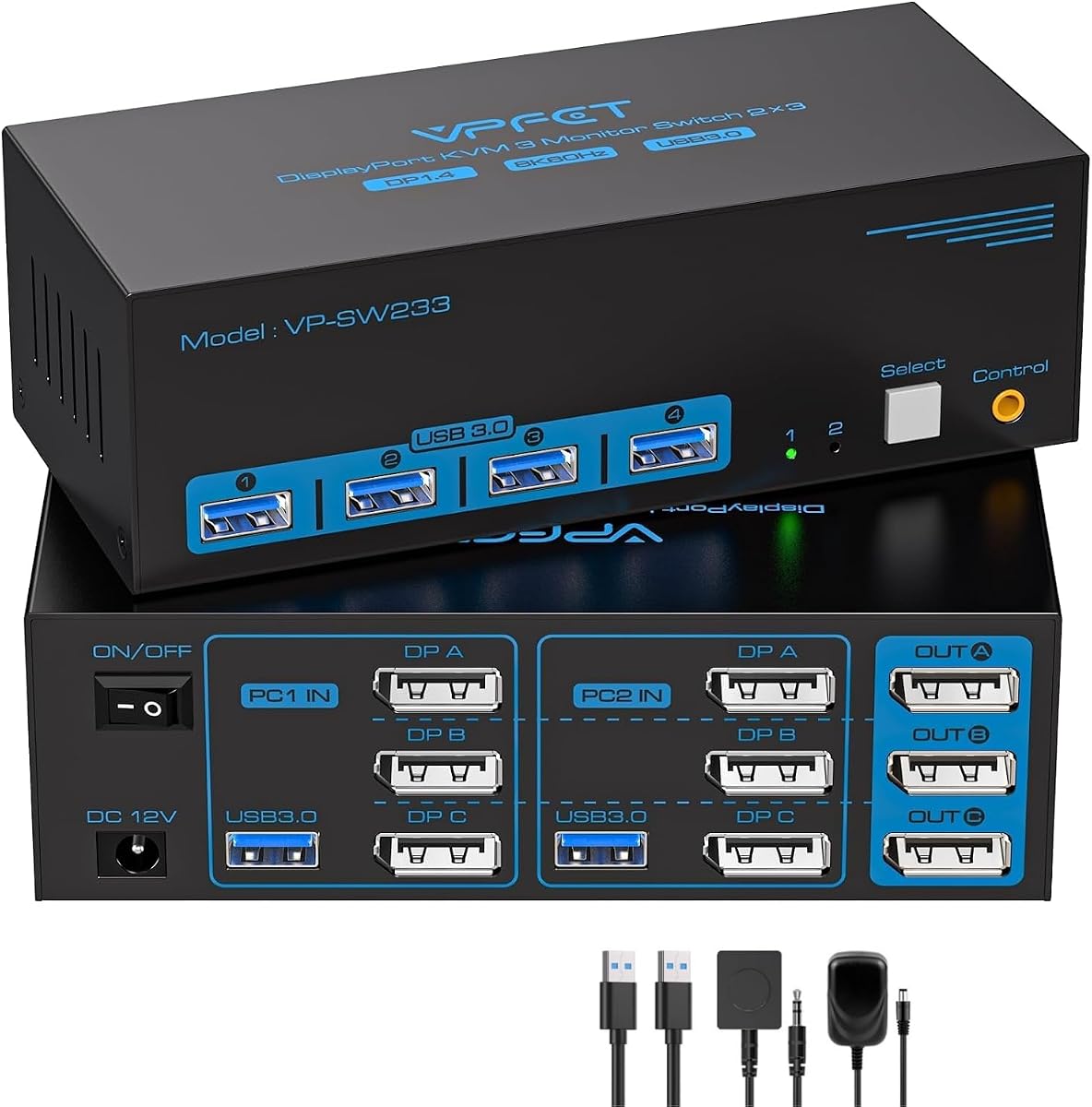
This DisplayPort KVM Switch is tailored for users relying on DP connections for high-speed video delivery. It supports up to 4K@144Hz making it perfect for graphic design and gaming workstations needing fluid motion.
We may earn a commission when you buy through this link, at no additional cost to you.
The switch allows you to share a single keyboard and mouse across two computers easily. It maintains a stable connection for daily work ensuring signal transmission remains reliable without frequent drops or flickering.
Note that each computer must have three DisplayPort outputs to support three monitors with this unit. This requirement limits its use to setups with discrete graphics cards capable of multi-output DP connections.
If your setup relies heavily on DisplayPort and you need high refresh rates this model is a strong candidate. It simplifies managing dual-computer workflows while ensuring your peripherals stay connected seamlessly.
Support up to 4K@144Hz for fluid motion in video editing and gaming applications.
Designed for demanding desktop environments to provide reliable signal transmission daily.
We may earn a commission when you buy through this link, at no additional cost to you.
This KVM Switch combines HDMI and DisplayPort inputs to support various modern monitor setups effectively. It includes most cables you need like HDMI 2.1 and DP 1.4 which saves extra purchase and setup time.
We may earn a commission when you buy through this link, at no additional cost to you.
Support for 8K@60Hz and 4K@144Hz ensures high visual fidelity across all screens. The wired remote allows for convenient switching while external power ensures stable operation even with high power USB devices.
Note that EDID emulation is not supported which may cause detection issues with some displays. Also check your PC capabilities to ensure it supports triple-monitor output before purchasing to avoid compatibility problems.
If you want a ready to use package with cables and warranty included this unit is convenient. It balances performance with accessibility to help you build a reliable dual-computer workstation quickly.
Includes HDMI and DP cables plus a remote to save time on accessories.
One-year warranty service provides peace of mind against potential hardware issues.
We may earn a commission when you buy through this link, at no additional cost to you.
Selecting the right KVM switch requires understanding your specific hardware and workflow needs. Consider these key factors to ensure compatibility and optimal performance.
Ensure the KVM switch supports the maximum resolution and refresh rate of your monitors. Look for 4K@60Hz or higher options like 8K if your display setup demands ultra-high detail for professional work.
Always verify that both your PC outputs and cables support the desired resolution to avoid performance bottlenecks.
Check how many computers you need to share monitors between and whether they use HDMI or DisplayPort. Some units support 3 computers while others limit to 2 or offer mixed input types for flexibility.
Select a switch that matches the specific port types on your computers to avoid needing additional adapters.
Look for USB 3.0 ports to ensure fast data transfer for peripherals and storage devices. This speeds up file access and ensures your keyboard and mouse respond without lag during switching.
Higher USB speed ratings mean better performance for connected external drives and high-speed devices.
Decide between panel buttons on the unit or external wired controllers for convenience. A wired controller allows you to place the switch outside your desk area for a cleaner workspace.
Choose a method that fits your ergonomic preferences for quick and easy system transitions.
Some models require external power adapters to handle high power USB devices like hard drives properly. An external power source ensures stable operation and prevents peripheral disconnection during use.
Prioritize units with stable external power if you plan to share high-demand USB devices.
Verify that the switch supports your operating system including Windows Linux or Mac. While most are plug and play specific features may vary depending on system configurations.
Driver-free compatibility ensures you can use the switch immediately after connection without extra software.
Consider the physical build quality such as aluminum casing for durability and heat management. A solid build extends the life of your equipment in demanding environments.
Look for warranty service to protect your investment against potential defects or failures.
Check if active adapters are supported if you need to convert video signals. Passive adapters often fail to work with KVM switches requiring specific active signal processing instead.
Confirm the included cable types and lengths match your desk setup before purchasing.
Connect all monitors to the KVM switch using the appropriate HDMI or DisplayPort cables ensuring firm connections. Then plug each computer into the corresponding input ports and connect the USB cables for peripheral sharing.
Use the wired controller or panel button to toggle between computers allowing your keyboard and mouse to switch control instantly. Ensure all devices are detected properly before beginning work to avoid signal issues.
Keep the switch in a well-ventilated area to prevent overheating and clean the ports regularly with a dry cloth. This maintenance helps preserve signal quality and extends the lifespan of your hardware.
A KVM Switch for Triple Monitors allows two or more computers to share three monitors and peripherals like keyboards and mice. It reduces desk clutter and simplifies switching between different work systems without unplugging cables.
Yes each computer connected to the KVM switch must have three separate video outputs or a graphics card supporting multi-monitor setups. Verify your hardware specifications before purchasing to ensure all screens will activate correctly.
Most switches support Mac but some docking models only allow mirrored displays on macOS. Extended mode may be limited depending on the unit's compatibility with Mac operating systems and video standards.
High-quality switches maintain original refresh rates like 4K@144Hz or higher to ensure smooth gaming. Look for models supporting VRR or G-Sync to avoid screen tearing when sharing gaming setups across PCs.
Most models include a wired controller or panel buttons allowing quick toggling with one click. The included remote lets you place the switch outside your desk to streamline your workspace layout efficiently.
No most of these KVM switches are plug and play and require no software installation. They work automatically once connected to your computer and peripherals with compatible operating systems like Windows and Linux.
An external power adapter ensures stable voltage for connected high power USB devices like hard drives. Without it some devices may disconnect or fail to function correctly during the switching process.
We reviewed ten top models ranging from budget HDMI options to high-end docking stations. The AV Access KVM Docking Station leads as our Editor's Choice for its power delivery and Ethernet features.
Prioritize resolution support and USB speed based on your workflow needs whether for gaming or professional design. Ensure your PCs match the required input mix to avoid compatibility issues during setup.
Check current prices and availability before purchasing as deals change frequently for these products. Use our comparison table to find the model that best fits your budget and hardware capabilities today.