
Anker Laptop Docking Station Dual Monitor
4.5Editor score
8-in-1 compact design
Up to 85W charging
Dual HDMI 4K output
We compare the best docking station that charges laptop devices to help you choose the right hub for power and connectivity in your workspace setup.
Finding a docking station that charges laptop devices is essential for modern productivity. These hubs streamline your workspace by connecting multiple peripherals while delivering power to your machine. A quality dock ensures stable performance and reduces clutter on your desk significantly.
Our team analyzed top models based on port variety charging speed and display support. We evaluated real-world compatibility with Windows and macOS systems to ensure reliable performance. Each product was selected for its ability to enhance workflow efficiency across different environments.
Every pick in this guide highlights key strengths and potential limitations for buyers. You will find detailed insights into charging capabilities and multi-monitor setups. Please note that prices and availability may change frequently on retailer websites.
4.5Editor score

4.0Editor score

4.2Editor score
This side-by-side comparison highlights the key specifications and capabilities of each top-rated docking station. We focus on charging power, display options, and port variety to help you decide quickly.


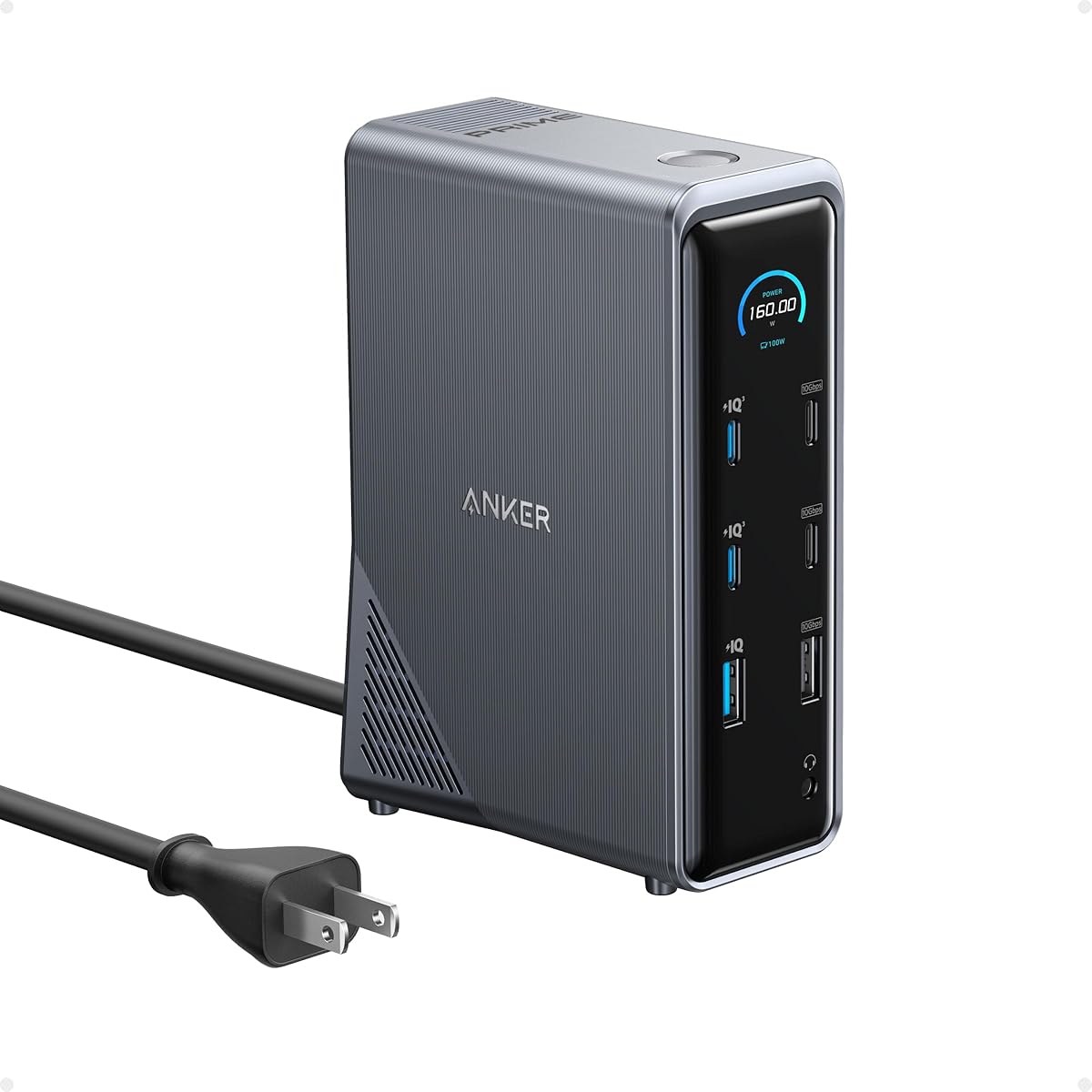


The Anker Prime Docking Station stands out as a top choice for users needing robust connectivity. It delivers impressive 140W power delivery to charge your laptop effectively while connecting numerous peripherals. The built-in smart display offers real-time monitoring of charging and cooling status for peace of mind.
We may earn a commission when you buy through this link, at no additional cost to you.
This dock supports up to three external monitors at 4K resolution for serious multitasking. Each USB-C port supports data and charging allowing you to power multiple devices simultaneously. The active cooling fan ensures stable performance even under heavy loads during extended work sessions.
However, it relies on DisplayLink drivers which may show black screens for DRM content like Netflix. Mac users are limited to mirrored displays rather than extended desktops for multiple screens. These trade-offs are acceptable for Windows users prioritizing speed and connectivity in a single hub.
Recommend this dock for professionals needing triple displays and high charging wattage. It simplifies your workspace by consolidating cables and power into one reliable unit. Ensure your system supports the required drivers for optimal performance before purchasing today.
Experience expanded workspace with three 4K monitors for enhanced productivity.
View charging power and cooling status on the built-in smart display.
We may earn a commission when you buy through this link, at no additional cost to you.
The Plugable Thunderbolt 4 Dock offers premium performance for users requiring ultra-fast data transfer. It supports Thunderbolt 4 speeds up to 40Gbps ensuring rapid file transfers and seamless connectivity. The 100W power delivery keeps your laptop charged even during intensive tasks and heavy workloads.
We may earn a commission when you buy through this link, at no additional cost to you.
With support for dual 4K displays at 60Hz this dock provides smooth visuals for creative professionals. It includes thirteen total ports covering HDMI USB and Ethernet needs without dongles. Driverless installation simplifies setup allowing you to start working immediately after connecting to your laptop.
While expensive this dock justifies its cost with future-proof Thunderbolt 5 compatibility. Mac users should note dual displays work only on specific Pro or Max models not base versions. These limitations are minimal compared to the reliability and speed offered by this high-end hub.
Choose this dock if you need maximum speed and broad peripheral support in one unit. It is ideal for power users who value performance and seamless workflow across mixed-device environments. Invest in this premium solution to elevate your professional workstation experience.
Enjoy 40Gbps data transfer rates for rapid file movement and connectivity.
Compatible with Thunderbolt 5 for long-term performance and compatibility.
We may earn a commission when you buy through this link, at no additional cost to you.
This Anker docking station provides excellent value for budget-conscious buyers seeking dual displays. It features a compact eight-in-one design that fits easily into any workspace or travel bag. The dual HDMI ports support 4K output giving you crisp visuals for work or entertainment tasks.
We may earn a commission when you buy through this link, at no additional cost to you.
It supports USB-C Power Delivery for pass-through charging up to 85W efficiently. You can connect your keyboard mouse and external drive all through one USB-C port. The included microSD reader helps photographers and creators quickly access and transfer media files easily.
Note that it requires a separate 100W wall charger and cable which are not included. This adds a minor extra step to setup but keeps the price competitive. For most users the convenience and low cost outweigh the need for a bundled power adapter.
Recommend this dock for students or remote workers needing a simple multi-monitor setup. It balances essential features with affordability making it a smart entry-level choice. Verify your laptop supports Power Delivery before purchase to ensure full functionality.
Lightweight design makes it perfect for travel and flexible workspaces.
Stream or mirror content in stunning 4K quality across two screens.
We may earn a commission when you buy through this link, at no additional cost to you.
The Dell Pro Laptop Docking Station WD25 is designed for modern AI PCs and mainstream laptops. It delivers 100W of power to keep your system running during intensive workflows. The ambidextrous cable routing allows flexible setup left or right to suit your desk preferences.
We may earn a commission when you buy through this link, at no additional cost to you.
Its focus on sustainability includes over 65% post-consumer recycled materials in construction. IT teams appreciate the enhanced manageability features for large-scale deployments. The robust connector ensures long-term durability even with frequent daily connection and disconnection usage.
While it supports up to four displays users may find port count lower than some rivals. Optimization for Dell systems can mean slightly reduced flexibility for non-Dell brands. These trade-offs are acceptable if you prioritize sustainability and reliable power delivery over port variety.
Select this dock if you use Dell hardware and value eco-friendly design features. It offers a stable connection and professional build quality for office environments. Check compatibility with your specific laptop model to ensure all features work as expected.
Built with recycled materials to reduce environmental impact significantly.
Flexible IT management tools help streamline large business deployments easily.
We may earn a commission when you buy through this link, at no additional cost to you.
This dock provides a massive 150W power adapter ensuring stable charging under heavy loads. It supports triple 4K displays for users who need extensive screen real estate for trading or coding. Three USB-C ports offer flexible charging options for your laptop and peripherals simultaneously.
We may earn a commission when you buy through this link, at no additional cost to you.
The 2.5Gbps Ethernet port delivers faster network speeds than standard Gigabit connections. Photographers and video editors benefit from the SD/TF 4.0 card reader for quick file access. Every port is optimized for specific device types to prevent bottlenecks in data transfers.
Mac users should note that extended desktop mode is not available due to system limits. The larger physical size may consume more desk space than compact alternatives. These limitations are minor for Windows users who prioritize power and extensive connectivity options.
Choose this dock if you need multiple monitors and high-speed data access. It is ideal for power users managing complex workflows requiring reliable power and speed. Verify your laptop supports USB-C DP Alt Mode before purchase for best results.
2.5Gbps Ethernet ensures fast and stable wired internet connections.
Supports three 4K monitors for ultimate multitasking capabilities.
We may earn a commission when you buy through this link, at no additional cost to you.
This Anker Prime dock delivers a powerful 160W total output across multiple devices. It can charge up to four devices simultaneously through three USB-C ports and one USB-A. Dual HDMI ports support crystal-clear streaming across two displays at 2K resolution easily.
We may earn a commission when you buy through this link, at no additional cost to you.
The versatile port selection manages data flow efficiently for all your connected gadgets. It supports USB-C and Thunderbolt connections for broad compatibility with modern laptops. This setup ensures you have enough ports for every peripheral without needing extra hubs.
Linux compatibility is not supported which may limit users running open-source systems. Mac users can mirror displays but cannot use extended desktop mode for multiple screens. These constraints are minor for most Windows users seeking high power and flexible connectivity.
Recommend this dock for users needing high charging capacity and dual-screen support. It simplifies workspace connectivity with a single cable to your laptop. Ensure your laptop supports Power Delivery to take full advantage of the charging capabilities.
Power up to four devices at once with high-wattage USB-C ports.
Enjoy clear visuals across two screens for enhanced productivity.
We may earn a commission when you buy through this link, at no additional cost to you.
The Acer docking station offers triple independent screens for powerful multitasking setups. It includes a 110W adapter that delivers 100W directly to your laptop for stable performance. The aluminum body dissipates heat efficiently to maintain peak performance during heavy use.
We may earn a commission when you buy through this link, at no additional cost to you.
Security features include an integrated slot for cable locks to protect your devices. You can read and write SD and MicroSD cards simultaneously for faster media management. The design consolidates all connectivity into one sleek unit for a clutter-free workspace.
Triple 4K output on Windows requires Display Stream Compression support on your host system. Mac users are limited to mirroring screens rather than extended desktops due to OS limits. These technical constraints are common for mid-range docks offering such extensive video capabilities.
Select this dock if you need triple displays and solid build quality for office use. It balances affordability with professional features for enhanced productivity. Verify your laptop GPU supports DSC if you require full 4K resolution on all monitors.
Sleek aluminum body helps dissipate heat for stable performance.
Integrated slot enables physical locking to protect your equipment.
We may earn a commission when you buy through this link, at no additional cost to you.
This unique dock features a detachable hub for seamless transition between desk and travel. It delivers 100W power to your laptop while supporting up to three monitors in desktop mode. The portable hub allows you to extend connectivity on-the-go without extra gear.
We may earn a commission when you buy through this link, at no additional cost to you.
With 10Gbps data transfer you can move large files quickly through a single USB-C port. The package includes a 140W power adapter to ensure stable performance under full load. Setup is plug-and-play requiring no drivers for immediate productivity across your devices.
Mac users will only get mirrored displays when using multiple external screens together. The dock requires a laptop connection to activate its blue light and ports fully. These constraints are acceptable for the flexibility of having one device for home and travel use.
Choose this dock if you travel often and need a single device for all setups. It offers exceptional versatility for users who want a clean home office and portable travel kit. Ensure your laptop supports Power Delivery to maximize the charging benefits.
Detachable hub makes it perfect for mobile work and commuting.
10Gbps speeds ensure quick file transfers during workflow.
We may earn a commission when you buy through this link, at no additional cost to you.
This dock turns your laptop into a desktop with thirteen versatile ports for all needs. It supports up to three external monitors at 1080p for expanded multitasking. The vertical design saves desk space while maintaining a professional aesthetic appearance.
We may earn a commission when you buy through this link, at no additional cost to you.
Includes a 135W power adapter to deliver stable power without extra purchases. You can charge your phone simultaneously via USB-C while powering your laptop efficiently. Transfer files at 10Gbps through USB-C for fast workflow and media access.
Mac users are limited to mirrored mode for multiple displays rather than extended desktops. The 85W host power may be insufficient for high-performance laptops under heavy loads. These trade-offs are reasonable for those prioritizing space efficiency and connectivity on a budget.
Recommend this dock for home office users needing a compact multi-monitor setup. It simplifies your desk with essential ports in a small footprint. Confirm your laptop supports USB-C DP Alt Mode before purchase for best compatibility.
Vertical design maximizes desk space efficiency and cleanliness.
Charge laptop and phone at the same time for convenience.
We may earn a commission when you buy through this link, at no additional cost to you.
This dock provides extensive connectivity with eight USB ports for all your peripherals. It supports triple 4K displays to minimize window switching and boost productivity. The 150W adapter ensures stable performance even with multiple high-power devices connected.
We may earn a commission when you buy through this link, at no additional cost to you.
Includes a 2.5Gbps Ethernet port for fast reliable wired networking during large file transfers. Photographers appreciate the SD/TF 4.0 card slot for instant access to media files. The design eliminates the need for multiple chargers or dongles on your desk.
Mac compatibility is not supported which limits use to Windows and ChromeOS systems. The larger physical size may be a consideration for small desk spaces. These limitations are acceptable for users needing maximum USB port variety and video options.
Choose this dock if you require eight USB ports and triple monitor support. It is ideal for professionals who manage multiple devices and high-speed data. Verify your laptop supports USB-C DP Alt Mode before purchase to ensure full functionality.
Eight USB ports ensure enough connections for all peripherals.
Includes 24-month warranty for peace of mind.
We may earn a commission when you buy through this link, at no additional cost to you.
Selecting the right docking station involves balancing power, port count, and display support to match your workflow needs.
Look for docks that offer at least 100W Power Delivery to keep your laptop charged under load. Higher wattage ensures stable performance when multiple peripherals are connected simultaneously.
Prioritize models with enough wattage for your specific laptop model to avoid power loss.
Determine how many external monitors you need and their resolution requirements. Some docks support triple displays while others are limited to dual setups at 4K.
Check your laptop GPU capabilities to ensure it supports the desired number of screens.
Evaluate the mix of USB-A and USB-C ports for your specific peripherals and drives. Fast data transfer speeds like 10Gbps are crucial for external hard drives.
Choose a dock with enough ports to avoid needing additional hubs.
Gigabit Ethernet is standard but 2.5Gbps offers faster network speeds for large file transfers. A wired connection is often more stable than Wi-Fi for professional work.
Select docks with Ethernet ports if you work with large datasets regularly.
Windows laptops support extended desktops on most docks but macOS often limits to mirroring. Ensure the dock explicitly supports your operating system for multi-monitor setups.
Mac users should verify display limits before purchasing any USB-C dock.
Docks with aluminum bodies and built-in fans run cooler during heavy use. Proper cooling ensures stable performance over long periods without throttling.
Invest in durable materials that feel sturdy and dissipate heat effectively.
If you travel, consider a dock with a detachable hub or compact design. Some models function as a full station at home and a portable hub on the go.
Check dimensions and weight if you plan to move the dock frequently.
A longer warranty period indicates confidence in product reliability and durability. Look for vendors offering responsive customer support for setup questions.
Verify support options like online guides or chat before purchasing.
Connect the power adapter to the dock before plugging it into your laptop to ensure stable power delivery. This prevents issues where the dock cannot supply enough energy for all connected devices simultaneously.
Organize cables neatly using ties or clips to maintain airflow around the dock's vents. Dust buildup can lead to overheating so keep the area clean and clear of obstructions.
Update drivers if your dock supports them especially for DisplayLink or advanced features. Regular maintenance ensures long-lasting performance and prevents connection dropouts over time.
Not all docking stations include power delivery. You need a model specifically designed with USB-C Power Delivery to charge your laptop. Always check the wattage rating to ensure it matches your laptop needs.
Yes but macOS often limits extended displays on standard USB-C docks. Many docks only mirror screens for Mac users unless they have Thunderbolt support. Check compatibility details before buying for multi-monitor setups.
Thunderbolt docks offer faster data speeds and broader display support than standard USB-C models. They are also more expensive but provide better performance for high-end laptops. USB-C docks are more affordable for basic connectivity needs.
Check your laptop charger to see its original wattage and look for a dock with at least that number. Higher wattage ensures the laptop charges even when using multiple peripherals. Lower wattage may result in slow charging or draining.
Most docks work plug-and-play without drivers on Windows and Mac. However, some triple monitor setups or DisplayLink docks require specific software. Always check the product manual for driver requirements before purchase.
Yes if the dock supports triple displays and your laptop GPU allows it. This often requires Display Stream Compression on Windows laptops for full resolution. Verify support in the product description before buying.
Compact models with detachable hubs are ideal for travel. Ensure you have the right cables and a secure case to protect ports. Check weight and size to avoid excess baggage or bulkiness.
This guide highlights ten top models offering varying power levels and connectivity options for different needs. Whether you need triple displays or portable hubs there is a dock to match your setup.
Prioritize wattage and display support based on your most demanding tasks to avoid limitations later. Balancing port count with cost ensures you get value without overspending on unused features.
Prices and availability may change so check current deals before making your final purchase. Investing in the right dock enhances your workflow and keeps your workspace organized efficiently.