
100W CO2 Laser Engraver, 35" x 24" Laser Cutter Machine
4.0Editor score
35×24 inch working area
Fireproof viewing window
Compatible with LightBurn
Choosing the right 100W laser engraver means finding a machine that balances power, speed, and safety for your specific projects. These powerful tools excel at cutting thick acrylic and wood while delivering crisp details on smaller items.
We evaluated ten leading models based on work area, software compatibility, safety features, and build quality. Each entry includes real specifications and user-focused insights to help you narrow down the best option for your workshop needs.
Every pick highlights key strengths and honest trade-offs so you can see exactly what each machine offers. Prices and availability change often so check the current details before making your final decision today.
4.0Editor score

4.5Editor score

4.5Editor score
As an Amazon Associate we earn from qualifying purchases.
The following table provides a side-by-side comparison of all ten products to help you evaluate their unique specifications at a glance.



This OMTech Pronto model stands out as a powerful tool for anyone needing a 100W CO2 laser for both cutting and engraving. It offers a generous workspace and high speeds that make it ideal for production runs or detailed custom work.
We may earn a commission when you buy through this link, at no additional cost to you.
The standout feature is the combination of power and efficiency. With speeds up to 1000mm/s and the ability to cut 1.2 inch acrylic in one pass, this machine saves significant time compared to lower wattage options. The autofocus system removes guesswork and ensures consistent results across different material thicknesses.
While the machine is robust, the shipping process involves three separate packages which can complicate assembly. The price is also higher than some competitors but the included chiller and air assist justify the cost for professional users who need reliability.
This machine is best for small businesses or makers who need to process large materials without constraints. If you want a balance of speed, area, and support the Pronto 100W is a top recommendation for serious users.
The 1000mm/s speed allows you to finish jobs faster which increases throughput for busy workshops.
Features like water protection and temperature alarms ensure safe operation while 24/7 support provides peace of mind.
We may earn a commission when you buy through this link, at no additional cost to you.
The OMTech Pro takes performance to the next level with an industrial grade build and the fastest speed in this roundup. It is designed for heavy duty use where consistency and speed are critical for output.
We may earn a commission when you buy through this link, at no additional cost to you.
Its main strengths lie in the Ruida controller which offers precise touch control and the 1200mm/s speed that outpaces competitors. The 4-way pass-through doors allow for oversized materials that would otherwise be impossible to handle on standard machines.
The large footprint and high price are trade-offs to consider. This machine is very heavy and needs a dedicated space. For most hobbyists it may be overkill but for professional shops it delivers unmatched efficiency.
This model is best for businesses that need to maximize output and precision. If budget is not the primary concern and you want the highest performance available the Pro is the clear choice.
The intuitive touchscreen makes it easy to control settings and upload files directly without external hardware.
Pass-through doors on all sides let you process long items like pipes or large sheets without cutting them first.
We may earn a commission when you buy through this link, at no additional cost to you.
This model offers a rare combination of 100W power and a large workspace at a budget friendly price. It is a solid entry point for those who need power but cannot afford premium industrial machines.
We may earn a commission when you buy through this link, at no additional cost to you.
The value comes from the generous 35×24 inch area which allows for bigger projects than other models at this price. The fireproof window adds a layer of safety that is often missing in cheaper units.
The main drawback is the speed which is significantly lower than other 100W models. This makes it better for hobbyists or low volume work rather than high volume production. However the cost savings can outweigh the slower pace for many users.
This machine is best for hobbyists and small shops that need a large bed and high power without breaking the bank. If speed is not your top priority this is an excellent value pick.
You get full 100W power which is rare at this price point making it a budget choice.
The viewing window is made of fire resistant material to reduce risk of fire accidents during operation.
We may earn a commission when you buy through this link, at no additional cost to you.
This Pronto variant is designed with transport and setup in mind. The split chassis makes it easier to move and assemble compared to monolithic units which is helpful for those with limited space.
We may earn a commission when you buy through this link, at no additional cost to you.
Its strengths match the other Pronto models with high speed and a large bed. The air assist system is particularly strong which helps keep cuts clean and reduces smoke buildup on materials like acrylic.
The assembly can be complex and it requires careful leveling to ensure the laser moves correctly. While it is robust it is not truly portable once assembled so you need a dedicated spot for it.
This machine is best for users who need to transport a large machine occasionally or have space constraints. If you want the Pronto performance with easier handling this version is worth considering.
The split design allows you to move the frame and head separately which simplifies moving through tight doorways.
The powerful pump helps prevent burning on materials and ensures cleaner edges for a professional finish.
We may earn a commission when you buy through this link, at no additional cost to you.
This version of the Pronto is tailored for production environments where speed and consistency are key. It offers the same power and area as other Pronto models but emphasizes features that support longer run times.
We may earn a commission when you buy through this link, at no additional cost to you.
The Smart Air Assist module helps maintain consistent cut quality which is essential when producing multiple identical items. The speed and area combination means you can process more orders in less time than smaller machines.
Logistics can be a headache with separate shipments for the chiller and air assist. You need to coordinate assembly carefully. Also the high power demands a stable electrical connection to avoid interruptions.
This machine is best for makers who are selling goods and need to fulfill orders quickly. If you want a reliable workhorse that can keep up with demand the Pronto is an excellent fit.
The combination of speed and area allows for faster turnaround on bulk orders and custom jobs.
The module regulates air pressure automatically to optimize cuts and reduce the need for manual adjustments.
We may earn a commission when you buy through this link, at no additional cost to you.
This OMTech model is a solid mid-range option that balances size and power for general workshops. It offers enough space for most projects without taking up the room of a full 40 inch machine.
We may earn a commission when you buy through this link, at no additional cost to you.
The autofocus and air assist features make it easy to use for beginners and pros alike. The 1000mm/s speed is comparable to the larger Pronto models which means you do not sacrifice performance for size.
The 28×20 inch bed may be limiting if you frequently work on large sheets but it is perfect for custom gifts and smaller signs. The price is often lower than the Pronto which makes it a good alternative.
This machine is best for makers who work on medium sized items and want a reliable 100W machine. If you need a balance of cost and performance this is a strong contender.
The smaller bed saves space in your workshop while still offering high power for thick materials.
The autofocus feature eliminates the time spent measuring focus distance manually on each new project.
We may earn a commission when you buy through this link, at no additional cost to you.
This model is a duplicate listing of a popular budget 100W machine that offers great value for money. It is often priced lower than branded competitors while providing a similar level of power and area.
We may earn a commission when you buy through this link, at no additional cost to you.
The digital control panel allows you to adjust settings directly on the machine which is convenient for quick tweaks. It also supports common software like LightBurn which is a must for serious users.
The slower speed means you will spend more time on large jobs but the power cuts through thick materials well. If you are patient and do not need high throughput this is a reliable budget choice.
This machine is best for hobbyists or new businesses that want to keep costs low. If you need a big bed and power but have a tight budget this model is worth checking out.
Compatibility with major design software means you can use tools you already know without learning new workflows.
Getting 100W at this price point allows you to cut thick materials without spending on a premium machine.
We may earn a commission when you buy through this link, at no additional cost to you.
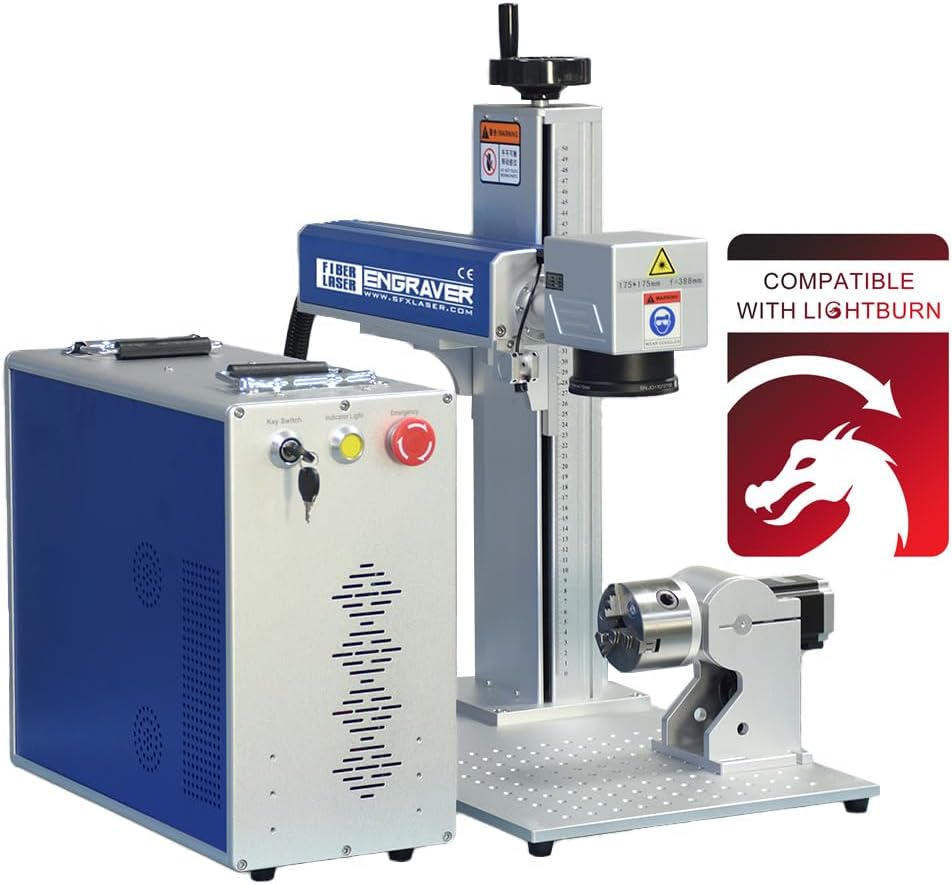
This machine is a fiber laser which is designed primarily for marking metals rather than cutting large non-metal sheets. It uses a different technology that allows for deep engraving on hard surfaces.
We may earn a commission when you buy through this link, at no additional cost to you.
The JPT MOPA source gives you control over pulse duration which helps create deep or light marks depending on the job. The included rotary axis allows you to engrave cylindrical objects like pens or jewelry rings.
This is not a replacement for a CO2 laser if you want to cut wood or acrylic but it is superior for metal. The small working area limits the size of parts you can mark at once.
This machine is best for jewelers or industrial marketers who need precise metal work. If your focus is on metal products this is a highly effective tool.
The fiber beam is small enough to create fine lines and detailed text on metal surfaces that CO2 cannot match.
The included rotary axis lets you rotate items as the laser marks them so you can engrave cylindrical shapes easily.
We may earn a commission when you buy through this link, at no additional cost to you.
This fiber marking machine is similar to the previous one but includes a tower which makes it easier to handle taller items. It is built for high precision work on metal and plastic components.
We may earn a commission when you buy through this link, at no additional cost to you.
The JPT MOPA technology allows you to vary the pulse which is useful for creating black marks on stainless steel or deep engraving on carbon steel. The tower adds stability for vertical projects.
The working area is limited to 300mm square so it is not suitable for large sheets. It is a specialized tool for small parts and industrial marking rather than general fabrication.
This machine is best for small part marking and industrial applications. If you need to mark metal consistently and precisely this is a top choice.
The tower design allows you to position taller items under the laser head without tilting them.
Variable pulse duration gives you more control over the depth and color of the mark on different metals.
We may earn a commission when you buy through this link, at no additional cost to you.
This VEVOR model is a solid entry level 100W machine that is designed for new users who want power without complexity. It offers a large workspace and basic features that are easy to understand.
We may earn a commission when you buy through this link, at no additional cost to you.
The tinted window is great for watching your work while keeping your eyes safe from the beam. The included air assist helps with clean cuts and makes the machine more versatile right out of the box.
The speed is not as high as premium models but it is sufficient for most hobby projects. It may not be as durable for daily heavy use but it serves well for occasional makers.
This machine is best for beginners who want to try laser engraving. If you want a large area and 100W power to get started this is a great first step.
The controls are simple and the included documentation helps new users learn how to operate the machine safely.
The tinted window blocks the laser beam so you can see what is happening inside without eye protection glasses.
We may earn a commission when you buy through this link, at no additional cost to you.
Selecting the right 100W laser engraver depends on several key factors that affect how well the machine fits your specific needs and workspace.
A 100W laser is capable of cutting thicker materials than lower wattage machines. This power allows you to cut up to 1.2 inches of acrylic or 0.6 inches of wood in one pass which is essential for structural parts.
Look for a tube that delivers consistent 100W output to ensure you can handle tough materials without multiple passes.
The work area determines the largest item you can engrave or cut. Larger beds like 40×24 inches are great for full size panels but smaller beds save space.
Choose a size that matches your largest frequent project to avoid cutting materials to fit the machine.
Speed affects how quickly you can finish jobs. Models vary from 500mm/s to 1200mm/s and higher speeds reduce production time significantly.
If you need to produce many items choose a model with a higher speed rating to improve your output.
Software compatibility ensures you can use tools you already know. Most machines work with RDWorks or LightBurn but check before buying.
Look for support for popular design tools like CorelDraw or AutoCAD to streamline your workflow.
Safety is critical with powerful lasers. Features like automatic shutoff when the lid opens and temperature alarms protect both the user and the machine.
Ensure the machine has fire resistant viewing windows and emergency stop buttons to minimize risk.
Sturdy construction ensures accuracy and longevity. Machines with ball bearing guides and solid frames are more stable.
Check for warranty length and support availability to ensure help is there if something goes wrong.
Air assist helps cool the material and clear debris for cleaner cuts. Some units have smart systems that adjust air pressure automatically.
A good air assist reduces smoke burn and improves edge quality especially on acrylic.
Laser tubes generate heat and need proper cooling. Built in chillers or separate units keep the tube at optimal temperature.
Look for a chiller that supports long run times to prevent overheating during long projects.
Always check the focus distance before starting a new project to ensure clean cuts. Use the autofocus button or a manual gauge to set the correct height for your material.
Run a test piece before engraving the final product to adjust power and speed settings. This prevents wasting expensive material and helps you find the best balance.
Clean the lens and mirrors regularly to prevent dust from affecting beam quality. Use a soft cloth and proper cleaner to keep the optical path clear for consistent results.
A 100W laser can cut materials like wood acrylic leather cardboard glass and paper. It cannot cut metals directly but can mark them depending on the laser type and settings.
Most machines work with RDWorks or LightBurn which are standard for laser control. Check the product specs to confirm which software is supported before you buy.
A typical 100W CO2 tube lasts between 6000 to 10000 hours depending on usage. Keeping it cool and running at moderate settings can extend its lifespan.
Yes a chiller is necessary for 100W lasers to cool the tube properly. Without it the tube can overheat and fail quickly during extended use.
Standard CO2 lasers do not engrave bare metal well but they can mark coated metal. For bare metal engraving you need a fiber laser like the JPT models listed.
You need eye protection rated for the laser wavelength and a fume extractor to remove smoke. Always operate the machine in a ventilated area with the lid closed.
The OMTech Pronto and Pro models stand out for their balance of speed and size making them ideal for most professional needs. They offer large beds and high performance for various materials.
For budget focused buyers the 100W CO2 models with 35 inch beds provide great value. They may be slower but they deliver the power needed for thick materials.
Check current prices and availability before making your choice as stock and deals change frequently. Select the machine that fits your workflow and budget to get the most value.