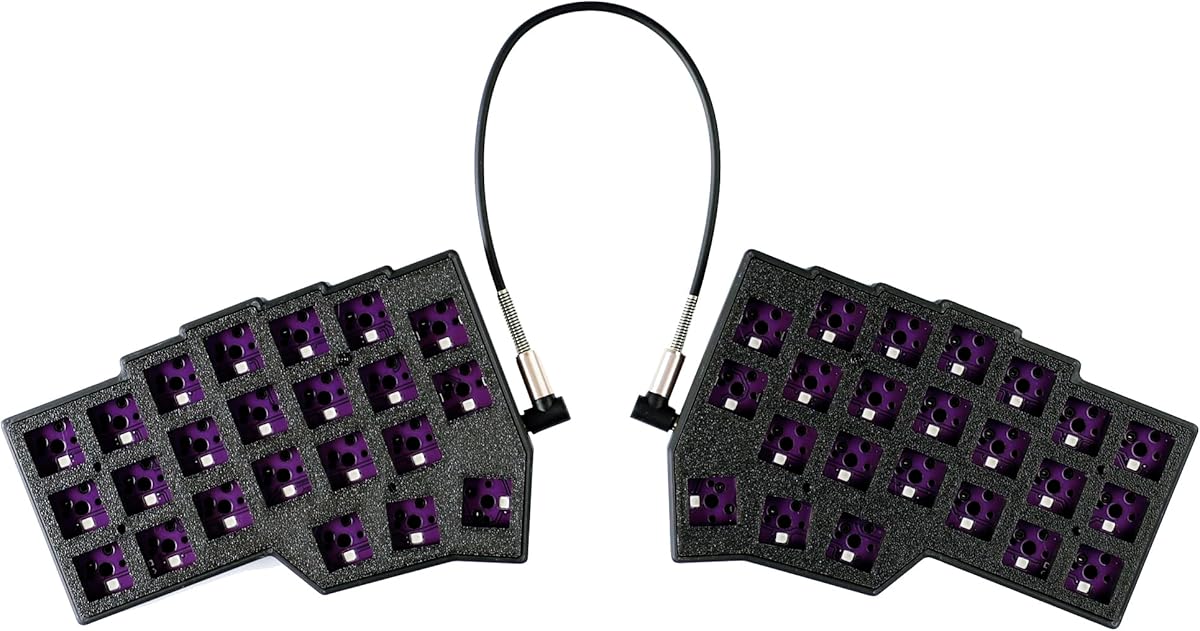
YMDK Split Keyboard Corne V4.1 46 Keys Ergonomic Hotswappable
4.2Editor score
40% Layout with 46 Keys
QMK Vial Programmable
3D PLA RGB Case
This guide compares the top ortholinear keyboards for ergonomics and typing efficiency, featuring split layouts, hot-swappable switches, and customizable
Ortholinear keyboards offer a unique typing experience by aligning keys in straight vertical and horizontal columns. This design reduces finger travel and can improve accuracy for developers and writers who type for extended periods daily.
We compared ten top models based on ergonomic design, build quality, switch options, and programmability. Each entry includes detailed specifications and real-world usage insights to help you find the perfect fit for your desk setup today.
Each pick highlights specific strengths like low-profile switches, wireless connectivity, or robust customization options. Keep in mind that availability and details may vary over time, so always check the latest product listings before making your final decision.
4.2Editor score

4.3Editor score

4.4Editor score
This side-by-side comparison outlines the key specifications and unique selling points of each ortholinear keyboard model featured in our guide. Use this table to quickly identify which layout and feature set aligns best with your specific typing needs and budget constraints.


The KBDcraft 07Israfel is a top-tier option for those seeking a highly ergonomic ortholinear experience. With a 4.3 rating from users, it stands out for its ability to align keys with natural finger movements, making it ideal for programmers and writers.
We may earn a commission when you buy through this link, at no additional cost to you.
Its Core56 Low-Profile System offers a thinner build without sacrificing responsiveness. The hinge-split design lets you adjust the angle up to seven different ways, which helps maintain good posture. The gasket mount ensures smooth feedback, while Vial software allows deep customization.
While the low-profile switches are comfortable, they may feel different from standard mechanical switches. Additionally, users accustomed to traditional layouts will need time to adjust to the ortho format. However, these trade-offs are generally accepted for the ergonomic benefits.
This keyboard is best for users who prioritize health and efficiency during long typing sessions. If you want a compact, customizable, and ergonomically sound tool, the Israfel is a strong recommendation to consider today.
The exclusive 50% ortho layout aligns keys in vertical and horizontal patterns to match natural finger movement, reducing strain over time.
Powerful programming features let users configure key mappings and macros through Vial software, enhancing workflow efficiency significantly.
We may earn a commission when you buy through this link, at no additional cost to you.
The 4×6 Corne Layout is designed for maximum efficiency through a split ergonomic form factor. With a 4.2 rating, it appeals to those who want to reposition keys to thumb groups. This design lowers the risk of repetitive strain injuries over time.
We may earn a commission when you buy through this link, at no additional cost to you.
It features hot-swappable sockets for Cherry MX switches and pre-lubed linear switches that are quiet and responsive. The keyboard supports VIAL remapping, allowing full customization of keys. RGB lighting adds a vibrant look, and the 60% compact layout saves desktop space.
However, beginners may find the customization complex without prior experience. The adaptation period for the split layout can also be challenging for those used to standard keyboards. These factors make it best suited for enthusiasts rather than casual users.
If you are looking for a highly customizable and ergonomically optimized keyboard, this Corne layout offers excellent value. Just be prepared to invest time in setup and learning the new layout for optimal results.
The split mechanical keyboard allows users to adjust spacing and tilt, reducing wrist fatigue caused by long-term typing and repetitive movements.
You can remap any key through VIAL and create a custom quick access layer to speed up your workflow significantly.
We may earn a commission when you buy through this link, at no additional cost to you.
The YIVU Corne V4.1 is a compact 40% ortholinear keyboard designed to reduce wrist fatigue. While it has a 3.8 rating, it offers essential features like hot-swappable switches and RGB lighting. It is ideal for those seeking a smaller footprint.
We may earn a commission when you buy through this link, at no additional cost to you.
It uses a 3×6 column staggered split layout with thumb keys for efficiency. The keyboard supports VIAL remapping and comes with pre-lubed switches. The RGB backlight is adjustable, providing visibility in low-light environments during long typing sessions.
Users should note that the TRS cable connecting the two parts does not support hot-swapping while powered on. Additionally, the lower rating suggests potential quality control issues. Careful setup is required to ensure proper function.
For users on a budget who want ortho capabilities in a tiny format, this is a viable option. Just be sure to follow connection instructions carefully and expect a learning curve for the split design.
Repositioning commonly used keys to an ergonomic thumb group maximizes efficiency and lowers the risk of tenosynovitis over time.
Pre-lubricated linear switches offer fast response and labor-saving operation, very suitable for long-term typing and e-sports enthusiasts.
We may earn a commission when you buy through this link, at no additional cost to you.
The black version of the KBDcraft 07Israfel provides the same ergonomic benefits as the white model but with a sleeker look. It holds a 4.3 rating for its ability to align keys with natural finger movements. This makes it ideal for professionals who spend hours typing.
We may earn a commission when you buy through this link, at no additional cost to you.
Its Core56 Low-Profile System ensures a compact build while maintaining responsiveness. The hinge-split design allows for multiple tilt angles, helping maintain good posture. The gasket mount provides smooth feedback, and Vial software enables deep customization.
Users may find the low-profile switches different from standard mechanical ones. Also, transitioning from a traditional layout takes time. However, these minor issues are often outweighed by the ergonomic and aesthetic advantages provided by this model.
If you prefer a dark aesthetic with high customization, this is a great choice. It is particularly well-suited for programmers and writers who want a stylish, ergonomic tool to improve their workflow efficiency.
The black finish provides a sleek and professional look that complements modern desk setups while maintaining ergonomic efficiency.
Custom low-profile MX-style compatible keycaps offer a smooth and comfortable typing experience that reduces finger strain over time.
We may earn a commission when you buy through this link, at no additional cost to you.
The YMDK Split Keyboard Corne V4.1 is an affordable entry point for custom ortholinear builds. With a 4.2 rating, it offers essential features like Vial support and RGB. It is perfect for hobbyists who want to build their own keyboard without high costs.
We may earn a commission when you buy through this link, at no additional cost to you.
It includes a PLA case that is environmentally friendly. You can directly open Vial for programming to customize keys. The kit supports full key RGB and allows you to choose switches and keycaps to match your preferences for the ultimate setup.
Note that you must prepare switches and keycaps yourself to form a complete usable keyboard. Also, PLA material is less durable than traditional plastics. These trade-offs are acceptable given the low cost and high customization potential.
If you want an affordable and eco-friendly way to try ortho keyboards, this is a top pick. Just be prepared for a DIY assembly process to get everything running correctly for your needs.
This kit allows you to build a custom keyboard at a low price point while using eco-friendly PLA materials that are better than traditional plastics.
The keyboard can directly open Vial for programming, allowing you to define key functions easily without complex software.
We may earn a commission when you buy through this link, at no additional cost to you.
The Maketheone M offers a unique X-Bows butterfly layout that aims to improve ergonomics. With a 3.4 rating, it provides a plug-and-play experience without complex setup. It is a good option for those seeking a distinct retro look on their desk.
We may earn a commission when you buy through this link, at no additional cost to you.
It features tactile responsive keys and a premium build quality. The keyboard is USB-C wired and includes hotkeys for easy access to functions. The white backlight adds to the vintage aesthetic, making it stand out among modern mechanical options.
However, the lower rating suggests some users may face issues. Also, it lacks the deep customization of programmable ortho boards. If you prefer a fixed layout with a retro vibe, this could work, but expect some compromises.
This keyboard suits users who value style and simplicity over advanced programmability. If you want a reliable, tactile experience with a unique look, it is worth considering for your specific setup.
The ergonomic butterfly layout is designed to reduce strain and improve typing posture over extended use periods.
Premium build quality ensures durability and a solid feel that enhances the overall typing experience significantly.
We may earn a commission when you buy through this link, at no additional cost to you.
The Keychron K2 HE brings magnetic precision to the mechanical keyboard market. With a 4.4 rating, it offers a 75% layout that balances compactness and functionality. It is ideal for users who want high performance across different devices.
We may earn a commission when you buy through this link, at no additional cost to you.
Magnetic switches allow customizable actuation, and rapid trigger provides instant responses for gaming. Multi-mode connectivity includes 2.4 GHz wireless and Bluetooth. The PBT keycaps are durable, and it supports both Mac and Windows seamlessly.
It is not a pure ortholinear keyboard, which may limit ergonomic benefits. The price is also higher than standard options. However, the advanced magnetic technology justifies the cost for those wanting precision and versatility.
If you need a wireless keyboard with premium features, this is a strong contender. Just know it is more about precision than strict ortho alignment. Consider this if performance is your main priority.
Magnetic sensors allow fully customizable actuation, giving you control over every key's response for an unparalleled typing experience.
Rapid trigger ensures instant responses for precise execution, giving you a competitive edge in critical gaming moments.
We may earn a commission when you buy through this link, at no additional cost to you.
The Logitech K835 TKL is a compact mechanical keyboard with a 4.6 rating. It features an aluminum frame for durability and linear red switches for smooth typing. It is great for users who need a reliable, space-saving solution.
We may earn a commission when you buy through this link, at no additional cost to you.
The space-saving design works well with laptops. It has a modern slim look and comfortable typing profile. The keyboard is built to last with mechanical switches tested up to 50 million clicks. It is fully compatible with Windows systems.
However, it lacks the ortholinear layout for ergonomic benefits. It is also limited to Windows compatibility. If you need a standard layout with high quality and affordability, this is a solid choice.
If you prioritize durability and a clean look, this TKL keyboard is worth considering. It offers great value for standard typing tasks without the learning curve of split layouts.
With an aluminum frame, mechanical switches have been tested up to 50 million clicks and given long-lasting character.
Curved profile, slim front and adjustable tilt brackets work together to create a comfortable typing position.
We may earn a commission when you buy through this link, at no additional cost to you.
The nuphy Air60 V2 is a compact low-profile mechanical keyboard with a 4.2 rating. It supports Bluetooth 5.1 and QMK/VIA customization. It is perfect for users who want portability and wireless connectivity without sacrificing quality.
We may earn a commission when you buy through this link, at no additional cost to you.
It has no F area to save space, allowing easier travel. You can connect up to 4 devices at once. The custom backlight bars show battery levels, and the battery lasts up to 150 hours. The 1000Hz rate of return reduces delay.
The lack of an F area may frustrate users who rely on function keys. Also, the side lights might be distracting in dark rooms. However, these trade-offs are acceptable for the high portability and battery life.
If you travel often and need a reliable wireless keyboard, this is a great choice. Just ensure you are comfortable with the layer-based function keys. It is a solid investment for mobile professionals.
Air60 V2 has no F area so its size is smaller, making it definitely a better choice for you to go out and use.
The battery capacity is 2500mAh with up to 150 hours working time, meeting the needs of a week's work easily.
We may earn a commission when you buy through this link, at no additional cost to you.
The Logitech Ergo K860 is a wireless ergonomic split keyboard with a 4.4 rating. It aims to reduce muscle strain through a curved keyframe and memory foam wrist rest. It is excellent for users who prioritize comfort over strict ortho alignment.
We may earn a commission when you buy through this link, at no additional cost to you.
It offers a full-size layout with familiar features. The adjustable palm lift allows customization of wrist angle. The keyboard is ergonomist approved to improve posture. It connects via Bluetooth or USB receiver, and includes a quiet key feel.
It is more expensive than smaller keyboards and lacks the precise ortholinear layout. The size might be too large for some desks. However, the health benefits and comfort are significant for those with wrist pain or long typing hours.
If you need a full-size keyboard that is gentle on your body, this is the top pick. It is a premium investment for your health and comfort that pays off over time.
Improved typing posture with a curved, split keyframe reduces muscle strain on your wrists and forearms.
Pillowed wrist rest with memory foam layer offers typing comfort with more wrist support and less bending.
We may earn a commission when you buy through this link, at no additional cost to you.
Choosing the right ortholinear keyboard requires balancing ergonomics with functionality. Consider layout, switches, and build quality before buying.
Ortholinear keyboards come in various sizes like 50%, 60%, and full-size. The 50% layout is compact and focuses on typing efficiency, while full-size offers more keys for work. Smaller sizes require learning key layers for missing keys, which might not suit everyone. Choose based on your need for portability versus function.
Select a size that fits your workspace and typing habits to ensure productivity.
Switches determine tactile feedback and sound. Linear switches are smooth and quiet, ideal for gaming. Tactile switches offer a bump for typing feedback. Many ortho keyboards are hot-swappable, allowing you to change switches later. Consider your preference for sound and feel.
Pick switches that match your typing style and noise tolerance.
Ortholinear keyboards are designed to align keys naturally. Split keyboards take this further by separating halves to reduce wrist strain. Look for adjustable tilt options and wrist rests if possible. A good ergonomic setup helps prevent long-term injury.
Prioritize split layouts and adjustable angles for maximum comfort.
Some ortho keyboards are wired for stability, while others offer wireless via Bluetooth or USB dongle. Wired connections ensure no input lag, while wireless adds portability. If you switch between devices often, look for multi-device Bluetooth support. Choose based on your setup needs.
Select connectivity that matches your workspace constraints.
Software like QMK and Vial allows deep customization of key mappings. This is vital for ortho layouts to access missing keys easily. Some boards have built-in RGB lighting control. Check if the keyboard supports remapping to suit your workflow. High customization helps productivity.
Ensure the keyboard supports software customization for flexibility.
Materials like aluminum or durable plastics affect longevity. Hot-swappable boards add value since you can replace parts later. Look for solid gasket mounts to reduce vibration noise. A sturdy case ensures the keyboard survives daily use. Invest in quality for long-term satisfaction.
Choose durable materials to ensure the keyboard lasts.
Prices range from affordable kits to premium wireless options. Entry-level ortho keyboards offer basic features, while high-end ones include advanced software. Consider how much you value ergonomics versus cost. Sometimes spending more prevents future health issues. Balance cost with essential features.
Set a budget that allows necessary features without overspending.
Ensure the keyboard works with your OS, including Windows, macOS, or Linux. Some keyboards have specific keycaps for Mac or Windows. Firmware might have different versions for different systems. Check the product details to confirm support. Proper compatibility avoids driver headaches.
Verify OS support before purchasing to avoid issues.
When starting with an ortholinear keyboard, expect a learning curve. Spend time practicing common key combinations daily. The straight columns feel different from staggered layouts but improve speed eventually. Focus on muscle memory to adjust to the new spacing quickly.
For maintenance, keep the keyboard clean by using compressed air regularly. Avoid spills to protect internal components. If you have hot-swappable switches, replace them gently without force. Regular cleaning prevents dust buildup that can affect typing feel over time.
Ortholinear keyboards align keys in straight columns, reducing finger travel and improving typing accuracy. This layout helps prevent repetitive strain and is particularly beneficial for programmers who type for long periods daily.
Yes, adapting to an ortholinear layout typically takes one to two weeks. The vertical alignment feels different from standard keyboards, but most users find their typing speed returns or improves after the initial adjustment period.
Many ortho keyboards support QMK or Vial software for deep customization. This allows you to remap keys, create macros, and adjust lighting. This flexibility helps you tailor the keyboard to your specific workflow needs.
Yes, some models offer Bluetooth or 2.4GHz wireless connectivity. However, wired options are often more popular for stability and reduced latency during typing tasks. Check product details for connection types.
Ortholinear keyboards can help reduce wrist strain by aligning keys with finger movement. Split ortho keyboards further reduce wrist bending. However, results vary by individual, and ergonomic adjustments like wrist rests also help.
Yes, they are suitable for gaming with quick actuation switches. However, the layout may require extra learning for key bindings. Gamers who prioritize precision and custom macros often find them beneficial.
Hot-swap allows you to change mechanical switches without soldering. This lets you customize feel and sound easily. It adds value and longevity since you can upgrade switches as preferences change.
Entry-level models like the YMDK Split Keyboard offer affordability and essential features. Look for boards with good support and clear instructions to ease the learning curve during your first ortho experience.
We have reviewed the top ortholinear keyboards ranging from compact 50% kits to full-size ergonomic splits. The KBDcraft 07Israfel stands out for ergonomic efficiency, while the Logitech Ergo K860 offers premium comfort.
When choosing, prioritize ergonomics and customization features like QMK support. Ensure the layout fits your workflow and budget before buying. The right keyboard can significantly improve your typing health and efficiency.
Prices and availability change frequently so always verify current listings before purchasing. We hope this guide helps you find a keyboard that supports your productivity goals. Thanks for reading and happy typing.