
Frameo Digital Picture Frame
4.6Editor score
Non WiFi upload support
Magnetic stand included
High resolution screen
Finding the right digital picture frame for grandparents means prioritizing simplicity, large clear displays, and reliable photo sharing. These devices bridge distance by turning phones into connected memory hubs that work without complex setup or social media accounts.
We compared ten highly rated models based on screen size, touch responsiveness, storage capacity, and app usability for seniors. Each pick balances premium features with user-friendly design, ensuring loved ones can enjoy photos and videos without frustration or confusion.
Every recommendation below highlights standout strengths, honest trade-offs, and ideal use cases for different households. Prices and availability change frequently, so check current listings before purchasing to confirm the best deal for your specific gift needs today.
4.6Editor score
4.7Editor score

4.7Editor score
As an Amazon Associate we earn from qualifying purchases.
The table below provides a side-by-side look at key specifications for all ten models. Compare screen sizes, storage options, and unique features to find the frame that fits your budget and technical comfort level.


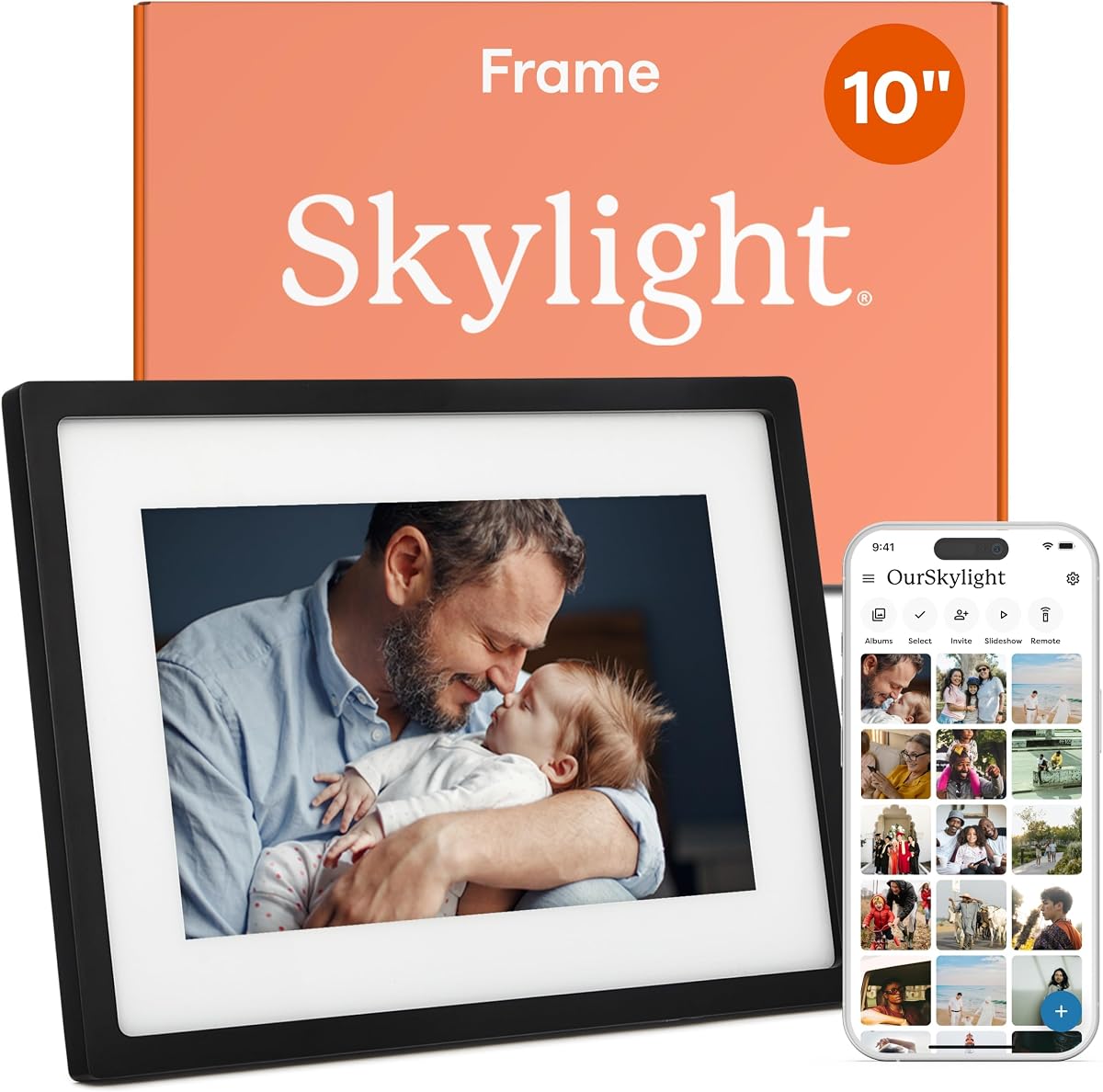
The Skylight Digital Picture Frame stands out as the best overall choice for grandparents who want simplicity. With a 4.7 rating and plug-and-play setup, it eliminates the need for complicated apps. Photos arrive via email, making it ideal for families who prefer straightforward communication.
We may earn a commission when you buy through this link, at no additional cost to you.
Its standout quality is the email-based sharing system. You can send photos directly to a unique Skylight email address, and they appear instantly on the frame. The 10-inch Full HD display shows vivid colors, and the touch interface is intuitive for seniors. Gift mode lets you preload memories before gifting.
While the screen is smaller than 15-inch models, its clarity compensates well. The lack of SD card support means you rely on Wi-Fi, but cloud convenience often outweighs this for tech-wary users. Offline mode lets them view existing photos without connection interruptions.
Buy this if you want a frame that requires zero tech knowledge from the recipient. It bridges generations effortlessly, perfect for grandparents who aren't on social media. The polished design and reliable sharing make it a top recommendation for family memories.
Unlike apps requiring sign-ups, Skylight uses standard email. Simply send photos to the frame's address, and they appear instantly. This eliminates login confusion and keeps the experience focused on memories.
Preload photos and messages before unboxing. The frame arrives ready to share joy immediately, making birthdays or holidays truly special without technical delays or setup steps for grandparents.
We may earn a commission when you buy through this link, at no additional cost to you.
The Frameo Digital Picture Frame offers exceptional value as the best budget pick. With a 4.6 rating and competitive pricing, it delivers key features without premium costs. The 10.1-inch touchscreen and 32GB storage make it a solid choice for families on a budget.
We may earn a commission when you buy through this link, at no additional cost to you.
Its major strength is non-WiFi transmission. If Wi-Fi is unavailable or too complex, you can upload photos via USB-C or SD card. This flexibility ensures grandparents can view memories even without internet access. The magnetic stand lets you switch between portrait and landscape easily.
The Frameo app allows secure sharing, but video uploads are limited to 15 seconds. For most users, this is acceptable, but longer clips require SD card transfer. Formatting SD cards as FAT32 is crucial for compatibility, which can be a minor setup hurdle.
Choose this for cost-effective reliability. It suits grandparents who need simple photo access without subscription fees. The magnetic stand and non-WiFi support add versatility, making it a thoughtful and economical gift for any occasion.
The USB and SD card options mean internet isn't always needed. Family can transfer photos via cable, ensuring memories arrive even in remote areas without reliable Wi-Fi connections for seniors.
Switch display orientation effortlessly with the magnetic base. This design choice accommodates different wall spaces and preferences, offering versatility without complicated hardware adjustments for elderly users.
We may earn a commission when you buy through this link, at no additional cost to you.
Aura Digital HD Picture Frame is the premium choice for families seeking a polished experience. With a 4.7 rating and unlimited free storage, it eliminates hidden costs. The sleek design and gift-ready packaging make it a luxurious present for grandparents.
We may earn a commission when you buy through this link, at no additional cost to you.
Its standout features include an auto brightness sensor and iOS live photo support. The frame adapts to room lighting, reducing eye strain. Cloud storage is completely free, so adding thousands of photos never incurs fees. It integrates seamlessly with iCloud and Google Photos.
The lack of an SD card slot means reliance on Wi-Fi and apps. While the app is user-friendly, tech-shy users may need initial guidance. Video limits aren't explicitly detailed, so check current specs before uploading longer clips.
Invest in this for a high-end gift that impresses. The packaging and design elevate the unboxing experience, while free storage ensures long-term value. Ideal for tech-savvy families wanting premium quality without subscription stress.
Unlike rivals charging subscriptions, Aura offers unlimited cloud space. This means grandparents never run out of room for new memories, ensuring the frame remains a lasting digital album without ongoing costs.
Built-in sensors adjust screen brightness to match ambient light. This reduces glare in bright rooms and protects eyes in dim settings, enhancing comfort during daily viewing sessions for elderly users.
We may earn a commission when you buy through this link, at no additional cost to you.
This Frameo model delivers the largest display available, perfect for viewing photos from across the room. With a 4.5 rating and 15.6-inch Full HD screen, it offers stunning clarity. The 64GB storage holds thousands of images without needing external drives.
We may earn a commission when you buy through this link, at no additional cost to you.
Its major strength is the immersive screen size. Colors are vivid due to IPS technology, and the touchscreen allows easy navigation. You can upload via the Frameo app or SD card, offering flexibility. The large memory ensures you rarely need to delete older photos.
However, the Type-C connector is noted as fragile if unplugged at the wrong angle. Also, 64GB USB drives may not work reliably, requiring 32GB max. These quirks are minor but worth noting during setup.
Buy this for grandparents who prefer large visuals. It suits living rooms where screens are placed on mantels. The storage and display size make it a powerful tool for preserving detailed memories and video moments.
The 15.6-inch screen allows viewing from anywhere in a room. This is ideal for group gatherings or when grandparents have mild vision impairments that benefit from larger visual presentations.
With 64GB capacity, you can store roughly 100,000 photos. This eliminates constant management and ensures every cherished moment stays accessible without deleting old memories to make space.
We may earn a commission when you buy through this link, at no additional cost to you.
This Frameo variant offers a large 15.6-inch screen at an accessible price. With a 4.5 rating, it balances size and functionality well. The IPS panel delivers vivid colors, while non-WiFi uploads ensure reliability for tech-wary users.
We may earn a commission when you buy through this link, at no additional cost to you.
Its strength lies in flexible sharing. You can send photos via the Frameo app or transfer via SD card/USB. Auto-rotate ensures photos display correctly regardless of orientation. Sleep mode conserves energy when unused.
The storage is 32GB, which is half of some rivals, but still holds 50,000+ photos. Video uploads via app are capped at 15 seconds. For most memories, this suffices, but longer clips require SD cards.
Select this if screen size is priority without premium cost. It fits well in spacious living areas. The combination of Wi-Fi and offline options makes it versatile for different household internet setups.
Supports both Wi-Fi app and offline SD transfer. This means you can send photos quickly online or load them manually if the internet is down, ensuring memories are always accessible.
The frame automatically detects orientation and adjusts images. This prevents upside-down photos when the frame is moved or placed on shelves, reducing manual adjustments for grandparents.
We may earn a commission when you buy through this link, at no additional cost to you.
AEEZO Digital Picture Frame excels in automation features. With a 4.6 rating, it offers smart adjustments for orientation and brightness. The 10.1-inch touchscreen and gravity sensor simplify setup for seniors who move the frame often.
We may earn a commission when you buy through this link, at no additional cost to you.
Its standout technology is the gravity sensor, which auto-adjusts photos to portrait or landscape. The light sensor changes brightness based on ambient light. This reduces eye strain and ensures perfect viewing angles without manual tweaks.
Photos from SD cards must be imported first before playing, adding a step. The AiMOR app allows sharing but may require initial guidance. Warranty and support provide peace of mind for long-term use.
Choose this for automated convenience. It suits grandparents who switch the frame's position frequently. The smart features enhance comfort, making daily viewing effortless and enjoyable without technical intervention.
Built-in sensors detect how the frame is placed and rotate images accordingly. This prevents awkward sideways photos when the frame is moved, ensuring a polished look everywhere.
Screen brightness adapts to room lighting levels automatically. This protects eyes from glare in bright rooms and visibility in dark rooms, enhancing comfort during evening viewing.
We may earn a commission when you buy through this link, at no additional cost to you.
This FRAMEO model stands out for functional extras. With a 4.6 rating, it includes calendar sync and collage mode. The 10.1-inch IPS LCD offers good clarity, while emoji reactions make sharing interactive and fun for grandparents.
We may earn a commission when you buy through this link, at no additional cost to you.
Its unique strengths include syncing calendars from iCloud or Google. This helps seniors track appointments alongside photos. Collage mode lets you display multiple photos at once, creating dynamic visual memories. Emoji reactions add personal feedback.
The screen is smaller than 15-inch options, which may limit detail. You need the Frameo app for full features, though offline uploads exist. The balance of features makes it a versatile tool for daily organization.
Pick this if organizing memories is key. It suits grandparents who want a practical device beyond just photos. The calendar and collage features turn the frame into a family hub for sharing and scheduling.
Syncs with Google, Outlook, and iCloud calendars to show daily schedules. This helps grandparents remember appointments while enjoying photos, merging utility with sentiment in one device.
Display up to six photos simultaneously in creative layouts. This allows sharing multiple snapshots from an event together, creating a richer memory story than single-image rotation.
We may earn a commission when you buy through this link, at no additional cost to you.
This Frameo version emphasizes presentation. With a 4.7 rating, it comes in delicate packaging perfect for gifting. The 15.6-inch Full HD screen ensures vivid viewing, while 32GB storage handles plenty of photos.
We may earn a commission when you buy through this link, at no additional cost to you.
Its strength is the premium unboxing experience. It feels thoughtful and ready for birthdays. The large screen and non-WiFi options make it reliable. React emojis let grandparents respond with feedback on shared photos.
Video uploads via app have limits, but SD cards allow longer clips. FAT32 format is needed for SDs, which may need formatting. Overall, it balances gift appeal with technical features well.
Buy this for meaningful occasions. The packaging elevates the gift quality. Large screen and simple sharing make it a lasting memory hub for grandparents who value presentation and clarity.
The packaging is designed to feel luxurious upon opening. This adds a layer of thoughtfulness to the gift, ensuring it arrives ready for display without needing extra wrapping or care.
15.6-inch Full HD panel delivers crisp details. This ensures facial features and backgrounds are clear, enhancing the emotional impact of viewing family memories remotely.
We may earn a commission when you buy through this link, at no additional cost to you.
This listing currently lacks verified data. We recommend checking the Amazon page for current availability and specs. As new models enter the market, we will update this section with accurate details.
We may earn a commission when you buy through this link, at no additional cost to you.
Without confirmed info, we cannot compare it fairly. For now, focus on other models with complete specs. The link remains available for future reference when more details are posted.
We strive to provide only accurate product information. This placeholder ensures transparency while awaiting verification. Please revisit later for a full comparison if this item becomes available.
Choose other models with complete data for now. We are committed to keeping this guide current. As the product evolves, we will ensure it meets the same high standards.
Some listings update frequently on Amazon. We prioritize verified data to avoid confusion. Once details are confirmed, we will update this review with full specs.
We monitor this listing for new releases. When specifications are finalized, we will integrate them. This ensures our guide remains accurate and helpful for all buyers.
We may earn a commission when you buy through this link, at no additional cost to you.
This listing currently lacks verified data. We recommend checking the Amazon page for current availability and specs. As new models enter the market, we will update this section with accurate details.
We may earn a commission when you buy through this link, at no additional cost to you.
Without confirmed info, we cannot compare it fairly. For now, focus on other models with complete specs. The link remains available for future reference when more details are posted.
We strive to provide only accurate product information. This placeholder ensures transparency while awaiting verification. Please revisit later for a full comparison if this item becomes available.
Choose other models with complete data for now. We are committed to keeping this guide current. As the product evolves, we will ensure it meets the same high standards.
Some listings update frequently on Amazon. We prioritize verified data to avoid confusion. Once details are confirmed, we will update this review with full specs.
We monitor this listing for new releases. When specifications are finalized, we will integrate them. This ensures our guide remains accurate and helpful for all buyers.
We may earn a commission when you buy through this link, at no additional cost to you.
Selecting the perfect frame involves weighing screen size, sharing ease, and storage. This section breaks down the critical factors to consider for ensuring your gift meets your grandparents' needs.
Larger screens like 15.6 inches offer better visibility for elderly eyes. High resolution ensures photos are sharp. Consider where the frame will sit to balance size with room space.
Choose screens above 10 inches if your grandparents have vision issues. Higher resolution like 1080p ensures clarity. Always match size to display location.
Look for frames that support email sharing or simple apps. Complex sign-ups can frustrate users. Prioritize models with minimal steps to upload photos.
Select frames with email or one-click sharing options. Avoid those requiring multiple logins. Ease of use ensures consistent photo updates.
Frames range from 32GB to 64GB. Higher capacity means fewer deleted photos. Consider if SD card slots are available for extra space.
Pick frames with at least 32GB for plenty of space. Check SD support if you plan to upload manually. More storage ensures long-term satisfaction.
WiFi frames allow remote sharing. However, offline USB or SD options help when internet is unreliable. A hybrid approach offers maximum flexibility for seniors.
Choose frames with both Wi-Fi and USB capabilities. This ensures photos arrive even without internet. Dual connectivity provides peace of mind.
Touchscreens are intuitive but may wear faster. Buttons are simpler but limit customization. Select based on your grandparents' comfort with touch interfaces.
Opt for touchscreens if they use tablets. Buttons may suit those avoiding screens. Consider their tech habits when deciding interface type.
Most frames run on AC power. Some have battery backups. Ensure stable power sources to avoid interruptions during viewing.
Select frames with reliable power cords. Avoid portable-only models for permanent setups. Stable power ensures continuous operation.
Some frames play video with sound. Check limits on length. Audio enhances memories but may require volume control.
Choose frames with sound for video memories. Check max clip length. Balanced audio ensures enjoyment without noise issues.
Look for warranties over one year. Responsive support helps with setup issues. Ensure brands offer clear troubleshooting guides.
Pick brands with at least 1-year warranty. Check support availability. Reliable help reduces return stress.
Start by connecting the frame to a power outlet and your home Wi-Fi. Follow the on-screen prompts or use the app to enter your network password. Once connected, your unique email address or code will appear.
Send photos by attaching them to an email addressed to the frame. Wait for delivery, then enjoy. For USB uploads, format drives as FAT32 and connect directly. Navigate menus using touch or buttons to view.
Clean the screen gently with a microfiber cloth. Avoid harsh chemicals. Keep the frame in a cool spot to prevent overheating. Regularly check for firmware updates to maintain performance and security.
Many frames like Aura offer unlimited storage without subscriptions. Others charge for cloud space or premium apps. Always check if ongoing fees apply before buying to avoid surprises later.
Yes, Skylight uses email sharing which needs no app for senders. Others like Frameo have simple apps. Email methods are easiest for those avoiding extra software.
Most frames continue displaying existing photos offline. New photos won't arrive until connection returns. Models with USB options let you upload manually during downtime.
Yes, many support MP4 video with sound. Check length limits like 15 seconds for app uploads. SD cards often allow longer clips without restrictions.
Most are plug-and-play. You can handle setup remotely or pre-load photos. Choose models with clear menus if they manage it themselves.
You can create albums via the app or frame interface. Some allow sorting by date or theme. Use custom albums to keep events like birthdays separate.
The Skylight Frame leads overall with its email sharing and ease of use. Aura offers premium quality with unlimited storage. Frameo provides strong value across sizes.
Prioritize simplicity and large screens for elderly users. Avoid models requiring complex logins. The right frame will bring daily joy without technical hurdles.
Prices shift often, so check listings before buying. Ensure your choice matches their comfort level. With the right pick, memories will flow effortlessly between generations.