
CENMATE Aluminum 4 Bay
4.3Editor score
Aluminum alloy housing with cooling fan
Up to 80TB total storage capacity
USB A/C 3.0 compatibility
Direct Attached Storage offers a reliable way to expand your digital workspace without complex network setups. These devices connect directly to your computer providing fast access to large files and essential backups. Finding the right model depends on your specific capacity needs speed requirements and budget constraints for optimal performance.
We evaluated ten top rated DAS enclosures based on their transfer speeds build quality and compatibility across different operating systems. Each product was selected for its ability to handle demanding workloads while maintaining data integrity and ease of use. Our analysis highlights key features that matter most for professionals and enthusiasts alike.
Each pick in this list showcases distinct strengths whether you need massive capacity hybrid storage or affordable expansion options. Please note that pricing and availability fluctuate frequently so check current listings before making a final decision. We recommend verifying compatibility with your specific hardware setup to ensure seamless integration.
4.3Editor score

4.2Editor score

5.0Editor score
As an Amazon Associate we earn from qualifying purchases.
The following table provides a side-by-side comparison of all ten selected Direct Attached Storage devices highlighting their core specifications and key differentiators to help you make an informed decision.


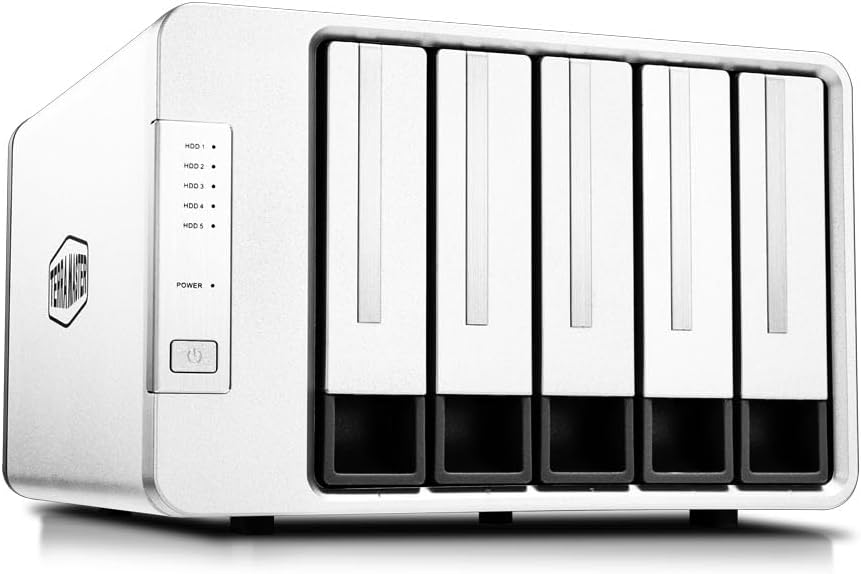


The TERRAMASTER D4-320 stands out as a reliable DAS solution for users needing fast and scalable storage. With a rating of 4.2 stars it delivers consistent performance for large file transfers and daily backups. Its USB 3.2 Gen2 interface ensures maximum bandwidth utilization for compatible systems.
We may earn a commission when you buy through this link, at no additional cost to you.
Key strengths include the impressive read/write speeds reaching up to 1,016 MB/s with four SATA III HDDs installed. The tool-free design simplifies drive management while the Push-lock mechanism secures trays effectively. Compatibility extends across macOS Windows and Linux making it versatile for multi-platform environments.
While it lacks hardware RAID support this design choice maintains simplicity and cost efficiency. The temperature-controlled fan may generate noticeable noise under heavy load but remains manageable for most office settings. These trade-offs are acceptable given the focus on pure speed and capacity expansion.
This enclosure is ideal for creative professionals and small businesses needing rapid access to large datasets. Its plug-and-play nature minimizes setup time and the hot swap feature ensures continuity during maintenance. For straightforward high-capacity needs without RAID requirements this model is highly recommended.
The USB 3.2 Gen2 protocol enables transfer rates up to 10Gbps significantly outpacing older USB standards.
An intelligent fan adjusts speed based on temperature ensuring drives stay cool without constant noise.
We may earn a commission when you buy through this link, at no additional cost to you.
The QNAP TR-004 excels as a direct-attached expansion unit specifically designed for QNAP ecosystem users. With a 4.2 star rating it offers robust hardware RAID options that software solutions cannot match. This makes it a secure choice for critical data storage needs.
We may earn a commission when you buy through this link, at no additional cost to you.
Its primary strength lies in hardware RAID support including modes like 0 1 and 5 which provide redundancy and performance benefits. The USB Type-C connection ensures fast data throughput and lockable bays add a layer of physical security. Compatibility with Windows macOS and Linux broadens its standalone utility.
Users should note that this device cannot merge storage pools directly with a connected NAS system. It operates as an independent volume and migration between TR-004 units is supported but files moved to NAS may not be recognized immediately. This limitation requires planning for data workflows.
For existing QNAP owners this enclosure provides a straightforward way to increase capacity without network complexity. It suits users who want hardware-level protection and easy expansion. Verify your NAS model compatibility before purchase to avoid firmware update issues.
Built-in RAID controllers manage data redundancy independently reducing load on the host system.
Designed to expand QNAP NAS capacity specifically though it functions as standalone DAS too.
We may earn a commission when you buy through this link, at no additional cost to you.
The TERRAMASTER D8 Hybrid offers a unique dual-media approach combining four HDD bays with four NVMe slots. With a 3.5 star rating it presents an innovative solution for balancing cost and performance. This hybrid design allows users to store cold data on HDDs and active files on SSDs.
We may earn a commission when you buy through this link, at no additional cost to you.
Key features include support for up to 152TB total capacity and transfer speeds up to 980MB/s with NVMe drives. The tool-free design applies to both drive types and the Push-lock system ensures security. TPC Backupper software simplifies backup scheduling for enhanced data security.
The lower user rating suggests potential setup complexity or compatibility quirks some users have experienced. Managing two different storage speeds requires manual organization which might deter less technical users. However the power on recovery feature adds reliability for unattended operations.
This enclosure is best for users who understand storage tiering and want to optimize performance without buying separate devices. It fits professionals needing both massive archives and fast access. Ensure your system can handle multiple drive volumes before committing.
Separate bays for HDD and NVMe let you tailor performance and capacity per file type.
TPC Backupper tool provides scheduled backups directly integrated with the device management.
We may earn a commission when you buy through this link, at no additional cost to you.
The CENMATE Aluminum 4 Bay delivers strong value for those seeking expandable storage without premium costs. Rated at 4.3 stars it offers solid performance and build quality for its price point. The aluminum construction helps manage heat effectively during intensive use.
We may earn a commission when you buy through this link, at no additional cost to you.
Standout features include compatibility with both 2.5 and 3.5 inch drives and up to 80TB total capacity. The tool-free design allows quick drive swaps and USB A/C options ensure broad port compatibility. Customer support is responsive with 24-hour response times for troubleshooting.
The fan noise level is higher than some competitors so it may not suit quiet environments. While hot swap functionality is convenient users need to ensure proper OS handling to prevent data loss. These minor issues are outweighed by its affordability and practicality.
Home users and budget-conscious professionals will find this enclosure meets their expansion needs well. It is ideal for backup drives or media libraries where maximum speed is less critical. Always check fan noise tolerance before finalizing your purchase.
Delivers 4-bay functionality at a lower price than many competing models without sacrificing features.
Accommodates both laptop and desktop drives making it flexible for existing drive inventories.
We may earn a commission when you buy through this link, at no additional cost to you.
The SABRENT 5-Bay USB-C offers independent drive access through dedicated controllers for each bay. With a 4.1 star rating it provides stable multi-drive performance without sharing bandwidth. This architecture reduces bottlenecks when accessing multiple drives simultaneously.
We may earn a commission when you buy through this link, at no additional cost to you.
Key strengths include the tray-less hot-swap design and USB-C daisy-chain capability for adding more units. The internal power supply eliminates external bricks for a cleaner desk setup. Compatibility spans major operating systems ensuring broad usability.
While it lacks RAID functionality this simplicity benefits users needing direct file access. The daisy-chain feature is useful but requires host USB-C support and proper cable management. Power stability depends on the internal supply which may need configuration.
Best for users managing multiple individual drives who need reliability without RAID complexity. Creative professionals working with large video files benefit from the independent connections. Ensure your computer supports USB-C daisy-chaining before buying.
Each bay has its own controller ensuring one drive issue does not affect others.
Connect multiple docks via USB-C to scale storage without using additional ports.
We may earn a commission when you buy through this link, at no additional cost to you.
The TERRAMASTER D8 Hybrid 2 achieves a perfect 5.0 star rating reflecting exceptional user satisfaction. It merges HDD capacity with NVMe speed for optimal workflow efficiency. The TPM power management technology ensures energy efficiency and faster wake-up times.
We may earn a commission when you buy through this link, at no additional cost to you.
Its hybrid design supports 4 HDDs and 4 NVMe SSDs allowing 152TB total capacity. Transfer speeds reach up to 1020 MB/s with NVMe drives speeding up large file exports. The plug-and-play nature simplifies installation across macOS Windows and Linux.
The premium price reflects its advanced features and build quality which may not fit tight budgets. Power management modes might require tweaking for specific workflows to balance performance and noise. However the reliability and speed justify the investment for demanding users.
Ideal for professionals needing top-tier performance and flexibility in a single enclosure. Video editors and data analysts benefit from the mixed drive speeds. Verify host USB 4 compatibility for maximum speed potential.
Optimizes energy use and wake-up times to match active or idle usage patterns.
Combines slow cold storage with fast hot storage in one unit for cost efficiency.
We may earn a commission when you buy through this link, at no additional cost to you.
The TERRAMASTER D5-310 stands out with hardware RAID controlled by a simple dial on the device. With a 3.6 star rating it offers redundancy features typically found in more complex systems. The hot spare disk enhances reliability by automating drive replacement.
We may earn a commission when you buy through this link, at no additional cost to you.
Key capabilities include RAID modes 5 0 1 10 and Single with support for up to 120TB total. USB 3.1 Gen 1 provides decent speeds though not as fast as Gen2. TPC Backupper software aids in scheduled incremental and differential backups.
User feedback indicates occasional RAID stability issues or confusion over modes. The USB 3.1 speed limit may bottleneck high-performance SSDs. Despite these trade-offs it remains a rare DAS option for hardware RAID at this price.
Best for users needing basic redundancy without network storage complexity. Small teams with shared data needs find the hardware RAID valuable. Test RAID modes before committing to critical data storage.
Physical dial simplifies changing RAID modes without software configuration or rebooting.
Automatically replaces failed drives in supported RAID levels minimizing data loss risk.
We may earn a commission when you buy through this link, at no additional cost to you.
The WAVLINK 4-Bay offers a distinct feature set including 4K HDMI video output from USB-C. With a 4.0 star rating it blends storage with display connectivity for media workflows. Dual cooling fans activate at 48°C to maintain optimal drive temperatures.
We may earn a commission when you buy through this link, at no additional cost to you.
Strengths include independent power switches for each bay allowing hot-swapping without full shutdown. The aluminum shell ensures durability and heat dissipation. USB 3.2 Type-C delivers up to 10Gbps transfer speeds for efficient data handling.
Video output requires a host USB-C port supporting DP1.4 which not all systems have. Mounting brackets for 2.5 drives are separate purchases adding to total cost. These limitations are manageable for users who need display integration.
Ideal for home theater setups or presentation environments needing both storage and video. Tech-savvy users benefit from the flexible power switches. Check your host port capabilities before relying on HDMI output.
Supports 4K@60Hz via HDMI for direct media playback without additional hardware.
Per-bay switches let you control individual drives for power saving or testing.
We may earn a commission when you buy through this link, at no additional cost to you.
The ORICO 5 Bay focuses on ease of use with magnetic chips eliminating tool needs for cover access. With a 4.0 star rating it offers fast recognition times suitable for frequent drive swaps. The 60mm fan ensures adequate cooling during operation.
We may earn a commission when you buy through this link, at no additional cost to you.
Key features include support for up to 110TB total and USB 3.1 gen1 Type-C compatibility. The honeycomb rear design aids airflow and multiple protection designs safeguard against voltage issues. Indicator lights provide quick status checks for drive health.
Linux systems may only read one drive at a time which limits multi-drive functionality. The fan is functional but can be audible in quiet spaces. These limitations are trade-offs for its user-friendly design.
Best for users prioritizing speed and simplicity in drive management. Home users and casual professionals find the quick setup appealing. Ensure OS compatibility requirements align with your workflow before purchase.
Magnetic cover allows instant access without screws speeding up drive maintenance tasks.
Four indicator lights show activity and status helping troubleshoot issues quickly.
We may earn a commission when you buy through this link, at no additional cost to you.
The QNAP TR-002 is a compact option for those needing basic redundancy in a small footprint. With a 4.0 star rating it offers hardware RAID for data safety without network complexity. USB Type-C ensures modern connectivity for most computers.
We may earn a commission when you buy through this link, at no additional cost to you.
Strengths include support for up to two drives and hardware RAID modes 0 1 and JBOD. It functions well as external storage or QNAP NAS expansion with lockable bays for security. Compatibility spans Windows macOS and Linux for broad use.
The 2-drive limit restricts scalability making it unsuitable for large data archives. Transfer speeds are adequate but not top-tier for high-performance workflows. These constraints fit users with limited space needs.
Ideal for individuals needing basic backup with some redundancy in a small space. Tech users or remote workers find the portability useful. Ensure your NAS compatibility before buying for expansion plans.
Small 2-bay design saves desk space while providing essential redundancy features.
Hardware RAID 0 provides backup options without requiring external network systems.
We may earn a commission when you buy through this link, at no additional cost to you.
Selecting the right Direct Attached Storage requires balancing speed capacity and compatibility with your existing systems. Consider these factors to match your needs with the appropriate device features.
Interface speed determines how fast data moves between your computer and the enclosure. USB 3.2 Gen2 offers up to 10Gbps while USB 3.1 Gen 1 caps at 5Gbps. Faster interfaces reduce wait times when transferring large files or editing media directly from the drive.
Choose interfaces that match your computer's ports to avoid bottlenecks. Thunderbolt compatibility may be needed for maximum performance on specific workstations.
Drive bay count affects total storage capacity and flexibility. 4-bay and 5-bay models provide more space for archives while 2-bay units save desk space. Consider current needs and future expansion plans when selecting bay count.
Ensure the enclosure supports your intended drive sizes such as 3.5 inch or 2.5 inch. Hybrid options offering HDD and SSD slots add versatility for tiered storage strategies.
RAID capability provides data redundancy and performance benefits. Hardware RAID is more reliable than software solutions and simplifies setup. Look for models offering modes like RAID 0 1 or 5 based on your data safety requirements.
Not all DAS units include RAID so check specifications carefully. Simple JBOD or individual drive access may suffice for non-critical storage needs.
Effective cooling prevents overheating during prolonged use and extends drive lifespan. Look for enclosures with intelligent fans that adjust speed based on temperature. Aluminum construction also aids heat dissipation and structural stability.
Noise levels vary so consider your environment. Silent operation is key for home offices while higher noise may be acceptable in studio settings.
Ensure the device works with your current operating system without requiring extra drivers. Most modern enclosures support Windows macOS and Linux but some features vary. Mac users should check for specific macOS compatibility especially with newer versions.
Cross-platform compatibility ensures you can share drives between different computers easily. Verify firmware updates if your OS changes frequently.
Hot swap support allows replacing drives without powering down the device. This feature is essential for maintaining uptime in active workflows. Tool-free trays simplify the physical process of changing drives.
Ensure your operating system supports hot swap to prevent data corruption. Proper eject procedures should still be followed before removal.
Check the maximum supported capacity per drive and total across all bays. Some enclosures limit individual drives to 20TB while others support up to 30TB. Calculate total needs based on current and future data growth.
Higher capacity limits provide headroom for expansion without needing new enclosures. Always confirm drive manufacturer compatibility with the enclosure model.
Build quality affects long-term reliability and resistance to physical stress. Aluminum enclosures offer better protection and heat dissipation than plastic. Lockable drive bays prevent accidental removal in shared environments.
Look for warranties and customer support terms. Responsive technical support ensures quick resolution of any hardware or software issues.
Connect the enclosure to a compatible USB port and ensure power is stable. Install any required drivers if your system does not auto-recognize the device. Most DAS units work plug-and-play but verify OS compatibility first.
Organize data logically across drives to manage performance and backup efficiency. Use separate volumes for active projects and archives. Regular backups to cloud or secondary storage protect against hardware failure.
Maintain adequate airflow around the device and avoid stacking other items on it. Clean dust from vents periodically and monitor temperatures during heavy use. Eject drives safely before removing to prevent data loss.
Direct Attached Storage is better for single-user access and faster local transfers while NAS suits multi-user environments. DAS offers lower cost and simpler setup whereas NAS provides remote access and advanced features.
New drives often need formatting to your file system like NTFS or exFAT before use. This process erases data so back up existing content first. Enclosures do not auto-format drives upon connection.
Yes most DAS enclosures support SATA SSDs and some support NVMe SSDs. SSDs provide faster access and are more durable but capacity per dollar is lower than HDDs. Check compatibility before buying SSDs.
Power loss may cause data corruption or incomplete writes. Use enclosures with power-on recovery features and enable OS-level backup. Always save work before unplugging the device.
You can add more drives if bays are free or buy another enclosure. Some DAS support daisy-chaining to link multiple units. Always ensure your computer has enough ports.
Some models include hardware RAID controllers while others rely on software. Check product specs for RAID support before purchase. Hardware RAID offers better performance and simpler management than software options.
DAS connects directly to one computer so sharing requires OS file sharing settings. For multi-user access NAS is more efficient. DAS sharing works for small home networks with limited needs.
Most modern DAS enclosures support macOS but some RAID features may not work fully. Verify macOS compatibility and required drivers before buying. ExFAT formatting works best for cross-platform use.
This guide reviewed ten top Direct Attached Storage options covering various capacity needs and use cases. The TERRAMASTER D4-320 leads as a balanced all-rounder while the CENMATE unit offers budget-friendly value. Hybrid models like the D8 Hybrid 2 provide performance for demanding users.
Prioritize interface speed and drive configuration based on your specific workflow requirements. Consider cooling noise levels and OS compatibility for long-term satisfaction. Hardware RAID options add security for critical data workflows.
Check current availability and compatibility before finalizing your purchase. Prices and features may change so confirm details on manufacturer websites. Selecting the right DAS ensures efficient data management and reliable storage expansion.