
Thermalright Assassin X120 Refined SE
4.7Editor score
Four efficient heat pipes
Low noise PWM fan
Wide socket support
This guide compares the top CPU air cooler fan heatsink models for performance and value. We review specs, noise levels, and compatibility to help you choose
Finding the right cooling solution is critical for maintaining system stability. A quality CPU air cooler fan heatsink ensures your processor runs at safe temperatures even under heavy loads. This helps prevent thermal throttling and extends the lifespan of your hardware components significantly.
We evaluated ten leading models based on thermal performance, build quality, and compatibility. Our analysis includes detailed specifications, fan noise levels, and mounting options for various platforms. This comprehensive review helps you identify the best value and premium options available today.
Each pick highlights key features like heat pipe count, fan speed, and socket support. Prices and availability change frequently so verify current details before purchasing. Use this guide to make an informed decision that matches your specific build requirements and budget constraints effectively.
4.7Editor score

4.8Editor score
4.7Editor score
The following table provides a side-by-side comparison of all ten products. It highlights key specifications like heat pipe count, fan type, and compatibility to help you quickly identify differences between models.


This model stands out as a top budget choice for general users. With a 4.7 rating, it delivers reliable cooling without breaking the bank. The TL-C12C PWM fan ensures efficient airflow while keeping noise levels low.
We may earn a commission when you buy through this link, at no additional cost to you.
Thermalright used AGHP technology in the heat pipes to ensure consistent performance regardless of orientation. The aluminum heatsink cover protects the fins and adds a clean look. Installation is straightforward with included mounting parts for most platforms.
While it lacks dual towers, it performs well for mid-range CPUs. The height fits most cases easily. Some users might prefer more premium features but for basic cooling, it is hard to beat.
Buy this if you need dependable cooling on a tight budget. It suits office PCs and gaming rigs with standard processors. Always check case clearance before installation to avoid issues.
This cooler offers exceptional value by combining reliable thermal performance with a budget-friendly price point.
The TL-C12C PWM fan runs quietly under load making it ideal for quiet workspace setups.
We may earn a commission when you buy through this link, at no additional cost to you.
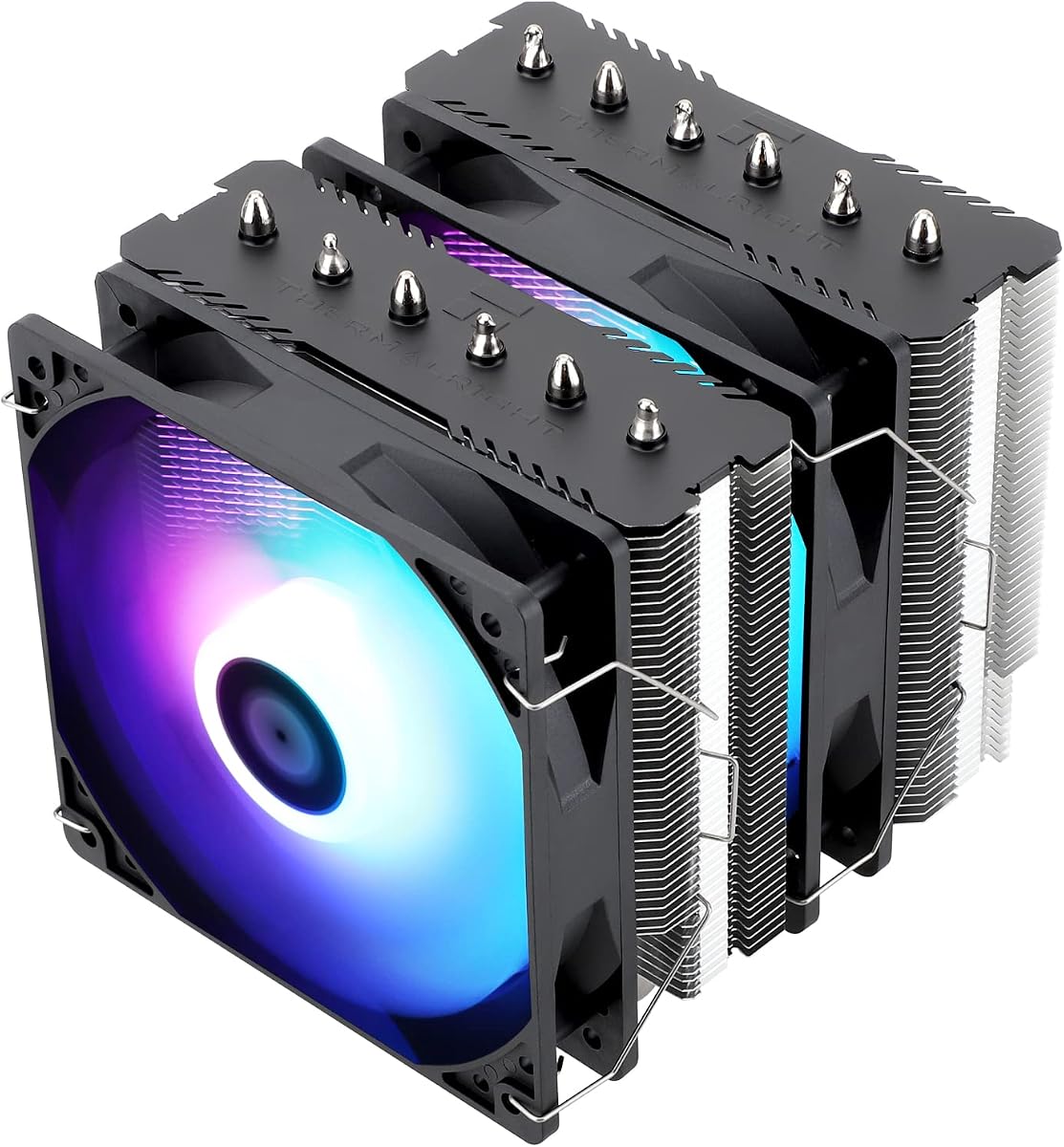
This dual tower cooler delivers premium performance for demanding systems. It earned a 4.7 rating for its robust cooling capabilities. The dual fans and six heat pipes handle high thermal loads effectively.
We may earn a commission when you buy through this link, at no additional cost to you.
AGHP technology ensures performance remains stable even if installed horizontally. The ARGB fans add visual appeal with customizable lighting effects. The aluminum cover provides durability and a polished finish.
Its size requires careful case selection. Some RAM modules might interfere so check clearances. The offset layout helps with graphics card clearance. It is a great choice for high-end builds.
Choose this for maximum cooling potential with aesthetic flair. It suits gamers and overclockers needing reliable heat dissipation. Ensure your case has enough room before purchasing.
The dual tower design with six heat pipes provides superior heat dissipation for high TDP processors.
ARGB lighting allows users to sync colors with other system components for a cohesive look.
We may earn a commission when you buy through this link, at no additional cost to you.
The NH-D15 is a legendary cooler known for exceptional thermal performance and low noise. With a 4.8 rating it continues to set the standard. The chromax.Black version offers a sleek all black aesthetic.
We may earn a commission when you buy through this link, at no additional cost to you.
It includes two NF-A15 fans optimized for high airflow. The wide tower design maximizes surface area for cooling. Installation is easy with SecuFirm2 mounting system and offset options.
The main drawback is its size and cost. It fits most tower cases but check clearance. The six year warranty adds peace of mind. It is worth the investment for top performance.
Buy this for silent systems with powerful processors. It suits enthusiasts who prioritize noise levels. Ensure you have space in your case for this larger unit.
The NF-A15 fans provide ultra quiet performance ideal for users who value silence during operation.
Noctua backs this product with a comprehensive six year manufacturer warranty for long term reliability.
We may earn a commission when you buy through this link, at no additional cost to you.
This model offers a balance of size and performance. With a 4.8 rating it delivers top tier cooling in a compact form. The all black design matches modern builds well.
We may earn a commission when you buy through this link, at no additional cost to you.
It uses two NF-A12x25 fans for superior airflow. The 120mm width fits most cases without RAM interference. Mounting is straightforward with included hardware and paste.
The dual fan setup adds height so check case limits. It is pricier than some rivals but delivers quality. Ideal for users needing performance without massive dimensions.
Choose this for balanced cooling in smaller builds. It suits gaming PCs and workstations with space constraints. Verify case height limits before purchase to ensure fit.
The 120mm width fits most tower cases while maintaining excellent compatibility with RAM slots.
Two NF-A12x25 fans provide superior cooling performance compared to single fan setups in this size.
We may earn a commission when you buy through this link, at no additional cost to you.
This cooler adds a digital screen for monitoring system stats. It earned a 4.7 rating for performance and features. The screen shows CPU temp and usage live.
We may earn a commission when you buy through this link, at no additional cost to you.
The fan spins at high RPM for strong airflow. The digital top cover enhances aesthetics significantly. Installation is standard with included parts for most platforms.
Noise levels are higher than silent models due to fan speed. Software is needed for screen control. It suits users wanting a display without water cooling.
Buy this for a unique look with real-time monitoring. It fits enthusiasts who want to track temps easily. Ensure your case has height clearance for it.
The digital screen allows users to monitor CPU temperature and usage in real time without software.
The ARGB fans sync with motherboard lighting for a vibrant and modern system aesthetic.
We may earn a commission when you buy through this link, at no additional cost to you.
The NH-D15 is a classic reference for air cooling performance. It maintains a 4.8 rating due to its reliability. It delivers near water cooler performance without leaks.
We may earn a commission when you buy through this link, at no additional cost to you.
Two NF-A15 fans provide balanced airflow. The dual tower design maximizes surface area. Installation is straightforward with SecuFirm2 mounts and included paste.
Its size limits case compatibility slightly. Check RAM and PCIe clearance carefully. The classic look may not suit black builds. It remains a top choice for performance.
Buy this for maximum silent cooling performance. It suits workstations and high-end desktops. Verify case dimensions before purchasing to ensure fit.
This model has won numerous awards and remains a top choice for users seeking proven cooling.
Low-noise adaptors allow users to reduce fan speeds for quieter operation under light loads.
We may earn a commission when you buy through this link, at no additional cost to you.
This variant optimizes compatibility with dual tower performance. It earned a 4.8 rating for balanced features. The asymmetrical design clears RAM and PCIe slots.
We may earn a commission when you buy through this link, at no additional cost to you.
The single NF-A15 fan ensures quiet operation. Mounting system is easy to use. It suits cases with limited clearance. Build quality remains top tier.
It costs more than some dual tower rivals. Performance is slightly lower than two fan version. Ideal for users needing specific compatibility requirements.
Choose this for builds with tight RAM clearance. It suits smaller cases or older boards. Check motherboard manual before purchase for compatibility.
The asymmetrical design ensures the cooler does not block the first PCIe slot on most motherboards.
65mm RAM clearance allows installation of tall memory modules without interference.
We may earn a commission when you buy through this link, at no additional cost to you.
This compact dual tower cooler suits small builds. It has a 4.7 rating for performance in its class. Only 110mm tall it fits many ITX cases.
We may earn a commission when you buy through this link, at no additional cost to you.
The NF-A9 fan ensures silent operation. Mounting is easy for most sockets. It fits most cases without RAM issues. Quality remains high as with other models.
Thermal capacity is limited compared to larger units. Not ideal for high TDP CPUs. Perfect for quiet office PCs or mini rigs. Always check case height limits.
Buy this for Small Form Factor builds needing dual tower performance. It suits quiet systems needing reliable cooling. Verify motherboard compatibility before purchase.
The 110mm height makes this cooler ideal for HTPCs and Small Form Factor cases.
The highly optimized NF-A9 fan provides ultra quiet operation even under moderate loads.
We may earn a commission when you buy through this link, at no additional cost to you.
This cooler combines performance with slim dimensions. It holds a 4.8 rating for quality. The 120mm width fits almost all cases easily.
We may earn a commission when you buy through this link, at no additional cost to you.
NF-F12 fan focuses airflow for cooling. Mounting is straightforward. It does not block RAM or PCIe slots. Ideal for standard builds needing reliable cooling.
Performance may lag behind larger towers. It suits moderate TDP CPUs. Check CPU needs before purchasing. This is a proven reliable option.
Choose this for balanced compatibility and cooling. It fits standard builds requiring quiet performance. Verify CPU specs to ensure adequate cooling.
The 120mm width ensures this cooler fits most tower cases without RAM interference.
The NF-F12 fan provides optimized airflow for efficient cooling without excessive noise.
We may earn a commission when you buy through this link, at no additional cost to you.
This dual tower cooler delivers high performance at a value. It has a 4.8 rating for quality and specs. Soldered base ensures good heat transfer.
We may earn a commission when you buy through this link, at no additional cost to you.
The offset layout improves GPU clearance. AGHP technology ensures orientation independence. Installation is standard with included parts. Ideal for modern gaming builds.
Check case and RAM clearance carefully. Some users find installation steps lengthy. It suits most users seeking dual tower performance. Great for high TDP CPUs.
Buy this for strong cooling at a fair price. It fits most modern builds. Verify motherboard specs before purchase for best fit.
The soldered base and heat pipes ensure rapid heat transfer from the processor surface.
The offset asymmetric layout improves graphics card clearance for better system compatibility.
We may earn a commission when you buy through this link, at no additional cost to you.
Selecting the right cooler requires balancing performance, size, and features. This section breaks down key factors to consider before purchasing a CPU air cooler fan heatsink.
Heat pipes transfer heat from the base to the fins. More pipes generally mean better thermal performance. For high-end CPUs look for coolers with six or more pipes.
Check the pipe count to ensure it matches your CPU's heat output.
Dual towers offer more surface area than single towers. This improves airflow and cooling efficiency. However they add height and may block RAM or PCIe slots.
Choose dual towers for performance but verify clearance needs.
Noise matters for quiet environments. Look for dB ratings under 25 for very quiet operation. PWM fans allow speed control to reduce noise when load is low.
Check dB ratings to ensure the cooler fits your noise tolerance.
Height determines if the cooler fits inside your case. Standard cases support up to 160mm. Smaller cases may require compact models under 120mm.
Measure your case internal height before purchasing a tall tower.
Ensure the cooler supports your motherboard socket. Newer sockets like AM5 may need specific mounting kits. Check product descriptions for detailed socket lists.
Verify socket compatibility to avoid mounting issues later.
Coolers often overhang RAM slots. Asymmetrical designs offer more clearance. Check height requirements for your specific RAM modules.
Measure RAM height to ensure it clears the cooler tower.
Included paste matters for performance. High-quality paste like NT-H1 improves contact. If not included buy premium paste separately.
Check if thermal paste is included to save time and cost.
Warranty periods vary from one to six years. Longer warranties indicate manufacturer confidence. Keep receipt and packaging for future claims.
Look for extended warranties to protect your investment.
First apply a thin layer of thermal paste on the CPU surface. Too much paste can insulate heat. Ensure even coverage without bubbles.
Securely mount the cooler using provided brackets. Tighten screws evenly to ensure flat contact. Uneven pressure leads to hot spots.
Keep the case and cooler clean of dust. Clean fans every few months with a blower. Dust buildup restricts airflow and raises temps.
The Noctua NH-D15 chromax.Black or NH-U12S are excellent choices for quiet operation. They feature low noise fans and high quality bearings that minimize sound output under load.
Most high-end coolers like Noctua include premium thermal paste. However budget models may not. Always check product specifications to ensure you have the right paste.
Yes most models listed support AM5 with included mounting kits. However you may need the original motherboard backplate for installation. Check the product details before purchasing.
AGHP technology helps heat pipes work effectively in horizontal orientations. It prevents gravity from affecting heat transfer. This ensures consistent cooling in non-standard case layouts.
Dual towers provide more surface area for heat dissipation. This results in lower CPU temperatures under load. They are ideal for high-performance processors that generate more heat.
Check the total height specification of the cooler. Compare it to your case's CPU cooler clearance limit. Ensure the height fits comfortably without touching the side panel.
ARGB fans add visual appeal but performance depends on airflow and noise. Standard fans focus on cooling efficiency. Choose based on your preference for aesthetics versus silent performance.
This guide reviewed ten top CPU air cooler fan heatsink models. From the budget-friendly Thermalright Assassin X120 to the premium Noctua NH-D15 options exist for every need.
Prioritize thermal performance and noise levels based on your usage. Ensure the cooler fits your case and supports your motherboard socket.
Prices and availability change frequently so verify current deals before purchasing. Use this information to make a smart choice that keeps your system cool.