
Rosewill Thor NAS – Full Tower Workstation Server Chassis
3.9Editor score
Supports up to 11x 3.5 HDD
E-ATX motherboard compatibility
USB 3.2 Type-C port
This guide compares the top full tower workstation server cases for enterprise builds, NAS, and AI servers focusing on storage, airflow, and expandability.
Building a robust server or workstation requires a chassis that handles massive storage and cooling needs efficiently. Full tower cases provide the space necessary for enterprise hardware and professional workloads without compromise.
We evaluated ten top models based on storage capacity, motherboard support, cooling potential, and build quality. Our analysis ensures you find a case that matches your specific infrastructure requirements and performance goals.
Each pick highlights key strengths and trade-offs for different use cases like NAS or AI servers. Remember that availability and pricing fluctuate so verify current details before purchasing your final system.
3.9Editor score

5.0Editor score
4.6Editor score
Compare the key specifications and features of all ten selected cases side by side to find the right fit for your professional workstation or server project.



The Antec 900 Full-Tower E-ATX PC Case stands out as a premier choice for professionals needing serious thermal performance and component density. With a perfect rating, it delivers a spacious interior designed to handle demanding AI workstation tasks and dual GPU configurations without thermal throttling.
We may earn a commission when you buy through this link, at no additional cost to you.
Its cooling system is exceptional featuring six pre-installed high-performance PWM fans that establish a massive airflow path. The front support for up to 420mm radiators ensures you can maintain low temperatures even under sustained heavy loads typical of server workloads or rendering tasks.
While the case excels in cooling and GPU support, users should note that it focuses on airflow rather than drive density compared to dedicated NAS enclosures. The lack of dedicated hot-swap bays means storage expansion requires internal access which may not suit all enterprise needs.
This case is ideal for workstation users prioritizing GPU stability and cooling headroom. The tool-free access and USB Type-C connectivity make it a practical choice for daily professional use requiring fast data transfer and easy maintenance.
The six pre-installed PWM fans create a directed airflow path ensuring critical components stay cool during intensive workloads.
USB Type-C 3.2 Gen 2 support allows for rapid data transfers essential for modern professional workflows and external storage.
We may earn a commission when you buy through this link, at no additional cost to you.
The Rosewill Thor NAS offers an accessible entry point for users building a DIY NAS or workstation server on a budget. It prioritizes storage density and motherboard compatibility making it suitable for SMB solutions or personal AI server projects requiring significant drive bays.
We may earn a commission when you buy through this link, at no additional cost to you.
Its standout feature is the high-density storage capacity accommodating up to 11 3.5 HDDs or 13 2.5 SSDs. The chassis also supports expansion cards up to 400mm in length providing flexibility for high-performance graphics cards or specialized add-in cards.
However the cooling setup is minimal with only one 140mm PWM fan included. Users intending to run high-heat components should plan to add additional fans to ensure stable thermal management during prolonged operation.
This case is best for storage-focused builds where cost efficiency is key. The USB 3.2 Type-C port adds modern connectivity ensuring rapid data transfers for your enterprise workflows without breaking the bank.
Accommodates 11x 3.5 HDD or 13x 2.5 SSD bays providing enterprise level storage capacity in a cost effective chassis.
Features 11 external 5.25 drive bays allowing for optical drives and additional storage expansion as your needs grow.
We may earn a commission when you buy through this link, at no additional cost to you.
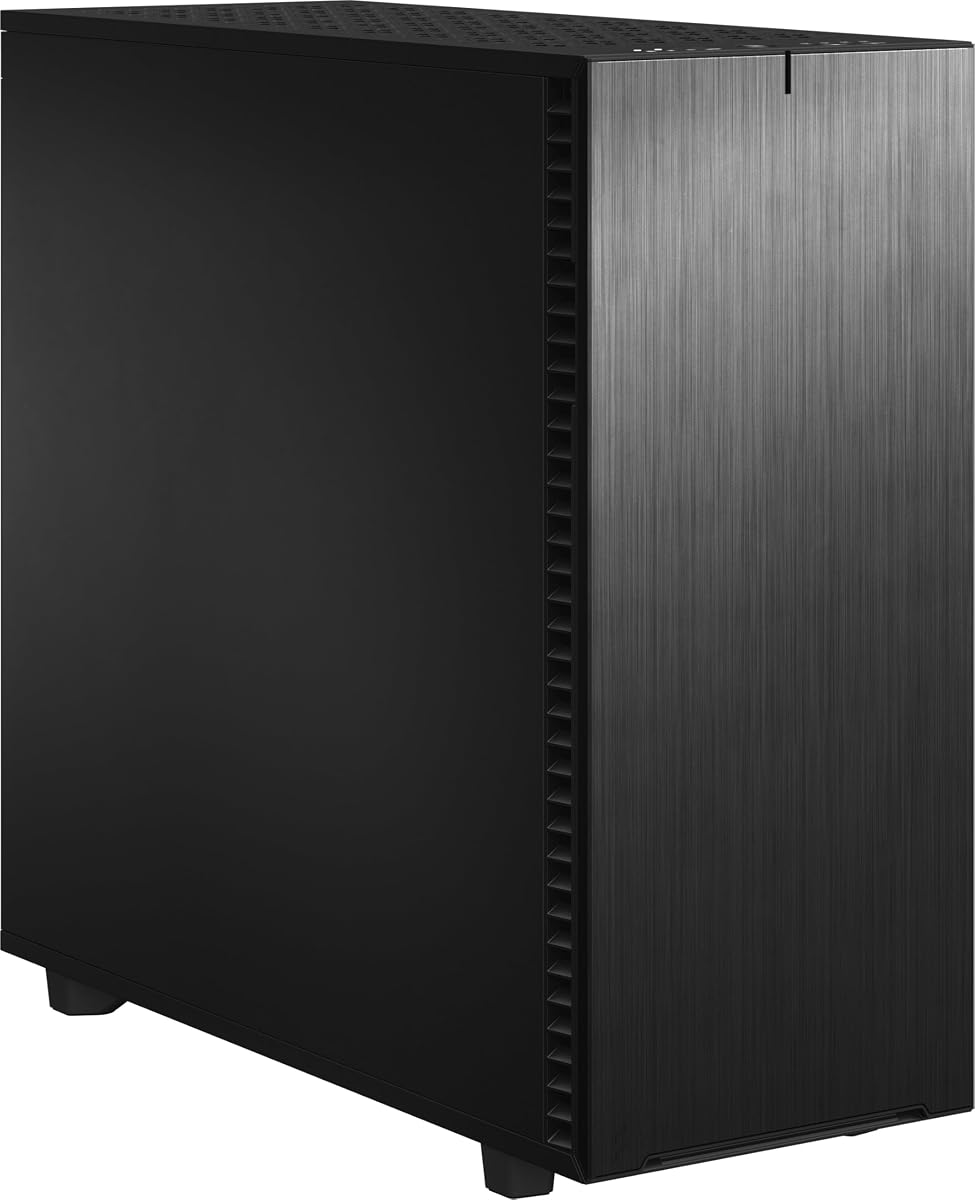
The Fractal Design Define 7 XL is a premium workstation chassis known for its expansive layout and exceptional noise dampening. It is engineered to support massive storage arrays and professional motherboards making it ideal for high-end data storage or creative workstations.
We may earn a commission when you buy through this link, at no additional cost to you.
Its internal layout is highly versatile allowing you to install up to 18 HDDs in the default storage setup. The modular design lets you convert to an open layout for custom water loops supporting radiators up to 480 mm in size.
While it offers superior build quality and features the solid brushed aluminum front door and heavy construction may limit portability. The price reflects its premium materials and engineering which justifies the investment for quiet and expandable server environments.
This case is perfect for users needing silent operation and extreme expandability. The versatile multi-brackets allow you to convert unused fan positions into storage or pump mounts optimizing every inch of available space.
Install up to 18 HDDs alongside 5 SSDs mounts in the default Storage Layout providing extensive data storage options.
Brushed aluminum encases a refined front door design with magnetic latching ensuring quiet operation for office environments.
We may earn a commission when you buy through this link, at no additional cost to you.
The Phanteks Enthoo Pro 2 Server V2 is a robust full tower case designed for extreme workstation and server systems. Its all-metal mesh panels provide exceptional airflow ensuring that powerful hardware stays cool during intensive computing tasks.
We may earn a commission when you buy through this link, at no additional cost to you.
The spacious open interior supports SSI-EEB motherboards and extensive storage configurations including up to 10 HDDs or 11 SSDs. You can install up to 15 fans with three positioned directly over the PCI and CPU area for targeted cooling.
While the open design maximizes airflow it may be less suitable for environments requiring dust protection or silent operation. Users should plan for adequate fan installation to leverage the full cooling potential of this chassis.
This case suits professionals needing a durable and high performance foundation for their server or workstation. The compatibility with large motherboards and radiators up to 480mm makes it a flexible choice for advanced custom builds.
All-Metal Mesh Panels ensure the highest performance and durability allowing unrestricted airflow for cooling intense workloads.
Spacious open interior supports up to SSI-EEB motherboards and 480mm radiators enabling complex professional system builds.
We may earn a commission when you buy through this link, at no additional cost to you.
The Antec Flux Pro stands out with its innovative multi-directional vent design and six pre-installed PWM fans. It offers a high-quality texture combining metal glass and wood making it a stylish choice for professional workstations that need serious cooling.
We may earn a commission when you buy through this link, at no additional cost to you.
Its cooling capabilities are enhanced by the innovative iShift PSU mount and the ability to support simultaneous installation of 420mm and 360mm radiators. The removable cooling brackets on top front and PSU shroud allow flexible configuration.
The design requires some adaptation due to the unique PSU orientation and panel layout. However once configured the airflow management ensures stable temperatures for demanding hardware components like GPUs and high-core CPUs.
Ideal for users prioritizing thermal stability and aesthetics this case offers robust support for heavy workloads. The included fans save time and effort ensuring you start with a well-cooled system out of the box.
Multi-directional vent design supports up to 12 fans simultaneously maximizing cooling efficiency across all system components.
Innovative iShift PSU 90° mount optimizes airflow within the chassis improving thermal management for power supplies.
We may earn a commission when you buy through this link, at no additional cost to you.
The KM7B Micro ATX/ATX/E-ATX Full Tower Computer Case offers an affordable route for building a NAS server with extensive storage needs. Its 13 HDD drive bays make it a strong contender for personal or small business data storage projects.
We may earn a commission when you buy through this link, at no additional cost to you.
It supports a wide range of motherboard sizes from Micro ATX to E-ATX ensuring compatibility with various server components. The magnetic front panel adds convenience for accessing internal components without tools or struggle.
While functional the build quality and advanced features may not match higher-end premium models. Users focused on cost effective storage expansion will find this case provides the necessary space and basic cooling support.
This case is a practical choice for DIY NAS enthusiasts looking to maximize drive capacity. The support for liquid cooling also offers flexibility for maintaining stable temperatures in a storage-heavy configuration.
13 HDD Drive Bays provide extensive storage options for NAS servers or data center applications at a reasonable cost.
Magnetic Front Panel ensures easy access for maintenance and drive swapping without needing tools or effort.
We may earn a commission when you buy through this link, at no additional cost to you.
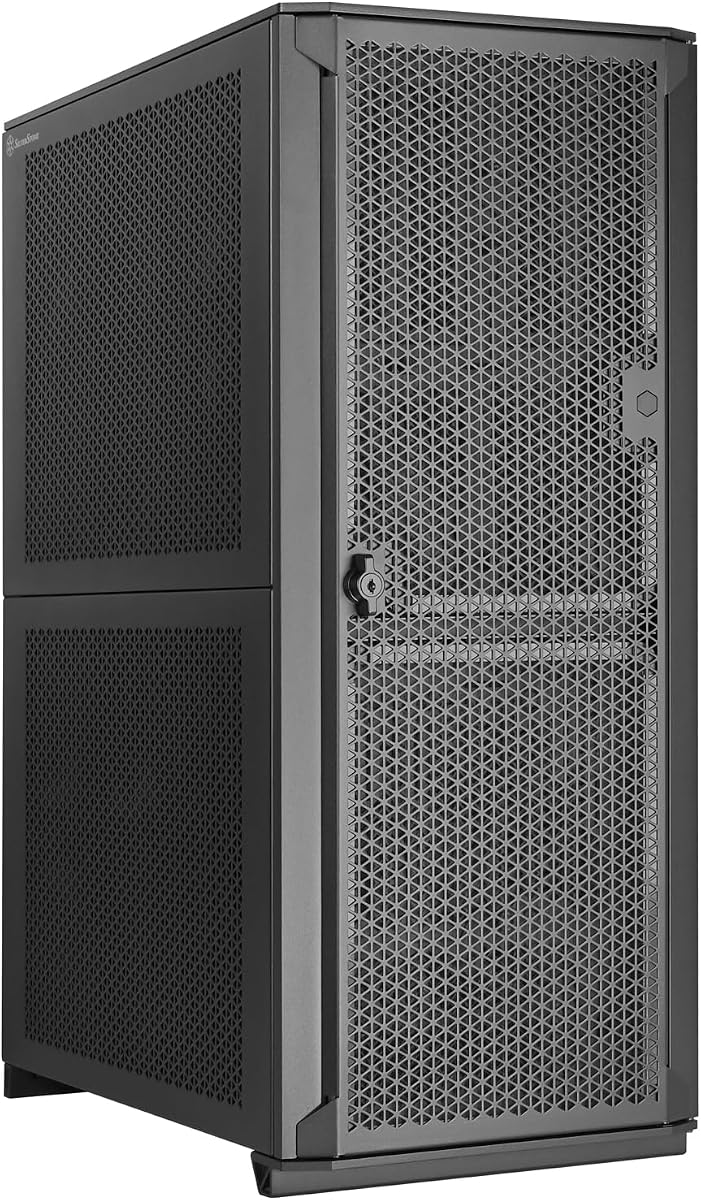
The Silverstone Technology SETA H2 is crafted from high-grade steel providing exceptional durability for professional workstations. Its fully perforated front mesh panel ensures unobstructed airflow essential for maintaining optimal temperatures during heavy server loads.
We may earn a commission when you buy through this link, at no additional cost to you.
It supports up to 15 drives including thick SSDs making it suitable for data storage and virtualization tasks. The case supports various motherboard form factors and offers multi-GPU capability with 8 available expansion slots.
Fans are not included so users must source compatible cooling separately to maximize thermal performance. This design choice allows for custom fan selection but adds to the overall build cost and planning effort.
This case is ideal for enterprise environments needing a robust and expandable tower solution. The combination of steel construction and flexible drive support makes it a reliable choice for critical infrastructure projects.
Crafted from high-grade steel provides exceptional durability and robustness ensuring longevity for demanding server applications.
Supports up to 15 x 2.5 SSDs including 15mm thick SSDs enabling high density storage configurations.
We may earn a commission when you buy through this link, at no additional cost to you.
The Fractal Design Pop XL Air RGB combines professional capabilities with modern aesthetics. Its easily mounted tempered glass side panel lets you showcase your components making it a stylish choice for workstations where visuals matter.
We may earn a commission when you buy through this link, at no additional cost to you.
It accommodates a wide range of motherboards including E-ATX and supports up to four HDDs and six SSDs. The included four Aspect RGB fans provide immediate cooling and lighting customization out of the box.
While visually appealing the storage capacity is lower than dedicated server cases so it is better suited for hybrid workstations. The concealed 5.25 bays add utility without compromising the clean aesthetic of the chassis.
This case is perfect for professionals who want a balance of performance and design. The support for large radiators ensures cooling remains effective even with the focus on visual presentation.
Easily mounted tempered glass side panel lets you showcase your components for a professional yet modern workstation look.
Comes with four Aspect RGB fans providing immediate customization and enhanced airflow for the system.
We may earn a commission when you buy through this link, at no additional cost to you.
The Silverstone Technology ALTA D1 is a premium modular workstation chassis designed for maximum flexibility. It supports specialized motherboards and dual power supplies making it ideal for mission critical computing and high-end GPU workstations.
We may earn a commission when you buy through this link, at no additional cost to you.
Its high slot count allows up to 11 expansion slots for multi-workstation GPU capability. The case is crafted from high-grade steel ensuring robustness and durability for demanding professional environments.
The modular design allows for extensive customization but may require careful planning to assemble. The higher price reflects the specialized engineering and flexibility available for unique infrastructure needs.
This case is best for advanced users needing extreme expandability and power redundancy. The ability to support specialized motherboard form factors ensures compatibility with legacy and new enterprise hardware.
Supports up to 11 expansion slots for multi-workstation GPU capability enabling complex professional system configurations.
Multiple modules and dual PSU capable for maximizing expansion performance and flexibility for critical server loads.
We may earn a commission when you buy through this link, at no additional cost to you.
The Silverstone Technology CS383 is a high performance NAS chassis featuring 8 hot-swappable drive trays. This allows for quick drive replacement and maintenance without shutting down the system making it ideal for busy enterprise environments.
We may earn a commission when you buy through this link, at no additional cost to you.
It supports motherboard up to E-ATX and SSI-EEB form factors ensuring compatibility with professional server hardware. The chassis also supports SAS-12G drives offering high speed data transfer capabilities for demanding workloads.
While it is a premium option the cost is justified by the enterprise-grade features and build quality. The dual power supply capability ensures redundancy for continuous operation which is vital for server uptime.
This case is a top choice for NAS professionals needing hot-swap functionality. The support for large radiators and GPU cards also makes it versatile for hybrid workstation and server builds.
Includes 8 hot-swappable 3.5 or 2.5 drive trays for rapid maintenance without system downtime.
Support for SAS-12G and SATA-6G drives ensures high speed data throughput for professional server applications.
We may earn a commission when you buy through this link, at no additional cost to you.
Selecting the right case requires evaluating your specific workload needs storage requirements and cooling expectations.
Consider the number of drives your system needs including both HDDs and SSDs. Cases vary significantly with some offering up to 18 bays while others focus on fewer high speed SSDs. Check for hot-swap capabilities if you need frequent drive access.
Ensure the case supports your specific drive types like 3.5 inch or 2.5 inch drives and SAS interfaces if required.
Verify that the case supports your motherboard form factor such as E-ATX or SSI-EEB. Standard ATX cases often cannot accommodate larger workstation boards limiting your upgrade options. Check internal dimensions for clearance.
Look for cases that support specialized layouts or back-connect boards if you plan to use advanced server hardware.
High-performance components generate significant heat so airflow and fan support are critical. Look for cases with multiple pre-installed fans or ample room for customization. Radiator support for liquid cooling can further enhance thermal performance.
Ensure there is enough space for radiators on the front or top to manage temperatures during heavy workloads.
Durable materials like high-grade steel or aluminum contribute to the longevity of your investment. A sturdy chassis reduces vibrations and protects internal components during shipping or handling. Premium finishes also improve aesthetics.
Prioritize cases with robust construction if your server will be in a frequently accessed or high traffic environment.
Check the number of expansion slots available for GPUs or specialized cards. High-end workstations often need multiple slots for multi-GPU setups or add-in cards. Ensure there is physical clearance for long graphics cards.
Cases with modular trays allow for future expansion without replacing the entire chassis saving costs over time.
Clean cable routing improves airflow and simplifies maintenance. Look for cases with cable management holes and tie-down points. A clean interior helps in troubleshooting and upgrading components later.
Good cable management reduces dust accumulation and keeps airflow paths clear for optimal cooling efficiency.
If the workstation is in an office or shared space noise dampening features are important. Cases with sound dampening panels or fan speed controls help reduce operational noise. Consider your environment when selecting a case.
Prioritize cases that offer balanced airflow and noise reduction for comfortable working conditions.
Modern connectivity options like USB Type-C are essential for fast data transfer. Ensure the front I/O panel meets your needs for peripherals and external storage. High-speed ports improve workflow efficiency.
Look for cases with multiple USB ports to accommodate various devices without using rear ports.
Regularly clean dust filters and vents to prevent airflow blockage and overheating. Use compressed air or a soft brush to remove debris from fans and heat sinks effectively.
Ensure all components are securely mounted to prevent vibration damage. Check screws and brackets periodically to maintain stability and reduce noise during operation.
Avoid placing the case in high dust or extreme temperature areas. Proper placement extends the life of your hardware and ensures consistent performance over time.
Workstation cases prioritize GPU space and aesthetics while server cases focus on storage density and reliability. Server cases often have hot-swap bays and redundancy features absent in workstation designs. Both can support E-ATX boards.
Several models like the Phanteks Enthoo Pro 2 and Fractal Define 7 XL explicitly support SSI-EEB. Always check specific specs before purchasing to ensure compatibility with your board size and layout requirements.
Ideally install at least six fans for balanced airflow with intake and exhaust. Many cases come with pre-installed fans but adding more improves cooling under heavy loads. Adjust speeds to control noise.
Hot-swap drives are supported by specific models like the Silverstone CS383. Others require manual access to swap drives which may take longer. Check the product data for specific bay details.
Air cooling is often sufficient but liquid cooling offers better thermal headroom for sustained loads. Look for cases that support large radiators like 420mm for maximum cooling potential in your build.
Most cases use standard mounting tools and panels but modular designs may require more time. Follow the manual carefully to avoid confusion with cable routing or drive trays during setup.
Most support E-ATX and ATX boards with some accommodating SSI-EEB. Check the specs for specific dimensions to ensure your motherboard fits comfortably within the internal layout.
Use cases with dust filters on intake fans to trap particles. Clean filters monthly in dusty environments to maintain airflow efficiency. Sealed designs help reduce dust intake.
The Antec 900 Fractal Design Define 7 XL and Rosewill Thor NAS lead the category for cooling capacity and cost efficiency respectively. Each model addresses specific needs from massive storage arrays to silent operation.
Prioritize your primary workload needs such as GPU density or drive bays before making a decision. Ensure the chosen case aligns with your motherboard and power supply requirements for a stable system.
Verify current pricing and availability before purchasing as product details and stock levels may vary. This guide provides a comprehensive overview to help you select the right chassis for your infrastructure.